
Design the asset tree
It is important to plan the organization of your asset tree in
advance. The organization of the tree can impact your efficiency in applying security
settings to assets and setting up disaster recovery schedules.
TIP:
For more background information to understand the types of assets available in
FactoryTalk AssetCentre
and the use of the asset tree, see
About the Asset Catalog and About the Asset View sections.You must be in the design mode to edit the tree. Only one user in the system at a time
can be in the design mode.
Assets are listed in alphabetical order in the tree.
Security considerations
When initially added, an asset inherits the security settings of the container in which
it is placed, and a container inherits the security settings of the container in which it
is placed. First, set security on the root. Then add containers under the root and set
security for those containers. Then add the next level of assets and containers, and so
on.
Schedule considerations
Schedules are set up by selecting the asset to be scheduled from the asset view. You can
only select one asset when creating a schedule. If you want the schedule to operate on
multiple assets, place all those assets in a container in the asset tree. This container
will be the starting point of the schedule. For example, if you want to back up the
configuration files for a group of devices, place all those devices in a container in the
asset view.
Organization
When you initially set up the asset tree, you will have to decide what will be the most
useful organization for you. The following examples show three possible organizations:
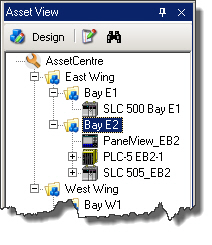
- Physical locationIn this arrangement, assets are organized by their physical location in your plant.
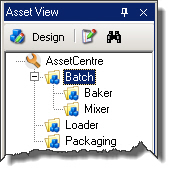
- Flow of materialsIn this arrangement, assets are organized by the flow of materials in the production process. This might be particularly useful for continuous and batch processes.
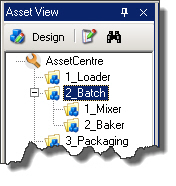 TIP:Items in the tree are automatically organized alphabetically. If you want to force a certain order, use numbers in your asset names.
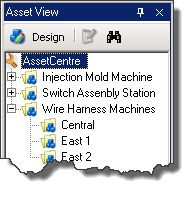
 - Machine typeIn this arrangement, assets are organized by the type of machine. You might further organize machines of the same type by location.
Provide Feedback