
IntelliCENTER Dashboard components
The
IntelliCenter Dashboard
contains the following
components: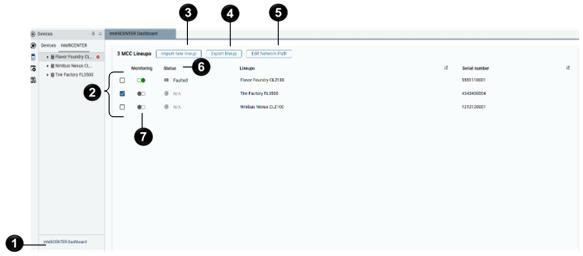
Component | Decription |
|---|---|
 | Option to open the IntelliCENTER dashboard at the bottom of the
IntelliCENTER explorer |
 | MCC lineups in the IntelliCENTER Dashboard |
 | Option to Import new lineup . You can import
either the pre-shipment or post-shipment dataset purchased with your
IntelliCENTER Motor Control Center. See Import an MCC lineup. |
 | Option to Export lineup . Export a lineup to
use the lineup in the local installation of IntelliCENTER. See Export an MCC lineup. |
 | Option to Edit Network Path . The network path
specifies the target network for status monitoring in an IntelliCENTER
lineup. See Set network paths. |
 | Status of the MCC lineup. Status appears when you monitor a lineup.
|
 | Toggle to turn on and off monitoring of an MCC lineup. |
Provide Feedback