
Navigate FactoryTalk AssetCentre
The Asset View contains the asset tree with a representation of your plant. Right-click an asset in the tree for a menu of actions you can take on that asset. The Asset Catalog is used when designing the asset tree and is only available when in Design mode.
Elements of the FactoryTalk AssetCentre desktop client window
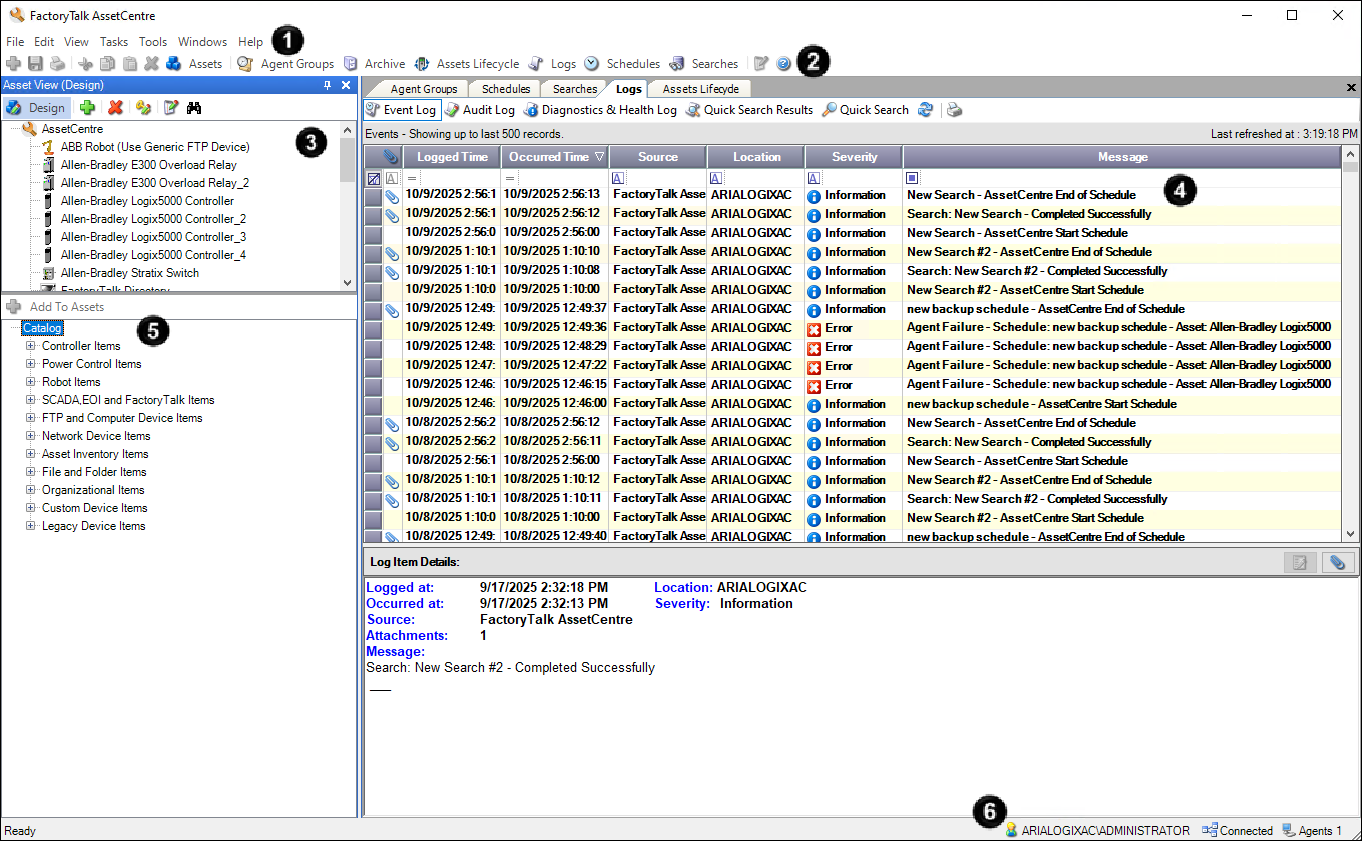
The screen includes the following items:
- Menu bar
- Toolbar
- Asset viewIt shows an assets tree that you create to represent your plant.
- Workspace paneIt shows the information and controls of the tools:
- Address Book
- Agent Groups
- Archive
- Assets Lifecycle
- Logs
- Schedules
- Searches
- Asset catalogAvailable in the design mode, it lists all types of assets that you can add to the assets tree in the asset view.
- Status barIt shows the following information:
- The currently logged on user
- The status of the connection to the server
- The number of connected agent computers in the system
Provide Feedback