
Interpret the Backup and Compare Report for Siemens S7 Controller (TIA Portal)
The following picture is an example of a Backup and Compare Report.
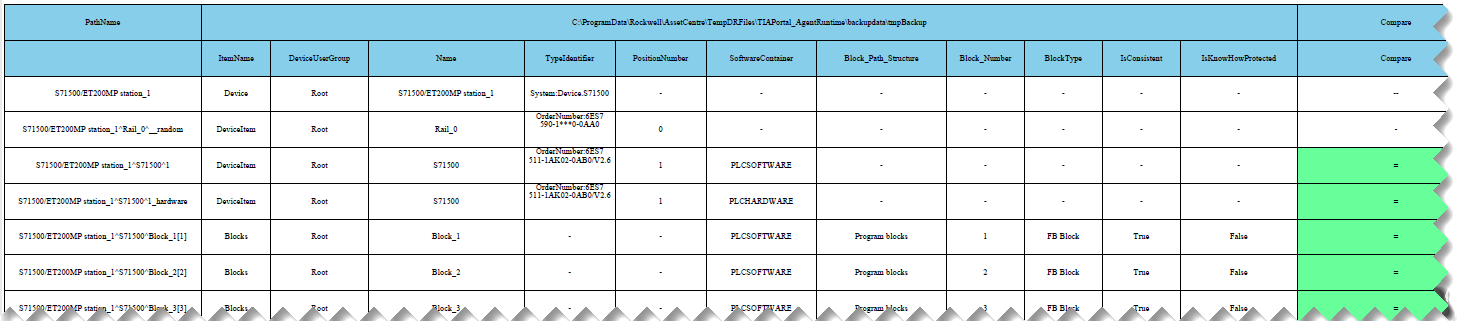
The following table lists the different types and colors on the Compare column in the Backup and Compare Report, and their meanings.
Difference Types and Color | Description |
|---|---|
- (white) | Indicates the comparison is not applicable for DeviceItem. |
-- (white) | Indicates the lack of compare functionality for Device. |
= (bright green) | Indicates no difference is detected. |
!= (red) | Indicates a difference is detected. |
New (teal) | Indicates new Block or DeviceItem is added from the master file. |
Deleted (orange) | Indicates Block or DeviceItem is deleted from the master file. |
The following table lists the PathName column in the Backup and Compare Report, and their naming convention.
PathName | Description |
|---|---|
Station | <StationName>, for example, S71500/ET200MP station_1 |
Rock | <StationName>^<RockName>^Random, for example, S71500/ET200MP station_1^Rail_0^__random |
PLC software total check | <StationName>^<DeviceName>^<PLC Solt number>, for example, S71500/ET200MP station_1^S71500^1 |
PLC hardware total check | <StationName>^<DeviceName>^<PLC Solt number>_hardware, for example, S71500/ET200MP station_1^S71500^1_hardware |
Block | <StationName>^<DeviceName>^Program blocks^<block name>, for example, S71500/ET200MP station_1^S71500^Block_2[2] |
Module | <StationName>^<ModuleName>^<PLC Solt number>, for example, S71500/ET200MP station_1^CP 1542-5_1^2 |
Provide Feedback