
Interpret the Backup and Compare Report for Siemens controllers
The Backup and Compare report uses color to indicate where differences have been detected between the controller files (called
Backup
in the report) and the compare partner. Depending on how you set up the schedule, the compare partner can be the Backup Data binder or the Configuration Data binder.Meanings of color coding
This component and color... | Means... |
|---|---|
address all red (all digits in the address are red) | the address was deleted or inserted. This caused other addresses to shift. |
address partially red (some but not all digits are red) | the address shifted to compensate for an inserted or removed address. |
code all red | the code was added or removed when an address was added or removed. |
code partially red | the code changed |
address or code all black | it did not change |
Blue highlighting in the report indicates the beginning of a segment.
Example
This is a portion of an actual report showing differences in block OB9, segment 1/1.
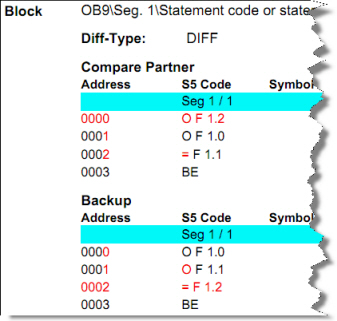
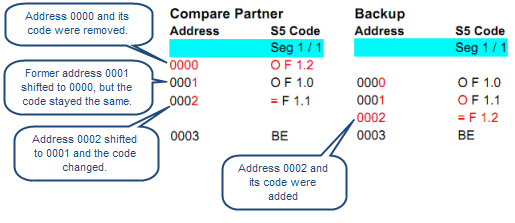
When shown side by side with spaces added, as in the following drawing, you can see that address 0000 was removed causing addresses 0001 and 0002 to shift to 0000 and 0001. You can also see that a new address, 0002, was inserted.
Provide Feedback