
Sort and arrange log records
You can change the sort order and arrangement of records in a shown log. This makes it easier to view the data that you want to see.
TIP:
If Quick Search results are shown, you can also sort and arrange those records by clicking the
Quick Search Results
button.Navigate records
Scroll or use the arrow keys to view the log records. You can change the number of shown records.
Arrange columns
- SortTo sort the data by another column or in another order, toggle a column's sort order between ascending and descending order by clicking a column heading. An arrow appears on the heading of the sorted column to indicate whether the sort column appears in descending
 or ascending order
  .
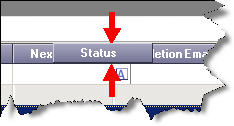
. - MoveTo change the order of columns in a log, drag the column heading to a new location. When you do, arrows appear indicating where the column would be placed if you were to stop dragging the mouse at that point:
- ResizeTo change the width of a column, position the pointer on a column divider and drag the cross-bar shape to make the column wider or narrower. To automatically adjust a column's width to be as wide as the longest entry in that column, double-click the divider to the right of the column heading.
- FilterYou can filter log records to show only those records that match column criteria.
Provide Feedback