
About the Assets per Agent Group pane
This pane shows the assets in the specified agent groups.
- By NameSelect this option to filter by asset name. Enter the asset name which you want to filter.
- By TypeSelect this option to filter by asset type. Click the drop-down arrow to select the asset type on which you want to filter.
- Show Assets in One LineSelect to show assets in one line with tree path information.
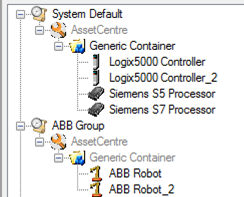
- Tree ViewList assets by agent groups and with the asset tree path information. The rootAssetCentreis in gray in the tree. If an asset has another agent group with the parent container, the container will be gray in the asset's path.
Provide Feedback