
Loading
Innovation Center LOGO
Recent ActivityRecent Activity

Implemente o Audit Trail 21 CFR no FactoryTalk Optix
Siga o processo passo a passo para implementar a 21 CFR usando o FactoryTalk Optix. - [Tempo de Implementação: 60 minutos]
Innovation Center Home Page
Digital Audit Trail: Ensuring Compliance and Transparency in Modern Systems
Innovation Center LOGO
  • Visão Geral
  • Guia de Implementação
  • Download
  • Contate-nos
  • Inscreva-se
Innovation Center Home Page
 

O que esta aplicação faz?

O 21 CFR Parte 11 é uma regulamentação emitida pela FDA (Food and Drug Administration) dos EUA em 1997. Ela estabelece os critérios sob os quais assinaturas e registros eletrônicos são aceitos como equivalentes legais às assinaturas manuscritas e registros em papel na indústria de ciências da vida (farmacêutica, biotecnológica, dispositivos médicos etc.).

Seu objetivo é garantir que os sistemas computacionais utilizados na fabricação, controle de qualidade e documentação regulatória atendam aos padrões de:

  • Autenticidade
  • Integridade
  • Confidencialidade
  • Não repúdio (que uma assinatura não possa ser rejeitada como não genuína)


A implementação do 21 CFR é útil porque:

  • Substitui o papel: Reduz custos de armazenamento, impressão e manuseio físico.
  • Agiliza processos: Permite fluxos de trabalho digitais com validade legal.
  • Auditoria eficiente: Facilita o rastreamento de ações e alterações em registros eletrônicos.
  • Cumprimento regulatório: É obrigatório para empresas que operam sob a FDA.


Características Gerais:

  • Sistemas fechados vs. abertos: Define controles conforme quem gerencia o acesso.
  • Registros eletrônicos: Texto, gráficos, áudio, dados etc., em formato digital.
  • Assinaturas eletrônicas: Equivalentes legais às assinaturas manuscritas.
  • Auditorias automatizadas: Registro de quem, quando e o que foi modificado.
  • Controles de acesso: Autenticação de usuários e permissões por função.

Vantagens:

  • Rastreabilidade completa: Cada ação é registrada com usuário e timestamp.
  • Segurança: Controles de acesso, criptografia e políticas de senha.
  • Eficiência: Fluxos de aprovação digital com assinaturas eletrônicas.
  • Flexibilidade: Configurável conforme necessidades específicas da empresa.

Limitações/Desvantagens:

  • Complexidade de implementação: Exige configuração detalhada de segurança e auditoria.
  • Custos iniciais: Investimento em software compatível e treinamento.
  • Manutenção: Atualizações, backups e gestão de usuários.
  • Rigidez: Alterações devem seguir procedimentos validados.
AHIC Download ICON VF.png

Download

Importante: Será necessário aceitar os Termos e Condições para cada download.

Baixar arquivos ›
Legal Disclaimer Acceptance. ROCKWELL AUTOMATION WILL PROVIDE ACCESS TO ROCKWELL PRODUCTS (BEST PRACTICES, APPLICATIONS AND KNOWLEDGE) ON THE CONDITION THAT YOU ACCEPT AND COMPLY WITH THE FOLLOWING TERMS AND CONDITIONS. YOU ACCEPT AND AGREE TO BE BOUND BY THE TERMS OF THIS AGREEMENT BY DOWNLOADING, INSTALLING, COPYING, OR OTHERWISE USING PRODUCTS. IF YOU ARE ACCEPTING THESE TERMS ON BEHALF OF ANOTHER PERSON, COMPANY, OR OTHER LEGAL ENTITY, YOU REPRESENT AND WARRANT THAT YOU HAVE FULL AUTHORITY TO BIND THAT PERSON, COMPANY, OR LEGAL ENTITY TO THESE TERMS. IF YOU DO NOT AGREE TO THESE TERMS, DO NOT DOWNLOAD, INSTALL, COPY, ACCESS, OR USE THE PRODUCTS, SOFTWARE AND/OR CLOUD SERVICES. 1. Rockwell Automation retains full ownership and title to all Products and related documentation. No rights or licenses are granted other than those set forth in this Agreement. Company grants to Rockwell Automation a non-exclusive, worldwide, royalty-free, perpetual, non-revocable license to use any feedback Company provides regarding the Products, even if Company has designated the feedback as confidential. Rockwell Automation will be entitled to use the feedback without restriction or compensation to Company. 2. Company may not lease sub-lease, assign, license, sub-license or otherwise transfer any of the Products without the prior written consent of Rockwell Automation. Company may not assign or otherwise transfer access rights to the Products without the prior written consent of Rockwell Automation. Any reverse assembly, reverse engineering, decompilation, and creation of derivative works based on the Products by Company is prohibited. 3. Company acknowledges that Products provided under this Agreement are Rockwell Automation’s Confidential Information and are covered by effective or pending copyrights, patents, trademarks and/or trade secrets of Rockwell Automation, and Company agrees to maintain confidentiality by not disclosing Products or documentation to any third party without the prior written consent of Rockwell Automation and to protect the confidentiality of the Products as it would Company’s own confidential information. Company agrees that its obligation of confidentiality under this paragraph shall survive expiration or termination of this Agreement. 4. Company agrees that Products provided under this Agreement are prototypes and examples and its application and results may vary depending on each customer and project conditions. Rockwell Automation do not warranty the same results. This Agreement shall in no way be construed as a commitment by Rockwell Automation at any time to manufacture and/or offer Products for sale. There is no explicit or implicit service level agreement associated with using the Products. Rockwell Automation does not warrant that the functions contained in the Products will meet Company’s requirements. Company agrees to use all Products only in accordance with the instructions and only for the intended usages identified in the documentation. 5. EXCLUSION OF WARRANTIES AND LIMITATION OF LIABILITY. THE PRODUCTS ARE PROVIDED "AS IS". ROCKWELL AUTOMATION DISCLAIMS ANY AND ALL WARRANTIES, EXPRESS, IMPLIED OR STATUTORY, INCLUDING WITHOUT LIMITATION ANY WARRANTIES OF MERCHANTABILITY OR FITNESS FOR A PARTICULAR PURPOSE. ROCKWELL AUTOMATION EXPLICITLY DISCLAIMS ALL WARRANTIES OF NON- INFRINGEMENT AND EXPRESSLY DOES NOT WARRANT THAT THE PRODUCTS, IN WHOLE OR IN PART, WILL BE ERROR FREE OR FREE FROM SECURITY VULNERABILITIES. IN NO EVENT SHALL ROCKWELL AUTOMATION BE LIABLE FOR (i) LOST PROFITS, LOST SAVINGS, DOWNTIME, SPECIAL, INDIRECT OR CONSEQUENTIAL DAMAGES OF ANY KIND, OR (ii) ANY PERSONAL INJURY, PROPERTY DAMAGE OR ENVIRONMENTAL DAMAGE ARISING OUT OF OR IN CONNECTION WITH THIS AGREEMENT, WHETHER IN AN ACTION IN CONTRACT, STRICT LIABILITY OR IN TORT INCLUDING NEGLIGENCE. 6. COMPANY AGREES TO INDEMNIFY AND HOLD ROCKWELL AUTOMATION HARMLESS FROM ALL COSTS, AWARDS, DAMAGES, EXPENSES AND FEES (INCLUDING ATTORNEYS FEES) RESULTING FROM OR RELATED TO ANY THIRD-PARTY CLAIMS (INCLUDING EMPLOYEES AND AGENTS OF COMPANY) AGAINST ROCKWELL AUTOMATION, ITS DISTRIBUTORS, AGENTS, OFFICERS, DIRECTORS OR EMPLOYEES FOR PERSONAL INJURY (INCLUDING DEATH), PROPERTY DAMAGE OR ENVIRONMENTAL DAMAGE RELATED TO OR RESULTING FROM THE USE OF THE PRODUCTS. 7. In the event a Product is exported, Company agrees to comply with all applicable United States Export Control Law and Regulations, and the applicable export control laws of other countries. This Agreement shall be governed by the laws of the state of Wisconsin. This Agreement is the complete and exclusive Agreement between Rockwell Automation and the Company, and supersedes all prior agreements, whether written or oral, relating to the Products.
AHIC NEED HELP ICON VF.png

Precisa de ajuda?

Se precisar de ajuda com uma aplicação ou tiver feedback do Innovation Center, por favor,  entre em contato conosco.


Esta aplicação é relevante para mim?

Este código é definido para aplicações onde seja necessário implementar o 21 CFR.


Áreas de aplicação: Alimentos, Manufatura, Bebidas


Como posso fazer funcionar?

Requisitos: produtos, ferramentas e conhecimentos prévios.

Hardware

  • Computador pessoal

Software

  • FactoryTalk Optix

Conhecimento Prévio

  • Programação e configuração no FT Optix e aplicação da norma 21 CFR.


AHIC STEP ICON.png

Guia de Implementação

 
  1. Passo 01
  2. Passo 02
  3. Passo 03
  4. Passo 04
  5. Passo 05
  6. Passo 06
  7. Passo 07
  8. Passo 08
Open All Close All
Passo 01


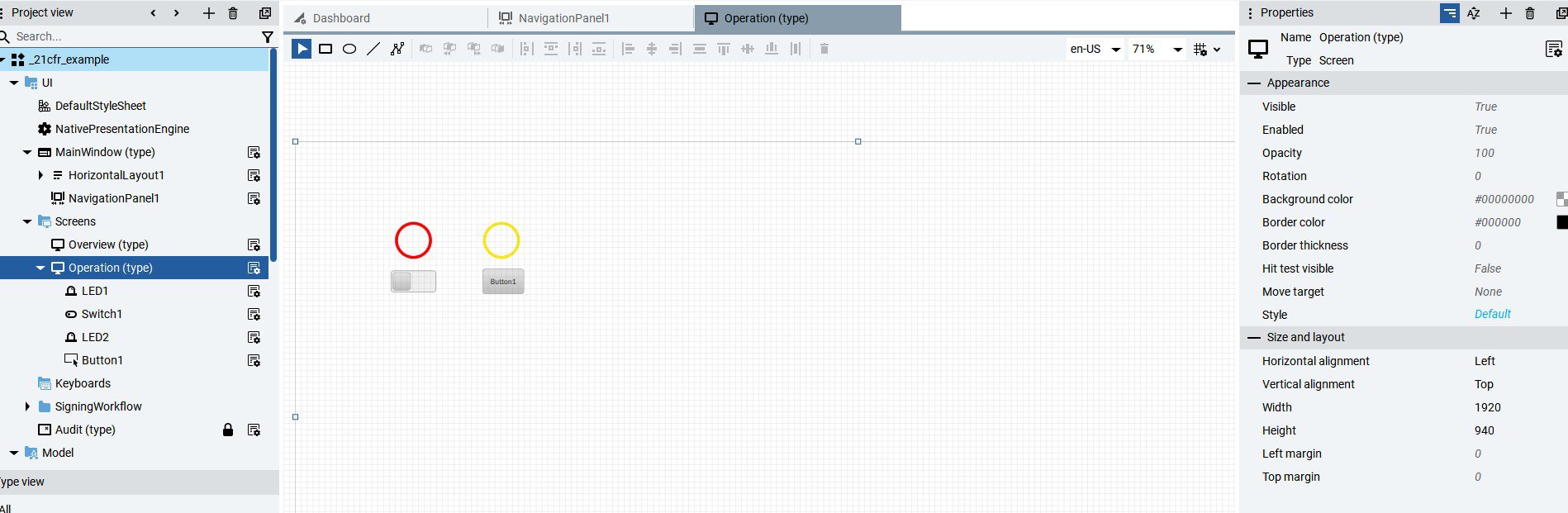
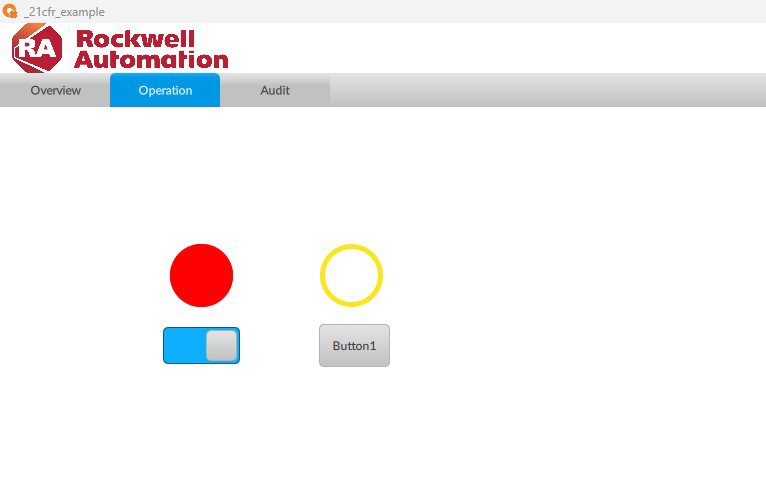
Criar tela, botões e controles sobre os quais será aplicada a assinatura eletrônica.

 
implement-audit-trail-21cfr-in-factorytalk-optix_Image1_1.jpg

Image 1.1. Creating objects

implement-audit-trail-21cfr-in-factorytalk-optix_Image1_2.jpg

Image 1.2. Creating objects (runtime)

Passo 02


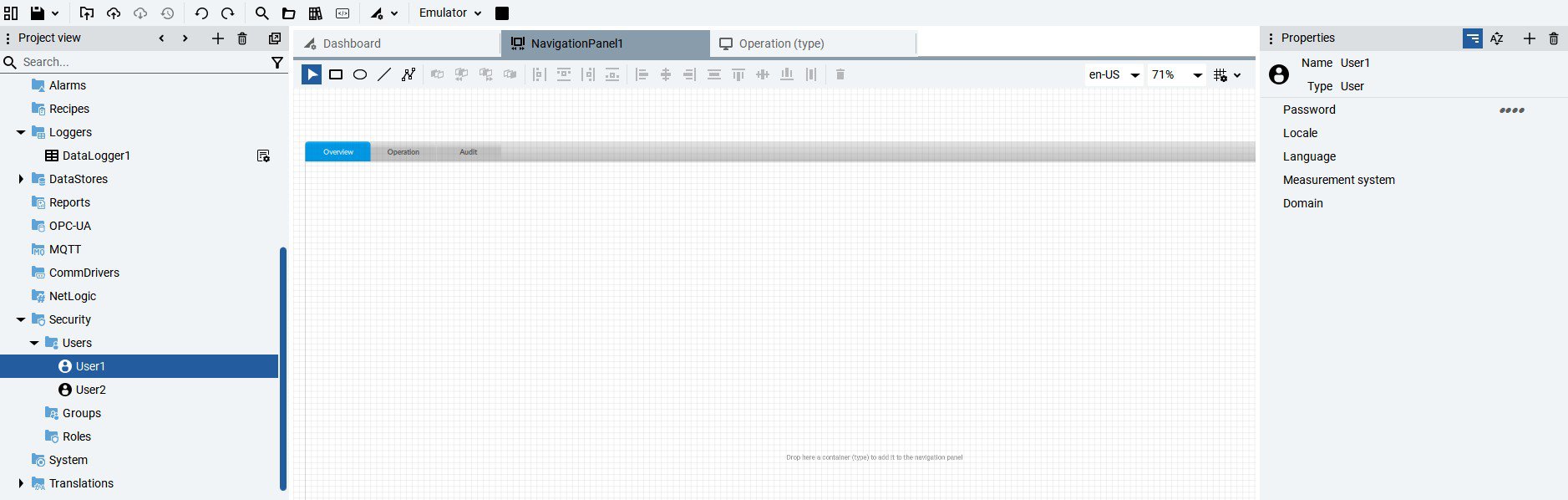
Criar os usuários necessários para a aplicação na aba Security e atribuir senha na seção de Propriedades.

 
implement-audit-trail-21cfr-in-factorytalk-optix_Image2.jpg

Image 2. Creating users

Passo 03


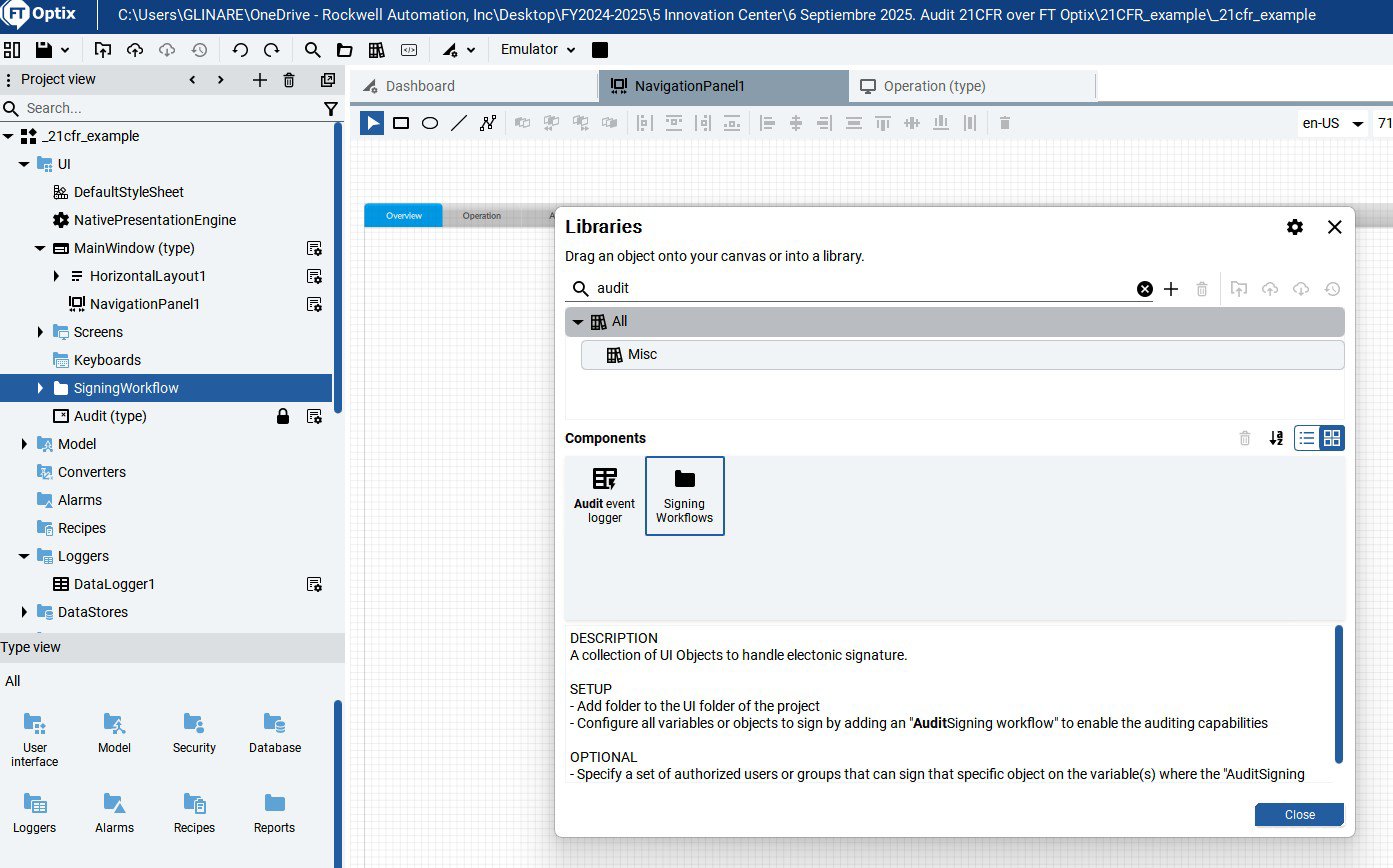
Na biblioteca de objetos, adicionar o objeto Signing Workflows, arrastando-o para a interface do usuário (UI).

 
implement-audit-trail-21cfr-in-factorytalk-optix_Image3.jpg

Image 3. Signing Workflows object

Passo 04


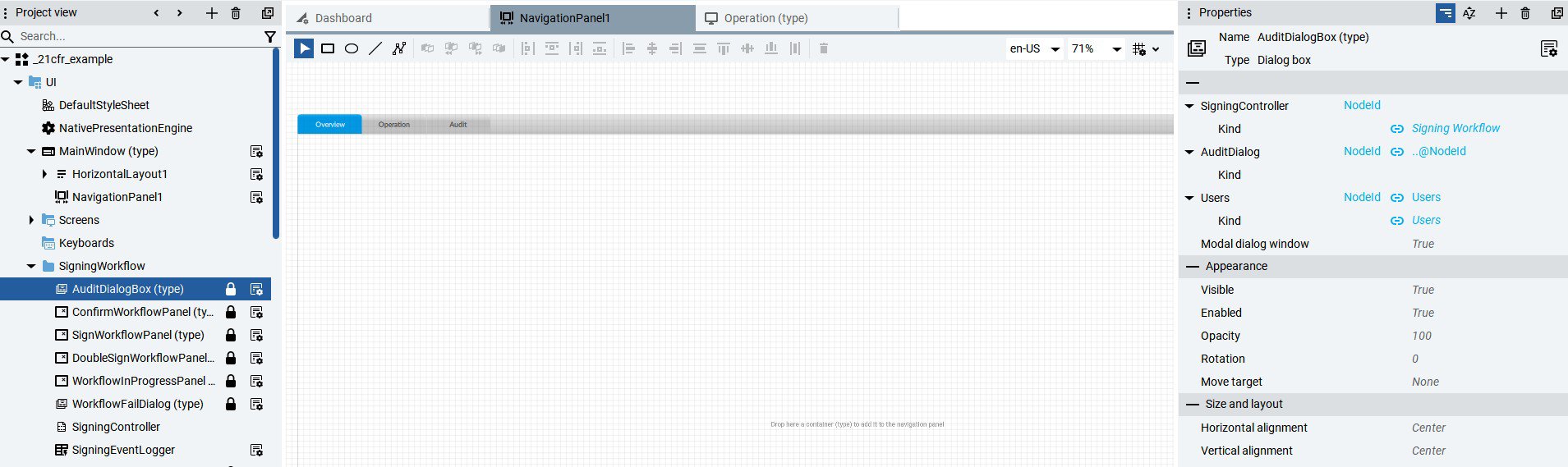
Configurar as propriedades do objeto AuditDialogBox, atribuindo usuários.


implement-audit-trail-21cfr-in-factorytalk-optix_Image4.jpg

Image 4. Configure AuditDialogBox properties

Passo 05


Atribuir às variáveis dos objetos que precisam ser auditados a propriedade de Assinatura de Auditoria e os usuários que podem alterar a condição do objeto.


implement-audit-trail-21cfr-in-factorytalk-optix_Image5.jpg

Image 5. Configuring the Audit property in variables.

Passo 06


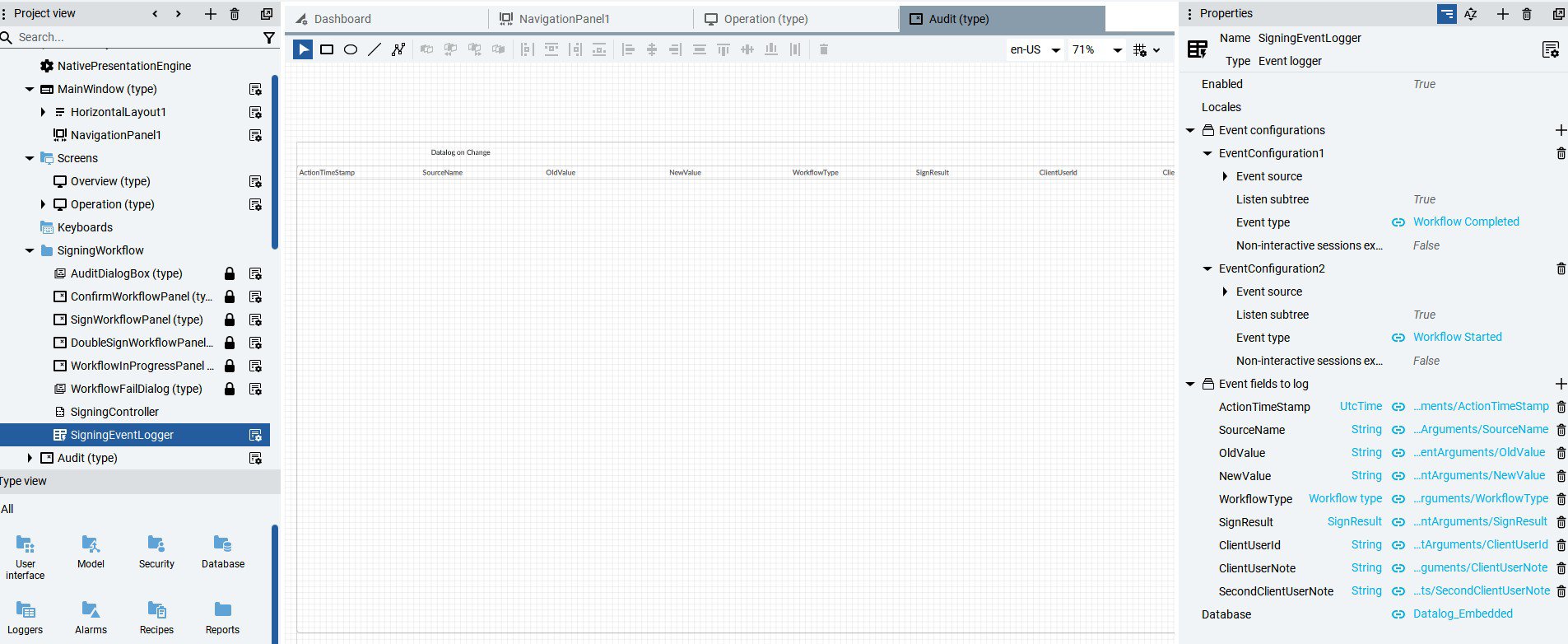
Criar uma base de dados Audit, por exemplo, embutida, na opção DataStores. Em seguida, atribuir no campo Database do objeto Signing Workflows, na propriedade SigningEventLogger, o nome da base criada.


implement-audit-trail-21cfr-in-factorytalk-optix_Image6.jpg

Image 6. Definition and assignment of the Audit database.

Passo 07


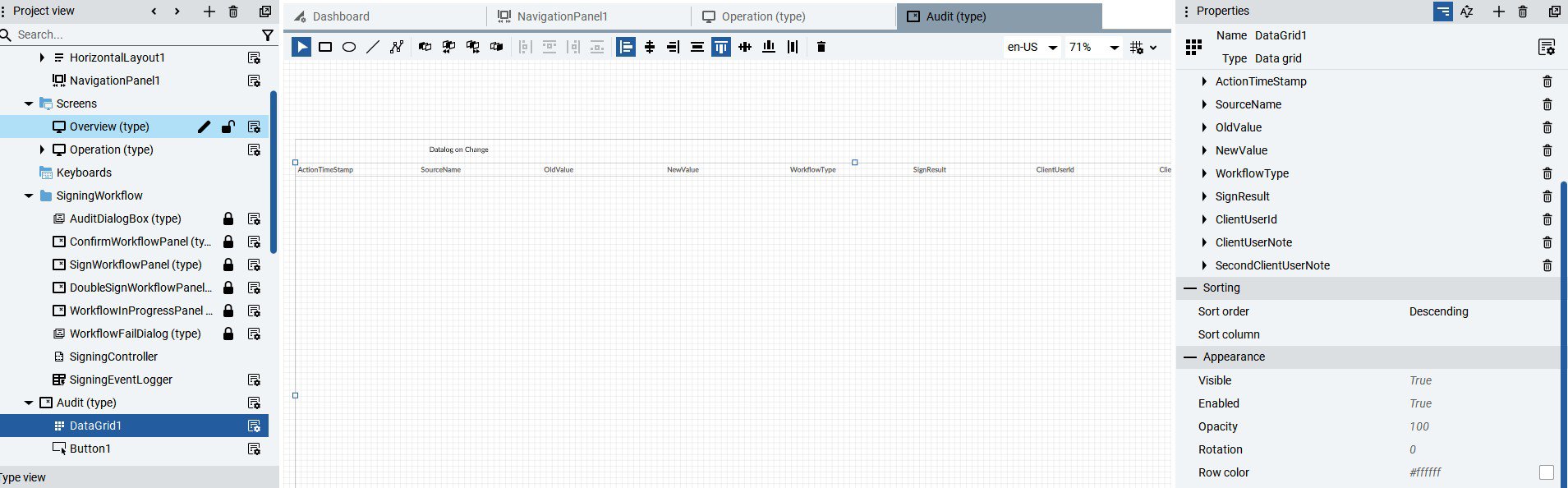
Criar uma nova tela chamada Audit e adicionar o objeto Datagrid (User Interface → Data Controls → Data Grid). Ajustar à resolução da tela e vincular a propriedade SigningEventLogger do objeto Signing Workflows ao Data Grid. Nas propriedades do Datagrid, alterar a configuração para Descendente.


implement-audit-trail-21cfr-in-factorytalk-optix_Image7.jpg

Image 7. Configure the Audit datalog.

Passo 08


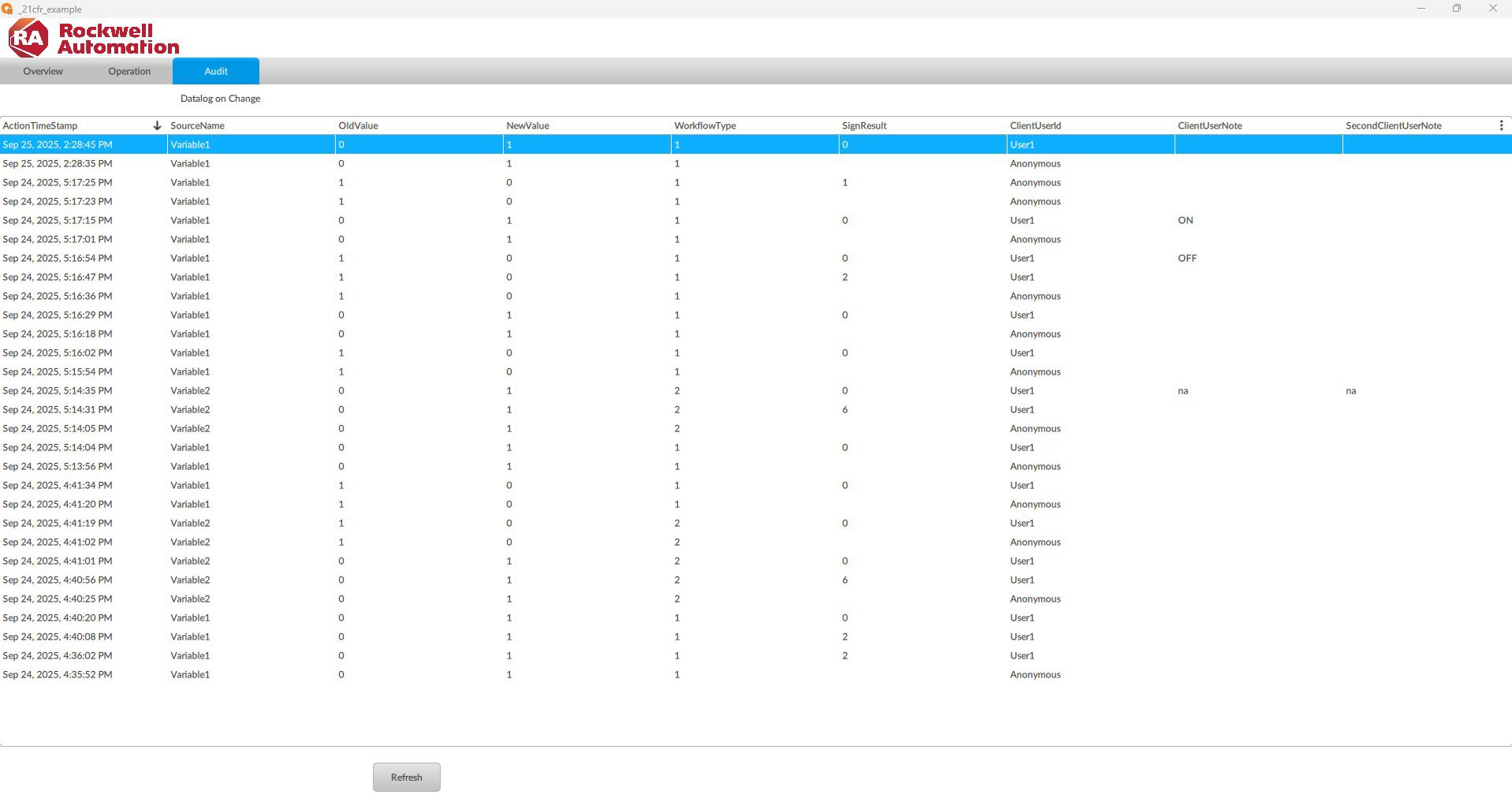
Visualizar na aba Audit o log de alterações nas variáveis e objetos definidos.


implement-audit-trail-21cfr-in-factorytalk-optix_Image8.jpg

Image 8. Audit log of variables.

implement-audit-trail-21cfr-in-factorytalk-optix_Image1_1.jpg

Image 1.1. Creating objects

implement-audit-trail-21cfr-in-factorytalk-optix_Image1_2.jpg

Image 1.2. Creating objects (runtime)

implement-audit-trail-21cfr-in-factorytalk-optix_Image2.jpg

Image 2. Creating users

implement-audit-trail-21cfr-in-factorytalk-optix_Image3.jpg

Image 3. Signing Workflows object

implement-audit-trail-21cfr-in-factorytalk-optix_Image4.jpg

Image 4. Configure AuditDialogBox properties

implement-audit-trail-21cfr-in-factorytalk-optix_Image5.jpg

Image 5. Configuring the Audit property in variables.

implement-audit-trail-21cfr-in-factorytalk-optix_Image6.jpg

Image 6. Definition and assignment of the Audit database.

implement-audit-trail-21cfr-in-factorytalk-optix_Image7.jpg

Image 7. Configure the Audit datalog.

implement-audit-trail-21cfr-in-factorytalk-optix_Image8.jpg

Image 8. Audit log of variables.


Implemente o Audit Trail 21 CFR no FactoryTalk Optix

Versão 2.0 - Setembro de 2026


AHIC White Logo

Receba novas aplicações e novidades do Centro de Inovação diretamente em seu e-mail.

Inscreva-se!


  1. Chevron LeftChevron Left Página inicial da Rockwell Automation
  2. Chevron LeftChevron Left Sup...
  3. Chevron LeftChevron Left Sup...
  4. Chevron LeftChevron Left Downloads
  5. Chevron LeftChevron Left Innovation Center
  6. Chevron LeftChevron Left Implemente o Audit Trail 21 CFR no FactoryTalk Optix
O conteúdo deste site foi traduzido usando inteligência artificial (IA) sem revisão nem edição humana. O conteúdo pode conter erros ou imprecisões e é fornecido “da forma como está” sem nenhum tipo de garantia. O texto oficial é a versão em inglês.
Atualize suas preferências de cookies para continuar.
Este recurso requer cookies para melhorar sua experiência. Atualize suas preferências para permitir esses cookies:
  • Cookies de Redes Sociais
  • Cookies Funcionais
  • Cookies de Desempenho
  • Cookies de Marketing
  • Todos os Cookies
Você pode atualizar suas preferências a qualquer momento. Para mais informações, consulte nosso {0} Política de Privacidade
CloseClose