Loading
Innovation Center LOGO
Recent ActivityRecent Activity

Controle de pH baseado em um modelo Wiener

Controla uma malha de pH altamente não linear por meio da linearização com modelo Wiener e controle regulatório PIDE. Inclui AOI de linearização, PIDE e rotina de chamada executando no controlador Logix. - [Tempo de Implementação: 30 minutos]
Innovation Center Home Page
control-of-ph-based-on-a-wiener-model_16x9-phControl_header.jpg

Innovation Center LOGO
  • Visão Geral
  • Guia de Implementação
  • Download
  • Contate-nos
  • Inscreva-se
Innovation Center Home Page
 

O que esta aplicação faz?

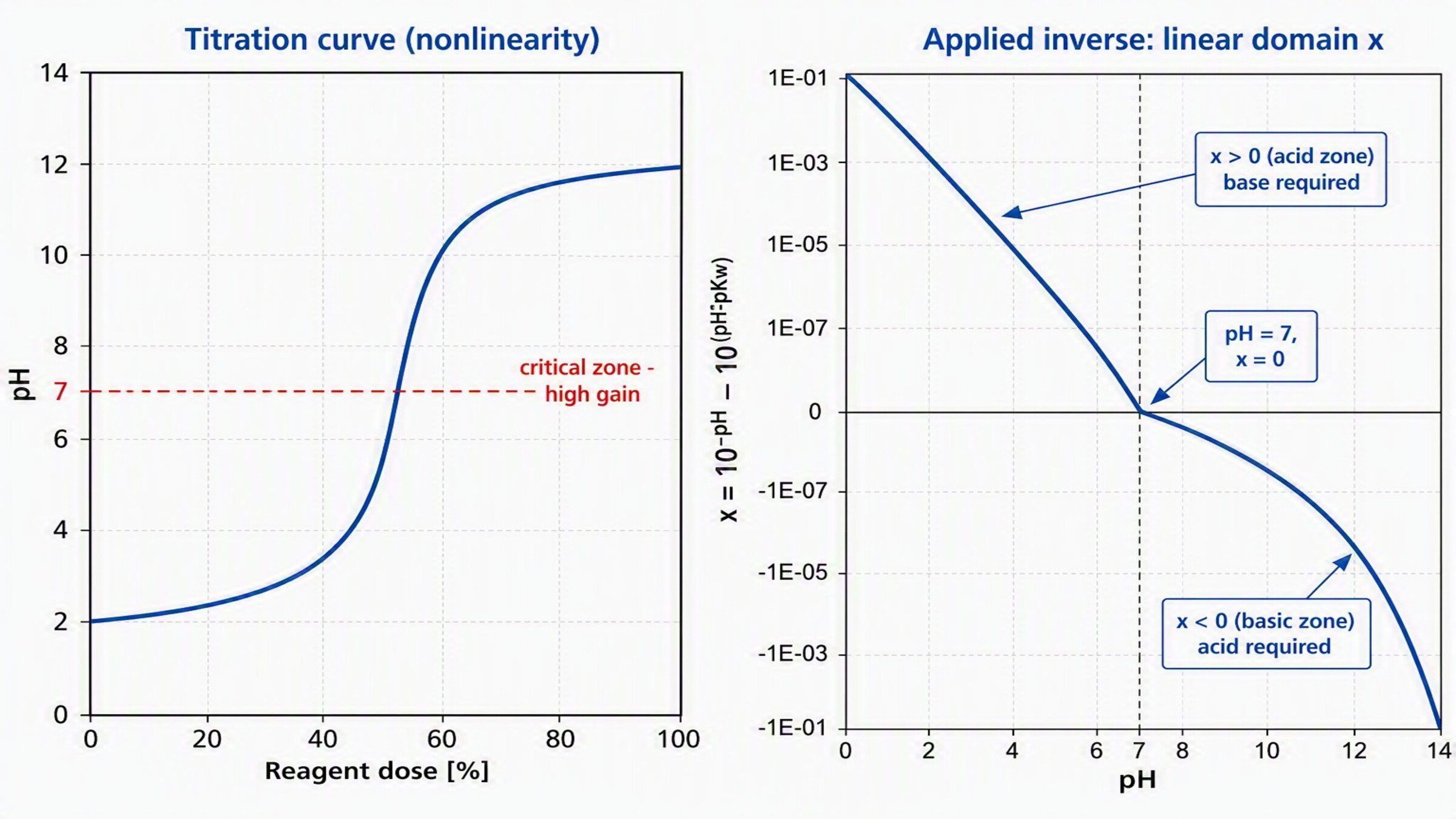
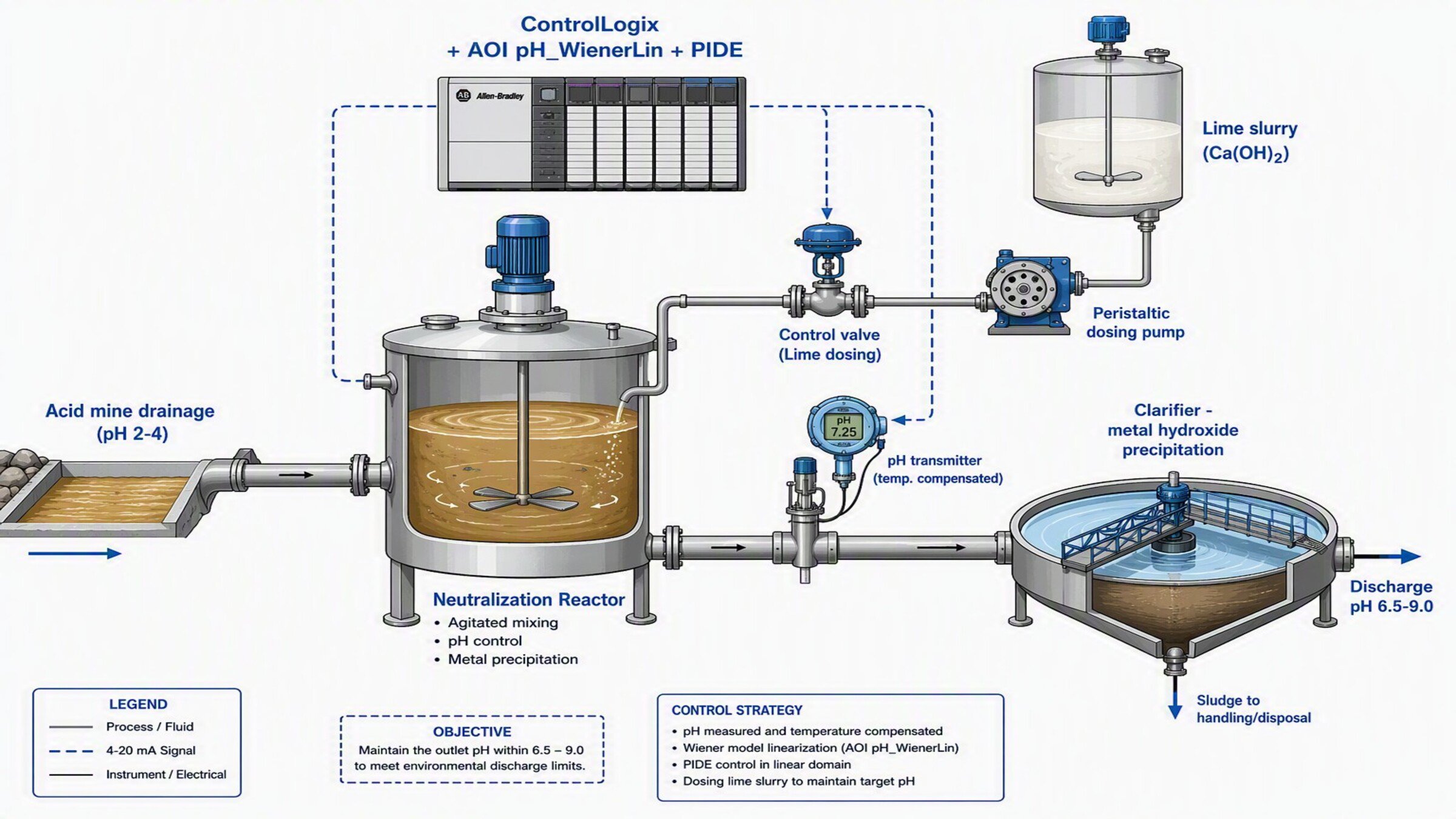
Usada para controlar uma malha de pH cuja relação reagente→pH é uma curva de titulação em formato S (não linear). A AOI aplica o inverso da não linearidade ao Setpoint e à Variável de Processo, permitindo que a malha seja fechada com um PIDE linear que opera de forma estável em toda a faixa de pH (ácida, neutra e básica).


control-of-ph-based-on-a-wiener-model_16x9-phControl_header.jpg

control-of-ph-based-on-a-wiener-model_16x9-phControl_header.jpg

control-of-ph-based-on-a-wiener-model_16x9-phControl_header.jpg

control-of-ph-based-on-a-wiener-model_16x9-phControl_header.jpg


Características Gerais

Este desenvolvimento inclui o seguinte:

  • Instrução Add-On pH_WienerLin (linearização Wiener) no Studio 5000
  • Instrução PIDE pré-configurada para controle no domínio linear
  • Rotina de chamada e tags associados


Vantagens:

  • Fornece uma referência inicial para o controle de processos altamente não lineares (pH, neutralização)
  • Permite desempenho estável sem ressintonizar o controlador ao mudar de zona de pH


Limitações/Desvantagens

  • Limitado a uma malha SISO (uma variável controlada, uma variável manipulada); para controle multivariável com restrições, recomenda-se o PlantPAx MPC
  • Requer identificação prévia da curva de titulação para o modo PWL


AHIC Download ICON VF.png

Download

Importante: Será necessário aceitar os Termos e Condições para cada download.

Baixar arquivos ›
Legal Disclaimer Acceptance. ROCKWELL AUTOMATION WILL PROVIDE ACCESS TO ROCKWELL PRODUCTS (BEST PRACTICES, APPLICATIONS AND KNOWLEDGE) ON THE CONDITION THAT YOU ACCEPT AND COMPLY WITH THE FOLLOWING TERMS AND CONDITIONS. YOU ACCEPT AND AGREE TO BE BOUND BY THE TERMS OF THIS AGREEMENT BY DOWNLOADING, INSTALLING, COPYING, OR OTHERWISE USING PRODUCTS. IF YOU ARE ACCEPTING THESE TERMS ON BEHALF OF ANOTHER PERSON, COMPANY, OR OTHER LEGAL ENTITY, YOU REPRESENT AND WARRANT THAT YOU HAVE FULL AUTHORITY TO BIND THAT PERSON, COMPANY, OR LEGAL ENTITY TO THESE TERMS. IF YOU DO NOT AGREE TO THESE TERMS, DO NOT DOWNLOAD, INSTALL, COPY, ACCESS, OR USE THE PRODUCTS, SOFTWARE AND/OR CLOUD SERVICES. 1. Rockwell Automation retains full ownership and title to all Products and related documentation. No rights or licenses are granted other than those set forth in this Agreement. Company grants to Rockwell Automation a non-exclusive, worldwide, royalty-free, perpetual, non-revocable license to use any feedback Company provides regarding the Products, even if Company has designated the feedback as confidential. Rockwell Automation will be entitled to use the feedback without restriction or compensation to Company. 2. Company may not lease sub-lease, assign, license, sub-license or otherwise transfer any of the Products without the prior written consent of Rockwell Automation. Company may not assign or otherwise transfer access rights to the Products without the prior written consent of Rockwell Automation. Any reverse assembly, reverse engineering, decompilation, and creation of derivative works based on the Products by Company is prohibited. 3. Company acknowledges that Products provided under this Agreement are Rockwell Automation’s Confidential Information and are covered by effective or pending copyrights, patents, trademarks and/or trade secrets of Rockwell Automation, and Company agrees to maintain confidentiality by not disclosing Products or documentation to any third party without the prior written consent of Rockwell Automation and to protect the confidentiality of the Products as it would Company’s own confidential information. Company agrees that its obligation of confidentiality under this paragraph shall survive expiration or termination of this Agreement. 4. Company agrees that Products provided under this Agreement are prototypes and examples and its application and results may vary depending on each customer and project conditions. Rockwell Automation do not warranty the same results. This Agreement shall in no way be construed as a commitment by Rockwell Automation at any time to manufacture and/or offer Products for sale. There is no explicit or implicit service level agreement associated with using the Products. Rockwell Automation does not warrant that the functions contained in the Products will meet Company’s requirements. Company agrees to use all Products only in accordance with the instructions and only for the intended usages identified in the documentation. 5. EXCLUSION OF WARRANTIES AND LIMITATION OF LIABILITY. THE PRODUCTS ARE PROVIDED "AS IS". ROCKWELL AUTOMATION DISCLAIMS ANY AND ALL WARRANTIES, EXPRESS, IMPLIED OR STATUTORY, INCLUDING WITHOUT LIMITATION ANY WARRANTIES OF MERCHANTABILITY OR FITNESS FOR A PARTICULAR PURPOSE. ROCKWELL AUTOMATION EXPLICITLY DISCLAIMS ALL WARRANTIES OF NON- INFRINGEMENT AND EXPRESSLY DOES NOT WARRANT THAT THE PRODUCTS, IN WHOLE OR IN PART, WILL BE ERROR FREE OR FREE FROM SECURITY VULNERABILITIES. IN NO EVENT SHALL ROCKWELL AUTOMATION BE LIABLE FOR (i) LOST PROFITS, LOST SAVINGS, DOWNTIME, SPECIAL, INDIRECT OR CONSEQUENTIAL DAMAGES OF ANY KIND, OR (ii) ANY PERSONAL INJURY, PROPERTY DAMAGE OR ENVIRONMENTAL DAMAGE ARISING OUT OF OR IN CONNECTION WITH THIS AGREEMENT, WHETHER IN AN ACTION IN CONTRACT, STRICT LIABILITY OR IN TORT INCLUDING NEGLIGENCE. 6. COMPANY AGREES TO INDEMNIFY AND HOLD ROCKWELL AUTOMATION HARMLESS FROM ALL COSTS, AWARDS, DAMAGES, EXPENSES AND FEES (INCLUDING ATTORNEYS FEES) RESULTING FROM OR RELATED TO ANY THIRD-PARTY CLAIMS (INCLUDING EMPLOYEES AND AGENTS OF COMPANY) AGAINST ROCKWELL AUTOMATION, ITS DISTRIBUTORS, AGENTS, OFFICERS, DIRECTORS OR EMPLOYEES FOR PERSONAL INJURY (INCLUDING DEATH), PROPERTY DAMAGE OR ENVIRONMENTAL DAMAGE RELATED TO OR RESULTING FROM THE USE OF THE PRODUCTS. 7. In the event a Product is exported, Company agrees to comply with all applicable United States Export Control Law and Regulations, and the applicable export control laws of other countries. This Agreement shall be governed by the laws of the state of Wisconsin. This Agreement is the complete and exclusive Agreement between Rockwell Automation and the Company, and supersedes all prior agreements, whether written or oral, relating to the Products.
AHIC NEED HELP ICON VF.png

Precisa de ajuda?

Se precisar de ajuda com uma aplicação ou tiver feedback do Innovation Center, por favor,  entre em contato conosco.


Esta aplicação é relevante para mim?

Se você precisa controlar uma malha de pH ou neutralização em que um PID convencional oscila, ultrapassa o valor desejado ou dosa reagente em excesso.


Áreas de Aplicação - Pode ser aplicada em tratamento de água, neutralização de efluentes, indústria química, alimentos e bebidas.


Como posso fazer funcionar?

Requisitos: produtos, ferramentas e conhecimentos prévios.

Hardware

  • Qualquer controlador Logix (o programa foi testado em um 1756-L81E ControlLogix 5580)
  • Transmissor de pH com compensação de temperatura
  • Elemento final: válvula de controle ou bomba dosadora de reagente

Software

  • Studio 5000 (o programa foi desenvolvido na versão 37)
  • MS Excel

Conhecimento Prévio

Conhecimento básico de programação e configuração em:

  • Studio 5000 (Instruções Add-On, instrução PIDE, Texto Estruturado)
  • Controle regulatório de processo
  • Fundamentos de controle de pH / modelos Wiener


AHIC STEP ICON.png

Guia de Implementação

 
  1. Passo 1
  2. Passo 2
  3. Passo 3
  4. Passo 4
  5. Passo 5
  6. Passo 6
  7. Passo 7
  8. Passo 8
  9. Passo 9
  10. Passo 10
  11. Passo 11
Open All Close All
Passo 1


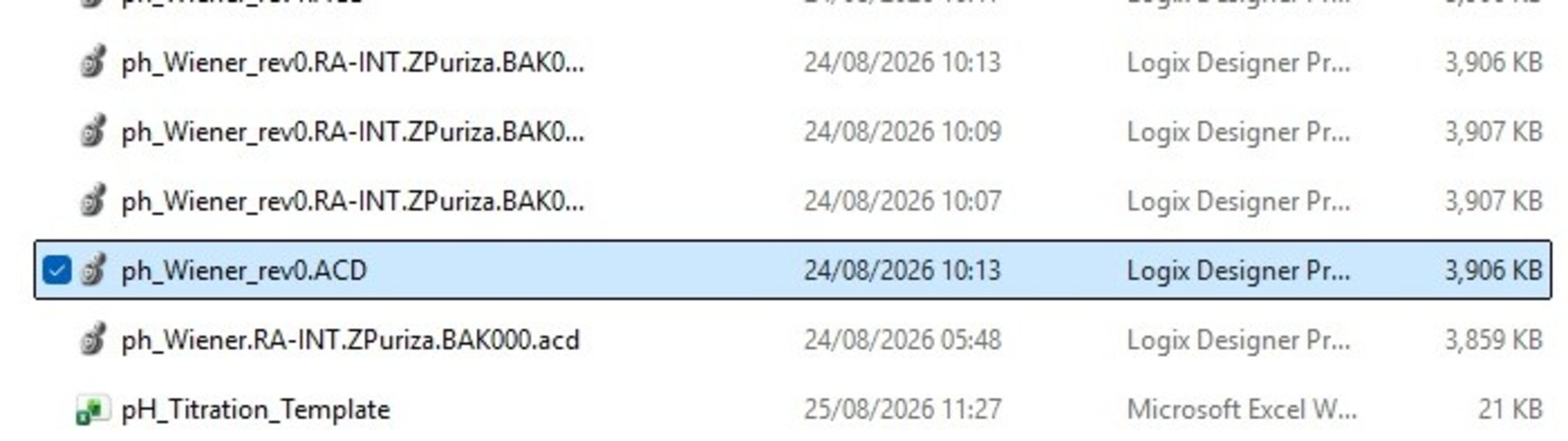
Extraia e abra os arquivos do programa entregue (projeto “.ACD”).


control-of-ph-based-on-a-wiener-model_16x9-phControl_step1_imagen1.jpg

control-of-ph-based-on-a-wiener-model_16x9-phControl_step1_imagen1.jpg


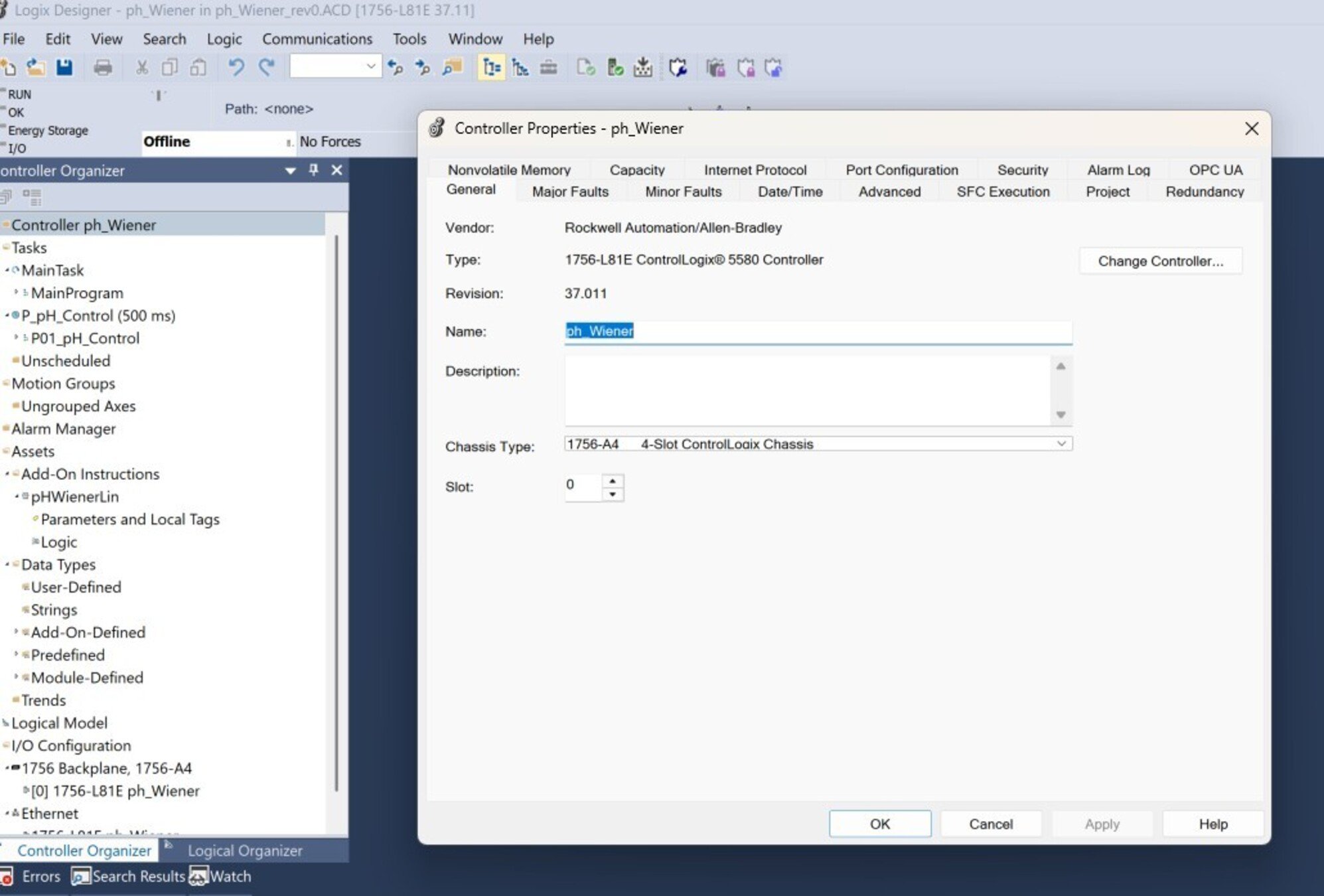
Abra o programa no Studio 5000 dando duplo clique no arquivo .ACD. Para testar esta aplicação, foi usado um controlador ControlLogix 5580 (1756-L81E). 


control-of-ph-based-on-a-wiener-model_16x9-phControl_step1_imagen2.jpg

control-of-ph-based-on-a-wiener-model_16x9-phControl_step1_imagen1.jpg

Passo 2


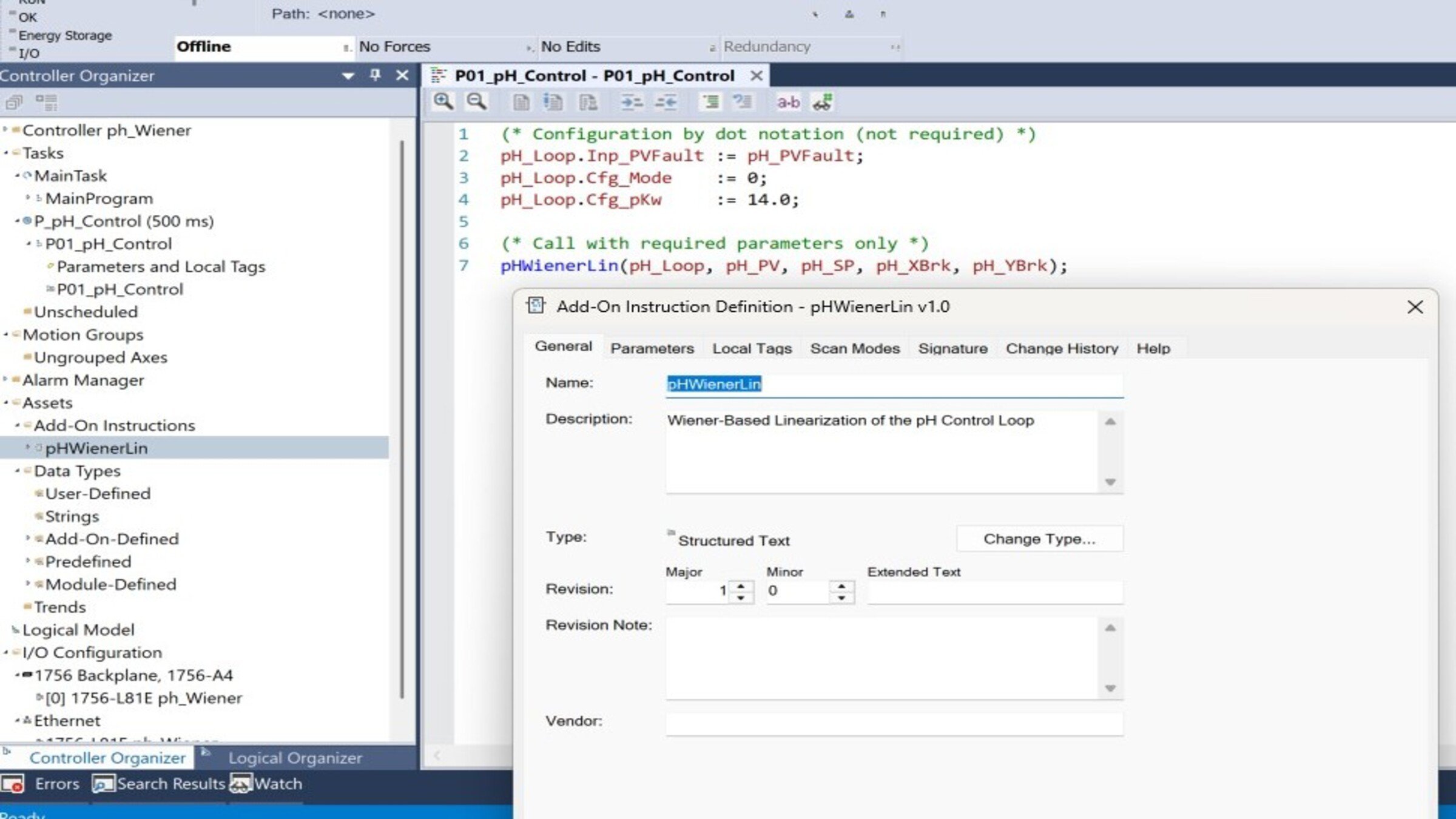
Entenda a estrutura do programa. Revise os principais componentes do programa no “Controller Organizer”:

  • pH_WienerLin: Lineariza o pH aplicando o inverso da curva de titulação
  • pH_PIDE (PID_ENHANCED): Controle regulatório no domínio linear
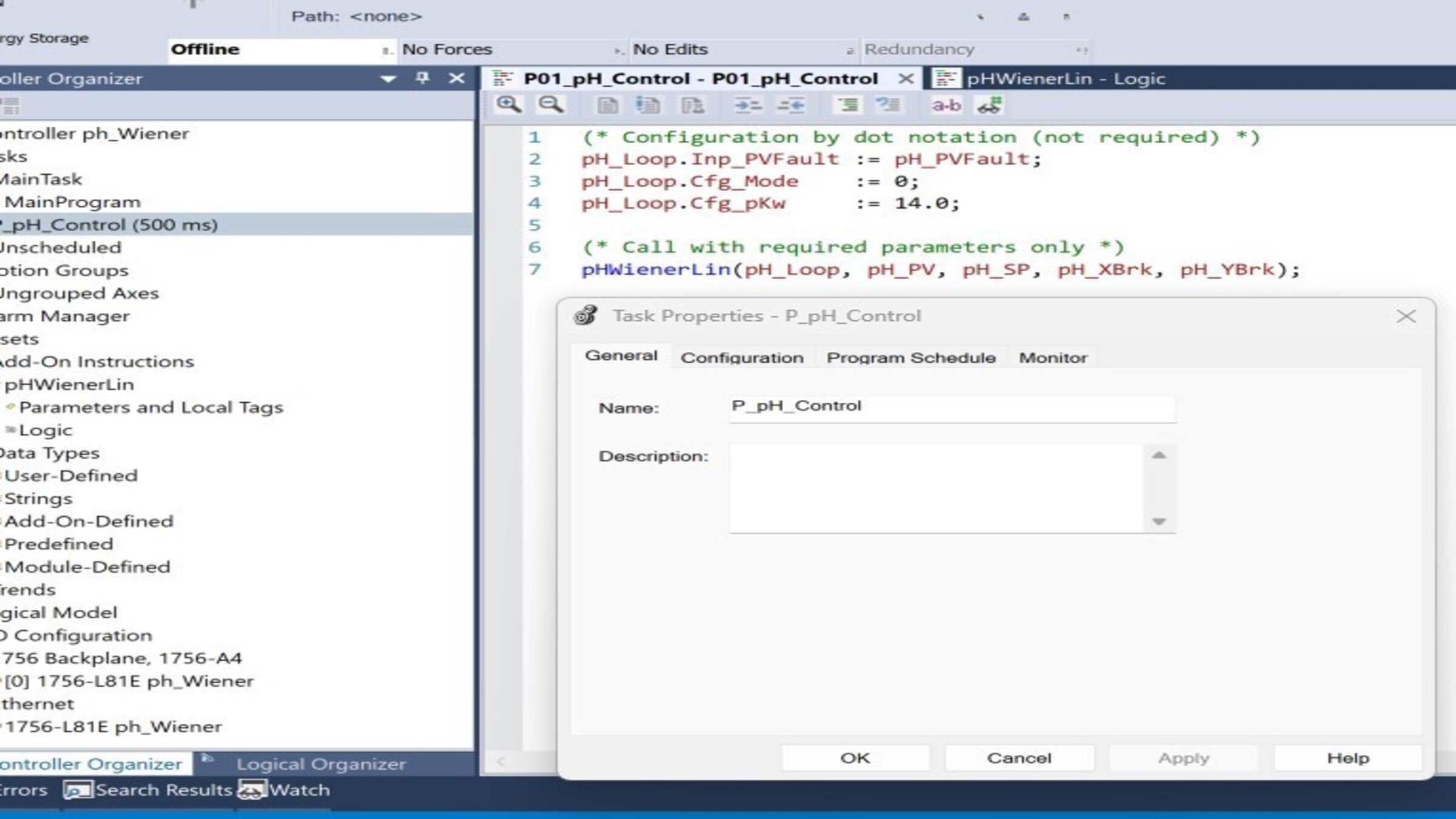
  • Programa P_pH_Control: Contém a rotina de chamada
  • Tarefa T_Process: Tarefa periódica que executa o controle
 
control-of-ph-based-on-a-wiener-model_16x9-phControl_step2_imagen1.jpg

control-of-ph-based-on-a-wiener-model_16x9-phControl_step2_imagen1.jpg

Passo 3


Entenda a AOI pH_WienerLin

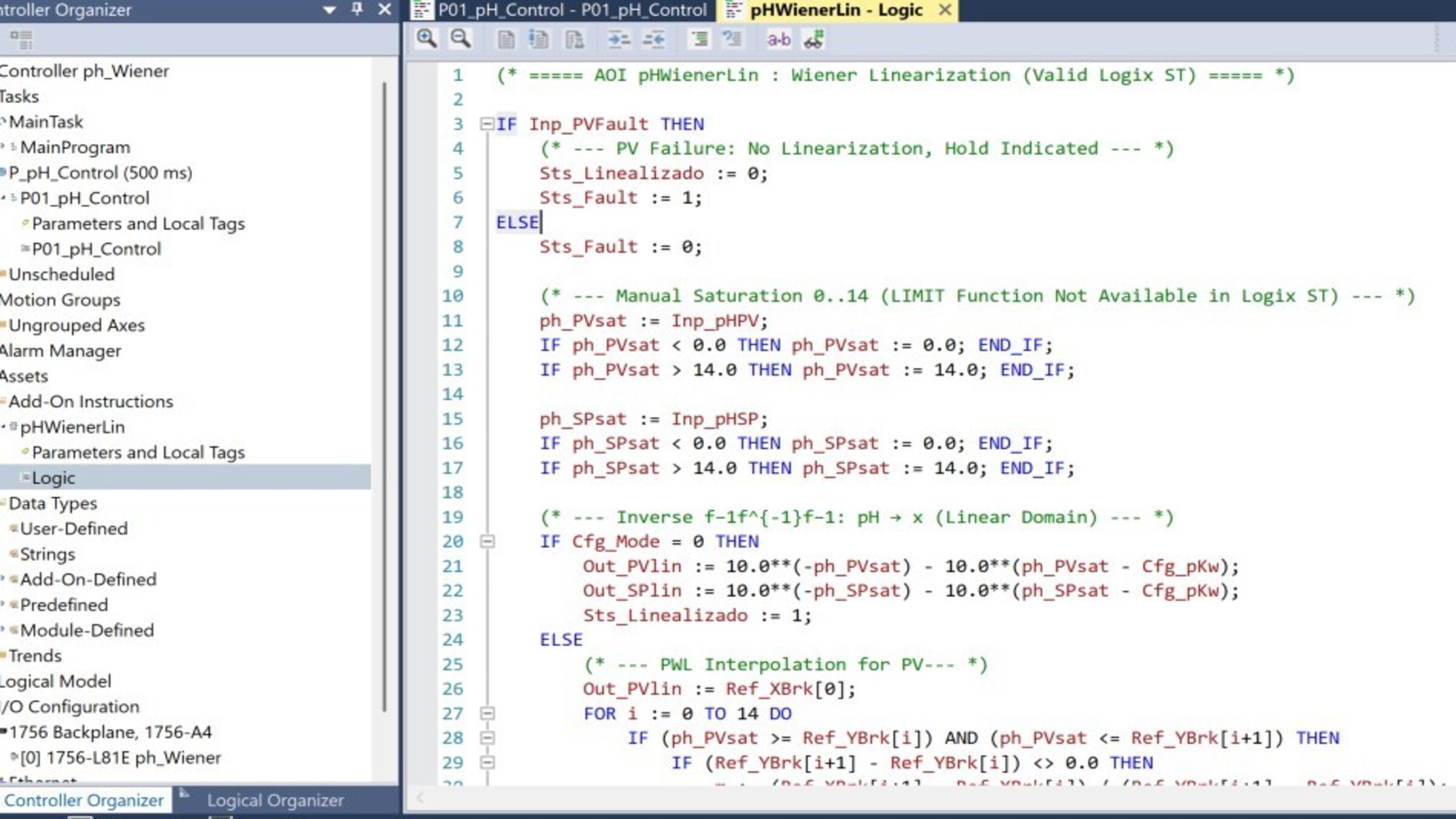
  • Abra a AOI no Controller Organizer e revise a aba Logic.
  • A AOI transforma o pH no domínio linear x por meio do inverso da não linearidade: x=10−pH−10(pH−pKw)x = 10^{-pH} - 10^{(pH - pK_w)}x=10−pH−10(pH−pKw)
  • Ela entrega duas saídas: Out_SPlin (SP linearizado) e Out_PVlin (PV linearizado), que alimentam o PIDE. O parâmetro Cfg_Mode seleciona o método: 0 = inverso analítico; 1 = tabela PWL (curva de titulação real).
     
 
control-of-ph-based-on-a-wiener-model_16x9-phControl_step3_imagen1.jpg

control-of-ph-based-on-a-wiener-model_16x9-phControl_step3_imagen1.jpg

Passo 4


Entenda a rotina de chamada. Na rotina P_pH_Control, verifique a sequência de execução:


control-of-ph-based-on-a-wiener-model_16x9-phControl_step4_imagen1.jpg

control-of-ph-based-on-a-wiener-model_16x9-phControl_step4_imagen1.jpg

Passo 5


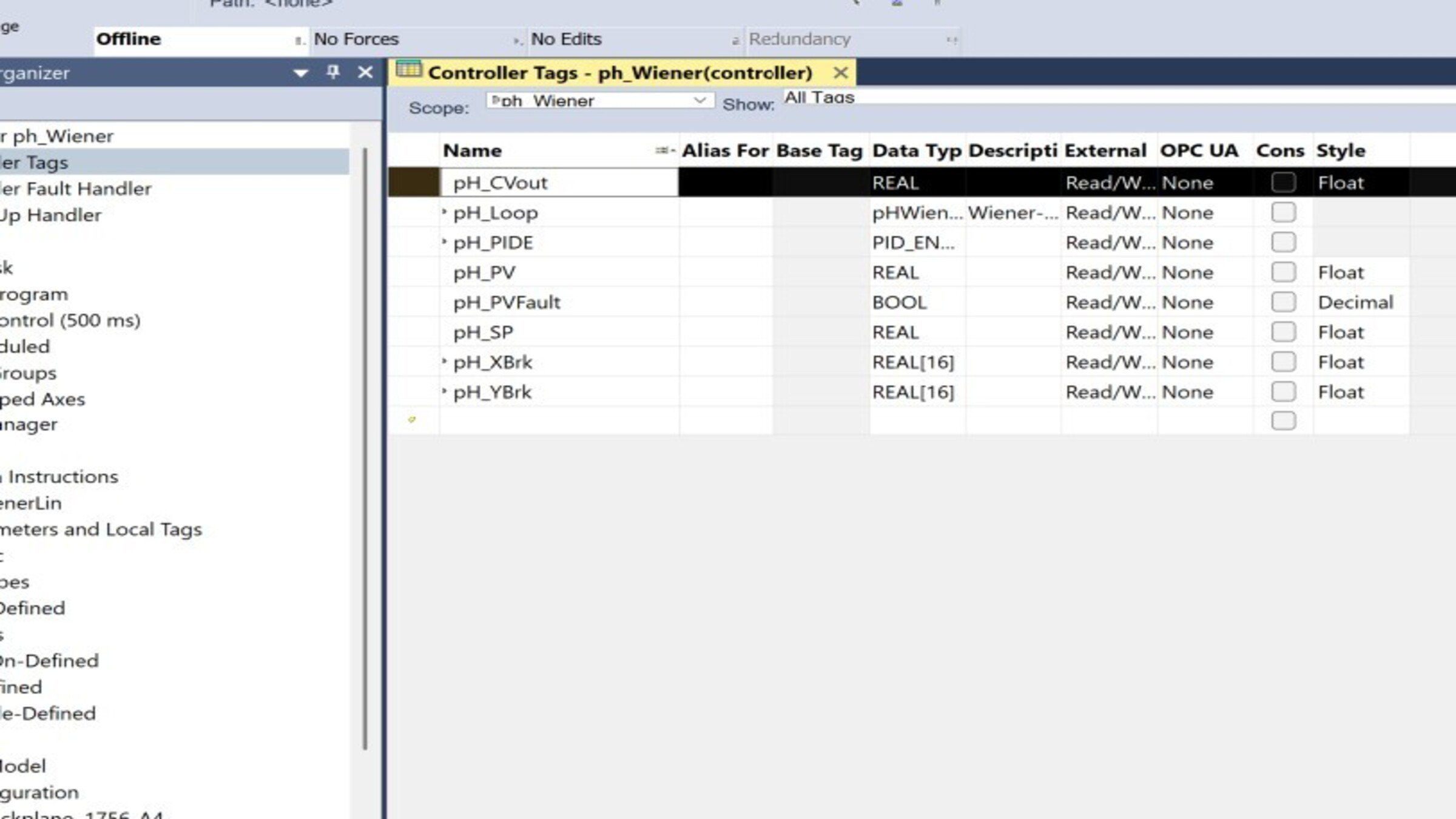
Configure as tags de campo (mapeamento de E/S). Vincule as tags do programa aos seus módulos de entrada/saída:

Tag Tipo Vincular a
pH_CVout REAL Saída analógica para válvula/bomba
pH_PVFault BOOL Diagnóstico do canal / falha do transmissor
pH_SP REAL Setpoint (valor inicial 7,0)
pH_PV REAL Entrada analógica do transmissor de pH


control-of-ph-based-on-a-wiener-model_16x9-phControl_step5_imagen1.jpg

control-of-ph-based-on-a-wiener-model_16x9-phControl_step5_imagen1.jpg

Passo 6


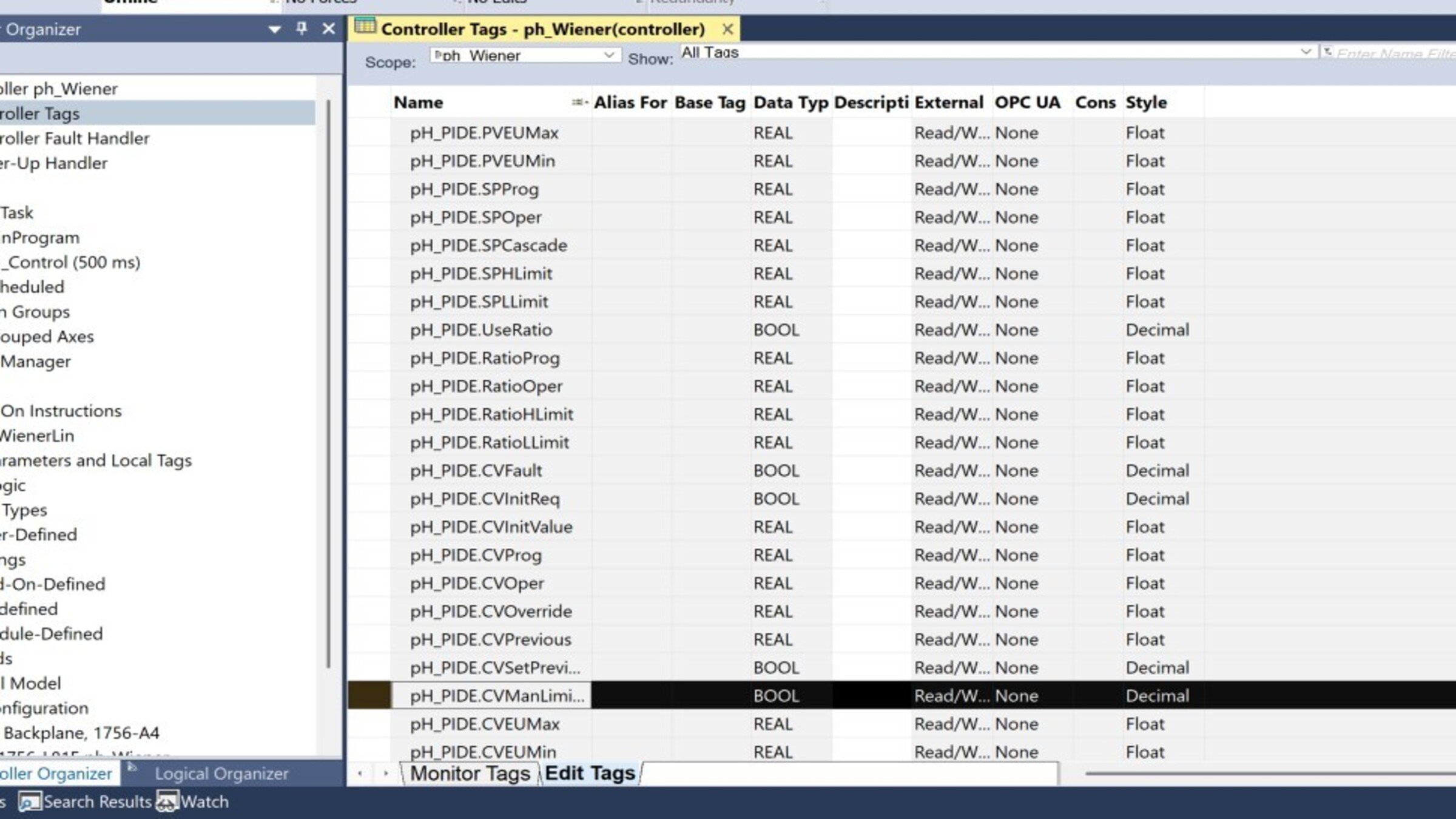
Configure as instruções PIDE. Abra as propriedades de pH_PIDE e ajuste:

Parámetro
Valor recomendado
Motivo – Ação
CVEUMax / CVEUMin
100 / 0 %
Faixa da válvula/bomba
PVEUMax / PVEUMin
+0.1 / −0.1
Escala do domínio linear (ajustar à sua curva)
PGain / IGain
1.2 / 0.05 (semilla)
Ressintonizar após identificação
DGain
0 Habitual em pH devido ao ruído


control-of-ph-based-on-a-wiener-model_16x9-phControl_step6_imagen1.jpg

control-of-ph-based-on-a-wiener-model_16x9-phControl_step6_imagen1.jpg

Passo 7


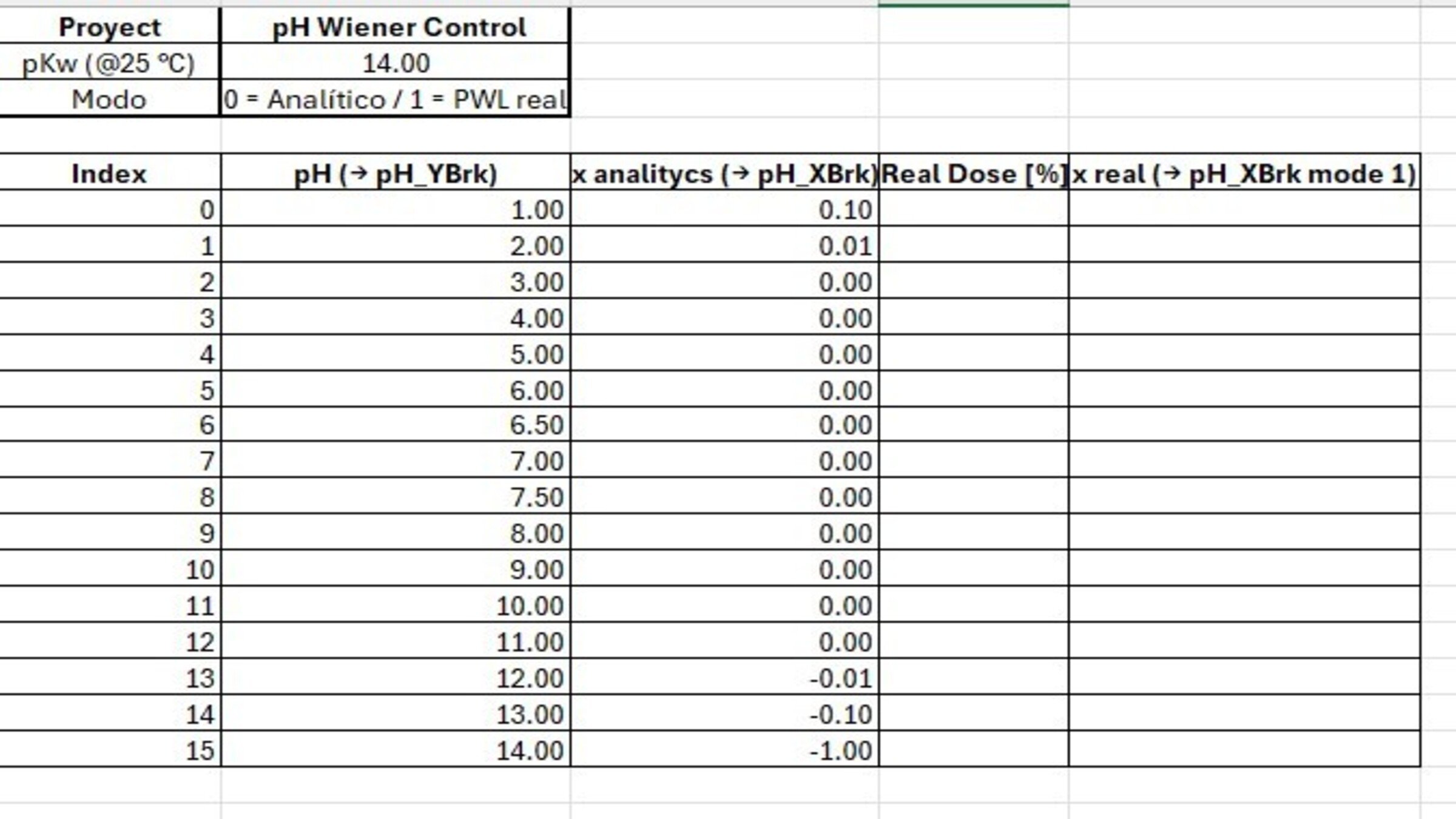
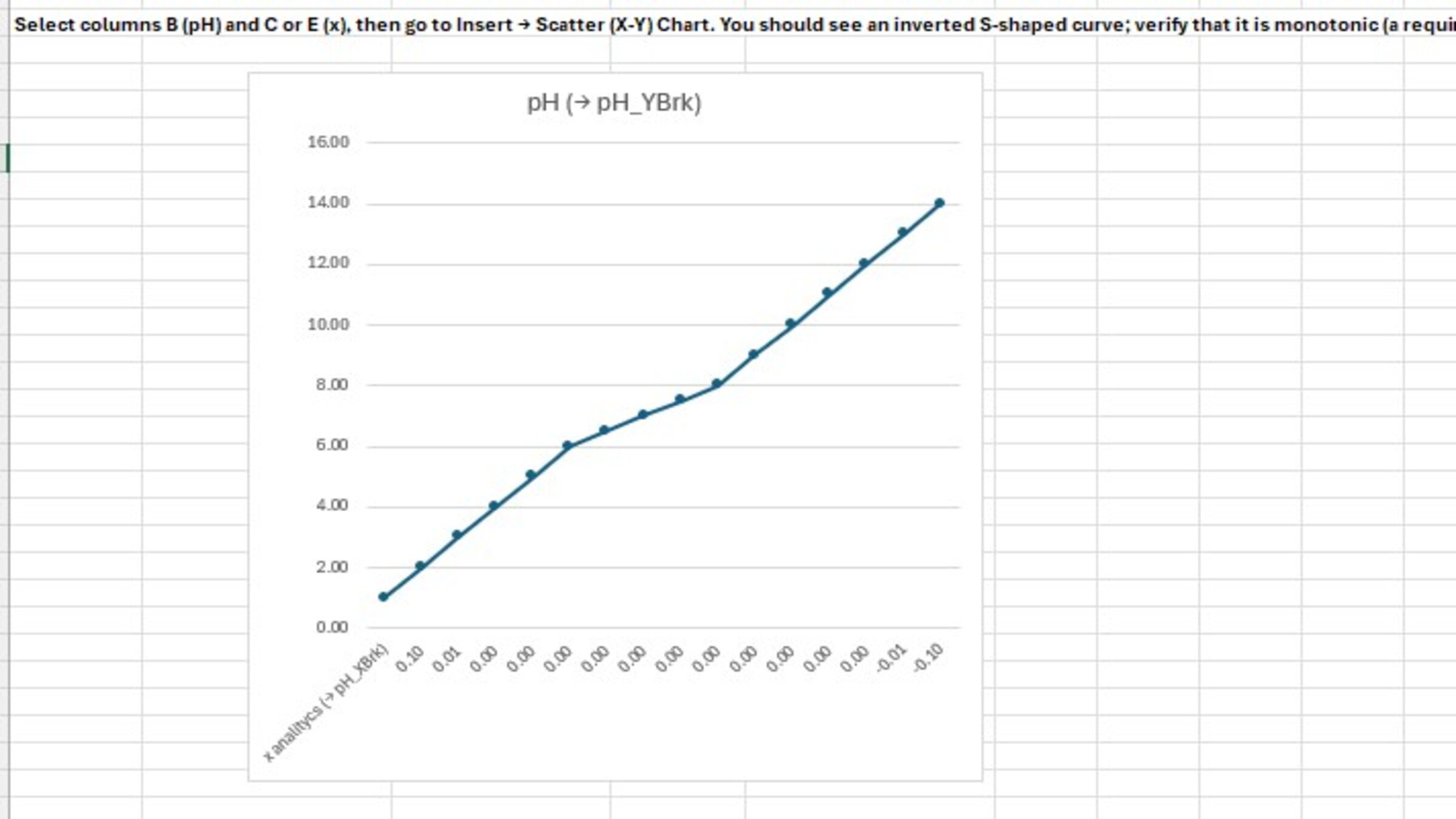
Preencha a curva de titulação (pH_XBrk / pH_YBrk):

  • No monitor de tags, complete os 16 valores de cada array (índices 0–15).
  • pH_YBrk: pH ascendente (1,0 → 14,0).
  • pH_XBrk: valores x do domínio linear (calculados ou provenientes da titulação real).
  • Verifique se pH_YBrk está estritamente ascendente e sem valores consecutivos repetidos
 
control-of-ph-based-on-a-wiener-model_16x9-phControl_step7_imagen1.jpg

control-of-ph-based-on-a-wiener-model_16x9-phControl_step7_imagen1.jpg

Passo 8


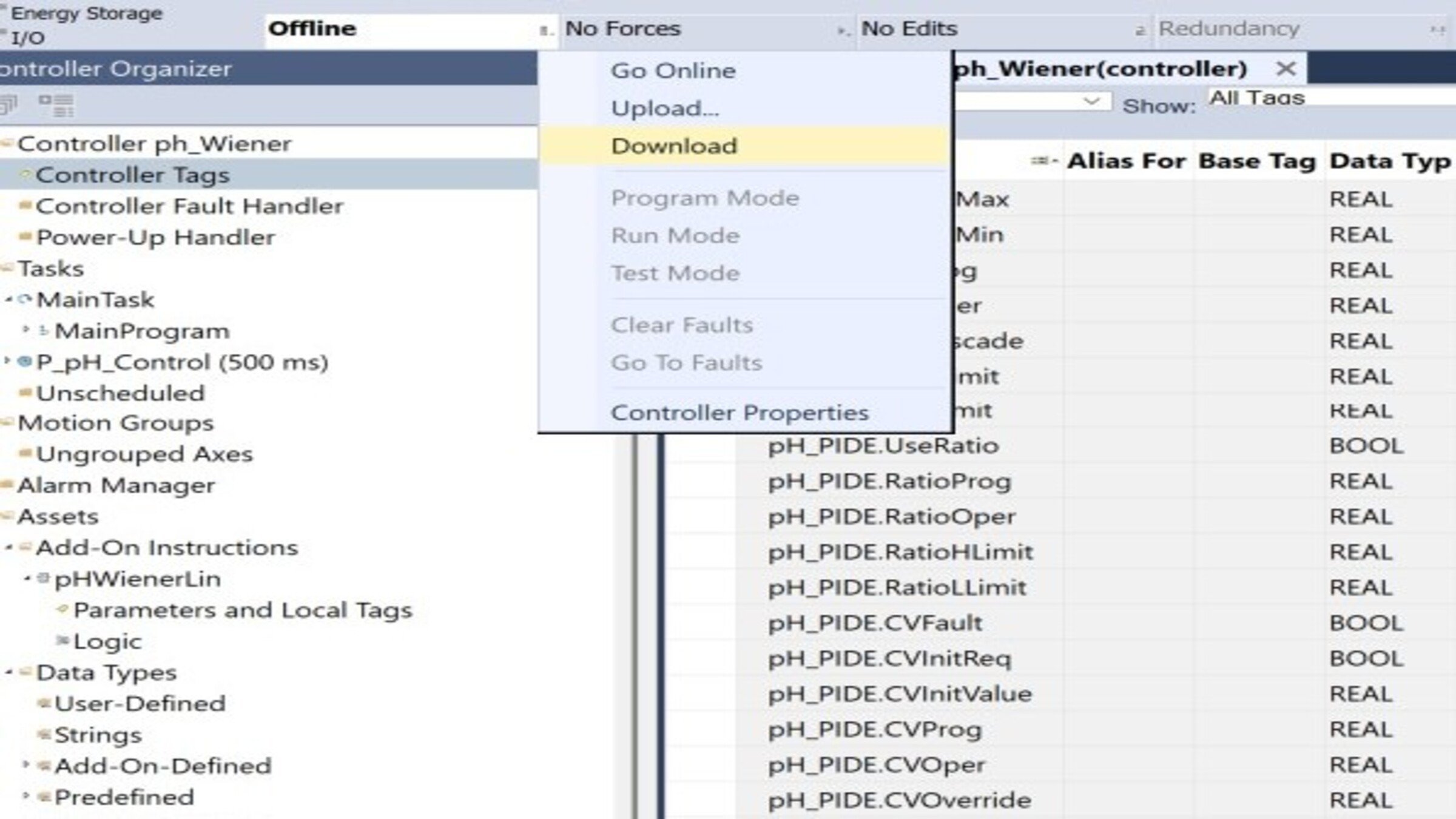
Baixe o programa para o controlador:

  • Configure o caminho de comunicação (RSLinx / FactoryTalk Linx).
  • Verifique o projeto com Verify (Ctrl+K) — ele deve compilar sem erros.
  • Baixe o projeto e coloque o controlador no modo Remote Run
 
control-of-ph-based-on-a-wiener-model_16x9-phControl_step8_imagen1.jpg

control-of-ph-based-on-a-wiener-model_16x9-phControl_step8_imagen1.jpg

Passo 9


Teste em modo Manual

  • Coloque o PIDE em Manual a partir da tag pH_PIDE.
  • Verifique se, ao variar pH_PV (ou forçar valores em simulação), Out_PVlin muda de sinal ao cruzar o pH 7 (positivo na zona ácida, ~0 em neutro, negativo em básico).
  • Confirme Sts_Linealizado = 1 e que pH_CVout responde manualmente.
 
control-of-ph-based-on-a-wiener-model_16x9-phControl_step9_imagen1.jpg

control-of-ph-based-on-a-wiener-model_16x9-phControl_step9_imagen1.jpg

Passo 10


Sintonize e teste em Automático

  • Com o PIDE em Manual, use o autotuner integrado em malha aberta (aplica um passo no CV e estima o modelo do processo).
  • Aplique os ganhos sugeridos (comece com uma resposta lenta/média, adequada para pH).
  • Mude para Auto e valide com pequenos passos de SP
Passo 11


Validação em toda a faixa de pH. Execute passos de SP nas três zonas e confirme desempenho homogêneo:

Zona SP de teste O que observar
Ácida 3 → 4 Resposta estável, sem oscilação
Neutra 6 → 8 Zona crítica — sem sobressinal apesar do alto ganho
Básica 10 → 11 Consistência com as outras zonas


  • Verificação da operação (checklist)
  • Projeto verificado sem erros (Ctrl+K)
  • pH_PIDE com ação reversa confirmada
  • Tags de campo mapeadas para E/S
  • Arrays pH_XBrk / pH_YBrk preenchidos corretamente
  • Teste manual: linearização e saída corretas
  • Sintonia aplicada e teste em Auto satisfatório
  • Validação da faixa (ácida/neutra/básica) homogênea
     
 
control-of-ph-based-on-a-wiener-model_16x9-phControl_step11_imagen1.jpg

control-of-ph-based-on-a-wiener-model_16x9-phControl_step11_imagen1.jpg

control-of-ph-based-on-a-wiener-model_16x9-phControl_step1_imagen1.jpg

control-of-ph-based-on-a-wiener-model_16x9-phControl_step1_imagen1.jpg

control-of-ph-based-on-a-wiener-model_16x9-phControl_step1_imagen2.jpg

control-of-ph-based-on-a-wiener-model_16x9-phControl_step1_imagen2.jpg

control-of-ph-based-on-a-wiener-model_16x9-phControl_step2_imagen1.jpg

control-of-ph-based-on-a-wiener-model_16x9-phControl_step2_imagen1.jpg

control-of-ph-based-on-a-wiener-model_16x9-phControl_step3_imagen1.jpg

control-of-ph-based-on-a-wiener-model_16x9-phControl_step3_imagen1.jpg

control-of-ph-based-on-a-wiener-model_16x9-phControl_step4_imagen1.jpg

control-of-ph-based-on-a-wiener-model_16x9-phControl_step4_imagen1.jpg

control-of-ph-based-on-a-wiener-model_16x9-phControl_step5_imagen1.jpg

control-of-ph-based-on-a-wiener-model_16x9-phControl_step5_imagen1.jpg

control-of-ph-based-on-a-wiener-model_16x9-phControl_step6_imagen1.jpg

control-of-ph-based-on-a-wiener-model_16x9-phControl_step6_imagen1.jpg

control-of-ph-based-on-a-wiener-model_16x9-phControl_step7_imagen1.jpg

control-of-ph-based-on-a-wiener-model_16x9-phControl_step7_imagen1.jpg

control-of-ph-based-on-a-wiener-model_16x9-phControl_step8_imagen1.jpg

control-of-ph-based-on-a-wiener-model_16x9-phControl_step8_imagen1.jpg

control-of-ph-based-on-a-wiener-model_16x9-phControl_step9_imagen1.jpg

control-of-ph-based-on-a-wiener-model_16x9-phControl_step9_imagen1.jpg

control-of-ph-based-on-a-wiener-model_16x9-phControl_step11_imagen1.jpg

control-of-ph-based-on-a-wiener-model_16x9-phControl_step11_imagen1.jpg


Controle de pH baseado em um modelo Wiener
Versão 1.0 - Agosto de 2026


AHIC White Logo

Receba novas aplicações e novidades do Centro de Inovação diretamente em seu e-mail.

Inscreva-se!


  1. Chevron LeftChevron Left Página inicial da Rockwell Automation
  2. Chevron LeftChevron Left Sup...
  3. Chevron LeftChevron Left Sup...
  4. Chevron LeftChevron Left Downloads
  5. Chevron LeftChevron Left Innovation Center
  6. Chevron LeftChevron Left Controle de pH baseado em um modelo Wiener

O conteúdo deste site foi traduzido usando inteligência artificial (IA) sem revisão nem edição humana. O conteúdo pode conter erros ou imprecisões e é fornecido “da forma como está” sem nenhum tipo de garantia. O texto oficial é a versão em inglês.
Atualize suas preferências de cookies para continuar.
Este recurso requer cookies para melhorar sua experiência. Atualize suas preferências para permitir esses cookies:
  • Cookies de Redes Sociais
  • Cookies Funcionais
  • Cookies de Desempenho
  • Cookies de Marketing
  • Todos os Cookies
Você pode atualizar suas preferências a qualquer momento. Para mais informações, consulte nosso {0} Política de Privacidade
CloseClose