
Configure Trigger Input and Output points
Trigger Input points
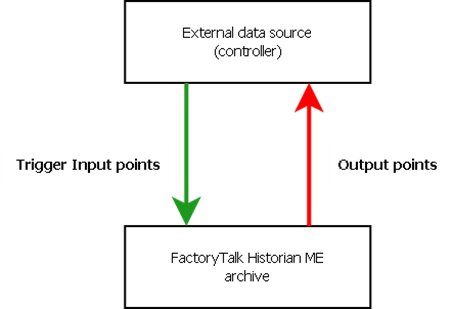
(tags) are points for which data flows from a controller to the FactoryTalk Historian ME archive. For Trigger Input points, you need to configure separate trigger points.Output points
(tags) are points for which data flows from the FactoryTalk Historian ME archive to a controller. For Output points, the timestamp of the trigger value must be greater than the timestamp of the previous value.
IMPORTANT:
Since the output tag values reach the controller with variable latency, they cannot be used for applications requiring real-time update. The output tags are meant for monitoring purposes only.
The following diagram illustrates the data flow of the trigger mechanism for Trigger Input and Output points:
When you configure the Trigger Input or Output points, pay attention to the following:
- The scan rate is not applicable to the Trigger Input point.
- Set theScan Onattribute toOn.
- Put trigger names in single quotes.
Provide Feedback