
Motion Change Dynamics (MCD)
Use the Motion Change Dynamics (MCD) instruction to selectively change the speed,
acceleration rate, or deceleration rate of a move profile or a jog profile in
process.
Available Languages
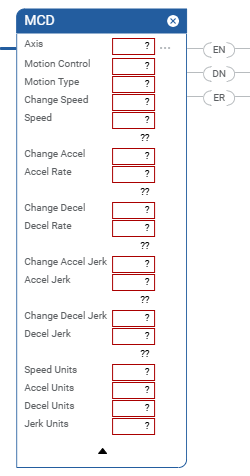
Ladder Diagram
Structured Text
MCD(Axis, MotionControl, MotionType, ChangeSpeed, Speed, ChangeAccel, AccelRate,
ChangeAccelJerk, AccelJerk, ChangeDecelJerk, ChangeDecel, DecelRate, SpeedUnits,
AccelUnits, DecelUnits, JerkUnits);
Operands
There are data conversion rules for mixed data types within an instruction. See Data conversions.
Ladder Diagram and Structured Text
Operand | Type | Format | Description |
|---|---|---|---|
Axis | AXIS | Tag | Name of the axis on which to perform the operation. |
Motion Control | MOTION_INSTRUCTION | Tag | Structure used to access instruction status parameters. |
Motion Type | UDINT | Immediate | Motion profile (jog or move) to change. Select either: 0 = jog 1 = move |
Change Speed | BOOLEAN | Immediate | Set to enable a change of speed. Select either: 0 = no 1 = yes |
Speed | REAL | Immediate or Tag | The new Speed to move the axis in % or Speed Units. |
Change Accel | BOOLEAN | Immediate | Set to enable an acceleration change. Select either: 0 = no 1 = yes |
Accel Rate | REAL | Immediate or Tag | The acceleration rate of the axis in % or Acceleration units. |
Change Decel | BOOLEAN | Immediate | Set to enable a deceleration change. Select either: 0 = no 1 = yes |
Decel Rate | REAL | Immediate or Tag | The deceleration rate of the axis in % or Deceleration units. The axis could overshoot its target position if you reduce the
deceleration while a move is in process. |
Change Accel Jerk | SINT, INT, or DINT | Immediate | 0 = No 1 = Yes |
Accel Jerk | SINT, INT, DINT, or REAL | Immediate or Tag | You must always enter a value for the Accel Jerk operand. This
instruction only uses the value if the Profile is configured as
S-curve. Accel Jerk is the acceleration jerk rate for the axis. Use this value to get started. Accel Jerk = 100 (% of Time) Jerk Units = 2 |
Change Decel Jerk | SINT, INT, or DINT | Immediate | 0 = No 1 = Yes |
Decel Jerk | SINT, INT, DINT, or REAL | Immediate or Tag | You must always enter a value for the Decel Jerk operand. This
instruction only uses the value if the Profile is configured as
S-curve. Decel Jerk is the deceleration jerk rate for the coordinate
system. Use these values to get started. Decel Jerk = 100 (% of Time) Jerk Units = 2 |
Speed Units | DINT | Immediate | Units used to display the Speed value. Select either: 0 = units per sec 1 = % of maximum speed 4 = units per leader unit |
Accel Units | DINT | Immediate | Units used to display the Acceleration value. Select either: 0 = units per sec 2 1 = % of maximum acceleration 4 = units per leader unit 2 |
Decel Units | BOOLEAN | Immediate | Units used to display the Deceleration value. Select either: 0 = units per sec 2 1 = % of maximum deceleration 4 = units per leader unit 2 |
Jerk Units | SINT, INT, or DINT | Immediate | 0 = Units per sec 3 1 = % of Maximum 2 = % of Time 4 = units per leader unit 3 6 = % of Time Leader Driven |
Structured Text
See Structured Text syntax for more information on the syntax of expressions within structured text.
Enter your selection for the operands that require you to select your available
options.
This Operand | Has These Options Which You | |
|---|---|---|
Enter as Text | Or Enter as a Number | |
Axis | No enumeration | Tag |
MotionControl | No enumeration | Tag |
MotionType | jog move | 0 1 |
ChangeSpeed | no yes | 0 1 |
Speed | No enumeration | Immediate or Tag |
ChangeAccel | no yes | 0 1 |
AccelRate | No enumeration | Immediate or Tag |
ChageDecel | no yes | 0 1 |
DecelRate | No enumeration | Immediate or Tag |
ChangeAccelJerk | No enumeration | 0 = No 1 = Yes |
AccelJerk | No enumeration | Immediate or tag You must always enter a value for the Accel operand. This
instruction only uses the value if the Profile is configured as
S-curve. Use this value to get started. Accel Jerk = 100 |
ChangeDecelJerk | No enumeration | 0 = No 1 = Yes |
DecelJerk | No enumeration | Immediate or tag You must always enter a value Decel Jerk operand. This
instruction only uses the value if the Profile is configured as
S-curve. Use this value to get started. Decel Jerk = 100 |
SpeedUnits | unitspersec %ofmaximum unitsperleaderunit | 0 1 4 |
AccelUnits | unitspersec 2 %ofmaximum unitsperleaderunit 2 | 0 1 4 |
DecelUnits | unitspersec 2 %ofmaximum unitsperleaderunit 2 | 0 1 4 |
JerkUnits | unitspersec 3 %ofmaximum %oftime unitsperleaderunit 3 %oftimeleaderdriven | 0 1 2 4 6 |
MOTION_INSTRUCTION Structure
Mnemonic | Description |
|---|---|
.EN (Enable) Bit 31 | It is set when the rung makes a false-to-true transition and
remains set until the servo message transaction is completed and
the rung goes false. |
.DN (Done) Bit 29 | It is set when axis change dynamics has been successfully
initiated. The instruction execution completes in a single scan,
and the DN bit is set immediately. |
.ER (Error) Bit 28 | It is set to indicate that the instruction detected an error,
such as if you specified an unconfigured axis. |
Description
The MCD instruction changes the speed of profile moves on-the-fly and the speed,
acceleration, and deceleration of trapezoidal profile jogs on-the-fly. Choose the
desired physical axis and type of motion and enter values or tag variables for the
Speed, Accel, and Decel. Speed, acceleration, and deceleration values can be entered
as percentages of the current maximum configured value or directly in the configured
speed or acceleration units of the axis.
If the targeted axis does not appear in the list of available axes, the axis has not
been configured for servo operation. Use the Tag Editor to create and configure a
new axis.
Programming Guidelines
IMPORTANT:
Risk of Velocity and/or End Position
Overshoot
If you change move parameters dynamically by any method, that is by changing move
dynamics [Motion Change Dynamics (MCD)] instruction or by starting a new
instruction before the last one has completed, be aware of the risk of velocity
and/or end position overshoot.
A Trapezoidal velocity profile can
overshoot if maximum deceleration is decreased while the move is decelerating or
is close to the deceleration point.
An S-curve velocity profile can
overshoot if:
- maximum deceleration is decreased while the move is decelerating or close to the deceleration point; or
- maximum acceleration jerk is decreased and the axis is accelerating. Keep in mind, however, that jerk can be changed indirectly if it is specified in % of time.
In this transitional instruction, the relay ladder, toggle the Rung-condition-in from
cleared to set each time the instruction should execute.
Changing Move Dynamics
When a Motion type of Move is entered or chosen, the speed, acceleration, and/or
deceleration of a Move in progress may be changed to the specified value. The speed
change occurs at the specified acceleration rate if the new speed is higher than the
current speed or at the specified deceleration rate if the new speed is lower than
the current speed.
Pausing Moves
The MCD instruction may be used to temporarily pause a move in progress by changing
its speed to zero. Use another MCD instruction with a non-zero speed value to
complete the move as originally specified.
Changing Jog Dynamics
When a Motion type of Jog is entered or chosen, the speed, acceleration, and/or
deceleration of a Jog in progress may be changed to the specified value. The speed
change occurs at the specified acceleration rate if the new speed is higher than the
current speed or at the specified deceleration rate if the new speed is lower than
the current speed.
Affects Math Status Flags
No
Major/Minor Faults
None specific to this instruction. A major fault can occur if an uninitialized
reference or a reference of incorrect type is passed to the Axis operand. See Common Attributes for operand-related faults.
Execution
Ladder Diagram
Condition/State | Action Taken |
|---|---|
Prescan | The .EN, .DN, .ER, and .IP bits are cleared to false. |
Rung-condition-in is false | The .EN bit is cleared to false if either the .DN or .ER bit is
true. |
Rung-condition-in is true | The .EN bit is set to true and the instruction executes. |
Postscan | N/A |
Structured Text
Condition/State | Action Taken |
|---|---|
Prescan | See Prescan in the Ladder Diagram table |
Normal execution | See Rung-condition-in is false, followed by rung-condition-in is
true in the Ladder Diagram table. |
Postscan | See Postscan in the Ladder Diagram table. |
Error Codes
See Motion Error Codes
.ERR for Motion Instructions.
Extended Error Codes
Extended Error Codes provide additional instruction specific information for the
Error Codes that are generic to many instructions. See Motion Error Codes
.ERR for Motion Instructions.
Extended Error codes for the Parameter Out of Range (13) error code lists a number
that refers to the number of the operand as they are listed in the faceplate from
top to bottom with the first operand being counted as zero. Therefore for the MCD
instruction, an extended error code of 4 would refer to the Speed operand’s value.
You would then have to check your value with the accepted range of values for the
instruction.
For the Error Code 54 – Maximum Deceleration Value is Zero, if the Extended Error
returns a positive number (0-n) it is referring to the offending axis in the
coordinate system. Go to the Coordinate System Properties General Tab and look under
the Brackets ([ ])column of the Axis Grid to determine which axis has a Maximum
Deceleration value of 0. Click on the ellipsis button next to the offending axis to
access the Axis Properties screen. Go to the Dynamics tab and make the appropriate
change to the Maximum Deceleration Value. If the Extended Error number is -1, this
means the Coordinate System has a Maximum Deceleration Value of 0. Go to the
Coordinate System Properties Dynamics Tab to correct the Maximum Deceleration
value.
MCD Changes to Status Bits
If a MCD is executed, the CDA bit is cleared. The Calculated Data for the move is
recomputed using the new dynamics parameters. The CDA bit is set again when
computations are complete. The Calculated Data that is recomputed is measured from
the original Motion Start Point (MSP) to the Event Distance point using the new
dynamics parameters as changed by the MCD instruction - not from the point of the
MCD.
Note that if the MCD changes the speed to 0, the Event Distance is not recomputed;
the CDA bit is not set. The Event Distance is however recomputed if a second MCD is
issued to restart the motion. The recomputed Calculated Data includes the duration
of the stopped motion.
If the Event Distance is set to 0, the Calculated Data is set to equal the position
that equals the length of the move. This may be one or two coarse update periods
before the PC bit is set because of an internal delay. The end position is typically
achieved in the middle of a coarse update period, which adds up to one additional
coarse update period to the delay. Therefore, if the leader is moved a distance
equal to the Calculated Data, you must wait up to 2 iterations more for the PC bit
of the follower move to be set.
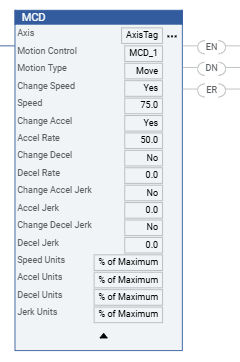
Example
Ladder Diagram
Provide Feedback