
Motion Axis Stop (MAS)
Use the Motion Axis Stop (MAS) instruction to stop a specific motion process on an
axis or to stop the axis completely.
Available Languages
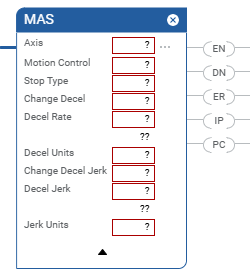
Ladder Diagram
Structured Text
MAS(Axis,MotionControl,StopType,ChangeDecel,DecelRate,DecelUnits,ChangeDecelJerk,DecelJerk,Jerk
Units)
Operands
Ladder Diagram
Operand | Type | Format | Description | |
|---|---|---|---|---|
Axis | AXIS | Tag | Name of the axis. | |
Motion Control | MOTION_INSTRUCTION | Tag | Control tag for the instruction. | |
Stop Type | DINT | Immediate | To Stop | Choose this Stop Type |
All motion in process for this axis. | All = 0 With this selection, the instruction stops all motion on an axis.
The stops takes any coordinated motion on the axis into account
when it computes the Decel rate and stops that component of the
coordinated motion. The other axes components of the coordinated
motion are unaffected and continue. If this instruction stops a Motion Drive Start (MDS) instruction,
the Direct Control Feature is disabled and the affected axis is
decelerated to a stop using the instruction parameters. | |||
Only a certain type of motion but leave other motion processes
running. | Choose the type of motion that you want to stop: | |||
Jog = 1 | ||||
Move = 2 | ||||
Gear = 3 | ||||
Home = 4 | ||||
Tune = 5 | ||||
Test = 6 | ||||
Time Cam = 7 | ||||
Position Cam = 8 | ||||
Leader Offset Move = 9 | ||||
Direct Control = 10 (1) | ||||
The axis could still be moving when the MAS instruction is
complete. | ||||
Change Decel | DINT | Immediate | If you want to | Then Choose |
Use the Maximum Deceleration rate of the axis. | No = 0 | |||
Specify the deceleration rate. | Yes = 1 | |||
Decel Rate | REAL | Immediate or Tag | Important : The axis could overshoot its target position if
you reduce the deceleration while a move is in process.Deceleration rate of the axis. The instruction uses this value
only if Change Decel is Yes. | |
Decel Units | DINT | Immediate | Which units do you want to use for the Decel Rate?
| |
Change Decel Jerk | DINT | Immediate | If you want to | Then Choose |
Use the Maximum Deceleration Jerk rate of the axis. | No (0) | |||
Program the deceleration jerk rate. | Yes (1) | |||
Decel Jerk | REAL | Immediate or Tag | Important : The axis could overshoot its target position if
you reduce the deceleration jerk while a move is in process.You must always enter a value for the Decel Jerk operand.
This instruction only uses the value if the Profile is
configured as S-curve.Decel Jerk is the deceleration jerk rate of the axis. Use these values to get started. Decel Jerk = 100 (% of Time) 0 = Units per sec 3 1 = % of Maximum 2 = % of Time (use this value to get started) | |
Jerk Units | DINT | Immediate | ||
(1)
When the MAS instruction is used to with either an All or
DirectVelocityControlStatus Command Stop Type, the selection also clears the MDS In
Process (.IP) bit, and clears the Axis DirectVelocityControlStatus bit in the Motion
Status attributeStructured Text
This Operand | Has These Options Which You | |
|---|---|---|
Enter as Text | Or Enter as a Number | |
Stop Type | all jog move gear home tune test timecam positioncam leaderoffsetmove directcontrol | 0 1 2 3 4 5 6 7 8 9 10 |
Change Decel | no yes | 0 1 |
Decel Units | Units per sec 2 %ofmaximum | 0 1 |
Change Decel Jerk | no yes | 0 1 |
Decel Jerk | no enumeration | You must always enter a value for the Decel Jerk operand.
This instruction only uses the value if the Profile is
configured as S-curve.Decel Jerk is the deceleration jerk rate of the axis. Use this value to get started. Decel Jerk = 100 % of Time (2) |
Jerk Units | unitspersec 3 % of Maximum % of Time | 0 1 2 |
See Structured Text syntax for more information on the syntax of expressions within structured text.
MOTION_INSTRUCTION Structure
To See If | Check To See If This Bit Is Set To | Data Type | Notes |
|---|---|---|---|
A false-to-true transition caused the instruction to execute. | EN | BOOL | The EN bit stays set until the process is complete and the rung
goes false. |
The stop was successfully initiated. | DN | BOOL | |
An error happened. | ER | BOOL | |
The axis is stopping. | IP | BOOL | Any of these actions end the MAS instruction and clear the IP
bit:
|
The axis is stopped. | PC | BOOL | The PC bit stays set until the rung makes a false-to-true
transition. |
Description
Use the MAS instruction when you want a decelerated stop for any controlled motion in
process for the axis. The instruction stops the motion without disabling the servo
loop. A trapezoidal profile is always used for MAS with Stop Type=ALL for the
deceleration regardless of the programmed profile type. Use the instruction to:
- stop a specific motion process such as jogging, moving, or gearing
- stop the axis completely
If the Stop Type is | Then the MAS Instruction Uses This
Profile |
|---|---|
Jog | Same type of profile as the Motion Axis Jog (MAJ) instruction
that started the jog. |
Move | Same type of profile as the Motion Axis Move (MAM) instruction
that started the move. |
None of the above | Trapezoidal. |
Example
Suppose you use a Motion Axis Jog (MAJ) instruction with an S-curve profile to start
a jog. Then you use an MAS instruction with a Stop Type of Jog to stop the jog. In
that case, the MAS instruction uses an S-curve profile to stop the jog.
Programming Guidelines
IMPORTANT:
Risk of Velocity and/or End Position
Overshoot
If you change move parameters dynamically by any method, that is by changing move
dynamics [Motion Change Dynamics (MCD)] instruction or by starting a new
instruction before the last one has completed, be aware of the risk of velocity
and/or end position overshoot.
A Trapezoidal velocity profile can
overshoot if maximum deceleration is decreased while the move is decelerating or
is close to the deceleration point.
An S-curve velocity profile can
overshoot if:
- maximum deceleration is decreased while the move is decelerating or close to the deceleration point; or
- maximum acceleration jerk is decreased and the axis is accelerating. Keep in mind, however, that jerk can be changed indirectly if it is specified in % of time.
Guidelines | Details | |
|---|---|---|
In ladder diagram, toggle the rung condition each time you want
to execute the instruction. | This is a transitional instruction:
| |
In structured text, condition the instruction so that it only
executes on a transition. | In structured text, instructions execute each time they are
scanned. Condition the instruction so that it only executes on a
transition. Use the structured text construct. For more information, see Structured Text Syntax. | |
Choose whether to stop all motion or only a specific type of
motion. | If You Want to Stop | Then Choose This Stop Type |
All motion in process for this axis. | All The instruction uses a trapezoidal profile and stops the
axis. | |
Stop only a certain type of motion but leave other motion
processes running. | The type of motion that you want to stop The axis could still be moving when the MAS instruction is
complete. The instruction uses an S-curve profile to stop the axis only
if:
| |
Example: Suppose your axis is executing both a jog and a
move at the same time. And suppose you want to stop only the jog
but leave the move running. In that case, choose a Stop Type of
Jog. | ||
To stop a Leader Offset move, enter the follower axis but use
leader units. | To stop an Absolute or Incremental Leader Offset move:
| |
Be careful if the instruction changes motion parameters. | When you execute an MAS instruction, the axis uses the new
deceleration and jerk rates for the motion that’s already in
process. This can cause an axis to overshoot its speed,
overshoot its end position, or reverse direction. S-curve
profiles are more sensitive to parameter changes. | |
Use the jerk operands for S-curve profiles. | Use the jerk operands when
Under those conditions, the instruction uses an S-curve profile
to stop the axis. The instruction uses a constant deceleration
rate for all other types of stops. You must fill in the jerk
operands regardless of the type of stop. | |
Use % of Time for the easiest programming and tuning of jerk. | For an easy way to program and tune jerk, enter it as a % of the
acceleration or deceleration time. | |
Affects Math Status Flags
No
Major/Minor Faults
None specific to this instruction. A major fault can occur if an uninitialized
reference or a reference of incorrect type is passed to the Axis Operand. See Common Attributes for operand related faults.
Execution
Ladder Diagram
Condition/State | Action Taken |
|---|---|
Prescan | The .EN, .DN, .ER, and .IP bits are cleared to false. |
Rung-condition-in is false | The .EN bit is cleared to false if the .DN or .ER bit is
true. |
Rung-condition-in is true | The .EN bit is set to true and the instruction executes. |
Postscan | N/A |
Structured Text
Condition/State | Action Taken |
|---|---|
Prescan | See Prescan in Ladder Diagram table |
Normal execution | See Rung-condition-in is false, followed by rung is true in the
Ladder Diagram table. |
Postscan | See Postscan in Ladder Diagram table. |
Error Codes
Extended Error Codes
Use Extended Error Codes (.EXERR) for more instructions about an error. See Motion Error Codes
.ERR.
If ERR is | And EXERR is | Then | ||
|---|---|---|---|---|
Cause | Corrective Action | |||
13 | Varies | An operand is outside its range. | The EXERR is the number of the operand that is out of range. The
first operand is 0. For example, if EXERR = 4, then check the Decel Rate. | |
EXERR | MAS Operand | |||
0 | Axis | |||
1 | Motion Control | |||
2 | Stop Type | |||
3 | Change Decel | |||
4 | Decel Rate | |||
MAS Changes to Single Axis Status Bits
Motion Status Bits
If the Stop Type Is | Then | ||
|---|---|---|---|
NOT All | The instruction clears the Motion Status bit for the motion
process that you stopped. | ||
All | The instruction clears all Motion Status bits. | ||
Bit Name | State | Meaning | |
MoveStatus | FALSE | Axis is not Moving. | |
JogStatus | FALSE | Axis is not Jogging. | |
GearingStatus | FALSE | Axis is not Gearing. | |
HomingStatus | FALSE | Axis is not Homing. | |
StoppingStatus | TRUE | Axis is Stopping. | |
PositionCamStatus | FALSE | Axis is not Position Camming. | |
TimeCamStatus | FALSE | Axis is not Time Camming. | |
PositionCamPendingStatus | FALSE | Axis does not have a Position Cam Pending. | |
TimeCamPendingStatus | FALSE | Axis does not have a Time Cam Pending. | |
GearingLockStatus | FALSE | Axis is not in a Gear Locked condition. | |
PositionCamLockStatus | FALSE | Axis is not in a Cam Locked condition. | |
DirectVelocityControlStatus | FALSE | Axis is not under Direct Velocity Control. | |
DirectTorqueControlStatus | FALSE | Axis is not under Direct Torque Control. | |
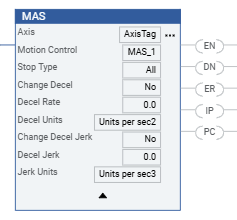
Example
Ladder Diagram
Provide Feedback