
Motion Axis Jog (MAJ)
Use the Motion Axis Jog (MAJ) instruction to move an axis at a constant speed until
you tell it to stop.
Available Languages
Ladder Diagram
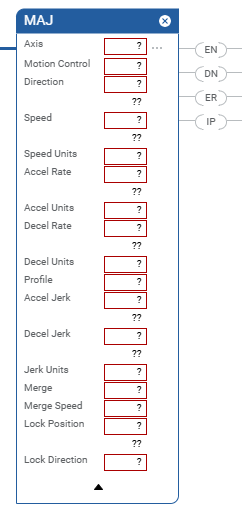
Structured Text
MAJ(Axis,MotionControl, Direction,Speed, SpeedUnits, AccelRate, AccelUnits,
DecelRate, DecelUnits, Profile,
AccelJerk, DecelJerk, JerkUnits, Merge, MergeSpeed LockPosition,
LockDirection);
Operands
Operand | Type | Format | Description | |
|---|---|---|---|---|
Axis | AXIS | Tag | Name of the axis to jog. | |
Motion Control | MOTION_INSTRUCTION | Tag | Control tag for the instruction. | |
Direction | DINT | Immediate | For This Jog Direction | Enter |
Forward | 0 | |||
Reverse | 1 | |||
Speed | REAL | Immediate or Tag | Speed to move the axis in Speed Units. | |
Speed Units | DINT | Immediate | Which units do you want to use for the Speed?
| |
Accel Rate | REAL | Immediate or Tag | Acceleration rate of the axis in Accel Units. | |
Accel Units | DINT | Immediate | Which units do you want to use for the Accel Rate?
| |
Decel Rate | REAL | Immediate or Tag | Deceleration rate to the axis in Deceleration Units. | |
Decel Units | DINT | Immediate | Which units do you want to use for the Decel Rate?
| |
Profile | DINT | Immediate | Select the velocity profile to run the jog:
| |
Accel Jerk | REAL | Immediate or Tag | You must always enter values for the Accel and Decel Jerk
operands. This instruction only uses the values if the Profile
is configured as S-curve.
Use these values to get started.
Enter the jerk rates in these Jerk Units. 0 = Units per sec 3 1 = % of Maximum 2 = % of Time (use this value to get started) 4 = Units per LeaderUnit 3 6 = % of Time-Leader Driven | |
Decel Jerk | REAL | Immediate or Tag | ||
Jerk Units | DINT | Immediate | ||
Merge | DINT | Immediate | Do you want to turn all current axis motion into a pure jog
governed by this instruction regardless of the motion
instructions currently in process?
| |
Merge Speed | DINT | Immediate | If Merge is Enabled, which speed do you want to jog at?
| |
Lock Position | REAL | Immediate or Tag | Position on the Leader Axis where a Follower should start
following the leader after the move has been initiated on the
Follower Axis. See the Structure section below for more information. | |
Lock Direction | UINT32 | Immediate or Tag | Specifies the conditions when the Lock Position should be
used. See the Structure section below for more information. | |
Structured Text
This Operand | Has These Options Which You | |
|---|---|---|
Enter as Text | Or Enter as a Number | |
Axis | No enumeration | Tag |
MotionControl | No enumeration | Tag |
Direction | No enumeration | Immediate |
Speed | No enumeration | Immediate or Tag |
SpeedUnits | units per sec % of maximum unitsperleaderunit | 0 1 4 |
AccelRate | ||
AccelUnits | units per sec 2 % of maximum unitsperleaderunit 2 | 0 1 4 |
DecelRate | ||
DecelUnits | units per sec 2 % of maximum unitsperleaderunit 2 | 0 1 4 |
Profile | Trapezoidal S-curve | 0 1 |
AccelJerk | No enumeration | Immediate or Tag You must always enter a value for the Accel and Decel Jerk
operands. This instruction only uses the values if the Profile
is configured as S-curve. Use these values to get started.
|
DecelJerk | No enumeration | |
Jerk Units | units per sec 3 %ofmaximum %oftime unitsperleaderunit 3 %oftimeleaderdriven | 0 1 2 (use this value to get started) 4 6 |
Merge | disabled enabled | 0 1 |
Merge Speed | programmed current | 0 1 |
Lock Position | No enumeration | Immediate or Tag |
Lock Direction | none immediateforwardonly immediatereverseonly positionforward positionreverse | 0 1 2 3 4 |
See Structured Text syntax for more information on the syntax of expressions within structured text.
MOTION_INSTRUCTION Structure
To See If | Check To See If This Bit Is Set To | Data Type | Notes |
|---|---|---|---|
A false-to-true transition caused the instruction to execute. | EN | BOOL | The EN bit stays set until the process is complete and the rung
goes false. |
The jog was successfully initiated. | DN | BOOL | |
An error happened. | ER | BOOL | |
The axis is jogging. | IP | BOOL | Any of these actions stop this jog and clear the IP bit:
|
Description
Use the MAJ instruction to move an axis at a constant speed without regard to
position.
Programming Guidelines
IMPORTANT:
Risk of Velocity and/or End Position
Overshoot
If you change move parameters dynamically by any method, that is by changing move
dynamics [Motion Change Dynamics (MCD)] instruction or by starting a new
instruction before the last one has completed, be aware of the risk of velocity
and/or end position overshoot.
A Trapezoidal velocity profile can
overshoot if maximum deceleration is decreased while the move is decelerating or
is close to the deceleration point.
An S-curve velocity profile can
overshoot if:
- maximum deceleration is decreased while the move is decelerating or close to the deceleration point; or
- maximum acceleration jerk is decreased and the axis is accelerating. Keep in mind, however, that jerk can be changed indirectly if it is specified in % of time.
Guidelines | Details | ||
|---|---|---|---|
In ladder diagram, toggle the rung condition each time you want
to execute the instruction. | This is a transitional instruction: In ladder diagram, toggle the rung-condition-in from cleared to
set each time you want to execute the instruction. | ||
In structured text, condition the instruction so that it only
executes on a transition. | In structured text, instructions execute each time they are
scanned. Condition the instruction so that it only executes on a
transition. Use the structured text construct. For more information, see Structured Text
Syntax. | ||
Use the jerk operands for S-curve profiles. | Use the jerk operands when the instruction uses an S-curve
profile. You must fill in the jerk operands regardless of the profile. | ||
Use % of Time for the easiest programming and tuning of jerk. | For an easy way to program and tune jerk, enter it as a % of the
acceleration or deceleration time. | ||
Use Merge to cancel the motion of other instructions. | How you want to handle any motion that’s already in process? | ||
If You Want To | And You Want To | Then Set | |
Add the jog to any motion already in process |  | Merge = Disabled Merge Speed = Programmed The instruction ignores Merge Speed but you must fill it in
anyway. | |
End the motion from other instructions and just jog | Jog at the speed that you set in this instruction | Merge = Enabled Merge Speed = Programmed | |
Jog at the speed that the axis is already moving | Merge = Enabled Merge Speed = Current The instruction ignores the value that you put in the Speed
operand. | ||
Be careful if you start another jog while the axis is already
jogging. | If you start a new MAJ instruction while one is already in
process, you can cause:
This happens if the MAJ instructions use an S-curve profile. The
new MAJ instruction cancels the old MAJ instruction. The axis
uses the speed, acceleration, deceleration, and jerk of the new
instruction. | ||
Use an MAS instruction to stop the jog. | |||
Use an MCD instruction to change the speed while jogging. | |||
Affects Math Status Flags
No
Major/Minor Faults
None specific to this instruction. A major fault can occur if an uninitialized
reference or a reference of incorrect type is passed to the Axis Operand. See Common Attributes for operand-related faults.
Execution
Ladder Diagram
Condition/State | Action Taken |
|---|---|
Prescan | The .EN, .DN, .ER, and .IP bits are cleared to false. |
Rung-condition-in is false | The .EN bit is cleared to false if either the .DN or .ER bit is
true. |
Rung-condition-in is true | The .EN bit is set to true and the instruction executes. |
Postscan | N/A |
Structured Text
Condition/State | Action Taken |
|---|---|
Prescan | See Prescan in the Ladder Diagram table |
Normal execution | See Rung-condition-in is false, followed by Rung-condition-in is
true in the Ladder Diagram table. |
Postscan | See Postscan in the Ladder Diagram table. |
Error Codes
See Motion Error Codes
.ERR for Motion Instructions.
Runtime Error Condition
The follower move must start at rest if Speed Units = Seconds or Leader Units. This
condition may occur when the MAJ with Speed = Seconds or Leader Units is started
while another MAJ is in progress (merging or replacement mode).
Extended Error Codes
Use Extended Error Codes (EXERR) for more information about an error.
If ERR is | And EXERR is | Then | ||
|---|---|---|---|---|
Cause | Corrective Action | |||
13 | Varies | An operand is outside its range. | The EXERR is the number of the operand that is out of range. The
first operand is 0. For example, if EXERR = 3, then check the Speed. | |
EXERR | MAS Operand | |||
0 | Axis | |||
1 | Motion Control | |||
2 | Direction | |||
3 | Speed | |||
5 | Accel Rate | |||
7 | Decel Rate | |||
15 | -1 | The coordinated system has a Maximum Deceleration of 0. | Go to the Properties for the coordinate system axis and set a
Maximum Deceleration. | |
0 or more | An axis in the coordinate system has a Maximum Deceleration of
0. |
| ||
Changes to Status Bits
Motion Instruction Predefined Data Type Status Bits
See Status Bits for Motion Instructions (MAM, MATC, MAJ) When MDAC Is Active.
MAJ Changes to Instruction Status Bits
Bit Name | Meaning | |
|---|---|---|
MotionStatus | The motion status bit for your axis. | |
Bit Number | Meaning | |
AccelStatus | 0 | The axis is not accelerating (FALSE state). |
DecelStatus | 1 | The axis is not decelerating (FALSE state). |
MoveStatus | 2 | The axis is not moving (FALSE state). |
JogStatus | 3 | The axis is not jogging (FALSE state). |
GearingStatus | 4 | The axis is not gearing (FALSE state). |
HomingStatus | 5 | The axis is not homing (FALSE state). |
StoppingStatus | 6 | The axis is stopping (TRUE state). |
AxisHomedStatus | 7 | The axis is not homed (FALSE state). |
PositionCamStatus | 8 | The axis is not position camming (FALSE state). |
TimeCamStatus | 9 | The axis is not time camming (FALSE state). |
PositionCamPendingStatus | 10 | The axis does not have a Position Cam Pending (FALSE state). |
TimeCamPendingStatus | 11 | The axis does not have a Time Cam Pending (FALSE state). |
GearingLockStatus | 12 | The axis is not in a Gear Locked condition (FALSE state). |
PositionCamLockStatus | 13 | The axis is not in a Position Cam Locked condition (FALSE
state). |
TimeCamLockStatus | 14 | The axis is not in a Time Cam Locked condition (FALSE state). |
LeaderOffsetMoveStatus | 15 | The axis is offset (TRUE state). |
CoordinatedMotionStatus | 16 | Sets when the MDAC instruction executes (TRUE state). Clears when
the instruction completes (FALSE state). |
TransformStateStatus | 17 | The axis is part of an active transform (TRUE state). |
ControlledByTransformStatus | 18 | The axis is moving because of a transform (TRUE state). |
DirectVelocityControlStatus | 19 | The axis is not under Direct Velocity Control (FALSE state). |
DirectTorqueControlStatus | 20 | The axis is not under Direct Torque Control (FALSE state). |
JogLockStatus | 24 | The bit is cleared when a MAS or MASD is executed. If either the Follower or Leader axis (or both) is paused by
changing its speed to 0, then the JogLockStatus bit stays set. Leader Driven Mode The bit is set when the Lock Direction request is satisfied. The bit is not used when the enumeration is NONE. For the enumerations Immediate Forward Only and Immediate Reverse
Only, the JogLockStatus bit is set immediately when the MAJ is
initiated. For the enumeration Position Forward Only and Position Reverse
Only, the bit is set when the Leader Axis crosses the Leader
Lock Position in the specified direction. The JogLockStatus bit is cleared when the Leader Axis reverses
direction and the Follower Axis stops following the Leader Axis.
The JogLockStatus bit is set again when the Follower Axis
resumes following the Leader Axis. Time Driven Mode The bit is not used when the enumeration is NONE. |
LeaderOffsetMoveLockStatus | 26 | Leader offset Move is Locked to leader in MDSC Mode (TRUE
state). |
MaximumSpeedExceeded | 27 | Sets when the maximum axis speed that is specified in the axis
configuration is exceeded during a move (TRUE state). Clears
when the velocity is reduced below the limit (FALSE state). |
MAJ Changes to Single Axis Status Bits
If Merge Is | Then the Instruction Changes These
Bits | ||
|---|---|---|---|
Bit Name | State | Meaning | |
Disabled | JogStatus | TRUE | Axis is Jogging. |
Enabled | JogStatus | TRUE | Axis is Jogging. |
MoveStatus | FALSE | Axis is no longer Moving. | |
GearingStatus | FALSE | Axis is no longer Gearing. | |
Example
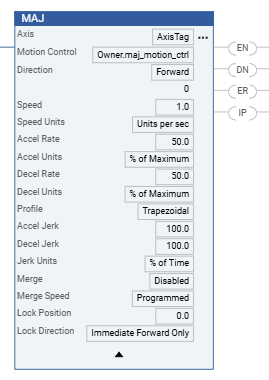
Ladder Diagram
Provide Feedback