
Motion Axis Home (MAH)
Use the Motion Axis Home (MAH) instruction to home an axis. Two different homing
modes can be selected during axis configuration: Active or Passive. If an Active
homing sequence is selected, the axis executes the configured Home Sequence Type and
establishes an absolute axis position. If Passive homing is selected, however, no
specific homing sequence is executed and the axis is left waiting for the next
marker pulse to establish the home position.
Available Languages
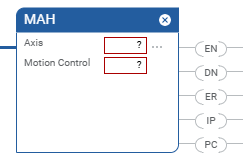
Ladder Diagram
Structured Text
MAH(Axis,MotionControl);
Operands
Ladder Diagram and Structured Text
Operand | Type | Format | Description |
|---|---|---|---|
Axis | AXIS | Tag | Name of the axis on which to perform operation. |
Motion Control | MOTION_INSTRUCTION | Tag | Structure used to access instruction status parameters. |
See Structured Text syntax for more information on the syntax
of expressions within structured text.
MOTION_INSTRUCTION Structure
Mnemonic | Description |
|---|---|
.EN (Enable) Bit 31 | It is set when the rung makes a false-to-true transition and
remains set until the servo message transaction is completed and
the rung goes false. |
.DN (Done) Bit 29 | It is set when axis home has been successfully completed or is
aborted. |
.ER (Error) Bit 28 | It is set to indicate that the instruction detected an error,
such as if you specified an unconfigured axis. |
.IP (In Process) Bit 27 | It is set on positive rung transition and cleared after the
Motion Home Axis is complete, or terminated by a stop command,
shutdown, or a servo fault. |
.PC (Process Complete) Bit 26 | It is set when axis home is successfully completed. |
Description
The MAH instruction is used to calibrate the absolute position of the specified axis.
For axes that are configured as type Servo, the axis can be homed using Active,
Passive, or Absolute Homing Mode configuration. For Feedback Only axes, only Passive
and Absolute homing modes are available. Absolute Homing Mode requires the axis to
be equipped with an absolute feedback device.
TIP:
Absolute Homing mode is not available with a CIP
axis. However, any successful Home sequence establishes an absolute position.
For CIP axes only, software overtravels are disabled if the Home status bit
transitions to the FALSE state.
The MAH instructions sets the HomedStatus bit upon successful completion of the
configured homing sequence. This bit indicates that an absolute machine reference
position has been established. When this bit is set, operations that require a
machine reference, such as Software Overtravel checking can be meaningfully
enabled.
Active Homing
When the axis Homing Mode is configured as Active, the physical axis is confirmed not
to be in motion when initiating the MAH. If the axis is in motion, the MAH errors
with error code 22, Axis in Motion. If the axis is not in motion, it is first
activated for servo operation. The axis is then homed using the configured Home
Sequence which may be Immediate, Switch, Marker, or Switch-Marker. The later three
Home Sequences result in the axis being jogged in the configured Home Direction and
then after the position is re-defined based on detection of the home event, the axis
is automatically moved to the configured Home Position.
Passive Homing
When the axis Homing Mode is configured as Passive, the MAH instruction re-defines
the actual position of a physical axis on the next occurrence of the encoder marker.
Passive homing is most commonly used to calibrate Feedback Only axes to their
markers, but can also be used on Servo axes. Passive homing is identical to active
homing to an encoder marker, except that the motion controller does not command any
axis motion.
After initiating passive homing, the axis must be moved past the encoder marker for
the homing sequence to complete properly. For closed-loop Servo axes, this may be
accomplished with a MAM or MAJ instruction. For physical Feedback Only axes, motion
cannot be commanded directly by the motion controller, and must be accomplished via
other means.
Absolute Homing
If the motion axis hardware supports an absolute feedback device, Absolute Homing
Mode may be used. The only valid Home Sequence for an absolute Homing Mode is
"immediate". In this case, the absolute homing process establishes the
true absolute position of the axis by applying the configured Home Position to the
reported position of the absolute feedback device. Prior to execution of the
absolute homing process via the MAH instruction, the axis must be in the Axis Ready
state with the servo loop disabled.
To successfully execute a MAH instruction on an axis configured for Active homing
mode, the targeted axis must be configured as a Servo Axis Type. To successfully
execute an MAH instruction, the targeted axis must be configured as either a Servo
or Feedback Only axis. If any of these conditions are not met, the instruction
errors.
TIP:
The instruction execution may take multiple scans
to execute because it requires multiple coarse updates to complete the request. The
Done (.DN) bit is not set immediately, but only after the request is
completed.
In this transitional instruction, the relay ladder, toggle the Rung-condition-in from
cleared to set each time the instruction should execute.
Affects Math Status Flags
No
Major/Minor Faults
None specific to this instruction. A major fault can occur if an uninitialized
reference or a reference of incorrect type is passed to the Axis operand. See Common
Attributes for operand-related faults.
Execution
Ladder Diagram
Condition/State | Action Taken |
|---|---|
Prescan | The .EN, .DN, .ER, and .IP bits are cleared to false. |
Rung-condition-in is false | The .EN bit is cleared to false if the .DN or .ER bit is
true. |
Rung-condition-in is true | The .EN bit is set to true and the instruction executes. |
Postscan | N/A |
Structured Text
Condition/State | Action Taken |
|---|---|
Prescan | See Prescan in Ladder Diagram table |
Normal execution | See Rung-condition-in is false, followed by rung is true in the
Ladder Diagram table. |
Postscan | See Postscan in Ladder Diagram table. |
Error Codes
See Motion Error Codes
.ERR for Motion Instructions.
Extended Error Codes
Extended Error Codes provide additional instruction specific information for the
Error Codes that are generic to many instructions. See Motion Error Codes
.ERR for Motion Instructions.
The following Extended Error codes help to pinpoint the problem when the MAH
instruction receives a Servo Message Failure (12) error message or Illegal Homing
Configuration (41).
Associated Error Code (decimal) | Extended Error Code (decimal) | Meaning |
|---|---|---|
SERVO_MESSAGE_FAILURE (12) | Process terminated on request (1) | Home execution followed by an instruction to shutdown/disable
drive, or a motion stop instruction or a Processor change
requests a cancel of Home. |
SERVO_MESSAGE_FAILURE (12) | Object Mode conflict (12) | Axis is in shutdown. |
SERVO_MESSAGE_FAILURE (12) | Device in wrong state (16) | Redefine Position, Home, and Registration 2 are mutually
exclusive (SERCOS), device state not correct for action.
(SERCOS) |
ILLEGAL_HOMING_CONFIG (41) | Home sequence (4) | The Home Sequence is incompatible with the Home Mode. |
ILLEGAL_HOMING_CONFIG (41) | Home speed of zero (6) | Home speed cannot be zero. |
ILLEGAL_HOMING_CONFIG (41) | Home return speed of zero (7) | The Home Return Speed cannot be zero. |
For the Error Code 54 – Maximum Deceleration Value is Zero, if the Extended Error
returns a positive number (0-n) it is referring to the offending axis in the
coordinate system. Go to the Coordinate System Properties General Tab and look under
the Brackets ([ ])column of the Axis Grid to determine which axis has a Maximum
Deceleration value of 0. Click on the ellipsis button next to the offending axis to
access the Axis Properties screen. Go to the Dynamics tab and make the appropriate
change to the Maximum Deceleration Value.
Status Bits
MAH Changes to Single Axis Status Bits
Bit Name | State | Meaning |
|---|---|---|
HomingStatus | TRUE | Axis is Homing. |
JogStatus | FALSE | Axis is no longer Jogging.* |
MoveStatus | FALSE | Axis is no longer Moving.* |
GearingStatus | FALSE | Axis is no longer Gearing. |
StoppingStatus | FALSE | Axis is no longer Stopping. |
*During portions of the active homing sequence these bits may be set and cleared. The
MAH instruction uses the Move and Jog motion profile generators to move the axis
during the homing sequence. This also means that any disruption in the Move or Jog
motion profiles due to other motion instructions can affect the successful
completion of the MAH initiated homing sequence.
If in Passive homing mode, the MAH instruction simply sets the Homing Status bit.
Example
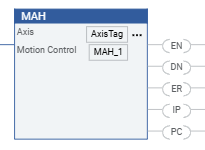
Ladder Diagram
Provide Feedback