
Get System Value (GSV) and Set System Value (SSV)
The GSV/SSV instructions get and set controller system data that is stored in objects.
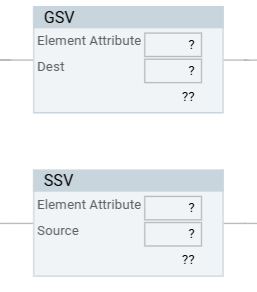
- GSV reads an object attribute into a tag.
- SSV writes a value from a tag into an object attribute.
Available Languages
Ladder Diagram
Structured Text
GSV(Object.Attribute,Dest)
SSV(Object.Attribute,Source)
Operands
The GSV and SSV instructions in
FactoryTalk Design Studio
have been modified from
their versions in Studio 5000 Logix Designer
. Each GSV and SSV instruction takes two
arguments. The Class Name, Instance Name, and Attribute Name arguments are replaced by a
single object attribute name.Ladder Diagram and Structured Text
Operand | Format | Description |
|---|---|---|
Object attribute | <object>.<attribute> | The target object attribute. The object can be an element instance or a
scope-selector keyword. |
Destination (GSV) 1 | tag | The tag that receives the attribute value. Its data type must be
assignment-compatible with the attribute type. |
Source (SSV) 1 | tag | The tag that contains the value to write to the attribute. Its type must be
assignment-compatible with, and its allocated size must be equal to or greater than
the attribute. |
1
The data type is determined by the attribute selected in the first argument.
TIP:
As you type the first argument,
FactoryTalk Design Studio
proposes the object attributes that are valid for the
instruction you are editing:- A GSV proposes only readable attributes.
- An SSV proposes only writable attributes.
- Attributes that support neither GSV nor SSV access are never proposed.
Scope-selector keywords
Use a scope-selector keyword that resolves to the enclosing scope of the routine being
edited.
Keyword | Resolves to |
|---|---|
thisRoutine | The routine containing the instruction. |
thisProgram | The program containing the routine. |
thisTask | The task containing the program. |
thisControllerApp | The controller application the routine is allocated to. |
thisControllerDevice | The controller device the routine is allocated to. |
thisAOIDefinition | The Add-On Instruction definition containing the routine. Available only inside an Add-On Instruction routine body. |
TIP:
- Class attributes.thisRoutine,thisProgram,thisControllerApp,thisControllerDevice, andthisAOIDefinitioncan also be used to reference class attributes of the enclosing scope object.
- System Object routines. In aSystem Objectroutine,thisControllerAppandthisControllerDeviceresolve to the controller application and controller device to which the routine is allocated.
- Reserved names. The scope-selector keywords are reserved. Using one as an identifier (routine, tag, structure type, or structure member name) results in a validation error. Property declarations of thethisXXXkeywords themselves are exempt.
Validation
FactoryTalk Design Studio
reports a validation error while you edit for any of the
following. These conditions are detected at design time; they do not have to reach the
controller to be caught.The Program
minorFaultRecord
and majorFaultRecord
attributes are exempt from second-argument type-compatibility checking and accept any
type.Condition | GSV | SSV |
|---|---|---|
The first-argument object reference is not a valid element instance or a defined
scope-selector keyword. | √ | √ |
The first-argument object reference is not followed by a valid attribute that
supports the required access (read for GSV, write for SSV). | √ | √ |
The first-argument attribute can be used in a GSV or SSV instruction. | √ | √ |
The first-argument attribute is read-only. | √ | |
The second-argument tag type is not assignment-compatible with the attribute's
declared type. | √ | √ |
The second-argument tag has a smaller allocated size than the target attribute's
declared size. | √ | |
A scope-selector keyword is used as an identifier. | √ | √ |
Safety access is not granted for the routine's scope. | √ | √ |
A safety-object attribute is used in a Structured Text routine. | √ (Structured Text) | √ |
Affects Math Status Flags
No.
Major/Minor Faults
The conditions in the table are design-time validation errors in
FactoryTalk Design Studio
.A minor fault will occur if: | Fault Type | Fault Code |
|---|---|---|
There is an invalid object address | 4 | 5 |
The specified object that does not support GSV/SSV | 4 | 6 |
There is an invalid attribute | 4 | 6 |
There was not enough information supplied for an SSV instruction | 4 | 6 |
The GSV destination was not large enough to hold the requested data | 4 | 7 |
See Common
Attributes for operand-related faults.
Ladder Diagram
Condition | Action Taken |
|---|---|
Prescan | N/A |
Rung-condition-in is false | N/A |
Rung-condition-in is true | The instruction executes. |
Postscan | N/A |
Structured Text
Condition | Action Taken |
|---|---|
Prescan | See Prescan in the Ladder Diagrams table. |
Normal Execution | See rung-condition-in is true in the Ladder Diagrams table. |
Postscan | See Postscan in the Ladder Diagrams table. |
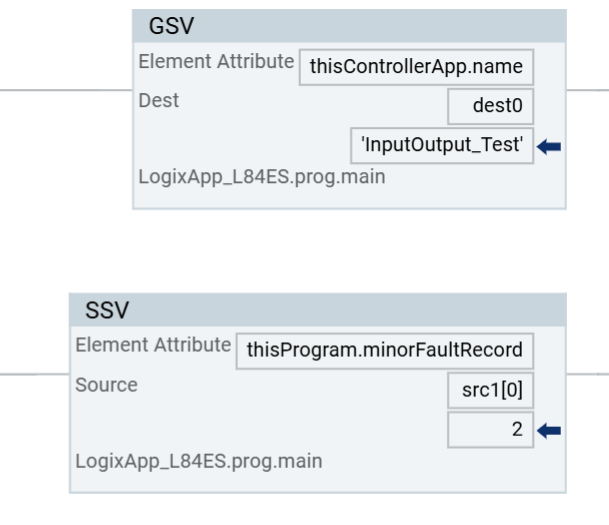
Example
Ladder Diagrams
Structured Text
GSV(thisProgram.lastScanTime, dest1)
SSV(thisProgram.minorFaultRecord, src[0]);
Importing projects from
Studio 5000 Logix Designer
A project exported from
Studio 5000 Logix Designer
that contains GSV and SSV instructions
can be imported into FactoryTalk Design Studio
and deployed directly. Import converts
each four-operand Studio 5000 Logix Designer
instruction into the two-argument form:Studio 5000 Logix Designer | FactoryTalk Design Studio |
|---|---|
GSV(Program,THIS,LASTSCANTIME,dest1) | GSV(thisProgram.lastScanTime, dest1) |
SSV(Program,THIS,MinorFaultRecord,src[0]) | SSV(thisProgram.minorFaultRecord, src[0]) |
GSV(Task,MixerTask,Watchdog,wd) | GSV(MixerTask.watchdog_us, wd) |
Provide Feedback