
Components

Document template editor
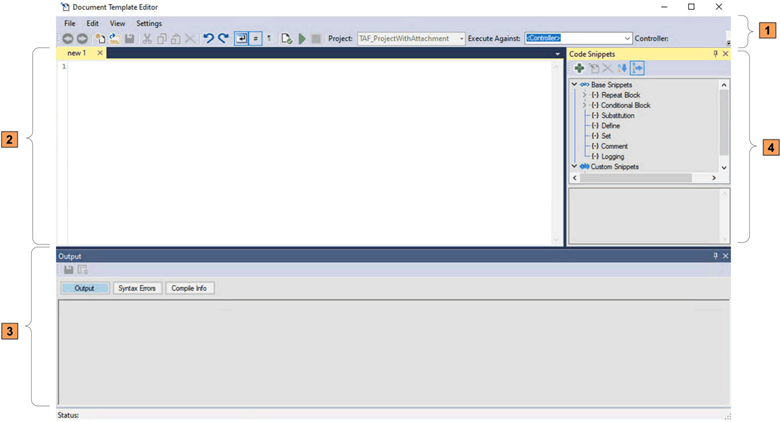
This table describes each section of the Document Template Editor.
Item
Name
Description
Callout 1
Selects editing options and features or application configuration options in this section.
Callout 2
Develops and tests templates in this section.
Callout 3
Displays the
Output
,
Syntax Errors
, and
Compile Info
panes.
  • Output
    Displays output results from the template after the generation process. You can save the output to a file.
  • Syntax Errors
    Displays any current syntax error descriptions that appear in the editor pane.
  • Compile Info
    Provides compilation information about the previously executed template generation process.
Callout 4
Code Snippets
Displays usable code snippets, including
Base Snippets
and
Custom Snippets
.
  • Base Snippets
    Includes snippets, which are the predefined template instructions that make up the template generation language.
  • Custom Snippets
    Includes snippets, which are reusable code fragments consist of pre-configured base snippets.
Drag snippets to the editor pane for implementation in a template.
The editor, Output, and Code Snippets panes can be undocked and moved around on the desktop to suit your requirements.
Provide Feedback
Have questions or feedback about this documentation? Please submit your feedback here.
Normal