
FactoryTalk Policy Manager interface
Use
FactoryTalk Policy Manager
to configure the policy model.Interface
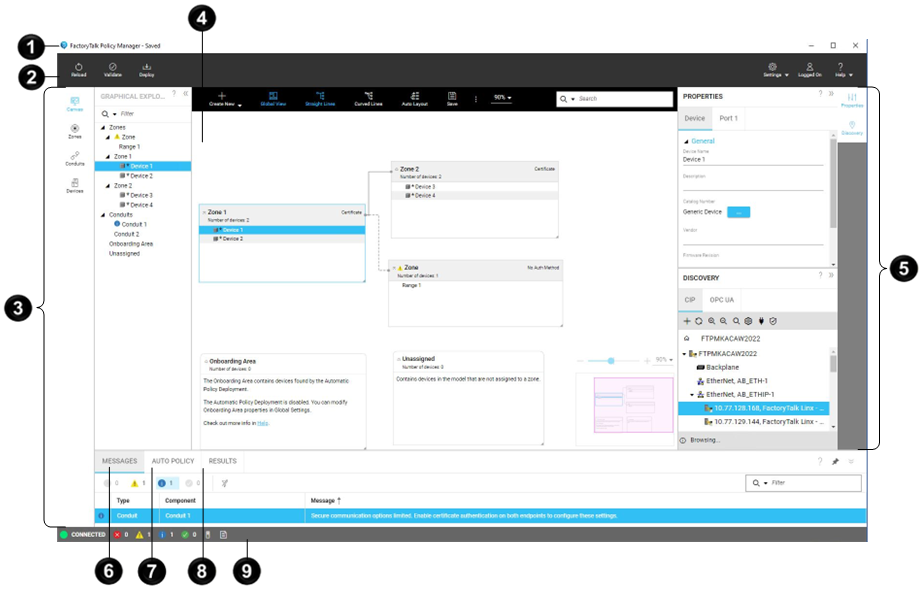
Item | Name | Description |
|---|---|---|
 | Title bar | Displays the status of the policy model. Saved models are local to the FactoryTalk Policy Manager database.Once you deploy a policy model, the Title bar does not display the status. If you change the deployed model, the Saved status displays again until you deploy the changes. |
 | Main menu bar | Allows you to:
Available actions depend on the item selected in the
Navigation bar. |
 | Navigation bar | Move between different views of the policy model |
 | Canvas , Zones ,
Conduits , or Devices view | Displays policy model components in different views. Contains a toolbar with actions available for a selected policy model component. |
 | Configuration bar | Open the Properties pane to configure the selected policy model component.Open the Discovery pane to find devices in networks, add drivers, and bridge networks. |
 | Messages pane | Displays filterable errors, warnings, info, and success messages. |
 | Auto policy pane | Displays filterable results of the last Automatic Policy Deployment. Select 
Save Select 
Delete Auto
policy .Select  to filter the results based on the message type. to filter the results based on the message type.Select a column header to sort the results. |
 | Results pane | Displays the results of the last policy model deployment. Select
Save |
 | Status bar | Displays the connection status to FactoryTalk System Services , running
processes, and results.Select 
Notifications pane to display messages.Select 
Automatic Policy Deployment result pane to display
Auto policy .Select 
Results pane to display deployment and model validation
results. |
Provide Feedback