Loading
Innovation Center LOGO
Recent ActivityRecent Activity

Remote access via Studio5000 using FactoryTalk Remote Access with Stratix 4300

FactoryTalk® Remote Access™ solution with Studio5000 and Stratix 4300 provides secure Internet connectivity for remote assistance and remote access to industrial automation machines and systems. - [Implementation Time: 120 Minutes]
Innovation Center Home Page
document management concept with icons on virtual screen, ERPBusinessman working on the computer for document management concept, online documentation, Generative AI
Innovation Center LOGO
  • Overview
  • Implementation Guide
  • Download
  • Contact us
  • Subscribe
Innovation Center Home Page
 

What does this application do?

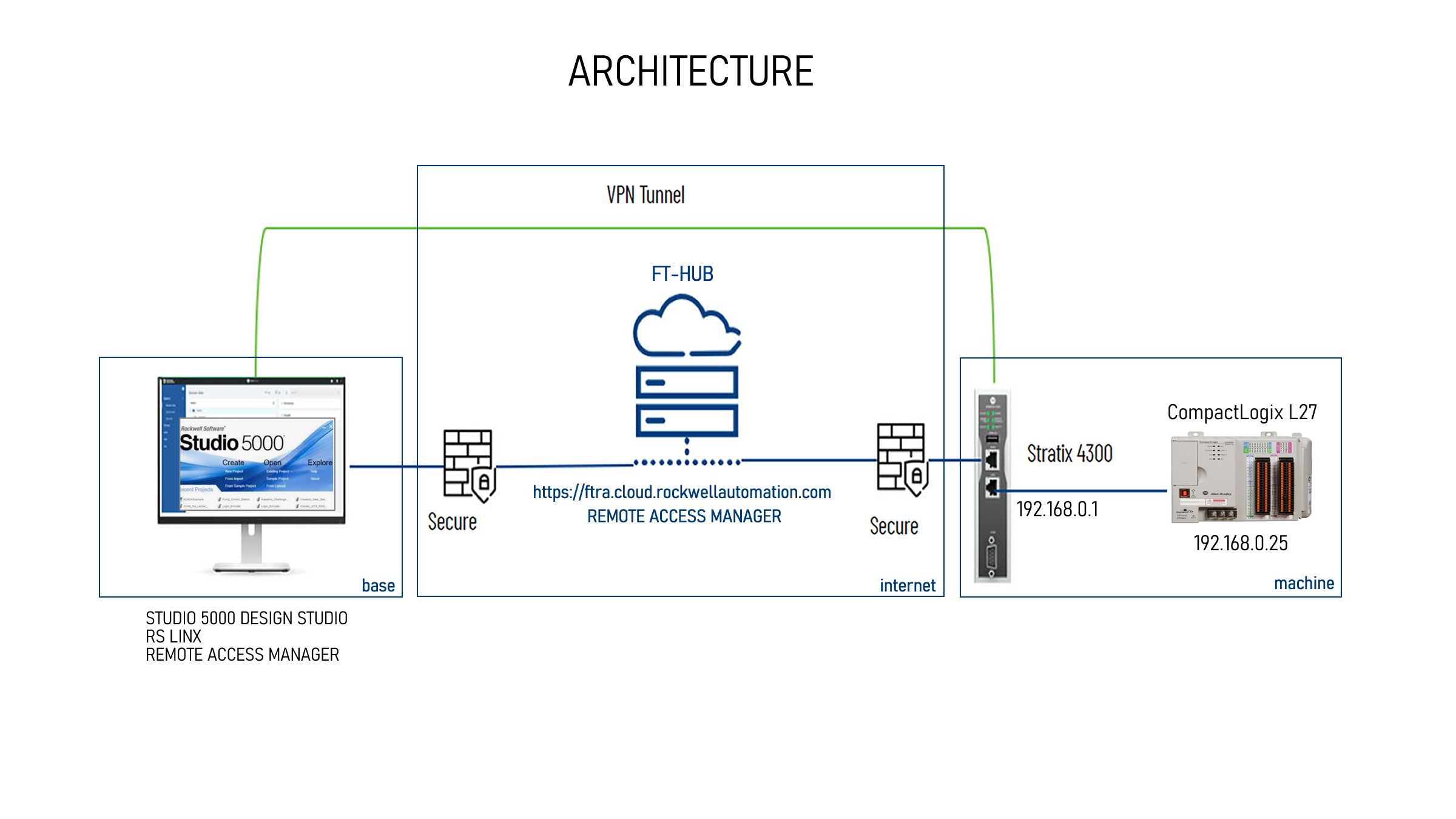
Imagine the possibility, ease, cost savings of connecting your application to Studio 5000 Design Studio being at your base, directly with the controllers and network/subnets present in your client remotely, through a secure VPN. That's exactly what this solution allows.

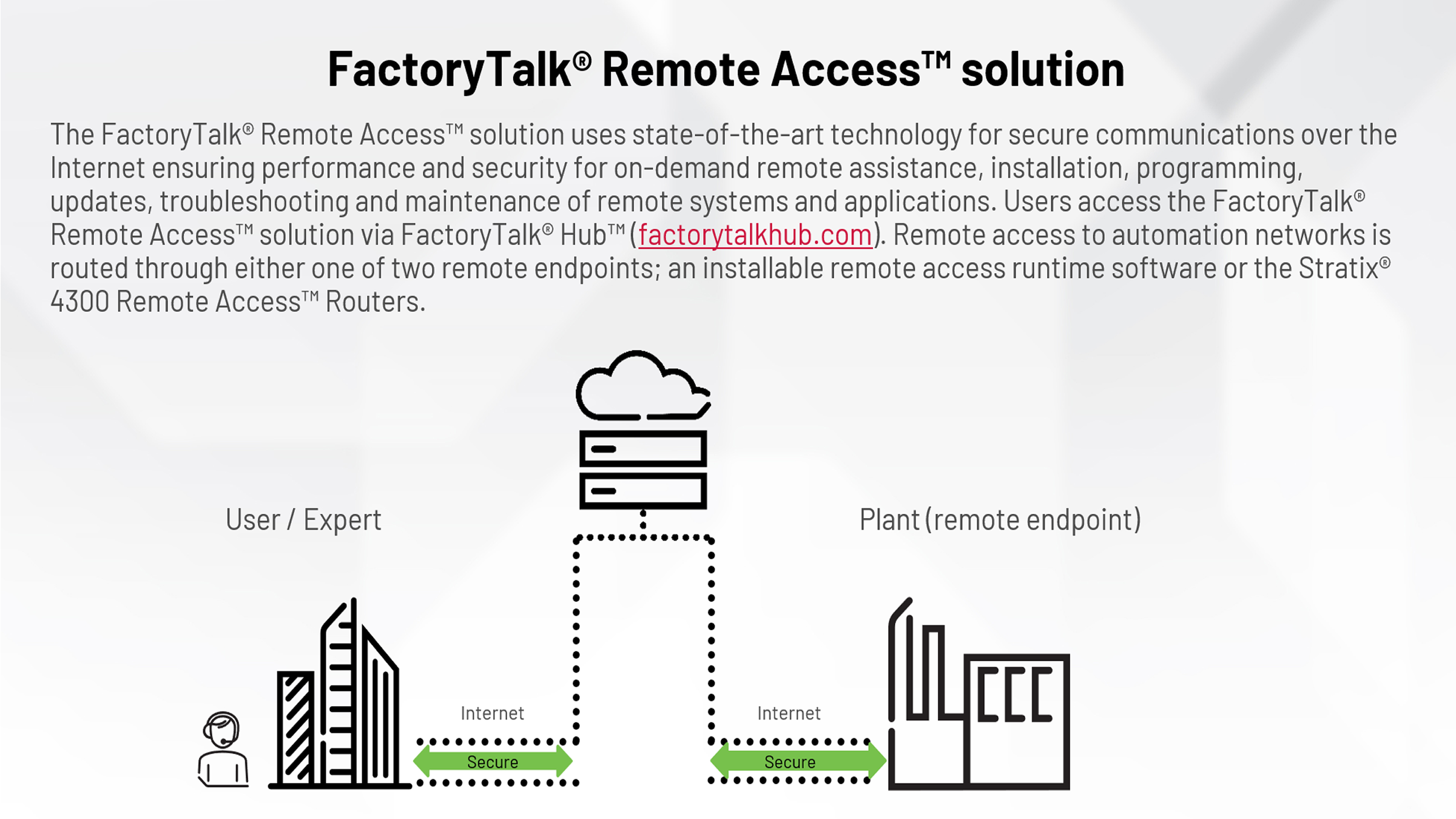
The FactoryTalk® Remote Access™ solution with Stratix 4300 provides secure communications over the Internet to enable performance and security for on-demand remote assistance, installation, programming, troubleshooting, and maintenance of any automation system and application remotely that can be used by end users, machine builders.


Note:

For a good understanding of this application note, we strongly recommend reading our application note: Remote Access using  FactoryTalk® Remote Access™ Runtime, it presents basic concepts for understanding this application note. https://www.rockwellautomation.com/pt-br/support/product/product-downloads/innovation-center/acesso-remoto-utilizando-factory-talk-remote-access-runtime.html


FTRemoteAccess - Stratix4300_General_Images1.png
AHIC Download ICON VF.png

Downloads

Please note: You will need to agree to the Terms & Conditions for each download.

Downloadable file ›
Legal Disclaimer Acceptance. ROCKWELL AUTOMATION WILL PROVIDE ACCESS TO ROCKWELL PRODUCTS (BEST PRACTICES, APPLICATIONS AND KNOWLEDGE) ON THE CONDITION THAT YOU ACCEPT AND COMPLY WITH THE FOLLOWING TERMS AND CONDITIONS. YOU ACCEPT AND AGREE TO BE BOUND BY THE TERMS OF THIS AGREEMENT BY DOWNLOADING, INSTALLING, COPYING, OR OTHERWISE USING PRODUCTS. IF YOU ARE ACCEPTING THESE TERMS ON BEHALF OF ANOTHER PERSON, COMPANY, OR OTHER LEGAL ENTITY, YOU REPRESENT AND WARRANT THAT YOU HAVE FULL AUTHORITY TO BIND THAT PERSON, COMPANY, OR LEGAL ENTITY TO THESE TERMS. IF YOU DO NOT AGREE TO THESE TERMS, DO NOT DOWNLOAD, INSTALL, COPY, ACCESS, OR USE THE PRODUCTS, SOFTWARE AND/OR CLOUD SERVICES. 1. Rockwell Automation retains full ownership and title to all Products and related documentation. No rights or licenses are granted other than those set forth in this Agreement. Company grants to Rockwell Automation a non-exclusive, worldwide, royalty-free, perpetual, non-revocable license to use any feedback Company provides regarding the Products, even if Company has designated the feedback as confidential. Rockwell Automation will be entitled to use the feedback without restriction or compensation to Company. 2. Company may not lease sub-lease, assign, license, sub-license or otherwise transfer any of the Products without the prior written consent of Rockwell Automation. Company may not assign or otherwise transfer access rights to the Products without the prior written consent of Rockwell Automation. Any reverse assembly, reverse engineering, decompilation, and creation of derivative works based on the Products by Company is prohibited. 3. Company acknowledges that Products provided under this Agreement are Rockwell Automation’s Confidential Information and are covered by effective or pending copyrights, patents, trademarks and/or trade secrets of Rockwell Automation, and Company agrees to maintain confidentiality by not disclosing Products or documentation to any third party without the prior written consent of Rockwell Automation and to protect the confidentiality of the Products as it would Company’s own confidential information. Company agrees that its obligation of confidentiality under this paragraph shall survive expiration or termination of this Agreement. 4. Company agrees that Products provided under this Agreement are prototypes and examples and its application and results may vary depending on each customer and project conditions. Rockwell Automation do not warranty the same results. This Agreement shall in no way be construed as a commitment by Rockwell Automation at any time to manufacture and/or offer Products for sale. There is no explicit or implicit service level agreement associated with using the Products. Rockwell Automation does not warrant that the functions contained in the Products will meet Company’s requirements. Company agrees to use all Products only in accordance with the instructions and only for the intended usages identified in the documentation. 5. EXCLUSION OF WARRANTIES AND LIMITATION OF LIABILITY. THE PRODUCTS ARE PROVIDED "AS IS". ROCKWELL AUTOMATION DISCLAIMS ANY AND ALL WARRANTIES, EXPRESS, IMPLIED OR STATUTORY, INCLUDING WITHOUT LIMITATION ANY WARRANTIES OF MERCHANTABILITY OR FITNESS FOR A PARTICULAR PURPOSE. ROCKWELL AUTOMATION EXPLICITLY DISCLAIMS ALL WARRANTIES OF NON- INFRINGEMENT AND EXPRESSLY DOES NOT WARRANT THAT THE PRODUCTS, IN WHOLE OR IN PART, WILL BE ERROR FREE OR FREE FROM SECURITY VULNERABILITIES. IN NO EVENT SHALL ROCKWELL AUTOMATION BE LIABLE FOR (i) LOST PROFITS, LOST SAVINGS, DOWNTIME, SPECIAL, INDIRECT OR CONSEQUENTIAL DAMAGES OF ANY KIND, OR (ii) ANY PERSONAL INJURY, PROPERTY DAMAGE OR ENVIRONMENTAL DAMAGE ARISING OUT OF OR IN CONNECTION WITH THIS AGREEMENT, WHETHER IN AN ACTION IN CONTRACT, STRICT LIABILITY OR IN TORT INCLUDING NEGLIGENCE. 6. COMPANY AGREES TO INDEMNIFY AND HOLD ROCKWELL AUTOMATION HARMLESS FROM ALL COSTS, AWARDS, DAMAGES, EXPENSES AND FEES (INCLUDING ATTORNEYS FEES) RESULTING FROM OR RELATED TO ANY THIRD-PARTY CLAIMS (INCLUDING EMPLOYEES AND AGENTS OF COMPANY) AGAINST ROCKWELL AUTOMATION, ITS DISTRIBUTORS, AGENTS, OFFICERS, DIRECTORS OR EMPLOYEES FOR PERSONAL INJURY (INCLUDING DEATH), PROPERTY DAMAGE OR ENVIRONMENTAL DAMAGE RELATED TO OR RESULTING FROM THE USE OF THE PRODUCTS. 7. In the event a Product is exported, Company agrees to comply with all applicable United States Export Control Law and Regulations, and the applicable export control laws of other countries. This Agreement shall be governed by the laws of the state of Wisconsin. This Agreement is the complete and exclusive Agreement between Rockwell Automation and the Company, and supersedes all prior agreements, whether written or oral, relating to the Products.
AHIC NEED HELP ICON VF.png


Need Help?

If you need help with an application or have feedback from the Innovation Center, please contact us.


GENERAL CHARACTERISTICS

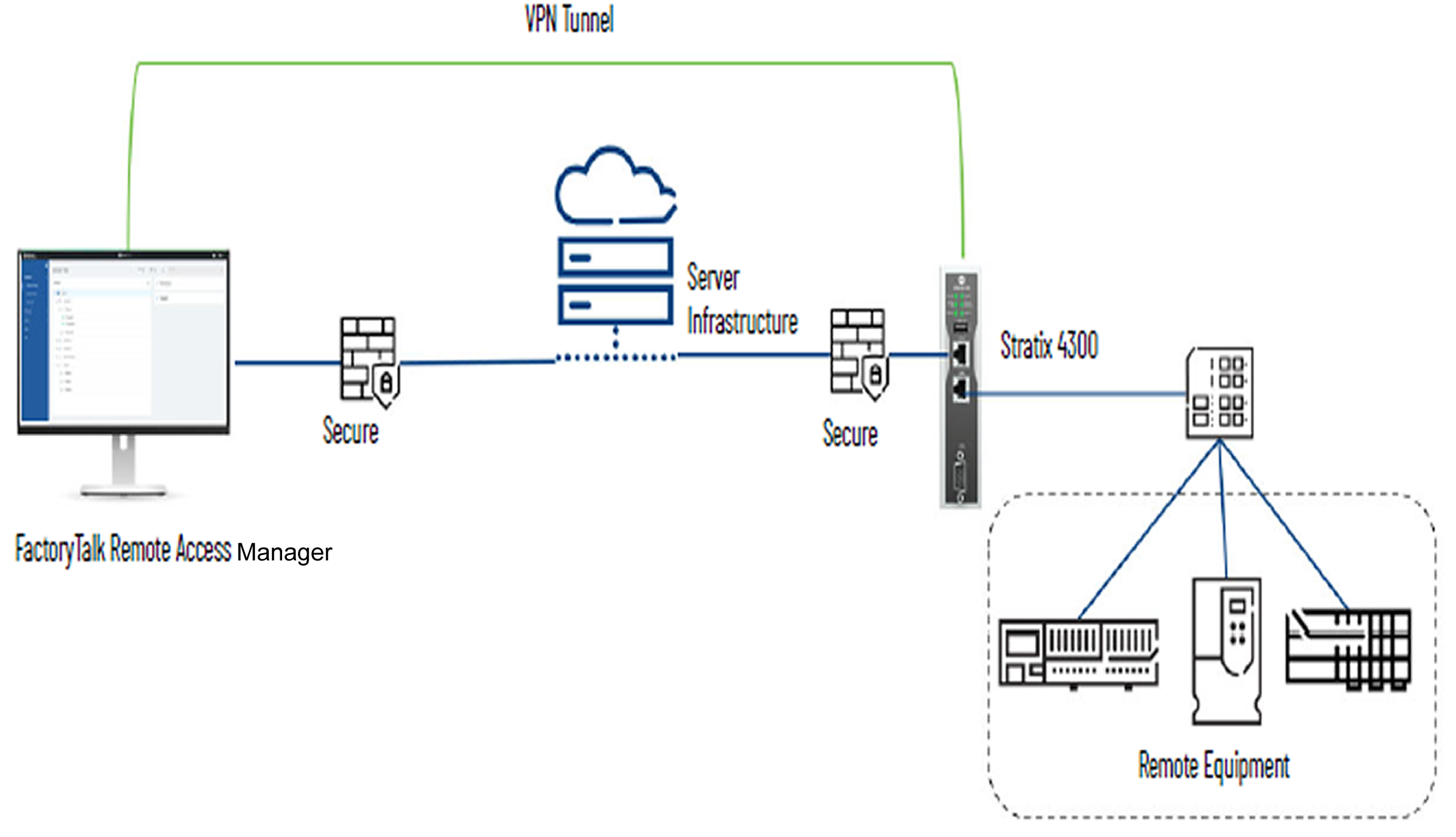
FT-Remote Access is a service in FactoryTalk HUB. FT-Remote Access has 2 (two) main working components:

  • FT Remote Access Manager: A web-based client used to maintain and initiate remote connections:
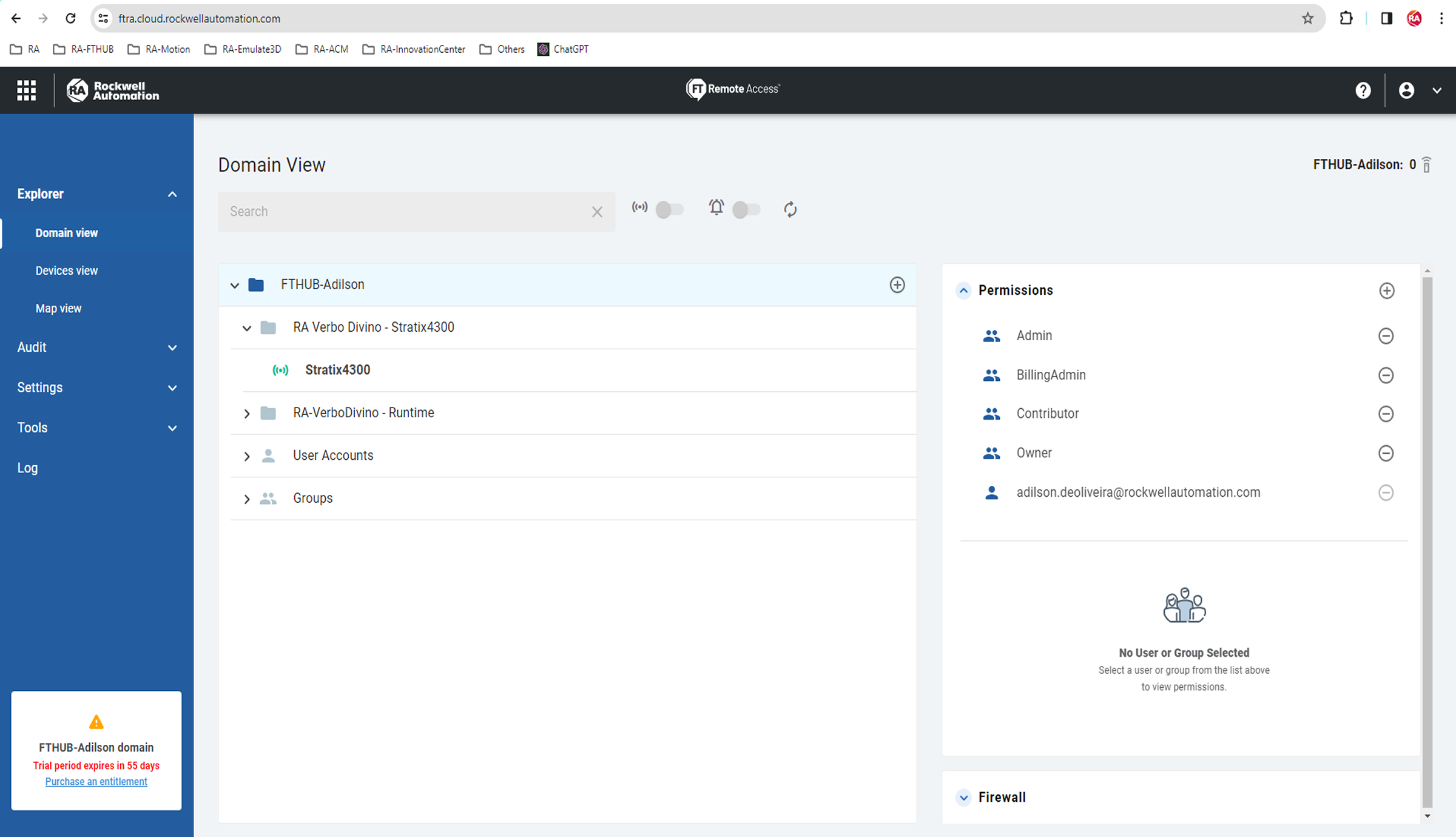
    • Enables account, user and permissions management, and device enrollment
    • Enables VPN for remote connectivity
  • FT Access EndPoint: the final element for connection, can be:
    • FactoryTalk Runtime
    • Stratix® 4300 Remote Access™ Router
    • OptixPanel™ Graphic Terminal
    • Built-in edge computing™ module

This document aims to introduce how to configure remote access between FT Remote Access Manager (FT-HUB-cloud) with controllers and network using FactoryTalk® Remote Access™ and Stratix 4300.

This solution using the Stratix 4300 is applied when there is a need for remote access directly to controllers (ControlLogix, CompactLogix, MicroLogix, Micro800), network and peripherals without the presence of a PC or IPC.
 

FTRemoteAccess - Stratix4300_General_Images2.png
 

ADVANTAGES

FactoryTalk® Remote Access™ Manager integrated with the FactoryTalk® Hub™ suite of cloud products for simplified role management and easy access to other applications

  1. Uses familiar MyRockwell account credentials
  2. Web-based client for centralized remote access solution management:
    1. Enroll devices in your organization
    2. Start VPN Connection
    3. Create role-based groups and users to manage access
    4. Configure the Stratix® 4300 Router and Apply Permission Control
    5. View domain and remote connection audits and activity logs
  3. FactoryTalk® Remote Access™ Manager is available as a subscription


Simultaneous Connections

Concurrent connections are the number of users who will need to connect to any remote access endpoint at the same time.

  1. Connections are assigned to an organization and can't be split across multiple organizations
  2. Simultaneous connections are not additive


Other Advantages and Key Capabilities

  1. Remotely access equipment via a VPN connection, transfer files, and view operator views.
  2. Two-factor authentication can be applied to validate the user's identity, and the Transport Layer Security (TLS) encryption protocol ensures confidentiality, integrity, and authenticity.
  3. Logs and audit trails are made available to track remote operations and established connections.


LIMITATIONS/DISADVANTAGES

No analytics tools and management dashboards.


Is this application relevant to me?

  • Applications
    • Remote service applications to support installation, troubleshooting, and maintenance.
  • Industries
    • Across all industries served by Rockwell Automation.
  • People
    • 1. Executive - Operations
    • 2. Manager - Engineering
    • 3. Manager - IT
    • 4. Manager - Operations
    • 5. Manager – Maintenance
  • Target audience
    • While the product will be valuable to end-users and SIs, the primary/primary use will be OEMs.
  • Customer Challenges & Outcomes
    1.  Reduces or eliminates travel time and costs of maintaining and providing on-demand remote support services.
    2. The web-based client simplifies remote access, configuration, and management.
    3. Enable users to quickly connect with machines through a web-based client.
    4. Join a session with a remote operator to collaborate on real-time actions.
    5. Connect your domain experts to critical issues quickly – no matter where they're physically located.


How can I make it work?

Requirements: products, tools, prior knowledge.

Hardware: 

  • Stratix 4300

Software:

  • FactoryTalk Hub, Cloud-based – No installation required
  • FactoryTalk® Remote Access™ Manager, Cloud-based – No installation required
  • FactoryTalk Tools Remote Access Tools – Version 13.5.174


Prior Knowledge

  • Knowledge of Windows or Linux operating system


AHIC STEP ICON.png

Implementation Guide

 
  1. Step 1
  2. Step 2
  3. Step 3
Open All Close All
Step 1


1 - See the document: Remote Access using FactoryTalk® Remote Access™ Runtime, it presents basic concepts for understanding this application note.

https://www.rockwellautomation.com/pt-br/support/product/product-downloads/innovation-center/acesso-remoto-utilizando-factory-talk-remote-access-runtime.html

For base configuration it is necessary to:

  • Login Rockwell
  • Subscription Package – simultaneous connection
  • Create an organization or join an already created organization and pertinent settings
  • Access the Remote Access Manager to access the Stratix 4300 and connect to the VPN


Note: This information is in the document linked above.


2 - Perform the configuration of the Stratix 4300. To do this, download the manual 1783-um014_-en-p.pdf in General_Files, it contains all the details to set it up, best practices and pertinent information.

Important: Also pay attention to the security details for typical remote access architectures, present in chapter 1, page 14 of the manual.

Step 2


1 - Install the FactoryTalkRemoteAccessToolsSetup.13.5.174 software

  • Access FactoryTalk Hub – cloud-based
    • Use your AR account for login
    • https://home.cloud.rockwellautomation.com
    • Open the FactoryTalk Remote Access Manager


2 - Associate the Stratix 4300 Router with the Domain

  • You need to connect locally and add it locally by plugging your computer directly into the LAN port. The default IP is 192.168.0.1. Username and Password are "admin". See page 24 of manual 1783-um014_-en-p.pdf.

FTRemoteAccess - Stratix4300_Step2_Image1.png
Step 3


Video showing how to configure remote access on a CompactLogix L27 controller, using Studio 5000 according to the architecture presented.

FTRemoteAccess - Stratix4300_Step3_Image1.png


Remote access via Studio5000 using FactoryTalk Remote Access with Stratix 4300

Version 2.0 - September 2026


AHIC White Logo

Receive new applications and Innovation Center updates directly in your inbox.

Subscribe!
 
  1. Chevron LeftChevron Left Rockwell Automation Home
  2. Chevron LeftChevron Left Sup...
  3. Chevron LeftChevron Left Pro...
  4. Chevron LeftChevron Left Downloads
  5. Chevron LeftChevron Left Innovation Center
  6. Chevron LeftChevron Left Remote access via Studio5000 using FactoryTalk Remote Access with Stratix 4300
Please update your cookie preferences to continue.
This feature requires cookies to enhance your experience. Please update your preferences to allow for these cookies:
  • Social Media Cookies
  • Functional Cookies
  • Performance Cookies
  • Marketing Cookies
  • All Cookies
You can update your preferences at any time. For more information please see our {0} Privacy Policy
CloseClose