Loading
Innovation Center LOGO
Recent ActivityRecent Activity

RMCT: Centro de Monitoreo Remoto con ThinManager

Supervise aplicaciones de OT de forma remota desde una ubicación centralizada con ThinManager. - [Tiempo de implementación: 240 minutos]
Innovation Center Home Page
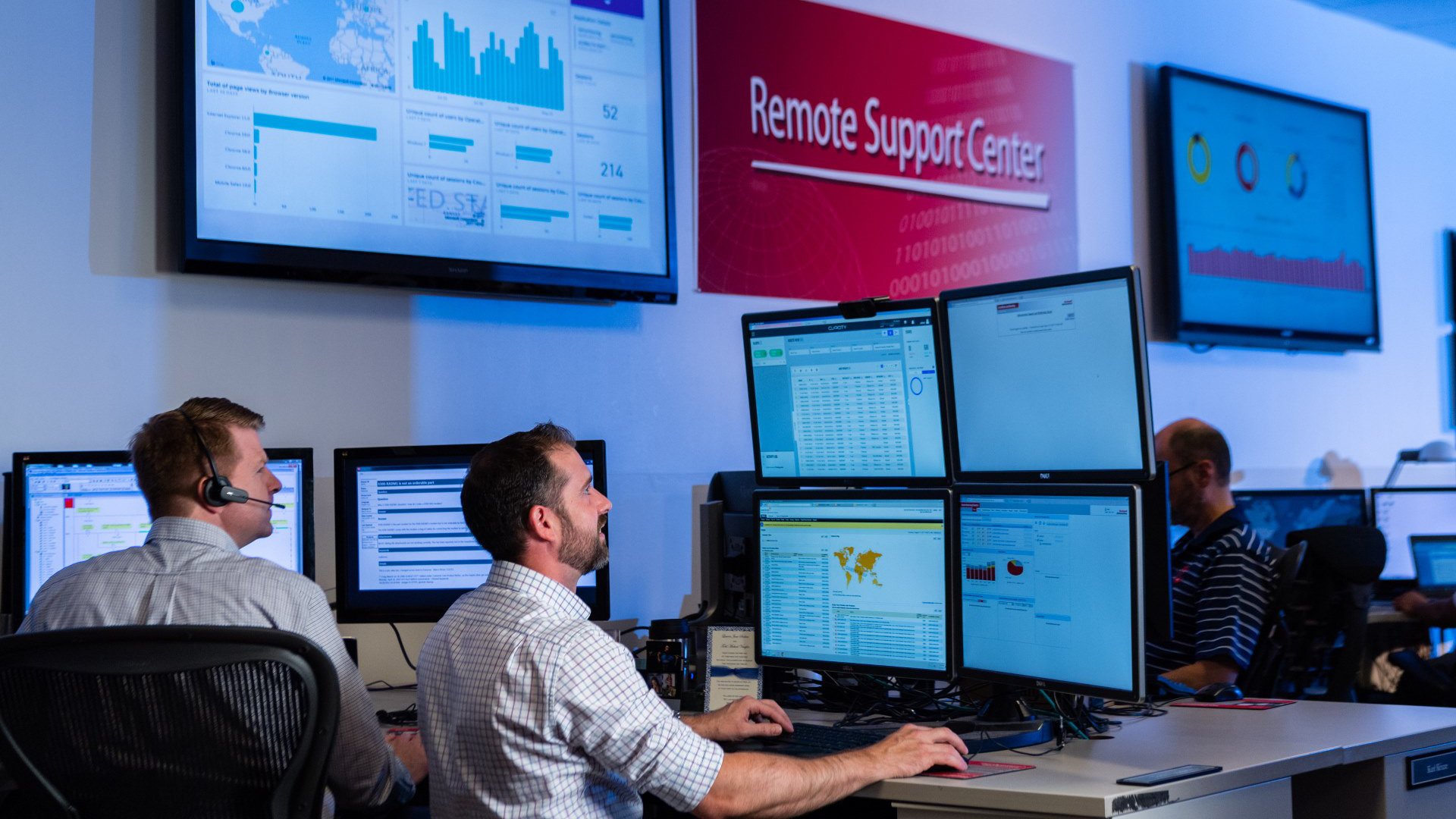
Employees in the RA Remote Support Center, wearing headphones and looking at monitors
Innovation Center LOGO
  • Visión General
  • Guía de Implementación
  • Descarga
  • Contáctanos
  • Suscríbase
Innovation Center Home Page


¿Qué hace esta aplicación?

La aplicación del centro de monitoreo remoto con ThinManager permite supervisar aplicaciones de OT de forma remota desde un centro de supervisión centralizada en un entorno seguro, gestionado dispositivos y desplegando contenidos (aplicaciones, contenidos Web, cámaras IP, VNC Server, HMI, etc.) por dispositivos, usuarios / roles, ubicaciones y eventos. 


¿Esta aplicación es relevante para mí?

Esta versión es una base para acelerar el desarrollo del monitoreo remoto permitiendo mejorar la productividad, la seguridad y visualización de la información desde cualquier lugar de la planta. Tiene la posibilidad de desplegar los contenidos de diferentes fabricantes en terminales como Desktops, Laptops, Tablet, dispositivos móviles y clientes ligeros.

Esta primera versión está enfocada en desplegar contenidos de OT que se podrán visualizar en IT, siguiendo buenas prácticas de seguridad de la información.

Casos de éxitos:

  • Operación y monitoreo remoto planta de cemento (Supervisión y operación de planta cementera a 200 kilómetros de distancia por eventos de derrumbe en la vía hacia la planta).
  • Soporte remoto de planta cementera, disminuyendo costo de traslado y maquina detenida.

La funcionalidad incluye:

  • Monitoreo de variables críticas de forma local o remota, desplegando herramientas de software existente y futuras, utilizando terminales ThinManager (WinTMC, aTMC o iTMC) para tomar decisiones en tiempo real y mejorar la productividad.
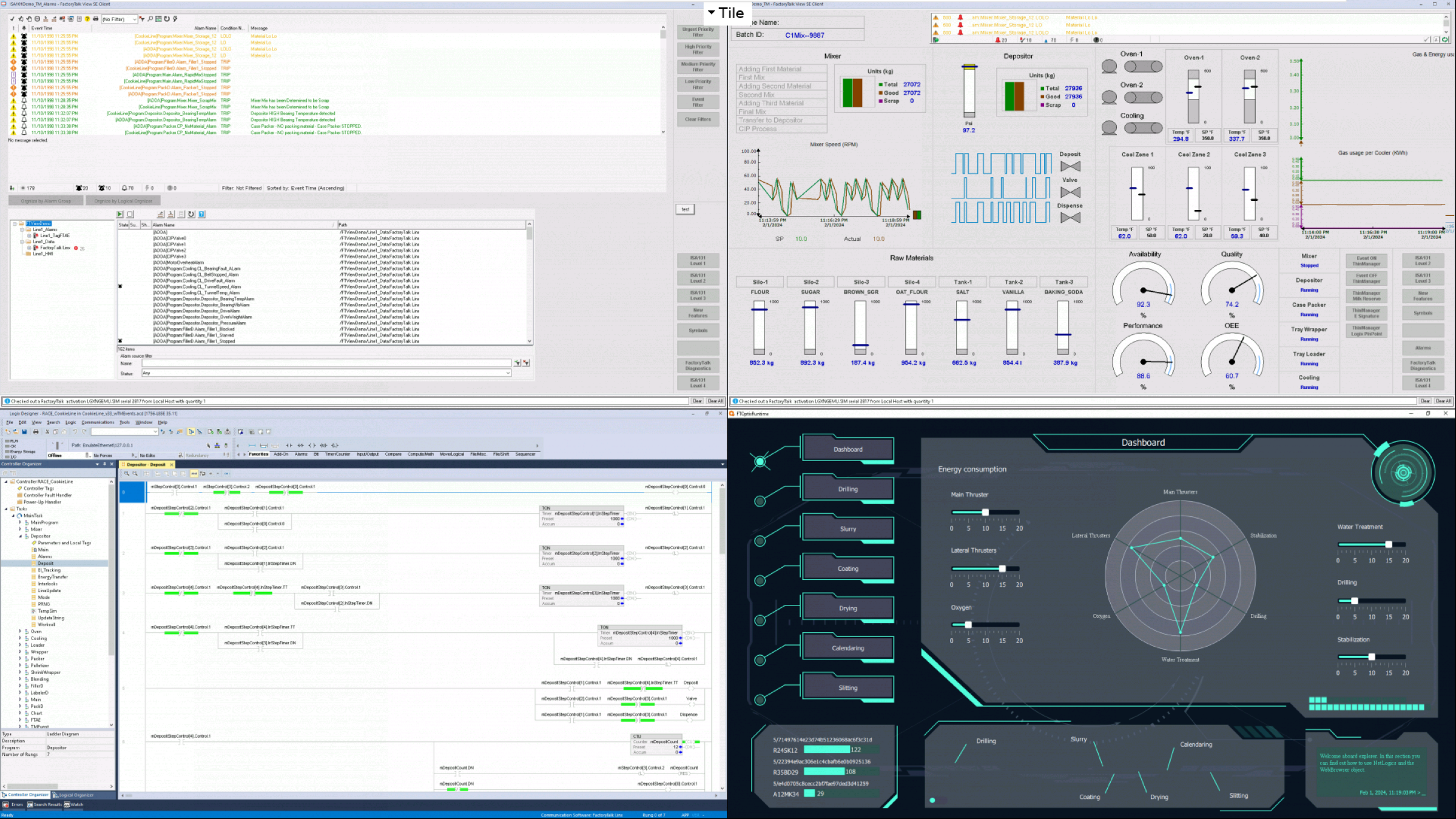
  • Posibilidad de desplegar 4 contenidos (aplicaciones) al mismo tiempo en un cliente Ligero (ASEM 6300) o un terminal ASEM 6300 por medio WinTMC.
  • Brindar soporte desde cualquier lugar de la planta.
  • Mitigación de los riesgos presentes en un ambiente industrial conectado.
  • Desplegar contenidos de OT a IT de forma segura.
  • Opción de desplegar contenidos preconfigurados como Factorytalk View SE, FactoryTalk Optix y Studio 5000.


AHIC Download ICON VF.png

Descarga

Tenga en cuenta: deberá aceptar los Términos y Condiciones para cada descarga.

Archivo descargable ›
Legal Disclaimer Acceptance. ROCKWELL AUTOMATION WILL PROVIDE ACCESS TO ROCKWELL PRODUCTS (BEST PRACTICES, APPLICATIONS AND KNOWLEDGE) ON THE CONDITION THAT YOU ACCEPT AND COMPLY WITH THE FOLLOWING TERMS AND CONDITIONS. YOU ACCEPT AND AGREE TO BE BOUND BY THE TERMS OF THIS AGREEMENT BY DOWNLOADING, INSTALLING, COPYING, OR OTHERWISE USING PRODUCTS. IF YOU ARE ACCEPTING THESE TERMS ON BEHALF OF ANOTHER PERSON, COMPANY, OR OTHER LEGAL ENTITY, YOU REPRESENT AND WARRANT THAT YOU HAVE FULL AUTHORITY TO BIND THAT PERSON, COMPANY, OR LEGAL ENTITY TO THESE TERMS. IF YOU DO NOT AGREE TO THESE TERMS, DO NOT DOWNLOAD, INSTALL, COPY, ACCESS, OR USE THE PRODUCTS, SOFTWARE AND/OR CLOUD SERVICES. 1. Rockwell Automation retains full ownership and title to all Products and related documentation. No rights or licenses are granted other than those set forth in this Agreement. Company grants to Rockwell Automation a non-exclusive, worldwide, royalty-free, perpetual, non-revocable license to use any feedback Company provides regarding the Products, even if Company has designated the feedback as confidential. Rockwell Automation will be entitled to use the feedback without restriction or compensation to Company. 2. Company may not lease sub-lease, assign, license, sub-license or otherwise transfer any of the Products without the prior written consent of Rockwell Automation. Company may not assign or otherwise transfer access rights to the Products without the prior written consent of Rockwell Automation. Any reverse assembly, reverse engineering, decompilation, and creation of derivative works based on the Products by Company is prohibited. 3. Company acknowledges that Products provided under this Agreement are Rockwell Automation’s Confidential Information and are covered by effective or pending copyrights, patents, trademarks and/or trade secrets of Rockwell Automation, and Company agrees to maintain confidentiality by not disclosing Products or documentation to any third party without the prior written consent of Rockwell Automation and to protect the confidentiality of the Products as it would Company’s own confidential information. Company agrees that its obligation of confidentiality under this paragraph shall survive expiration or termination of this Agreement. 4. Company agrees that Products provided under this Agreement are prototypes and examples and its application and results may vary depending on each customer and project conditions. Rockwell Automation do not warranty the same results. This Agreement shall in no way be construed as a commitment by Rockwell Automation at any time to manufacture and/or offer Products for sale. There is no explicit or implicit service level agreement associated with using the Products. Rockwell Automation does not warrant that the functions contained in the Products will meet Company’s requirements. Company agrees to use all Products only in accordance with the instructions and only for the intended usages identified in the documentation. 5. EXCLUSION OF WARRANTIES AND LIMITATION OF LIABILITY. THE PRODUCTS ARE PROVIDED "AS IS". ROCKWELL AUTOMATION DISCLAIMS ANY AND ALL WARRANTIES, EXPRESS, IMPLIED OR STATUTORY, INCLUDING WITHOUT LIMITATION ANY WARRANTIES OF MERCHANTABILITY OR FITNESS FOR A PARTICULAR PURPOSE. ROCKWELL AUTOMATION EXPLICITLY DISCLAIMS ALL WARRANTIES OF NON- INFRINGEMENT AND EXPRESSLY DOES NOT WARRANT THAT THE PRODUCTS, IN WHOLE OR IN PART, WILL BE ERROR FREE OR FREE FROM SECURITY VULNERABILITIES. IN NO EVENT SHALL ROCKWELL AUTOMATION BE LIABLE FOR (i) LOST PROFITS, LOST SAVINGS, DOWNTIME, SPECIAL, INDIRECT OR CONSEQUENTIAL DAMAGES OF ANY KIND, OR (ii) ANY PERSONAL INJURY, PROPERTY DAMAGE OR ENVIRONMENTAL DAMAGE ARISING OUT OF OR IN CONNECTION WITH THIS AGREEMENT, WHETHER IN AN ACTION IN CONTRACT, STRICT LIABILITY OR IN TORT INCLUDING NEGLIGENCE. 6. COMPANY AGREES TO INDEMNIFY AND HOLD ROCKWELL AUTOMATION HARMLESS FROM ALL COSTS, AWARDS, DAMAGES, EXPENSES AND FEES (INCLUDING ATTORNEYS FEES) RESULTING FROM OR RELATED TO ANY THIRD-PARTY CLAIMS (INCLUDING EMPLOYEES AND AGENTS OF COMPANY) AGAINST ROCKWELL AUTOMATION, ITS DISTRIBUTORS, AGENTS, OFFICERS, DIRECTORS OR EMPLOYEES FOR PERSONAL INJURY (INCLUDING DEATH), PROPERTY DAMAGE OR ENVIRONMENTAL DAMAGE RELATED TO OR RESULTING FROM THE USE OF THE PRODUCTS. 7. In the event a Product is exported, Company agrees to comply with all applicable United States Export Control Law and Regulations, and the applicable export control laws of other countries. This Agreement shall be governed by the laws of the state of Wisconsin. This Agreement is the complete and exclusive Agreement between Rockwell Automation and the Company, and supersedes all prior agreements, whether written or oral, relating to the Products.
AHIC NEED HELP ICON VF.png

¿Necesita ayuda?

Si necesita ayuda con alguna aplicación o tiene comentarios acerca del Innovation Center, por favor contáctenos.


¿Cómo puedo hacerlo funcionar?

Requisitos: productos, herramientas, conocimientos previos.

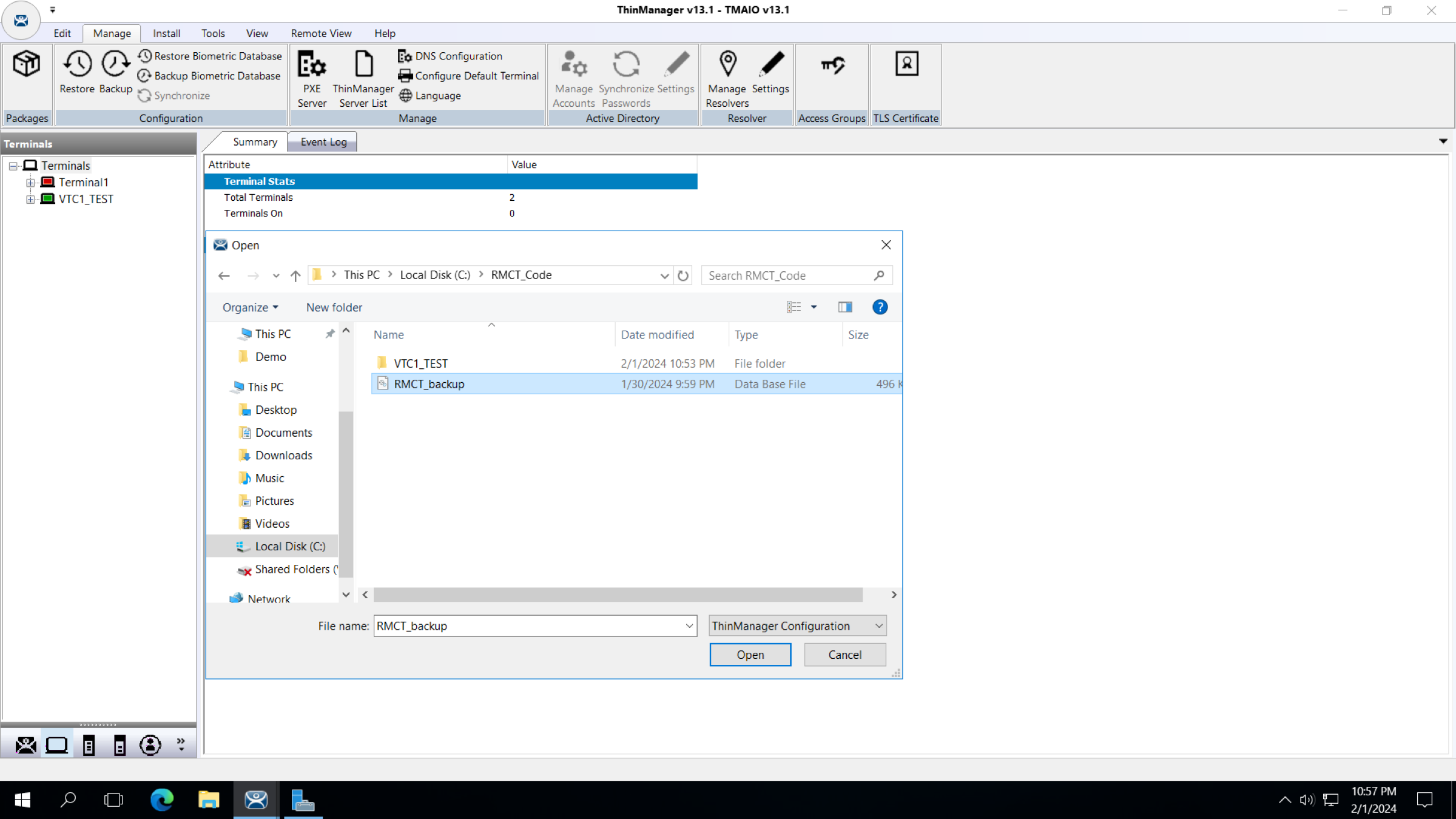
Descargue los archivos “RMCT_backup y VTC1_TEST” y restaure el archivo RMCT_backup en ThinManager Server y configure las aplicaciones que se desea desplegar en los terminales. Para comenzar a utilizar la aplicación VTC1_TEST como un ThinClient Virtual para hacer un test de los contenidos que se desean desplegar.


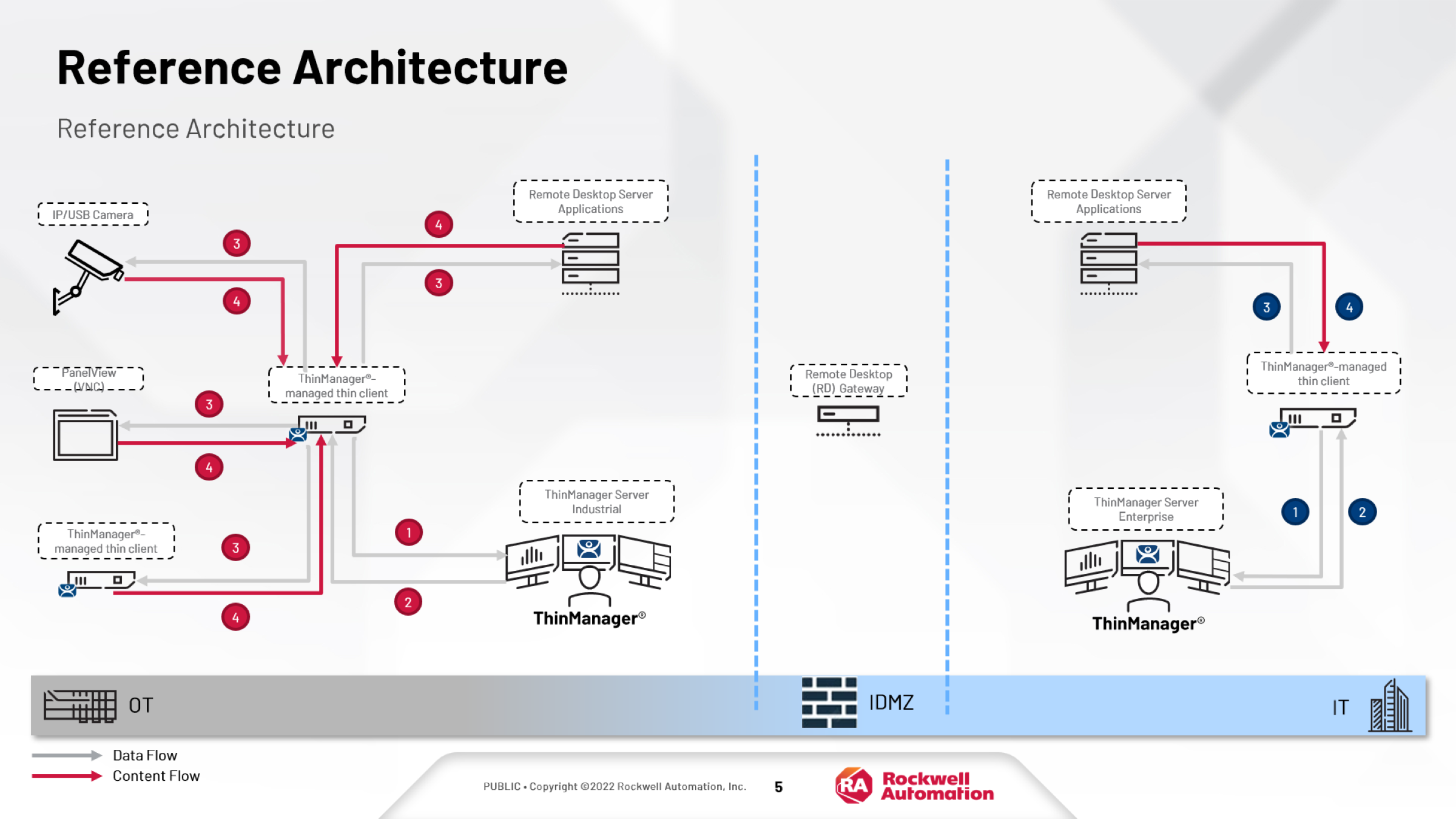
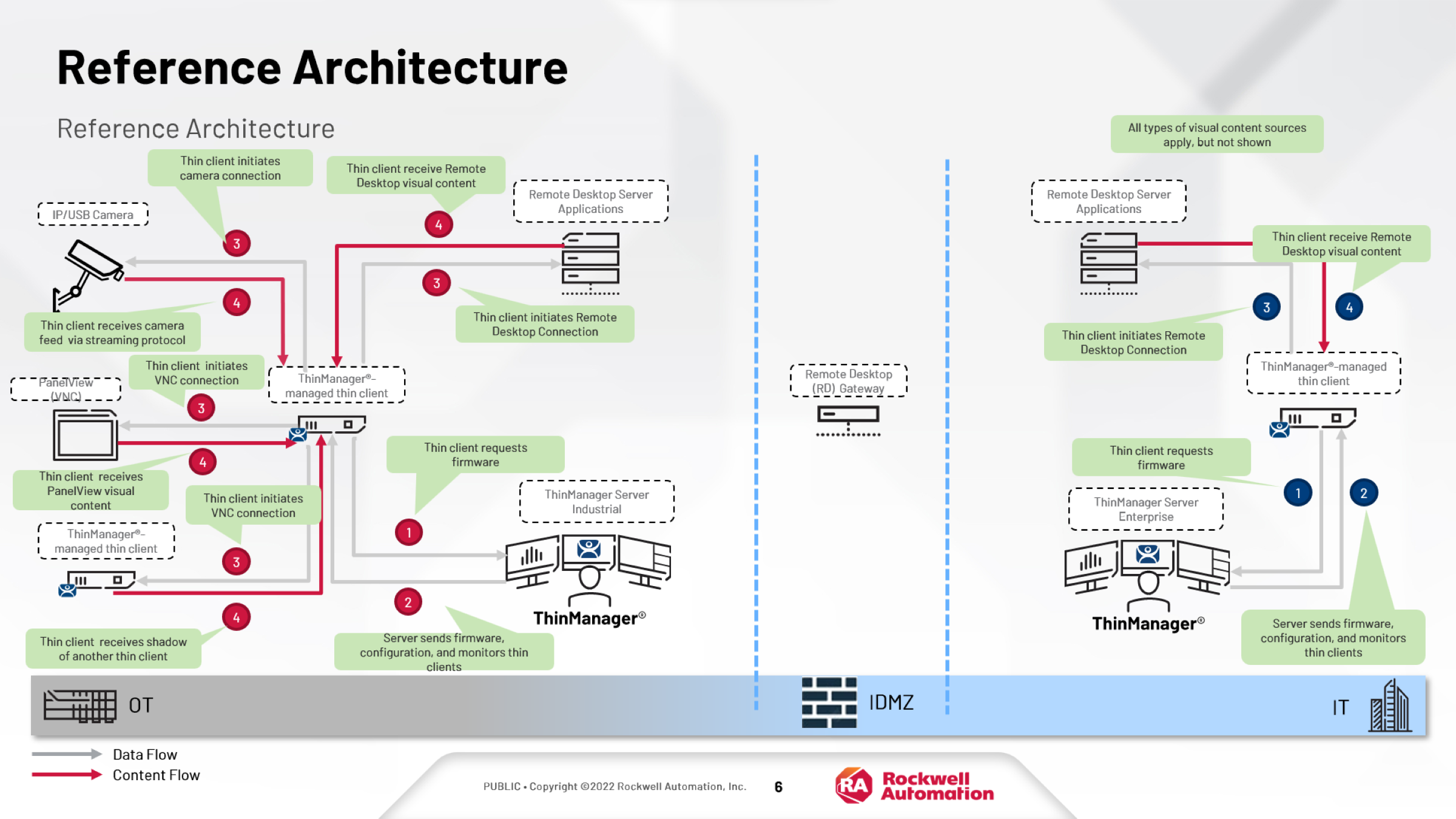
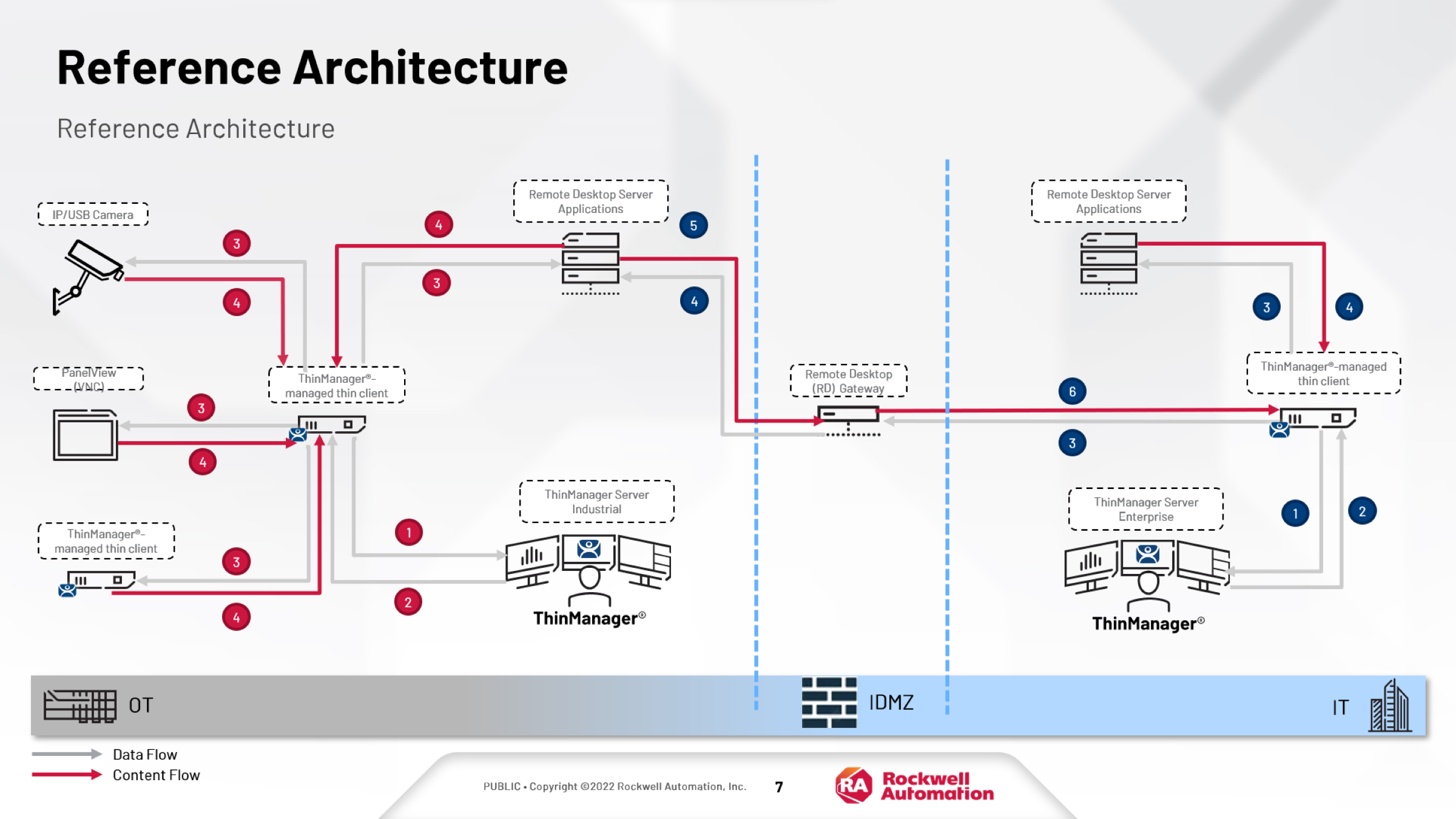
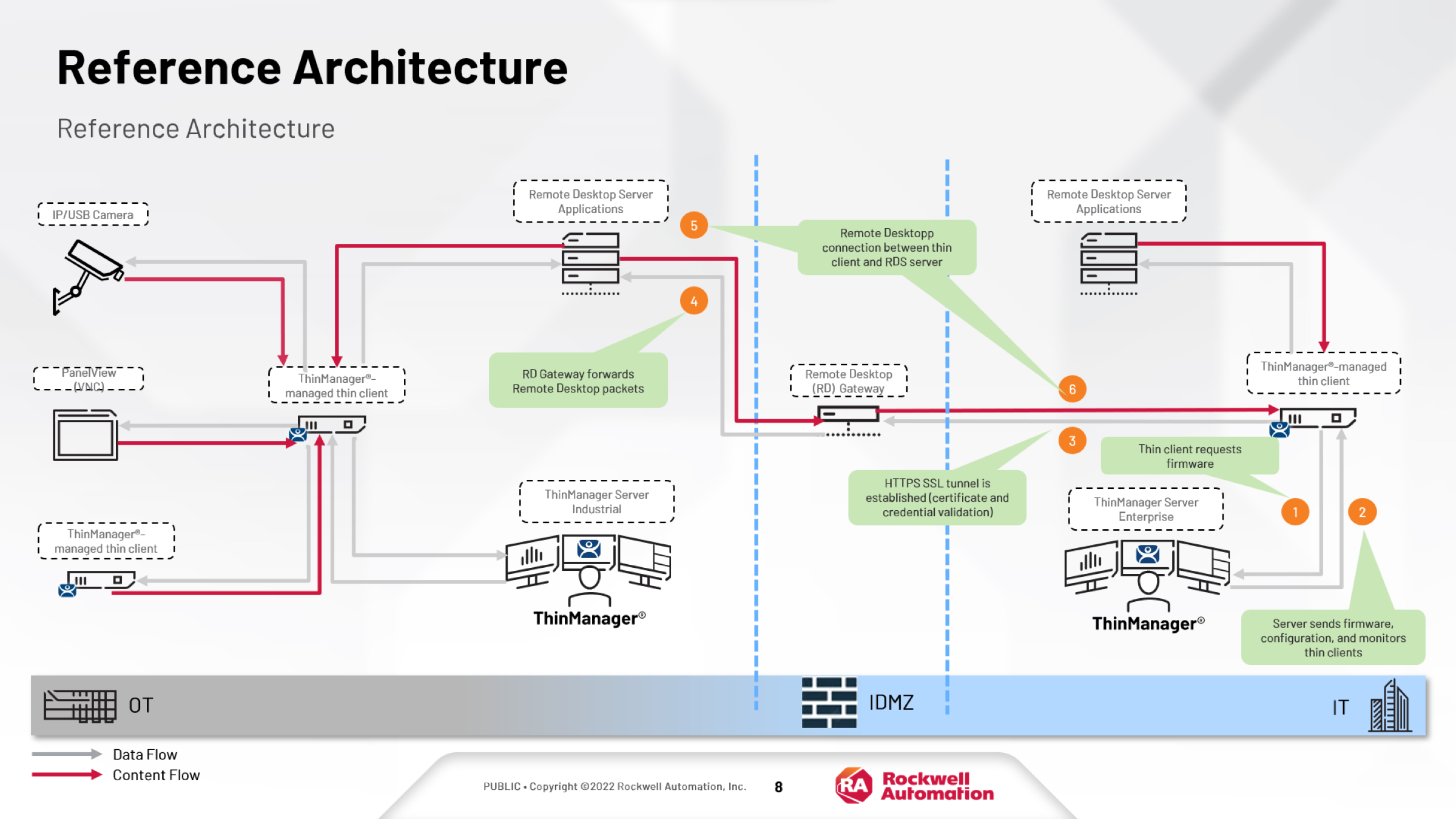
Seguir la arquitectura de referencia para la conectividad segura entre OT y IT y tener presente los puertos a utilizar que dependerá de las funcionalidades que se requiera habilitar.


Los puertos con º son opcionales y no son necesarios para la funcionalidad principal, y los puertos con ͨ son configurables en la solución.

puerto Protocolo Descripción
UDP 67 DHCP Usado por el servidor PXE (si se usa el hardware de inicialización PXE).
UDP 69 TFTP Se usa para ejecutar el TFTP del firmware y de los módulos a los clientes ligeros compatibles con ThinManager.
TCP 443º HTTPS Se usa para establecer túneles HTTPS SSL al gateway RD.
TCP 1494º ICA Usado por el protocolo ICA (si se usa Citrix ICA en vez de RDP).
UDP 1758 ͨ  Multidifusión TFTP
Se usa si ThinManager habilita la multidifusión.
TCP 2031 Propiedad
Se usa para pasar la configuración desde el servidor ThinManager al terminal, y se usa para la sincronización automática entre los servidores ThinManager.
TCP 3268 LDAP Se usa para la autenticación de dominio mediante Lightweight Directory Access Protocol.
TCP 3389 ͨ   RDP Usado por el protocolo RDP. El cliente ligero inicia la conexión al servidor RD.
UDP 3391º

Datagrama

Permite que el transporte cree una conexión al gateway RD (solo se requiere si está habilitado el RDP a través de UDP; de lo contrario, regresa de forma predeterminada a TCP 443).
UDP 4011 DHCP Usado por ThinManager PXE Service cuando se instala un servidor DHCP estándar en el mismo ordenador que ThinManager. Se usa este puerto al inicializar los clientes ligeros de inicialización PXE compatibles con ThinManager mediante el BIOS de la UEFI (Unified Extensible Firmware Interface). (ThinManager 11)
UDP 4900 TFTP Se usa para ejecutar el TFTP del firmware a los clientes ligeros listos ThinManager
TCP 5900 ͨ   Propiedad, VNC
Propriety Shadow Protocol, VNC inicializado por el cliente ligero al servidor VNC.
 

Hardware

  • Servidor principal de Servicios de Escritorio Remoto (RDS)

Software

Requisitos del sistema para la aplicación:

  • Windows Server 2019
  • ThinManager V13.2
  • FactoryTalk View Site Edition V14
  • Studio 5000 V36
  • FactoryTalk Optix V1.3

Conocimiento previos

  • Conocimientos sobre el software ThinManager, redes y configuración de soluciones de Servicios de Escritorio Remoto (RDS).
AHIC STEP ICON.png

Guía de Implementación

 
  1. Paso 1
  2. Paso 2
  3. Paso 3
  4. Paso 4
Open All Close All
Paso 1


Consulte la arquitectura de referencia para la conectividad segura entre OT y IT y Consulte el Manual ThinManager-v132-UserGuide_TM-UM001I-EN-P.pdf

  • Step 1 - screenshot

    Step 1 - Image 1

  • Step 2 - screenshot

    Step 1 - Image 2

  • Step 1 - screenshot

    Step 1 - Image 3

  • Step 4 - screenshot

    Step 1 - Image 4

Step 1 - screenshot
Step 1 - screenshot
Step 1 - screenshot
Step 1 - screenshot
Paso 2


Descargue los archivos “RMCT_backup y VTC1_TEST” y restaure el archivo RMCT_backup en ThinManager Server y configure las aplicaciones que se desea desplegar en los terminales. Puede utilizar la aplicación VTC1_TEST como un ThinClient Virtual para hacer un test de los contenidos que se desean desplegar. 

Step 2 - screenshot
Step 2 - screenshot
Paso 3


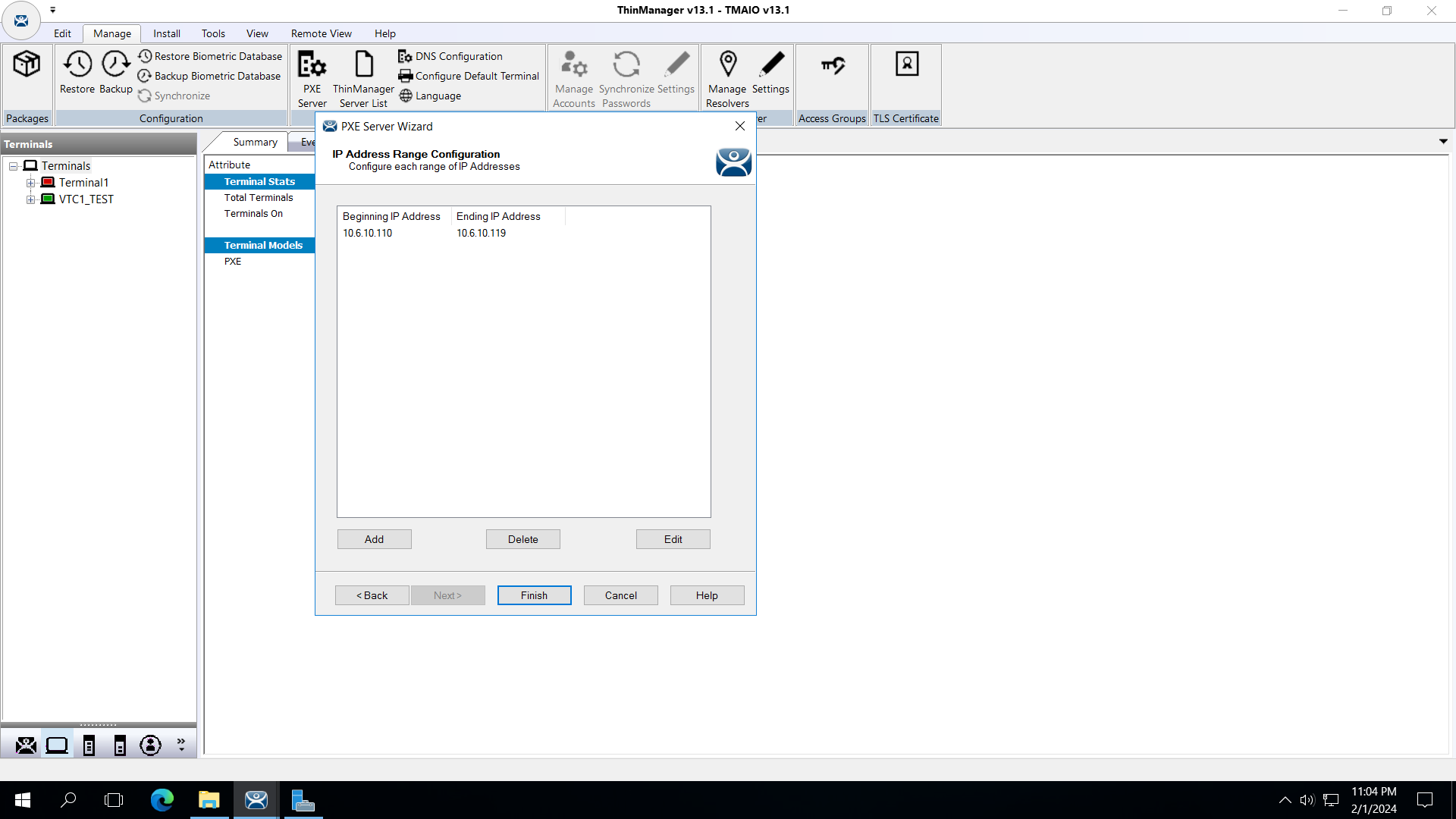
Configure PEX Server y con VMware Player 17 y ejecute VTC1_TEST.

Step 3 - screenshot
Step 3 - screenshot
Paso 4
 
 
Step 4 - screenshot
 

RMCT: Centro de Monitoreo Remoto con ThinManager

Versión 2.0 - Septiembre de 2026

 
AHIC White Logo

Reciba nuevas aplicaciones y novedades del Centro de Innovación directamente en su correo electrónico.

¡Suscríbase!
  1. Chevron LeftChevron Left Página principal de Rockwell Automation
  2. Chevron LeftChevron Left Asi...
  3. Chevron LeftChevron Left Sop...
  4. Chevron LeftChevron Left Descargas
  5. Chevron LeftChevron Left Application Hub - Innovation Center
  6. Chevron LeftChevron Left RMCT: Centro de Monitoreo Remoto con ThinManager
El contenido de este sitio ha sido traducido mediante inteligencia artificial (IA) sin revisión humana o ediciones. El contenido podría contener errores o inexactitudes, y se proporciona “tal cual” sin ninguna garantía. El texto oficial es la versión en inglés del contenido.
Actualice sus preferencias de cookies para continuar.
Esta función requiere cookies para mejorar su experiencia. Actualice sus preferencias para permitir estas cookies.:
  • Cookies de Redes Sociales
  • Cookies Funcionales
  • Cookies de Performance
  • Cookies de Marketing
  • Todas las cookies
Puede actualizar sus preferencias en cualquier momento. Para más información, vea nuestro {0} Política de Privacidad

CloseClose