Loading
Innovation Center LOGO
Recent ActivityRecent Activity

Implemente Audit Trail 21 CFR en FactoryTalk Optix
Siga el proceso paso a paso para implementar 21 CFR con FactoryTalk Optix. - [Tiempo de Implementacíon: 60 minutos]
Innovation Center Home Page
Digital Audit Trail: Ensuring Compliance and Transparency in Modern Systems
Innovation Center LOGO
  • Visión General
  • Guía de Implementación
  • Descarga
  • Contáctanos
  • Suscríbase
Innovation Center Home Page
 

¿Qué hace esta aplicación?

El 21 CFR Parte 11 es una regulación emitida por la FDA (Food and Drug Administration) de EE. UU. en 1997. Establece los criterios bajo los cuales se aceptan firmas y registros electrónicos como equivalentes legales a las firmas manuscritas y registros en papel en la industria de ciencias de la vida (farmacéutica, biotecnológica, dispositivos médicos, etc.).

Su objetivo es garantizar que los sistemas informáticos utilizados en la fabricación, control de calidad y documentación regulatoria cumplan con estándares de:

  • Autenticidad
  • Integridad
  • Confidencialidad
  • No repudio (que una firma no pueda ser rechazada como no genuina)

La implementación de 21CFR es útil ya que:

  • Sustituye el papel: Reduce costos de almacenamiento, impresión y manejo físico.
  • Agiliza procesos: Permite flujos de trabajo digitales con validez legal.
  • Auditoría eficiente: Facilita el rastreo de acciones y cambios en registros electrónicos.
  • Cumplimiento regulatorio: Es obligatorio para empresas que operan bajo la FDA.


Características Generales:

  • Sistemas cerrados vs. abiertos: Define controles según quién gestiona el acceso.
  • Registros electrónicos: Texto, gráficos, audio, datos, etc., en formato digital.
  • Firmas electrónicas: Equivalentes legales a firmas manuscritas.
  • Auditorías automatizadas: Registro de quién, cuándo y qué se modificó.
  • Controles de acceso: Autenticación de usuarios y permisos por roles.

Ventajas:

  • Trazabilidad completa: Cada acción queda registrada con usuario y timestamp.
  • Seguridad: Controles de acceso, encriptación y políticas de contraseñas.
  • Eficiencia: Flujos de aprobación digital con firmas electrónicas.
  • Flexibilidad: Configurable según necesidades específicas de cada empresa.

Limitaciones/Desventajas:

  • Complejidad de implementación: Requiere configuración detallada de seguridad y auditoría.
  • Costos iniciales: Inversión en software compatible y capacitación.
  • Mantenimiento: Actualizaciones, backups y gestión de usuarios.
  • Rigidez: Los cambios deben seguir procedimientos validados.
AHIC Download ICON VF.png

Descarga

Tenga en cuenta: deberá aceptar los Términos y Condiciones para cada descarga.

Archivo descargable ›
Legal Disclaimer Acceptance. ROCKWELL AUTOMATION WILL PROVIDE ACCESS TO ROCKWELL PRODUCTS (BEST PRACTICES, APPLICATIONS AND KNOWLEDGE) ON THE CONDITION THAT YOU ACCEPT AND COMPLY WITH THE FOLLOWING TERMS AND CONDITIONS. YOU ACCEPT AND AGREE TO BE BOUND BY THE TERMS OF THIS AGREEMENT BY DOWNLOADING, INSTALLING, COPYING, OR OTHERWISE USING PRODUCTS. IF YOU ARE ACCEPTING THESE TERMS ON BEHALF OF ANOTHER PERSON, COMPANY, OR OTHER LEGAL ENTITY, YOU REPRESENT AND WARRANT THAT YOU HAVE FULL AUTHORITY TO BIND THAT PERSON, COMPANY, OR LEGAL ENTITY TO THESE TERMS. IF YOU DO NOT AGREE TO THESE TERMS, DO NOT DOWNLOAD, INSTALL, COPY, ACCESS, OR USE THE PRODUCTS, SOFTWARE AND/OR CLOUD SERVICES. 1. Rockwell Automation retains full ownership and title to all Products and related documentation. No rights or licenses are granted other than those set forth in this Agreement. Company grants to Rockwell Automation a non-exclusive, worldwide, royalty-free, perpetual, non-revocable license to use any feedback Company provides regarding the Products, even if Company has designated the feedback as confidential. Rockwell Automation will be entitled to use the feedback without restriction or compensation to Company. 2. Company may not lease sub-lease, assign, license, sub-license or otherwise transfer any of the Products without the prior written consent of Rockwell Automation. Company may not assign or otherwise transfer access rights to the Products without the prior written consent of Rockwell Automation. Any reverse assembly, reverse engineering, decompilation, and creation of derivative works based on the Products by Company is prohibited. 3. Company acknowledges that Products provided under this Agreement are Rockwell Automation’s Confidential Information and are covered by effective or pending copyrights, patents, trademarks and/or trade secrets of Rockwell Automation, and Company agrees to maintain confidentiality by not disclosing Products or documentation to any third party without the prior written consent of Rockwell Automation and to protect the confidentiality of the Products as it would Company’s own confidential information. Company agrees that its obligation of confidentiality under this paragraph shall survive expiration or termination of this Agreement. 4. Company agrees that Products provided under this Agreement are prototypes and examples and its application and results may vary depending on each customer and project conditions. Rockwell Automation do not warranty the same results. This Agreement shall in no way be construed as a commitment by Rockwell Automation at any time to manufacture and/or offer Products for sale. There is no explicit or implicit service level agreement associated with using the Products. Rockwell Automation does not warrant that the functions contained in the Products will meet Company’s requirements. Company agrees to use all Products only in accordance with the instructions and only for the intended usages identified in the documentation. 5. EXCLUSION OF WARRANTIES AND LIMITATION OF LIABILITY. THE PRODUCTS ARE PROVIDED "AS IS". ROCKWELL AUTOMATION DISCLAIMS ANY AND ALL WARRANTIES, EXPRESS, IMPLIED OR STATUTORY, INCLUDING WITHOUT LIMITATION ANY WARRANTIES OF MERCHANTABILITY OR FITNESS FOR A PARTICULAR PURPOSE. ROCKWELL AUTOMATION EXPLICITLY DISCLAIMS ALL WARRANTIES OF NON- INFRINGEMENT AND EXPRESSLY DOES NOT WARRANT THAT THE PRODUCTS, IN WHOLE OR IN PART, WILL BE ERROR FREE OR FREE FROM SECURITY VULNERABILITIES. IN NO EVENT SHALL ROCKWELL AUTOMATION BE LIABLE FOR (i) LOST PROFITS, LOST SAVINGS, DOWNTIME, SPECIAL, INDIRECT OR CONSEQUENTIAL DAMAGES OF ANY KIND, OR (ii) ANY PERSONAL INJURY, PROPERTY DAMAGE OR ENVIRONMENTAL DAMAGE ARISING OUT OF OR IN CONNECTION WITH THIS AGREEMENT, WHETHER IN AN ACTION IN CONTRACT, STRICT LIABILITY OR IN TORT INCLUDING NEGLIGENCE. 6. COMPANY AGREES TO INDEMNIFY AND HOLD ROCKWELL AUTOMATION HARMLESS FROM ALL COSTS, AWARDS, DAMAGES, EXPENSES AND FEES (INCLUDING ATTORNEYS FEES) RESULTING FROM OR RELATED TO ANY THIRD-PARTY CLAIMS (INCLUDING EMPLOYEES AND AGENTS OF COMPANY) AGAINST ROCKWELL AUTOMATION, ITS DISTRIBUTORS, AGENTS, OFFICERS, DIRECTORS OR EMPLOYEES FOR PERSONAL INJURY (INCLUDING DEATH), PROPERTY DAMAGE OR ENVIRONMENTAL DAMAGE RELATED TO OR RESULTING FROM THE USE OF THE PRODUCTS. 7. In the event a Product is exported, Company agrees to comply with all applicable United States Export Control Law and Regulations, and the applicable export control laws of other countries. This Agreement shall be governed by the laws of the state of Wisconsin. This Agreement is the complete and exclusive Agreement between Rockwell Automation and the Company, and supersedes all prior agreements, whether written or oral, relating to the Products.
AHIC NEED HELP ICON VF.png

¿Necesita ayuda?

Si necesita ayuda con alguna aplicación o tiene comentarios acerca del Innovation Center, por favor contáctenos.


¿Esta aplicación es relevante para mí?

Este código está definido para aplicaciones donde requiera implementar 21CFR.

Áreas de aplicación: Alimentos, Manufactura, Bebidas


¿Cómo puedo hacerlo funcionar?

Requisitos: productos, herramientas, conocimientos previos.

Hardware

  • Computadora personal

Software

  • FactoryTalk Optix

Conocimiento previos

  • Conocimientos de programación y configuración en FT Optix y aplicación de la norma 21CFR.
 
AHIC STEP ICON.png

Guía de Implementación

 
  1. Paso 01
  2. Paso 02
  3. Paso 03
  4. Paso 04
  5. Paso 05
  6. Paso 06
  7. Paso 07
  8. Paso 08
Open All Close All
Paso 01


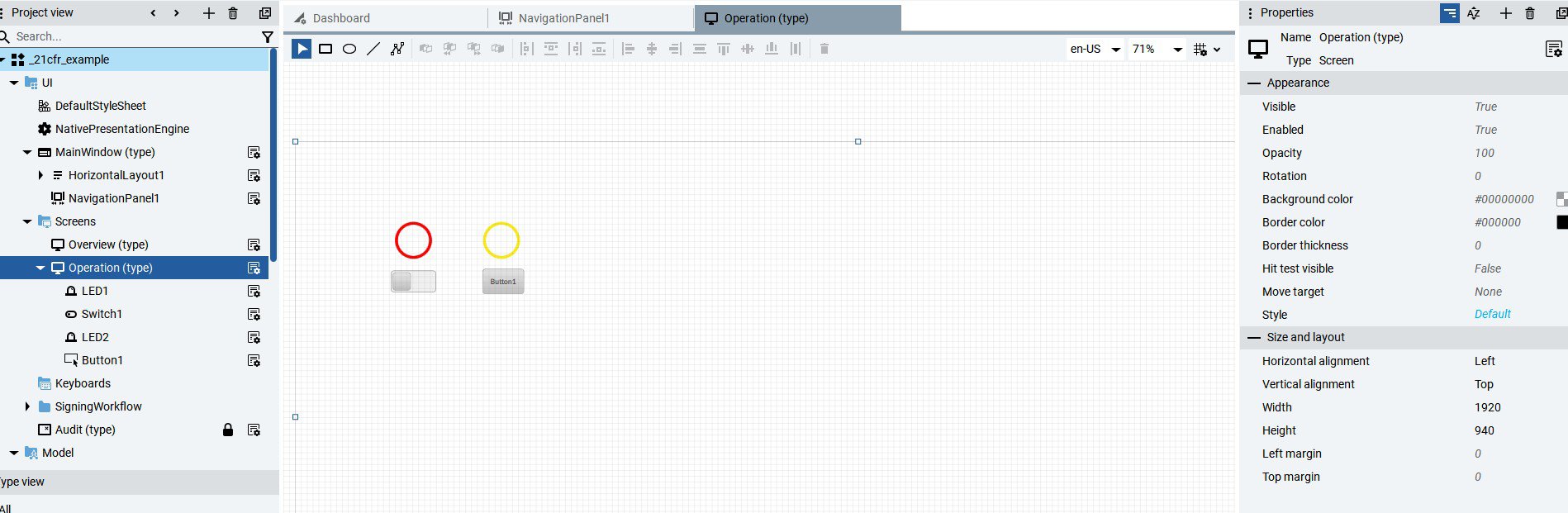
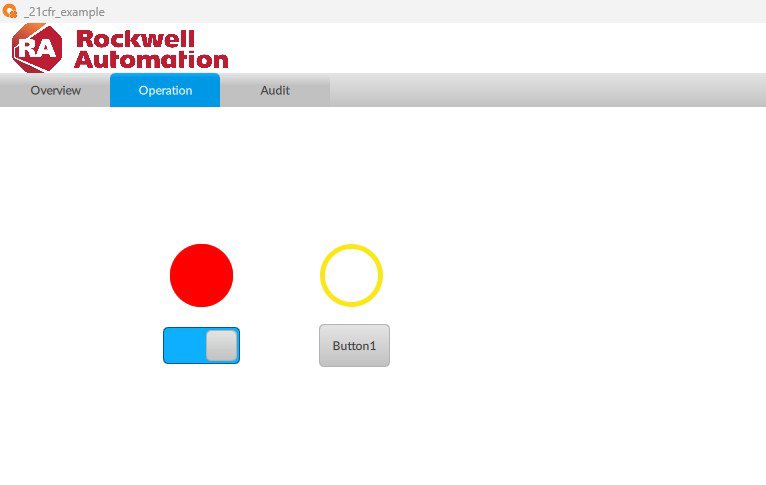
Crear Pantalla, botones y controles sobre los que se aplicará la firma electrónica.

 
implement-audit-trail-21cfr-in-factorytalk-optix_Image1_1.jpg

Image 1.1. Creating objects

implement-audit-trail-21cfr-in-factorytalk-optix_Image1_2.jpg

Image 1.2. Creating objects (runtime)

Paso 02


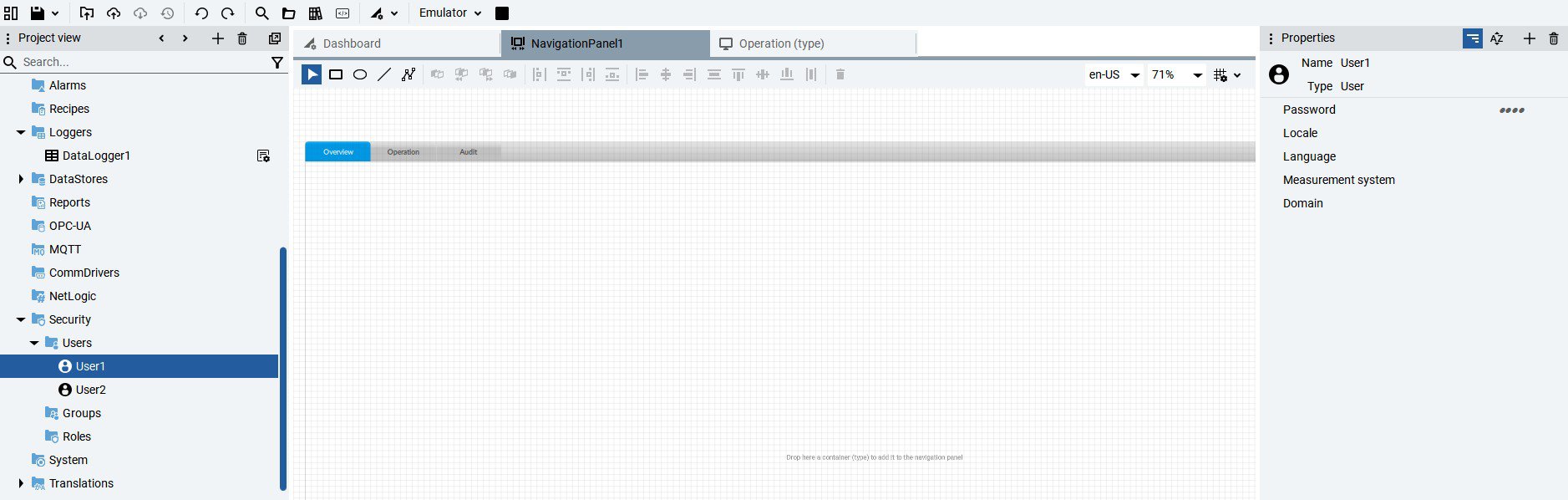
Crear los usuarios necesarios para la aplicación desde la Pestaña de Security y asignar Password en la sección de Propiedades.

 
implement-audit-trail-21cfr-in-factorytalk-optix_Image2.jpg

Image 2. Creating users

Paso 03


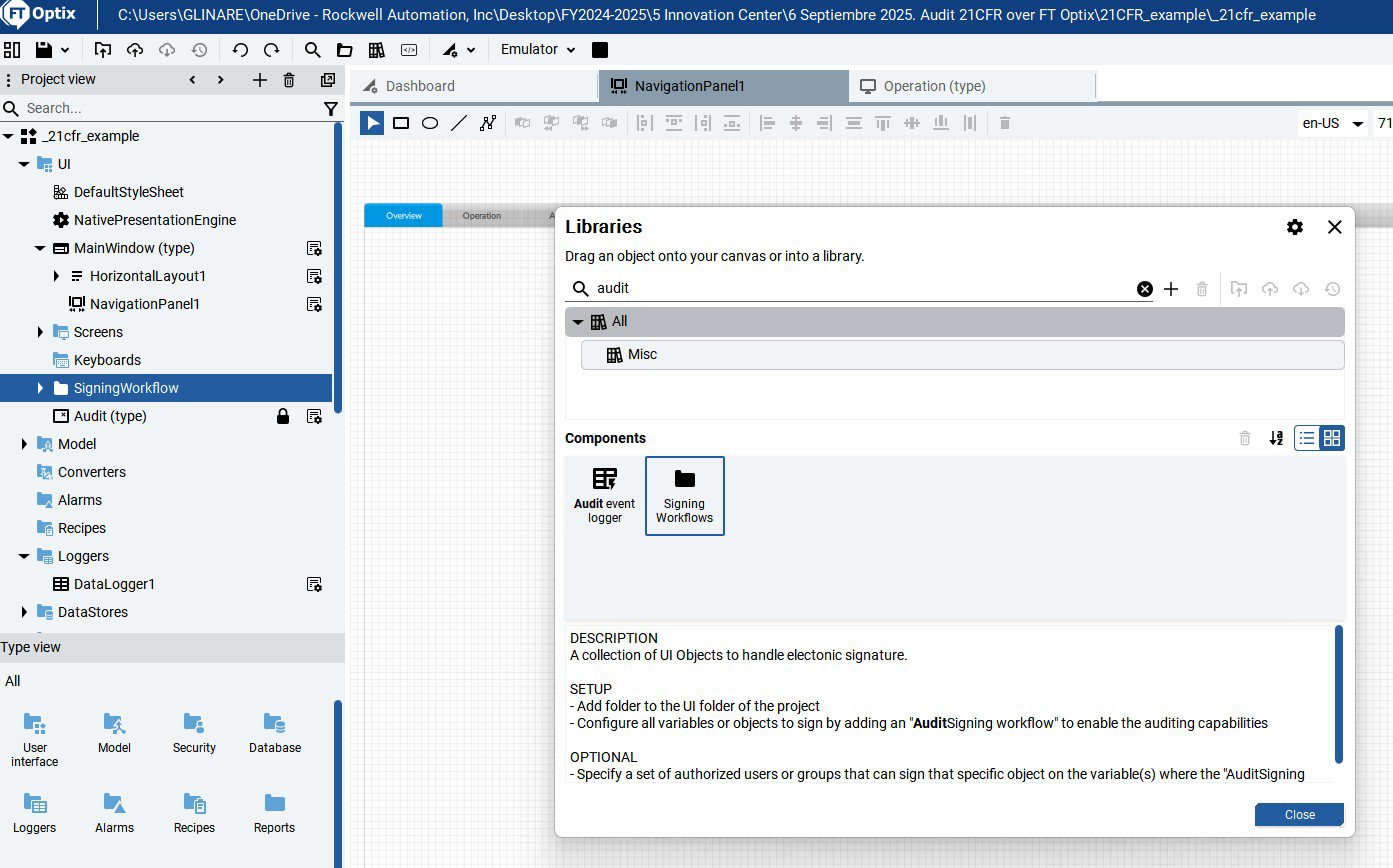
Desde la librería de objetos, agregar el objeto Signing Workflows arrastrando el objeto desde la biblioteca hasta el UI.

 
implement-audit-trail-21cfr-in-factorytalk-optix_Image3.jpg

Image 3. Signing Workflows object

Paso 04


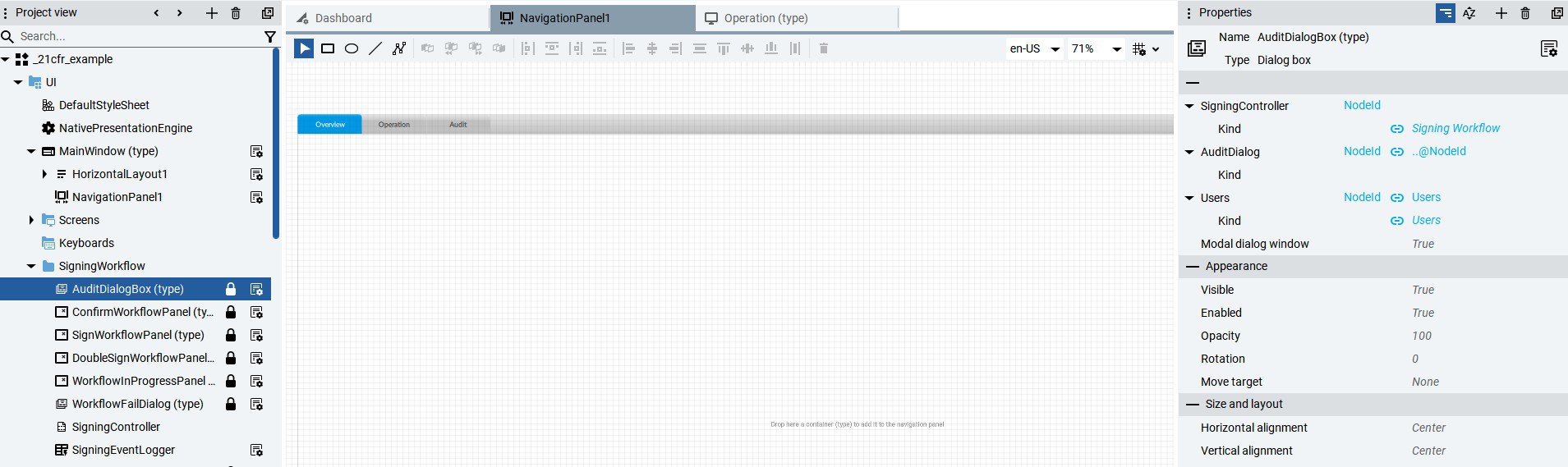
Configurar las propiedades del objeto de AuditDialogBox, asignar usuarios.


implement-audit-trail-21cfr-in-factorytalk-optix_Image4.jpg

Image 4. Configure AuditDialogBox properties

Paso 05


Asignar a las variables de los objetos que se requiere auditar la propiedad de Firma de Audioría y los usuarios que pueden cambiar la condición del objeto.


implement-audit-trail-21cfr-in-factorytalk-optix_Image5.jpg

Image 5. Configuring the Audit property in variables.

Paso 06


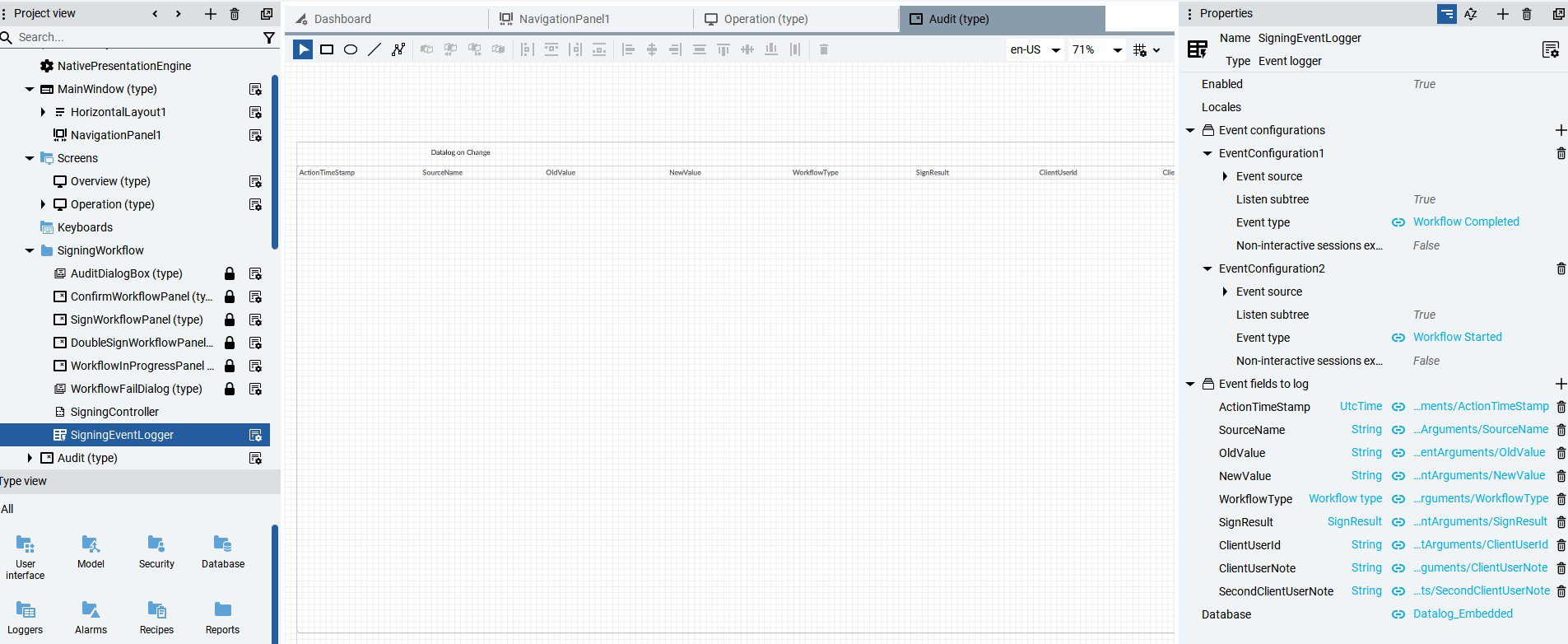
Crear una base de datos Audit, ejemplo, embebida, desde la opción de DataStores. Luego asignar en el campo de Database del objeto Signing Workflows en la propiedad SigningEventLogger el nombre de la base de datos antes creada.


implement-audit-trail-21cfr-in-factorytalk-optix_Image6.jpg

Image 6. Definition and assignment of the Audit database.

Paso 07


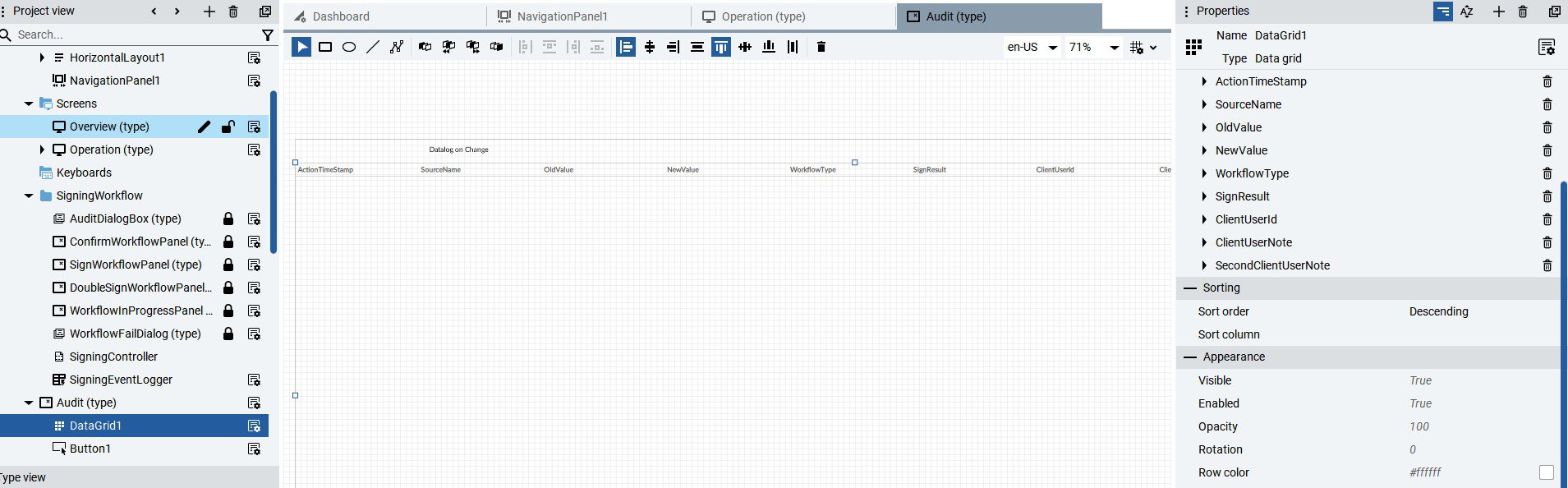
Generar una pantalla nueva llamada Audit y asignar el objeto Datagrid que se encuentra en la lista de objetos (User Interface → Data Controls → Data Grid). Una vez ajustado a la resolución de la pantalla, tomar la propiedad SigningEventLogger del objeto Signing Workflows arrastrando hacia el Data Grid. Desde propiedades del Datagrid cambiar la configuración como Descendiente.


implement-audit-trail-21cfr-in-factorytalk-optix_Image7.jpg

Image 7. Configure the Audit datalog.

Paso 08


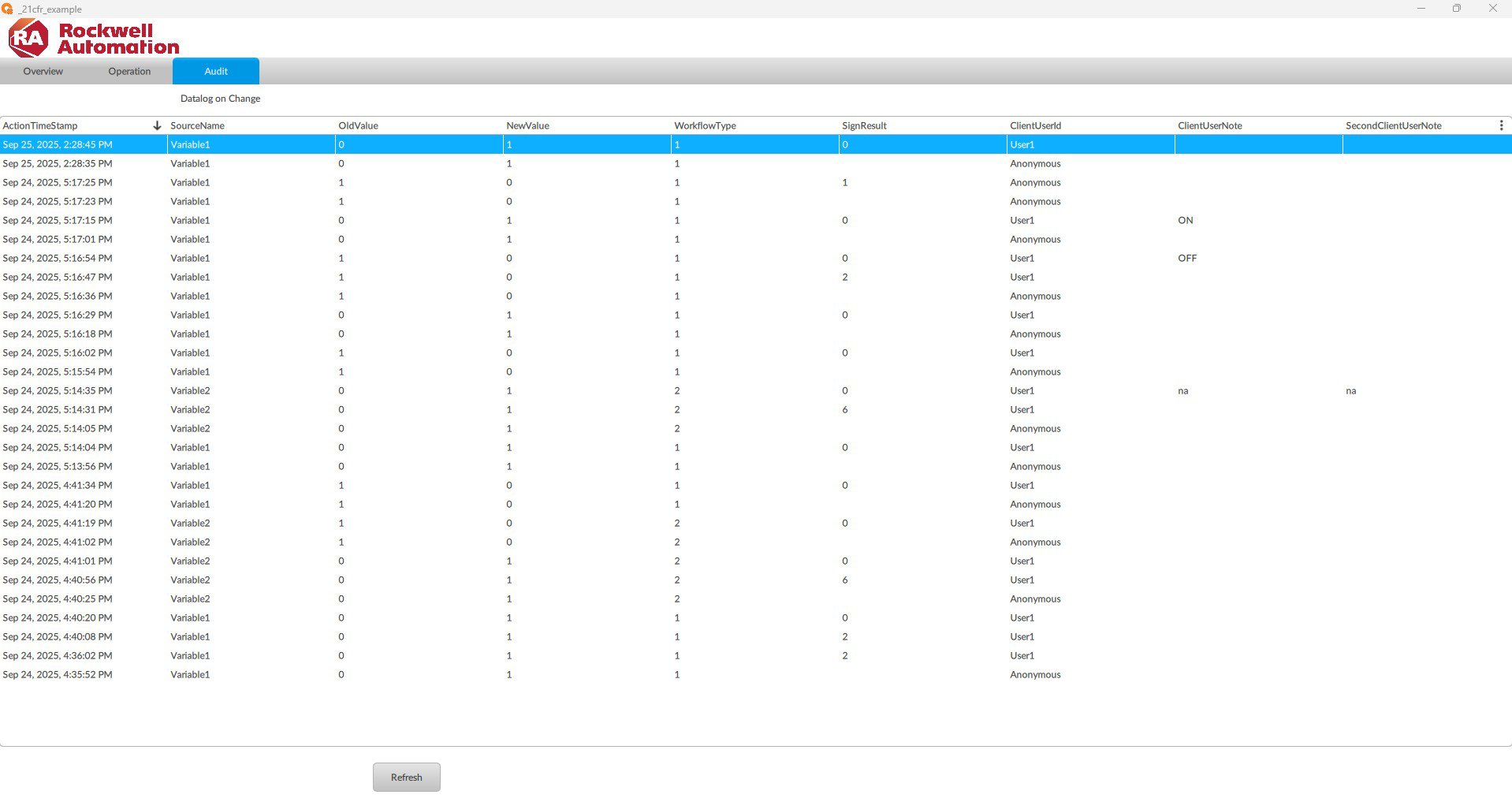
Se visualiza desde la pestaña de Audit el log de cambios en las variables y los objetos definidos.


implement-audit-trail-21cfr-in-factorytalk-optix_Image8.jpg

Image 8. Audit log of variables.

implement-audit-trail-21cfr-in-factorytalk-optix_Image1_1.jpg

Image 1.1. Creating objects

implement-audit-trail-21cfr-in-factorytalk-optix_Image1_2.jpg

Image 1.2. Creating objects (runtime)

implement-audit-trail-21cfr-in-factorytalk-optix_Image2.jpg

Image 2. Creating users

implement-audit-trail-21cfr-in-factorytalk-optix_Image3.jpg

Image 3. Signing Workflows object

implement-audit-trail-21cfr-in-factorytalk-optix_Image4.jpg

Image 4. Configure AuditDialogBox properties

implement-audit-trail-21cfr-in-factorytalk-optix_Image5.jpg

Image 5. Configuring the Audit property in variables.

implement-audit-trail-21cfr-in-factorytalk-optix_Image6.jpg

Image 6. Definition and assignment of the Audit database.

implement-audit-trail-21cfr-in-factorytalk-optix_Image7.jpg

Image 7. Configure the Audit datalog.

implement-audit-trail-21cfr-in-factorytalk-optix_Image8.jpg

Image 8. Audit log of variables.


Implemente Audit Trail 21 CFR en FactoryTalk Optix

Versión 2.0 - Septiembre de 2026

 
AHIC White Logo

Reciba nuevas aplicaciones y novedades del Centro de Innovación directamente en su correo electrónico.

¡Suscríbase!
  1. Chevron LeftChevron Left Página principal de Rockwell Automation
  2. Chevron LeftChevron Left Asi...
  3. Chevron LeftChevron Left Sop...
  4. Chevron LeftChevron Left Descargas
  5. Chevron LeftChevron Left Application Hub - Innovation Center
  6. Chevron LeftChevron Left Implemente Audit Trail 21 CFR en FactoryTalk Optix
El contenido de este sitio ha sido traducido mediante inteligencia artificial (IA) sin revisión humana o ediciones. El contenido podría contener errores o inexactitudes, y se proporciona “tal cual” sin ninguna garantía. El texto oficial es la versión en inglés del contenido.
Actualice sus preferencias de cookies para continuar.
Esta función requiere cookies para mejorar su experiencia. Actualice sus preferencias para permitir estas cookies.:
  • Cookies de Redes Sociales
  • Cookies Funcionales
  • Cookies de Performance
  • Cookies de Marketing
  • Todas las cookies
Puede actualizar sus preferencias en cualquier momento. Para más información, vea nuestro {0} Política de Privacidad
CloseClose