Loading
Innovation Center LOGO
Recent ActivityRecent Activity

Balance de energía usando tabla de vapor
La gestión deseada de la cantidad de energía térmica en la planta, cada día, cobra mayor relevancia en la operación, dado que repercute en los costes operativos variables, así como en la huella de carbono. - [Tiempo de Implementacíon: 60 minutos]
Innovation Center Home Page
Futuristic radiation power plant generating clean energy, glowing reactor core visible through protective shielding, high-tech sustainable technology , alternative energy, eco-friendly
Innovation Center LOGO
  • Visión General
  • Guía de Implementación
  • Descarga
  • Contáctanos
  • Suscríbase
Innovation Center Home Page
 

El manejo adecuado de la cantidad de energía térmica en planta, todos los días toma más relevancia en la operación, dado que impacta los costos variables de operación, así como la huella de carbón del producto y de la compañía, por esto cualquier tipo de industria, como CPG, química, Petróleo y Gas, farmacéutica entre otras, se ha vuelto un KPI clave en la de producción, por ello las compañías están interesadas en conocer la cantidad de energía especifica que usan sus materias primas en el momento adecuado, brindar esta información a la persona adecuada, para tomar decisiones adecuadas.

La aplicación que se presenta tiene el cálculo del balance de materia para tres tipos de fuentes de energía, denominadas así:

  • LP, Low Pressure, por su denominación en Ingles,
  • MP, Medium Pressure, por su denominación en Ingles,
  • HP, High Pressure, por su denominación en Ingles,

Y cada una de ellas es evaluada ante un flujo de:
1000 Kg/h, 5000 Kg/h y 10.000 Kg/h, con el fin de tener un balance de energía instantáneo en [].
 

¿Qué hace esta aplicación?

La aplicación de configuración de un balance de energía para unas condiciones específicas de operación, que cubren regiones de baja presión, media presión y alta presión, las cuales se describen arriba. Se usa Studio5000, las librerías de PlantPAx versión 4.1 para las librerías de Vapor, el FTLogix Echo, para la configuración y simulación, en las cantidades de energía y flujos, así el usuario podrá modificar las variables que se mencionan abajo, con el fin de explorar más a detalle su configuración:

  • Variación de Temperatura
  • Variación de Presión
  • Cantidad de Energía en tiempo real
  • Región de termodinámica donde se encuentra a T y P, con respecto a sus Tsat y Psat el vapor de agua


Características generales

La configuración de un balance de energía en condiciones de baja, media y alta presión, que ofrece las siguientes características:

  • Referencia de flujo ajustable de vapor.
  • Uso de las tablas de Vapor en Baja, Media y Alta presión.

Ventajas

  • Muestra la integración de herramientas de las librerías de proceso PlantPAx en la configuración de equipos de proceso.
  • Muestra el uso de Studio 5000 en el modelamiento dinámico de cálculos de balance de energía.
  • Permite relacionar el Studio 5000 con herramientas de simulación como el FTLogix Echo.
  • Agiliza el tiempo de configuración de los balances de energía de baja, media, y alta presión usando las librerías de vapor.
  • Exhibe escalabilidad y repetibilidad para adaptarse a diversos entornos industriales.
  • Permitir modificaciones ágiles y precisas según las necesidades cambiantes.
  • Optimizar el rendimiento en términos de eficiencia y productividad.
 
AHIC Download ICON VF.png

Descarga

Tenga en cuenta: deberá aceptar los Términos y Condiciones para cada descarga.

Archivo descargable ›
Legal Disclaimer Acceptance. ROCKWELL AUTOMATION WILL PROVIDE ACCESS TO ROCKWELL PRODUCTS (BEST PRACTICES, APPLICATIONS AND KNOWLEDGE) ON THE CONDITION THAT YOU ACCEPT AND COMPLY WITH THE FOLLOWING TERMS AND CONDITIONS. YOU ACCEPT AND AGREE TO BE BOUND BY THE TERMS OF THIS AGREEMENT BY DOWNLOADING, INSTALLING, COPYING, OR OTHERWISE USING PRODUCTS. IF YOU ARE ACCEPTING THESE TERMS ON BEHALF OF ANOTHER PERSON, COMPANY, OR OTHER LEGAL ENTITY, YOU REPRESENT AND WARRANT THAT YOU HAVE FULL AUTHORITY TO BIND THAT PERSON, COMPANY, OR LEGAL ENTITY TO THESE TERMS. IF YOU DO NOT AGREE TO THESE TERMS, DO NOT DOWNLOAD, INSTALL, COPY, ACCESS, OR USE THE PRODUCTS, SOFTWARE AND/OR CLOUD SERVICES. 1. Rockwell Automation retains full ownership and title to all Products and related documentation. No rights or licenses are granted other than those set forth in this Agreement. Company grants to Rockwell Automation a non-exclusive, worldwide, royalty-free, perpetual, non-revocable license to use any feedback Company provides regarding the Products, even if Company has designated the feedback as confidential. Rockwell Automation will be entitled to use the feedback without restriction or compensation to Company. 2. Company may not lease sub-lease, assign, license, sub-license or otherwise transfer any of the Products without the prior written consent of Rockwell Automation. Company may not assign or otherwise transfer access rights to the Products without the prior written consent of Rockwell Automation. Any reverse assembly, reverse engineering, decompilation, and creation of derivative works based on the Products by Company is prohibited. 3. Company acknowledges that Products provided under this Agreement are Rockwell Automation’s Confidential Information and are covered by effective or pending copyrights, patents, trademarks and/or trade secrets of Rockwell Automation, and Company agrees to maintain confidentiality by not disclosing Products or documentation to any third party without the prior written consent of Rockwell Automation and to protect the confidentiality of the Products as it would Company’s own confidential information. Company agrees that its obligation of confidentiality under this paragraph shall survive expiration or termination of this Agreement. 4. Company agrees that Products provided under this Agreement are prototypes and examples and its application and results may vary depending on each customer and project conditions. Rockwell Automation do not warranty the same results. This Agreement shall in no way be construed as a commitment by Rockwell Automation at any time to manufacture and/or offer Products for sale. There is no explicit or implicit service level agreement associated with using the Products. Rockwell Automation does not warrant that the functions contained in the Products will meet Company’s requirements. Company agrees to use all Products only in accordance with the instructions and only for the intended usages identified in the documentation. 5. EXCLUSION OF WARRANTIES AND LIMITATION OF LIABILITY. THE PRODUCTS ARE PROVIDED "AS IS". ROCKWELL AUTOMATION DISCLAIMS ANY AND ALL WARRANTIES, EXPRESS, IMPLIED OR STATUTORY, INCLUDING WITHOUT LIMITATION ANY WARRANTIES OF MERCHANTABILITY OR FITNESS FOR A PARTICULAR PURPOSE. ROCKWELL AUTOMATION EXPLICITLY DISCLAIMS ALL WARRANTIES OF NON- INFRINGEMENT AND EXPRESSLY DOES NOT WARRANT THAT THE PRODUCTS, IN WHOLE OR IN PART, WILL BE ERROR FREE OR FREE FROM SECURITY VULNERABILITIES. IN NO EVENT SHALL ROCKWELL AUTOMATION BE LIABLE FOR (i) LOST PROFITS, LOST SAVINGS, DOWNTIME, SPECIAL, INDIRECT OR CONSEQUENTIAL DAMAGES OF ANY KIND, OR (ii) ANY PERSONAL INJURY, PROPERTY DAMAGE OR ENVIRONMENTAL DAMAGE ARISING OUT OF OR IN CONNECTION WITH THIS AGREEMENT, WHETHER IN AN ACTION IN CONTRACT, STRICT LIABILITY OR IN TORT INCLUDING NEGLIGENCE. 6. COMPANY AGREES TO INDEMNIFY AND HOLD ROCKWELL AUTOMATION HARMLESS FROM ALL COSTS, AWARDS, DAMAGES, EXPENSES AND FEES (INCLUDING ATTORNEYS FEES) RESULTING FROM OR RELATED TO ANY THIRD-PARTY CLAIMS (INCLUDING EMPLOYEES AND AGENTS OF COMPANY) AGAINST ROCKWELL AUTOMATION, ITS DISTRIBUTORS, AGENTS, OFFICERS, DIRECTORS OR EMPLOYEES FOR PERSONAL INJURY (INCLUDING DEATH), PROPERTY DAMAGE OR ENVIRONMENTAL DAMAGE RELATED TO OR RESULTING FROM THE USE OF THE PRODUCTS. 7. In the event a Product is exported, Company agrees to comply with all applicable United States Export Control Law and Regulations, and the applicable export control laws of other countries. This Agreement shall be governed by the laws of the state of Wisconsin. This Agreement is the complete and exclusive Agreement between Rockwell Automation and the Company, and supersedes all prior agreements, whether written or oral, relating to the Products.
AHIC NEED HELP ICON VF.png

¿Necesita ayuda?

Si necesita ayuda con alguna aplicación o tiene comentarios acerca del Innovation Center, por favor contáctenos.


¿Esta aplicación es relevante para mí?

Beneficios - El usuario de la configuración podrá encontrar una configuración ya elaborada de un balance de energía, con la capacidad de modelamiento dinámico de su operación, y manipular tanto en los fluidos como la cantidad de energía total de vapor de Baja, Media y Alta Presión.


¿Cómo puedo hacerlo funcionar?

Requisitos: productos, herramientas y conocimientos previos.

Hardware

  • ControlLogix
  • CompactLogix

Software

  • Studio5000 (V35)
  • FT Logix Echo
  • PlantPAx Libraries 5.2
  • PlantPAx Libraries 4.2 (Steam Table)

Conocimientos Previos

  • Conocimientos de Studio 5000.
  • FTLogixEcho
  • PlantPAX Process Librareis
  • Termodinámica
 

Enlaces de interés (internos o externos)

  • https://compatibility.rockwellautomation.com/Pages/MultiProductDownload.aspx?Keyword=Free&crumb=112
  • PlantPAx Display and Library Guidelines
  • Rockwell Automation Library of Steam Table Instructions Version 4.0
AHIC STEP ICON.png

Guía de Implementación

 
  1. Paso 1
  2. Paso 2
  3. Paso 3
  4. Paso 4
  5. Paso 5
  6. Paso 6
  7. Paso 7
  8. Paso 8
  9. Paso 9
  10. Paso 10
  11. Paso 11
  12. Paso 12
  13. Paso 13
  14. Paso 14
  15. Paso 15
Open All Close All
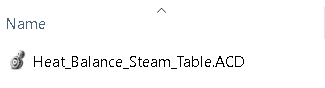
Paso 1


Selección de la configuración.

heat-balance-using-steam-table_Image1_Studio_5000_ACD.png

heat-balance-using-steam-table_Image1_Studio_5000_ACD

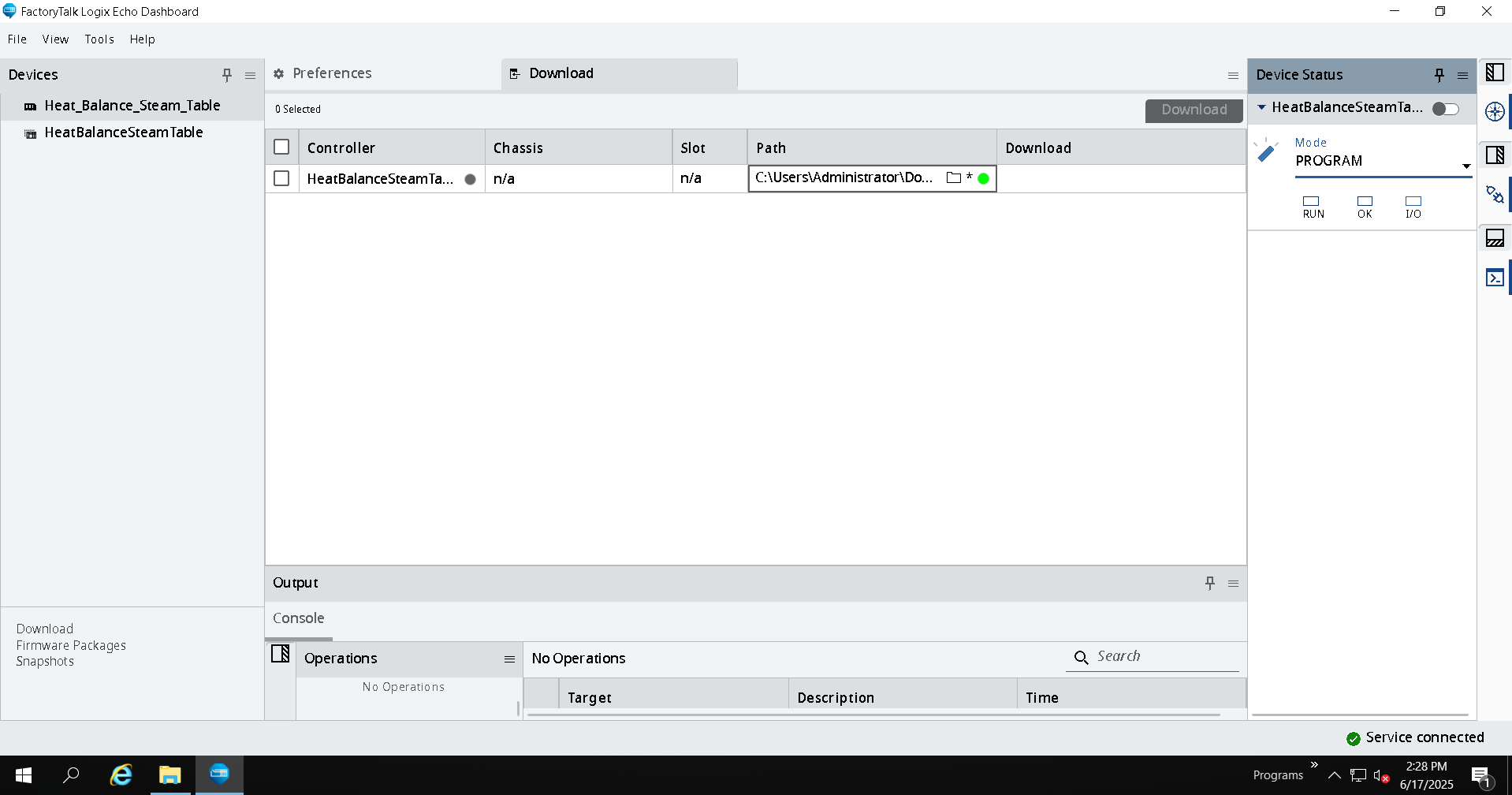
Paso 2


Configuración de FTLogixEcho.

heat-balance-using-steam-table_Image2_FTLogixEcho_Connection.png

heat-balance-using-steam-table_Image2_FTLogixEcho_Connection

Paso 3


Configuración de parámetros Iniciales.

 
heat-balance-using-steam-table_Add_On_Instruction.png

heat-balance-using-steam-table_Add_On_Instruction

 
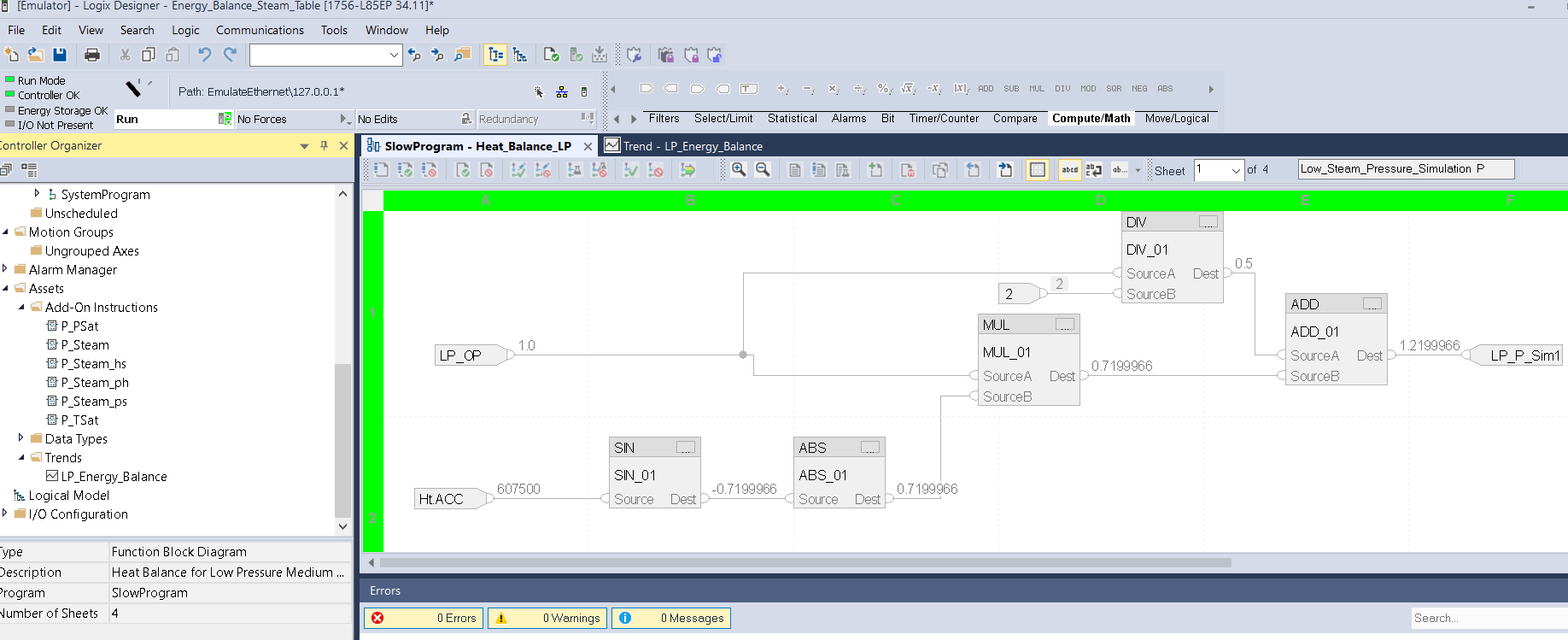
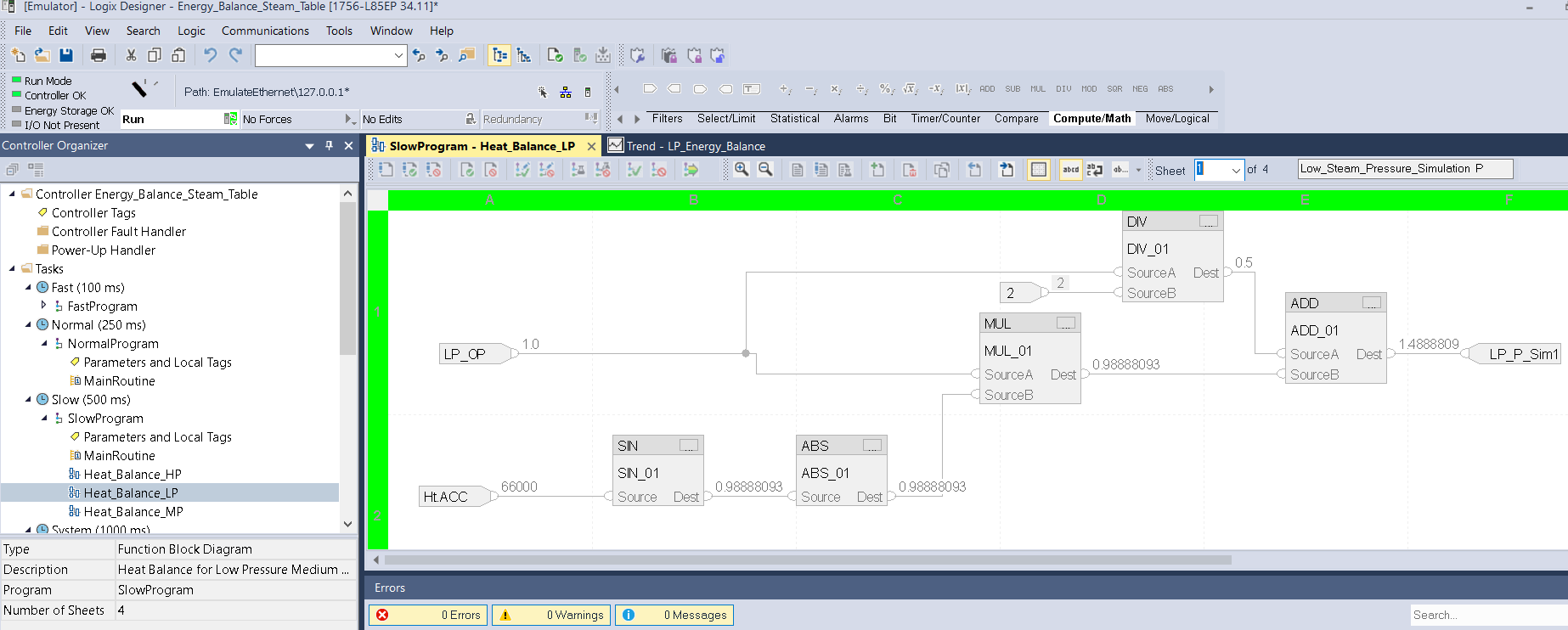
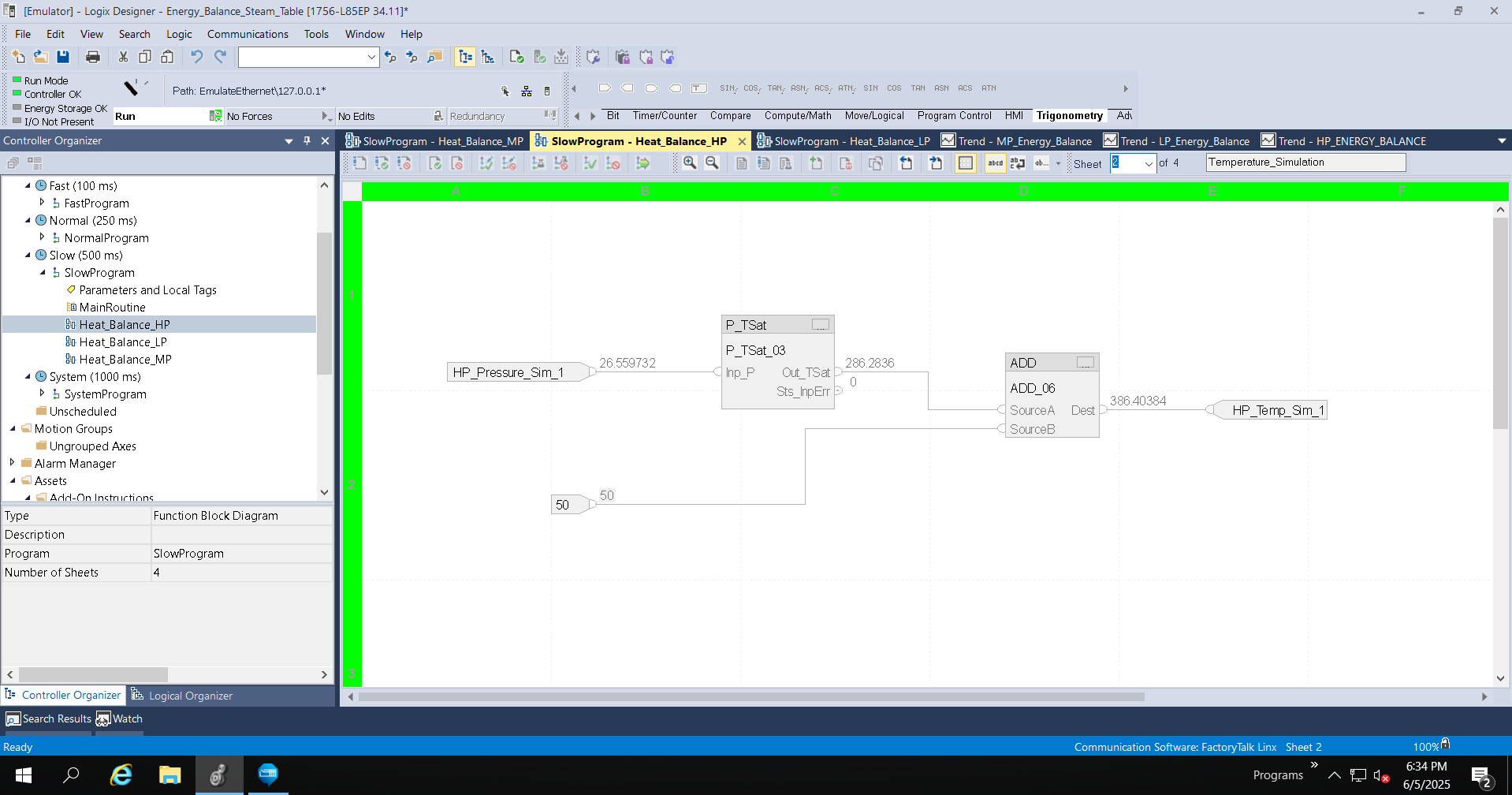
Paso 4


Configuración de simulación de transmisores de presión.


heat-balance-using-steam-table_Image3_Studio5000_LP_Page_1_Pressure_Simulation.png

heat-balance-using-steam-table_Image3_Studio5000_LP_Page_1_Pressure_Simulation

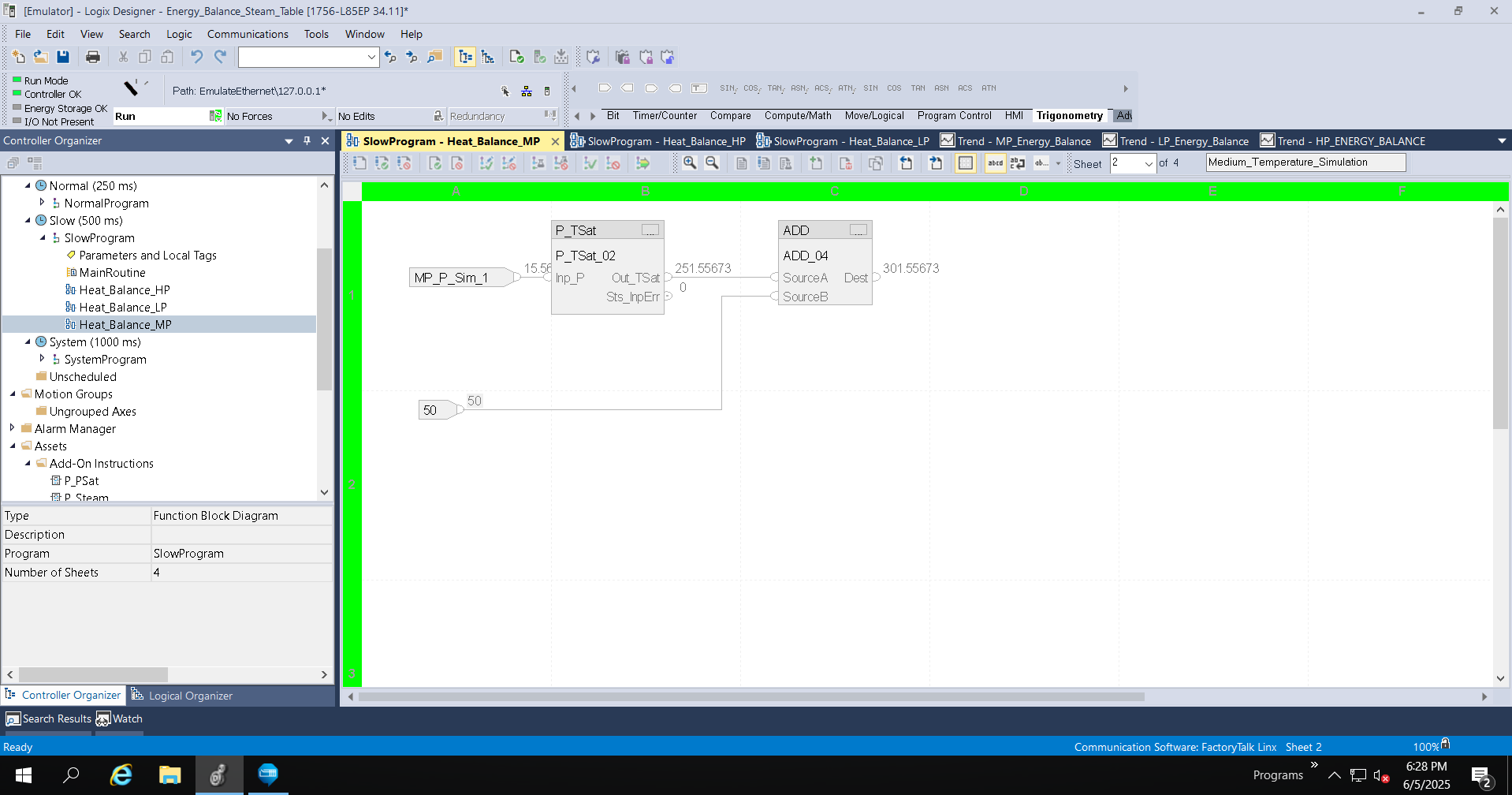
Paso 5


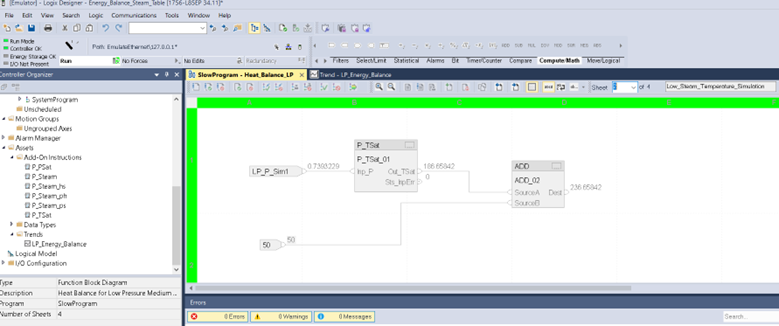
Configuración de simulación de transmisores de temperatura.

 
heat-balance-using-steam-table_Studio5000_LP_Page_2_Temperature_Simulation

heat-balance-using-steam-table_Studio5000_LP_Page_2_Temperature_Simulation

Paso 6


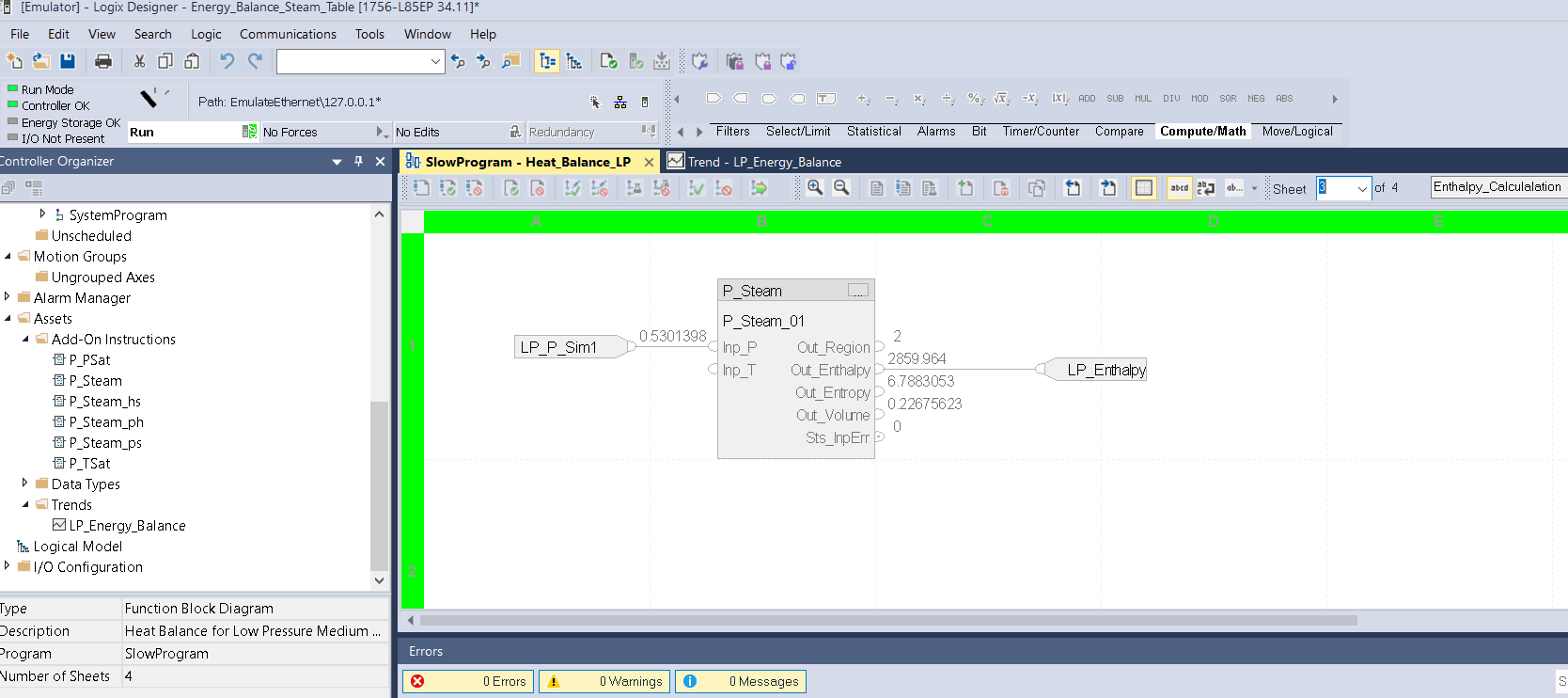
Cálculo de la Entalpia. 


heat-balance-using-steam-table_Image5_Studio5000_LP_Page_3_Entalphy_Calculation.png

heat-balance-using-steam-table_Image5_Studio5000_LP_Page_3_Entalphy_Calculation

Paso 7


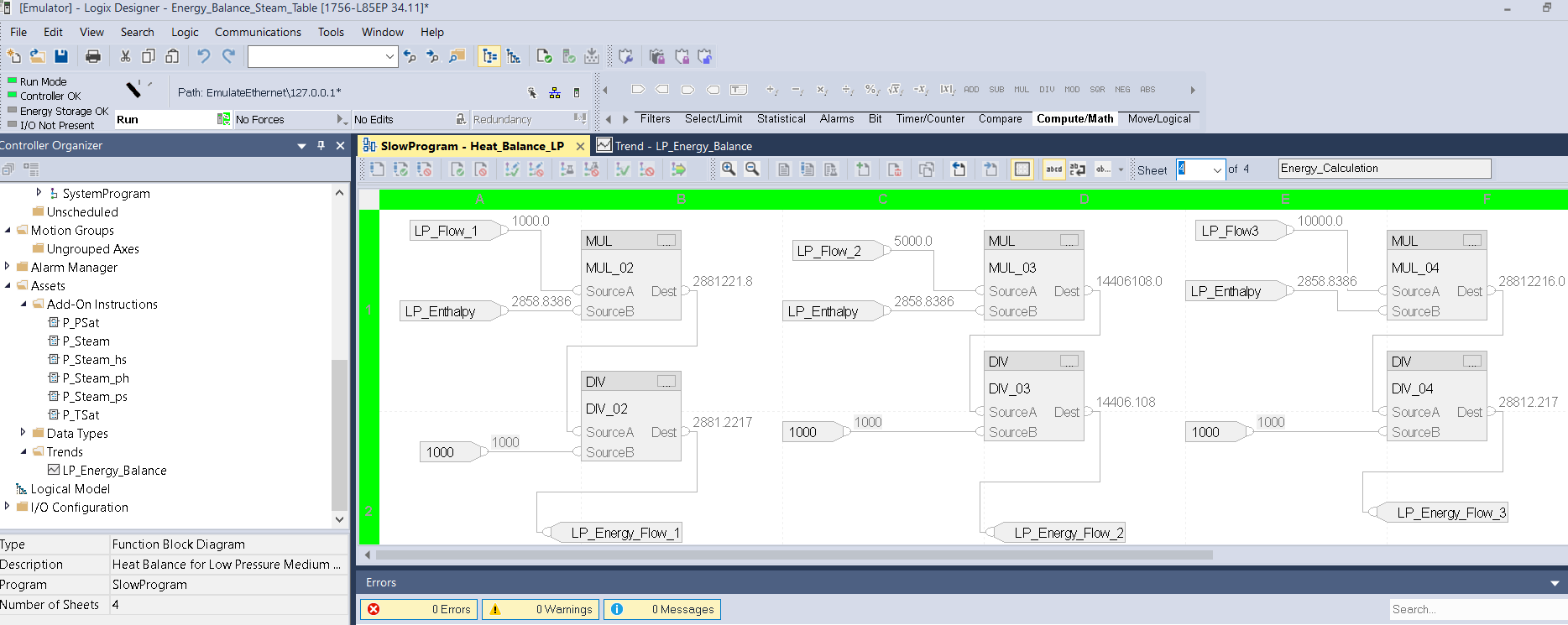
Cálculo de la Cantidad de Energía. 

heat-balance-using-steam-table_Image5_Studio5000_LP_Page_4_Energy_Calculation.png

heat-balance-using-steam-table_Image5_Studio5000_LP_Page_4_Energy_Calculation

Paso 8


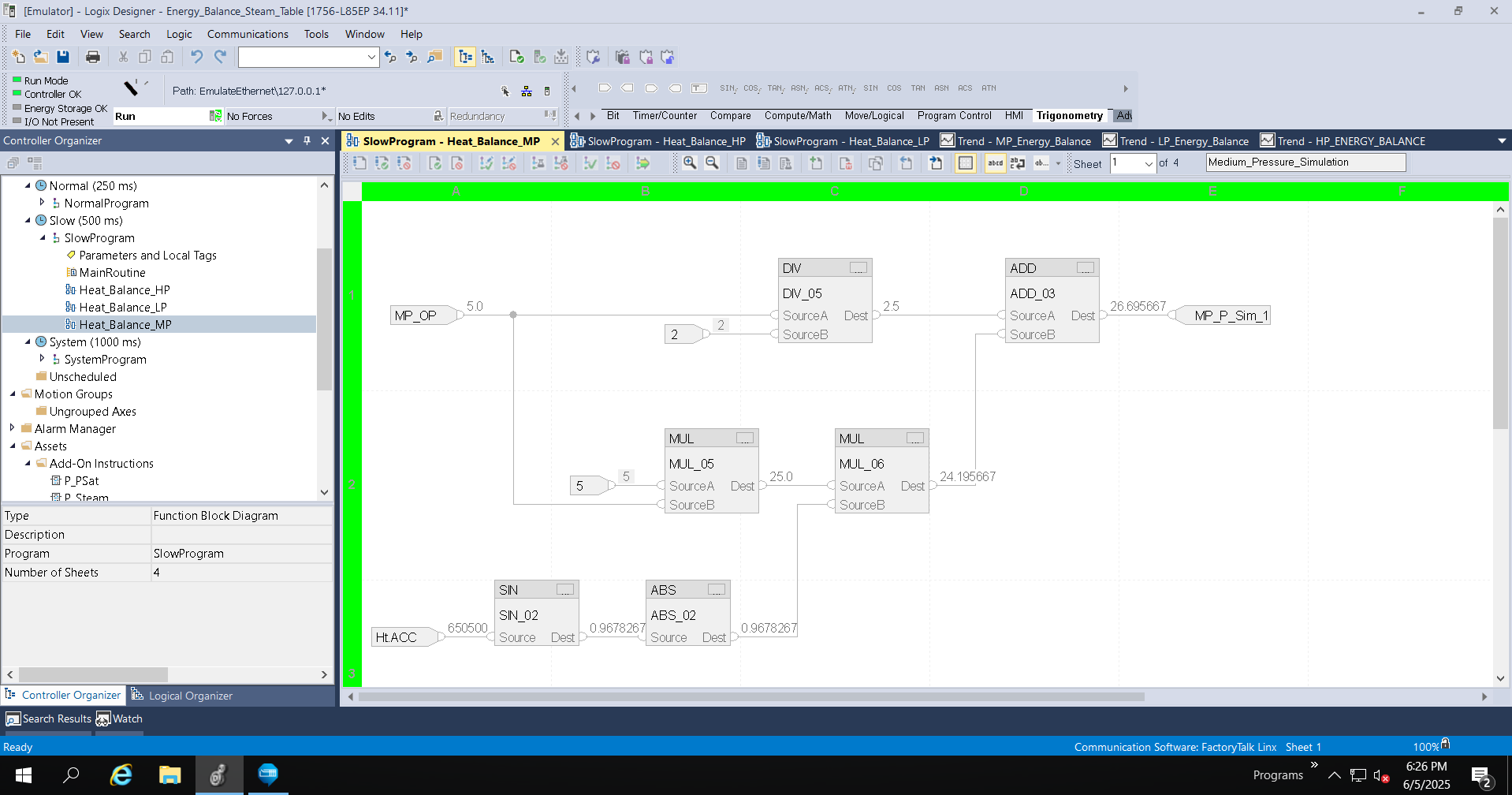
Configuración de simulación de transmisores de presión.

heat-balance-using-steam-table_Studio5000_MP_Page_1_Pressure_Simulation.png

heat-balance-using-steam-table_Studio5000_MP_Page_1_Pressure_Simulation

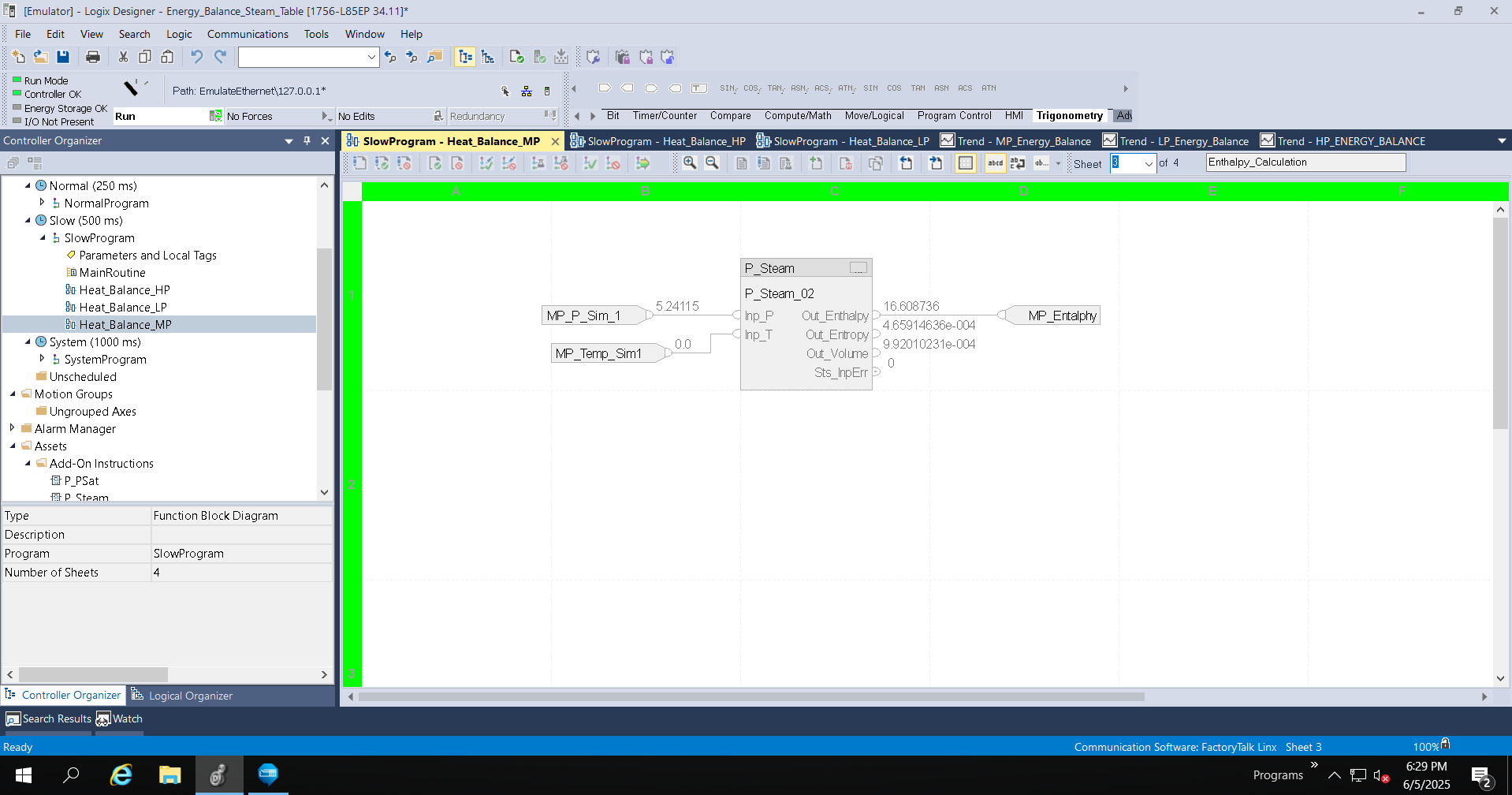
Paso 9


Configuración de simulación de transmisores de temperatura.

heat-balance-using-steam-table_Studio5000_MP_Page_2_Temperature_Simulation.png

heat-balance-using-steam-table_Studio5000_MP_Page_2_Temperature_Simulation

Paso 10


Cálculo de la Entalpia. 

 
heat-balance-using-steam-table_Studio5000_MP_Page_3_Entalphy_Calculation.png

heat-balance-using-steam-table_Studio5000_MP_Page_3_Entalphy_Calculation

 
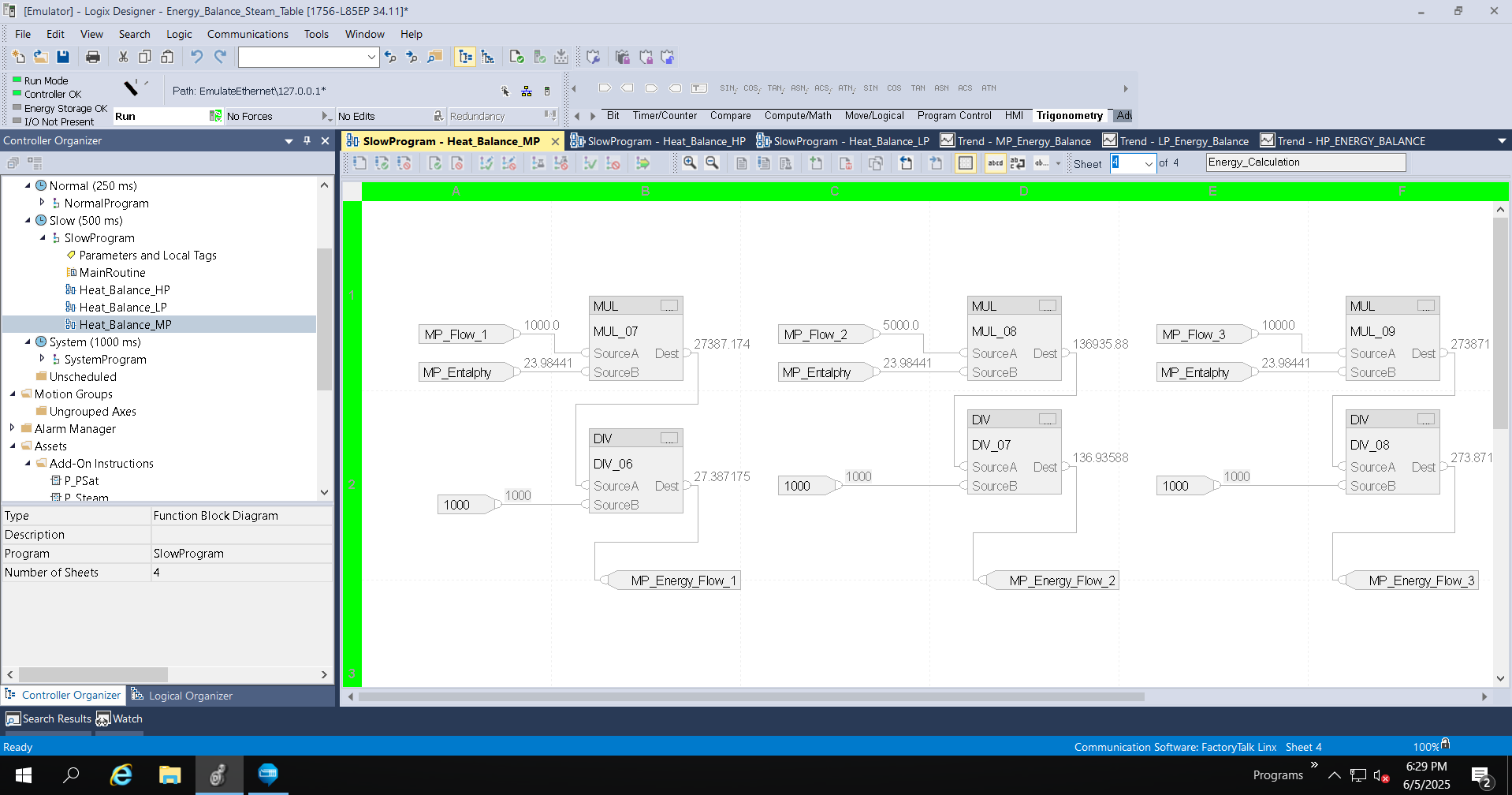
Paso 11


Cálculo de la Cantidad de Energía. 

 
heat-balance-using-steam-table_Studio5000_MP_Page_4_Energy_Calculation.png

heat-balance-using-steam-table_Studio5000_MP_Page_4_Energy_Calculation

 
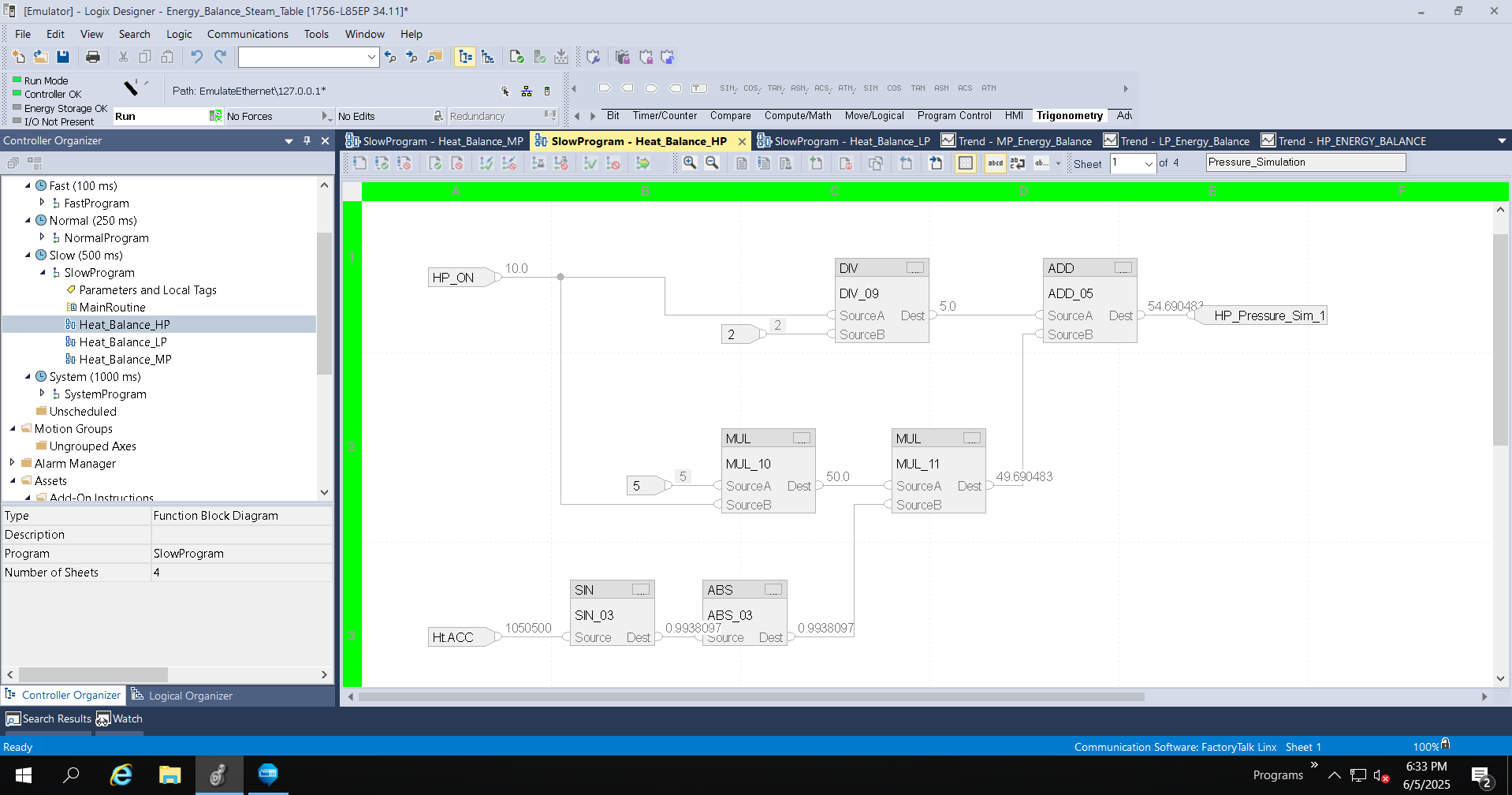
Paso 12


Configuración de simulación de transmisores de presión.

 
heat-balance-using-steam-table_Studio5000_HP_Page_1_Pressure_Simulation.png

heat-balance-using-steam-table_Studio5000_HP_Page_1_Pressure_Simulation

 
Paso 13


Configuración de simulación de transmisores de temperatura.

 
heat-balance-using-steam-table_Studio5000_HP_Page_1_Temperature_Simulation.png

heat-balance-using-steam-table_Studio5000_HP_Page_1_Temperature_Simulation

 
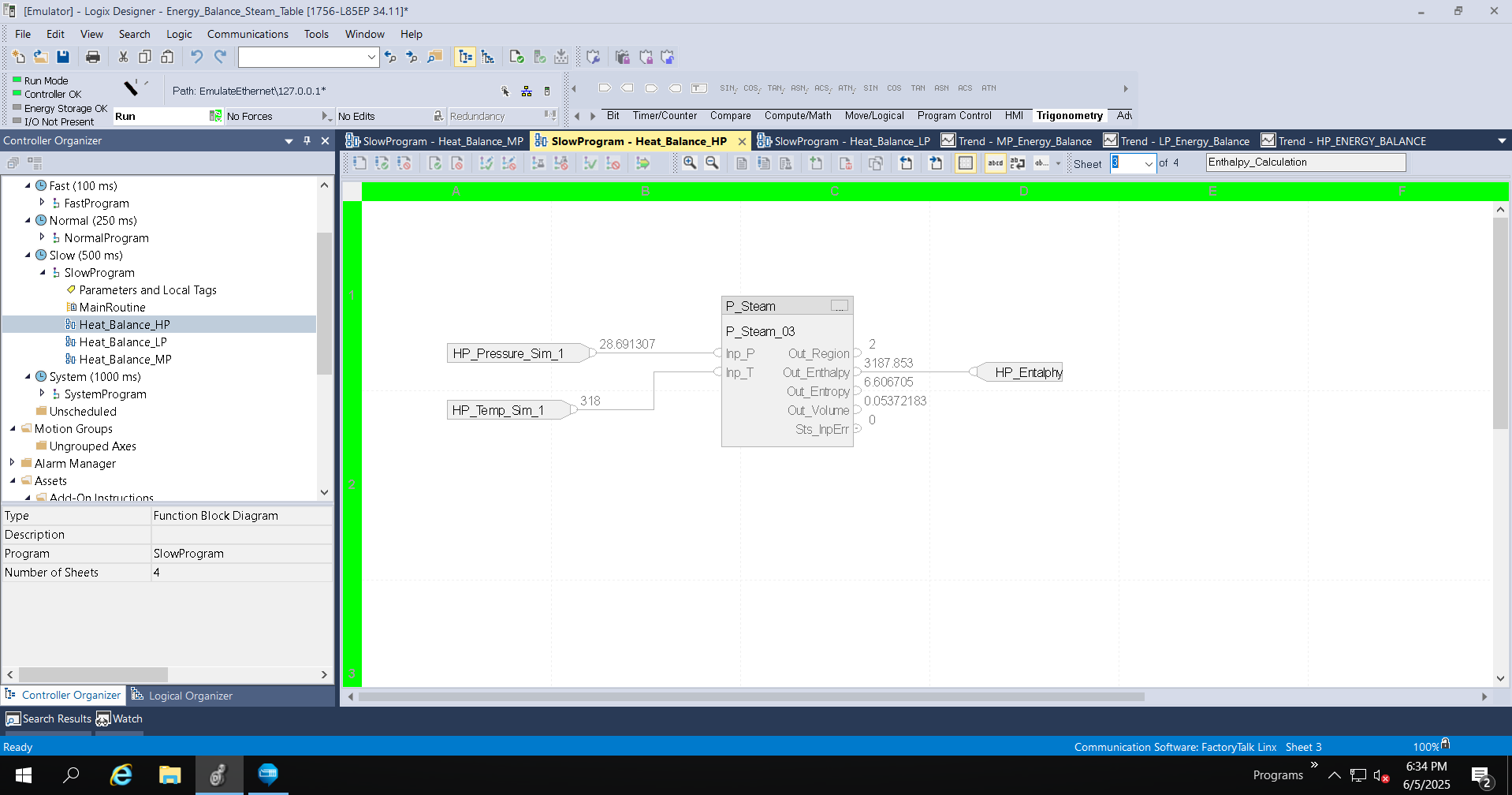
Paso 14


Cálculo de la Entalpia. 

 
heat-balance-using-steam-table_Studio5000_HP_Page_3_Entalphy_Calculation.png

heat-balance-using-steam-table_Studio5000_HP_Page_3_Entalphy_Calculation

 
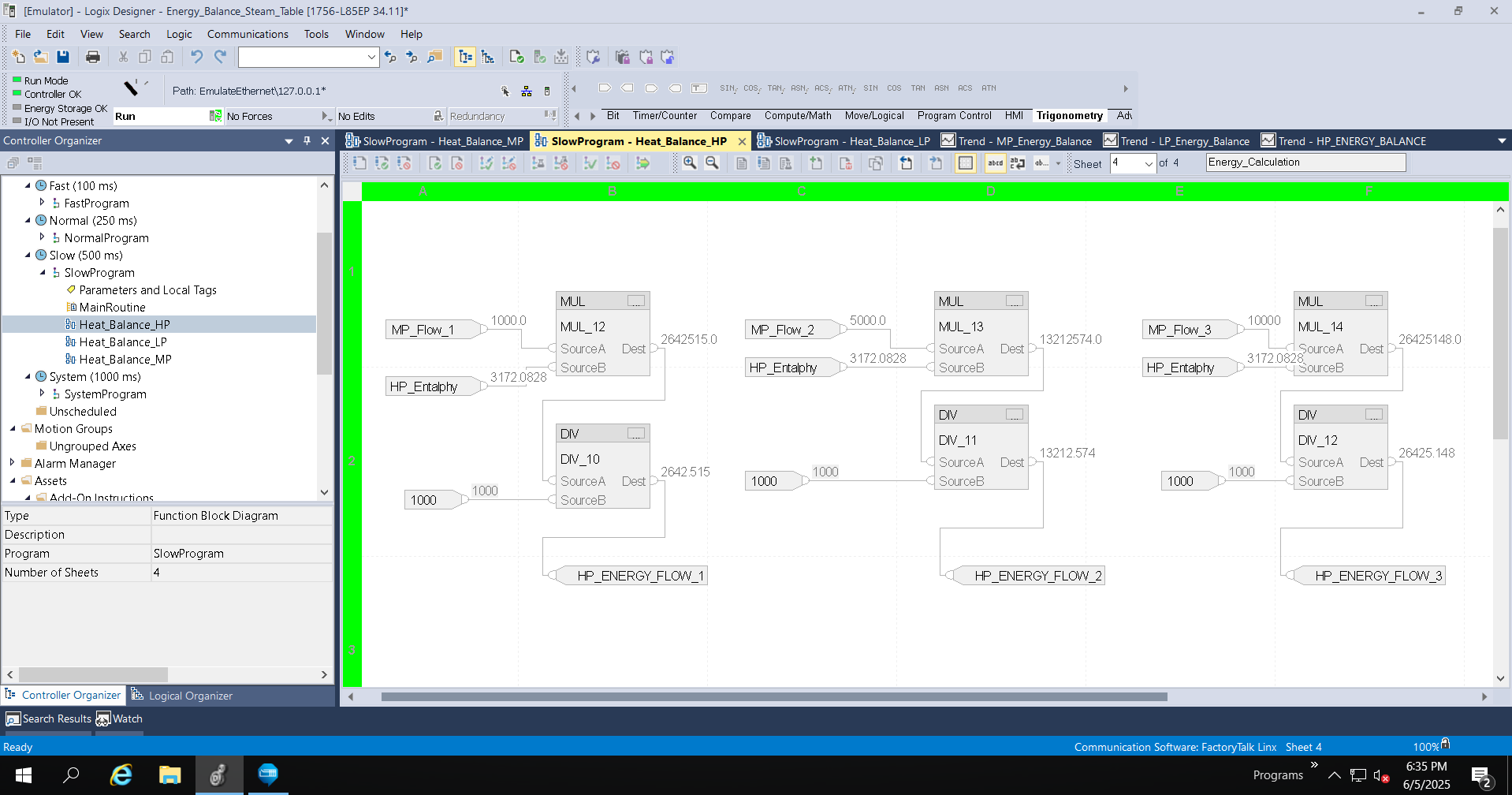
Paso 15


Cálculo de la Cantidad de Energía. 

 
heat-balance-using-steam-table_Studio5000_HP_Page_4_Energy_Calculation.png

heat-balance-using-steam-table_Studio5000_HP_Page_4_Energy_Calculation

 
heat-balance-using-steam-table_Image1_Studio_5000_ACD.png

heat-balance-using-steam-table_Image1_Studio_5000_ACD

heat-balance-using-steam-table_Image2_FTLogixEcho_Connection.png

heat-balance-using-steam-table_Image2_FTLogixEcho_Connection

heat-balance-using-steam-table_Add_On_Instruction.png

heat-balance-using-steam-table_Add_On_Instruction

heat-balance-using-steam-table_Image3_Studio5000_LP_Page_1_Pressure_Simulation.png

heat-balance-using-steam-table_Image3_Studio5000_LP_Page_1_Pressure_Simulation

heat-balance-using-steam-table_Studio5000_LP_Page_2_Temperature_Simulation

heat-balance-using-steam-table_Studio5000_LP_Page_2_Temperature_Simulation

heat-balance-using-steam-table_Image5_Studio5000_LP_Page_3_Entalphy_Calculation.png

heat-balance-using-steam-table_Image5_Studio5000_LP_Page_3_Entalphy_Calculation

heat-balance-using-steam-table_Image5_Studio5000_LP_Page_4_Energy_Calculation.png

heat-balance-using-steam-table_Image5_Studio5000_LP_Page_4_Energy_Calculation

heat-balance-using-steam-table_Studio5000_MP_Page_1_Pressure_Simulation.png

heat-balance-using-steam-table_Studio5000_MP_Page_1_Pressure_Simulation

heat-balance-using-steam-table_Studio5000_MP_Page_2_Temperature_Simulation.png

heat-balance-using-steam-table_Studio5000_MP_Page_2_Temperature_Simulation

energy-monitor-using-optix_Step 9.png

heat-balance-using-steam-table_Studio5000_MP_Page_3_Entalphy_Calculation

heat-balance-using-steam-table_Studio5000_MP_Page_4_Energy_Calculation.png

heat-balance-using-steam-table_Studio5000_MP_Page_4_Energy_Calculation

heat-balance-using-steam-table_Studio5000_HP_Page_1_Pressure_Simulation.png

heat-balance-using-steam-table_Studio5000_HP_Page_1_Pressure_Simulation

heat-balance-using-steam-table_Studio5000_HP_Page_1_Temperature_Simulation.png

heat-balance-using-steam-table_Studio5000_HP_Page_1_Temperature_Simulation

heat-balance-using-steam-table_Studio5000_HP_Page_3_Entalphy_Calculation.png

heat-balance-using-steam-table_Studio5000_HP_Page_3_Entalphy_Calculation

heat-balance-using-steam-table_Studio5000_HP_Page_4_Energy_Calculation.png

heat-balance-using-steam-table_Studio5000_HP_Page_4_Energy_Calculation


Balance de energía usando tabla de vapor

Versión 1.0 - Septiembre de 2026

 
AHIC White Logo

Reciba nuevas aplicaciones y novedades del Centro de Innovación directamente en su correo electrónico.

¡Suscríbase!
  1. Chevron LeftChevron Left Página principal de Rockwell Automation
  2. Chevron LeftChevron Left Asi...
  3. Chevron LeftChevron Left Sop...
  4. Chevron LeftChevron Left Descargas
  5. Chevron LeftChevron Left Application Hub - Innovation Center
  6. Chevron LeftChevron Left Balance de energía usando tabla de vapor
El contenido de este sitio ha sido traducido mediante inteligencia artificial (IA) sin revisión humana o ediciones. El contenido podría contener errores o inexactitudes, y se proporciona “tal cual” sin ninguna garantía. El texto oficial es la versión en inglés del contenido.
Actualice sus preferencias de cookies para continuar.
Esta función requiere cookies para mejorar su experiencia. Actualice sus preferencias para permitir estas cookies.:
  • Cookies de Redes Sociales
  • Cookies Funcionales
  • Cookies de Performance
  • Cookies de Marketing
  • Todas las cookies
Puede actualizar sus preferencias en cualquier momento. Para más información, vea nuestro {0} Política de Privacidad
CloseClose