
Loading
Innovation Center LOGO
Recent ActivityRecent Activity

Control de pH basado en un modelo Wiener

Controla un lazo de pH altamente no lineal mediante linealización por modelo Wiener y control regulatorio PIDE. Incluye AOI de linealización, PIDE y rutina de llamada ejecutándose en el controlador Logix. - [Tiempo de Implementacíon: 30 minutos]
Innovation Center Home Page
control-of-ph-based-on-a-wiener-model_16x9-phControl_header.jpg
Innovation Center LOGO
  • Visión General
  • Guía de Implementación
  • Descarga
  • Contáctanos
  • Suscríbase
Innovation Center Home Page
 

¿Qué hace esta aplicación?

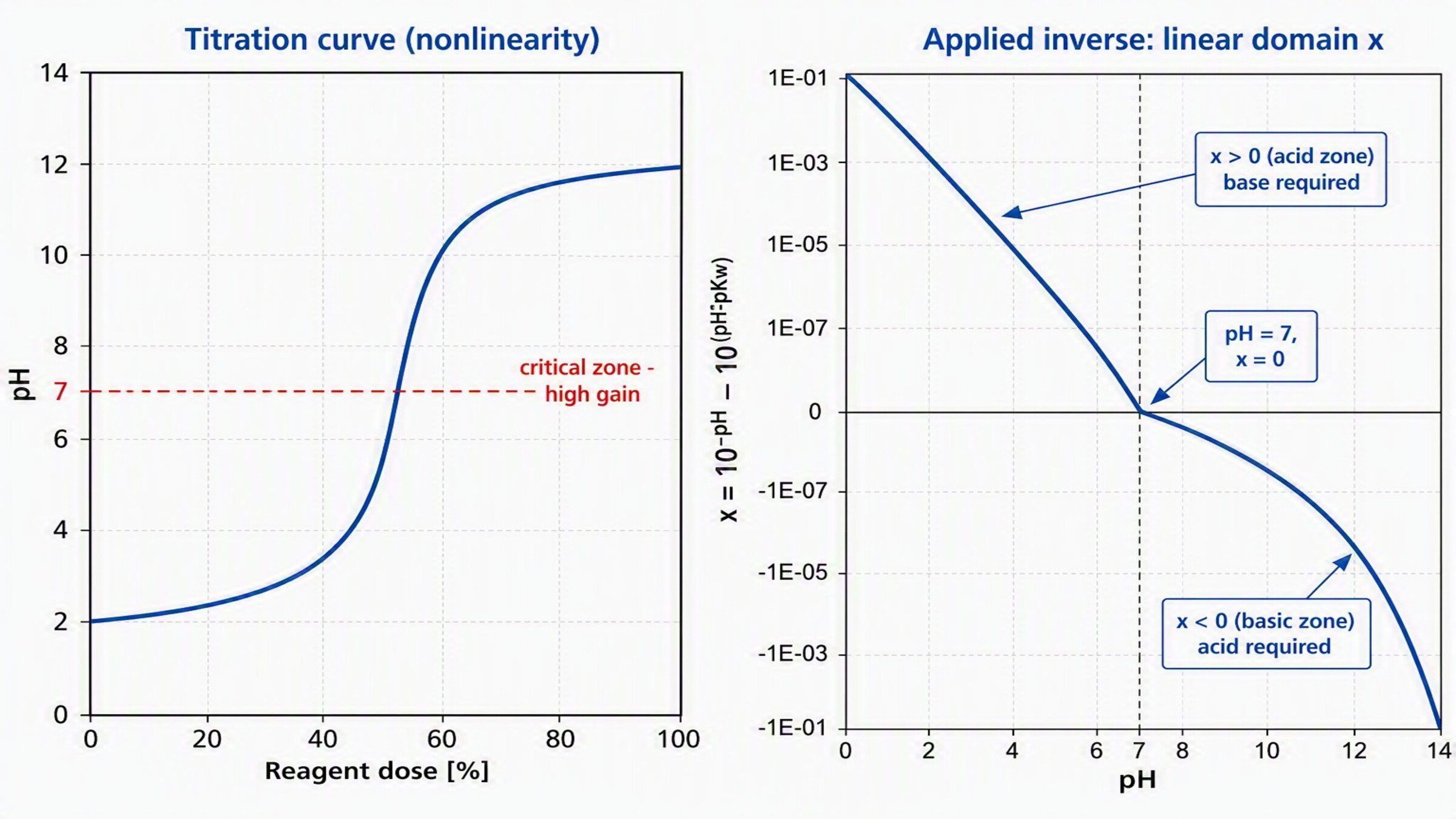
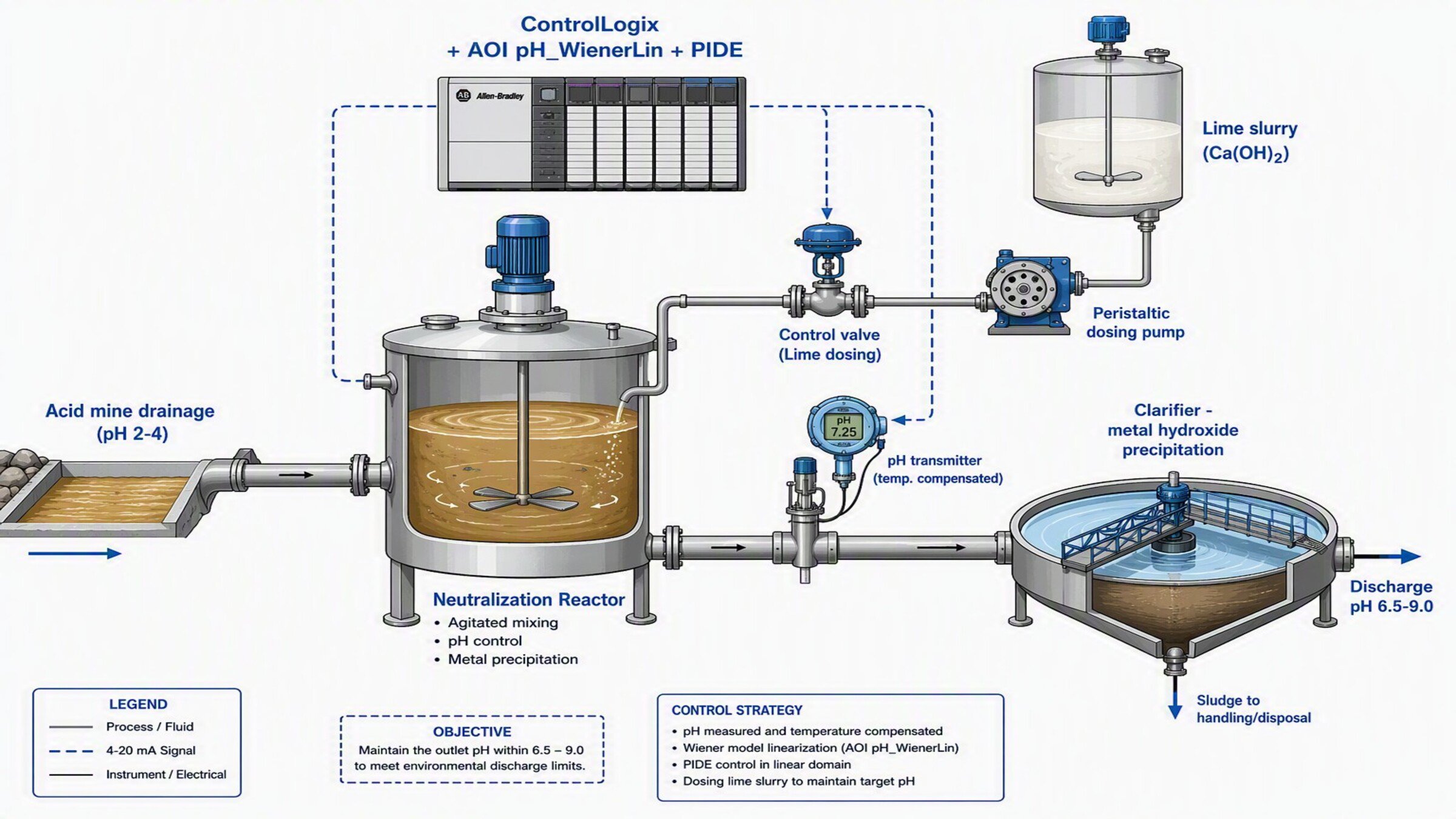
Utilizado para controlar un lazo de pH cuya relación reactivo→pH es una curva de titulación en forma de S (no lineal). El AOI aplica la inversa de la no linealidad al Setpoint y a la Variable de Proceso, permitiendo cerrar el lazo con un PIDE lineal que se desempeña de forma estable en todo el rango de pH (ácido, neutro y básico).


control-of-ph-based-on-a-wiener-model_16x9-phControl_header.jpg

control-of-ph-based-on-a-wiener-model_16x9-phControl_header.jpg

control-of-ph-based-on-a-wiener-model_16x9-phControl_header.jpg

control-of-ph-based-on-a-wiener-model_16x9-phControl_header.jpg


Características Generales

Este desarrollo incluye lo siguiente:

  • Add-On Instruction pH_WienerLin (linealización Wiener) en Studio 5000
  • Instrucción PIDE preconfigurada para control en el dominio lineal
  • Rutina de llamada y tags asociado


Ventajas:

  • Presenta una referencia inicial para el control de procesos altamente no lineales (pH, neutralización)
  • Permite un desempeño estable sin resintonizar el controlador al cambiar de zona de pH


Limitaciones/Desventajas

  • Se limita a un lazo SISO (una variable controlada, una manipulada); para control multivariable con restricciones se recomienda PlantPAx MPC
  • Requiere identificación previa de la curva de titulación para el modo PWL
 
 
AHIC Download ICON VF.png

Descarga

Tenga en cuenta: deberá aceptar los Términos y Condiciones para cada descarga.

Archivo descargable ›
Legal Disclaimer Acceptance. ROCKWELL AUTOMATION WILL PROVIDE ACCESS TO ROCKWELL PRODUCTS (BEST PRACTICES, APPLICATIONS AND KNOWLEDGE) ON THE CONDITION THAT YOU ACCEPT AND COMPLY WITH THE FOLLOWING TERMS AND CONDITIONS. YOU ACCEPT AND AGREE TO BE BOUND BY THE TERMS OF THIS AGREEMENT BY DOWNLOADING, INSTALLING, COPYING, OR OTHERWISE USING PRODUCTS. IF YOU ARE ACCEPTING THESE TERMS ON BEHALF OF ANOTHER PERSON, COMPANY, OR OTHER LEGAL ENTITY, YOU REPRESENT AND WARRANT THAT YOU HAVE FULL AUTHORITY TO BIND THAT PERSON, COMPANY, OR LEGAL ENTITY TO THESE TERMS. IF YOU DO NOT AGREE TO THESE TERMS, DO NOT DOWNLOAD, INSTALL, COPY, ACCESS, OR USE THE PRODUCTS, SOFTWARE AND/OR CLOUD SERVICES. 1. Rockwell Automation retains full ownership and title to all Products and related documentation. No rights or licenses are granted other than those set forth in this Agreement. Company grants to Rockwell Automation a non-exclusive, worldwide, royalty-free, perpetual, non-revocable license to use any feedback Company provides regarding the Products, even if Company has designated the feedback as confidential. Rockwell Automation will be entitled to use the feedback without restriction or compensation to Company. 2. Company may not lease sub-lease, assign, license, sub-license or otherwise transfer any of the Products without the prior written consent of Rockwell Automation. Company may not assign or otherwise transfer access rights to the Products without the prior written consent of Rockwell Automation. Any reverse assembly, reverse engineering, decompilation, and creation of derivative works based on the Products by Company is prohibited. 3. Company acknowledges that Products provided under this Agreement are Rockwell Automation’s Confidential Information and are covered by effective or pending copyrights, patents, trademarks and/or trade secrets of Rockwell Automation, and Company agrees to maintain confidentiality by not disclosing Products or documentation to any third party without the prior written consent of Rockwell Automation and to protect the confidentiality of the Products as it would Company’s own confidential information. Company agrees that its obligation of confidentiality under this paragraph shall survive expiration or termination of this Agreement. 4. Company agrees that Products provided under this Agreement are prototypes and examples and its application and results may vary depending on each customer and project conditions. Rockwell Automation do not warranty the same results. This Agreement shall in no way be construed as a commitment by Rockwell Automation at any time to manufacture and/or offer Products for sale. There is no explicit or implicit service level agreement associated with using the Products. Rockwell Automation does not warrant that the functions contained in the Products will meet Company’s requirements. Company agrees to use all Products only in accordance with the instructions and only for the intended usages identified in the documentation. 5. EXCLUSION OF WARRANTIES AND LIMITATION OF LIABILITY. THE PRODUCTS ARE PROVIDED "AS IS". ROCKWELL AUTOMATION DISCLAIMS ANY AND ALL WARRANTIES, EXPRESS, IMPLIED OR STATUTORY, INCLUDING WITHOUT LIMITATION ANY WARRANTIES OF MERCHANTABILITY OR FITNESS FOR A PARTICULAR PURPOSE. ROCKWELL AUTOMATION EXPLICITLY DISCLAIMS ALL WARRANTIES OF NON- INFRINGEMENT AND EXPRESSLY DOES NOT WARRANT THAT THE PRODUCTS, IN WHOLE OR IN PART, WILL BE ERROR FREE OR FREE FROM SECURITY VULNERABILITIES. IN NO EVENT SHALL ROCKWELL AUTOMATION BE LIABLE FOR (i) LOST PROFITS, LOST SAVINGS, DOWNTIME, SPECIAL, INDIRECT OR CONSEQUENTIAL DAMAGES OF ANY KIND, OR (ii) ANY PERSONAL INJURY, PROPERTY DAMAGE OR ENVIRONMENTAL DAMAGE ARISING OUT OF OR IN CONNECTION WITH THIS AGREEMENT, WHETHER IN AN ACTION IN CONTRACT, STRICT LIABILITY OR IN TORT INCLUDING NEGLIGENCE. 6. COMPANY AGREES TO INDEMNIFY AND HOLD ROCKWELL AUTOMATION HARMLESS FROM ALL COSTS, AWARDS, DAMAGES, EXPENSES AND FEES (INCLUDING ATTORNEYS FEES) RESULTING FROM OR RELATED TO ANY THIRD-PARTY CLAIMS (INCLUDING EMPLOYEES AND AGENTS OF COMPANY) AGAINST ROCKWELL AUTOMATION, ITS DISTRIBUTORS, AGENTS, OFFICERS, DIRECTORS OR EMPLOYEES FOR PERSONAL INJURY (INCLUDING DEATH), PROPERTY DAMAGE OR ENVIRONMENTAL DAMAGE RELATED TO OR RESULTING FROM THE USE OF THE PRODUCTS. 7. In the event a Product is exported, Company agrees to comply with all applicable United States Export Control Law and Regulations, and the applicable export control laws of other countries. This Agreement shall be governed by the laws of the state of Wisconsin. This Agreement is the complete and exclusive Agreement between Rockwell Automation and the Company, and supersedes all prior agreements, whether written or oral, relating to the Products.
AHIC NEED HELP ICON VF.png

¿Necesita ayuda?

Si necesita ayuda con alguna aplicación o tiene comentarios acerca del Innovation Center, por favor contáctenos.


¿Esta aplicación es relevante para mí?

Si necesita controlar un lazo de pH o de neutralización donde un PID convencional oscila, sobreimpulsa o sobredosifica reactivo.

Áreas de aplicación - Se puede aplicar en tratamiento de aguas, neutralización de efluentes, industria química, alimentos y bebidas.


¿Cómo puedo hacerlo funcionar?

Requisitos: productos, herramientas, conocimientos previos.

Hardware

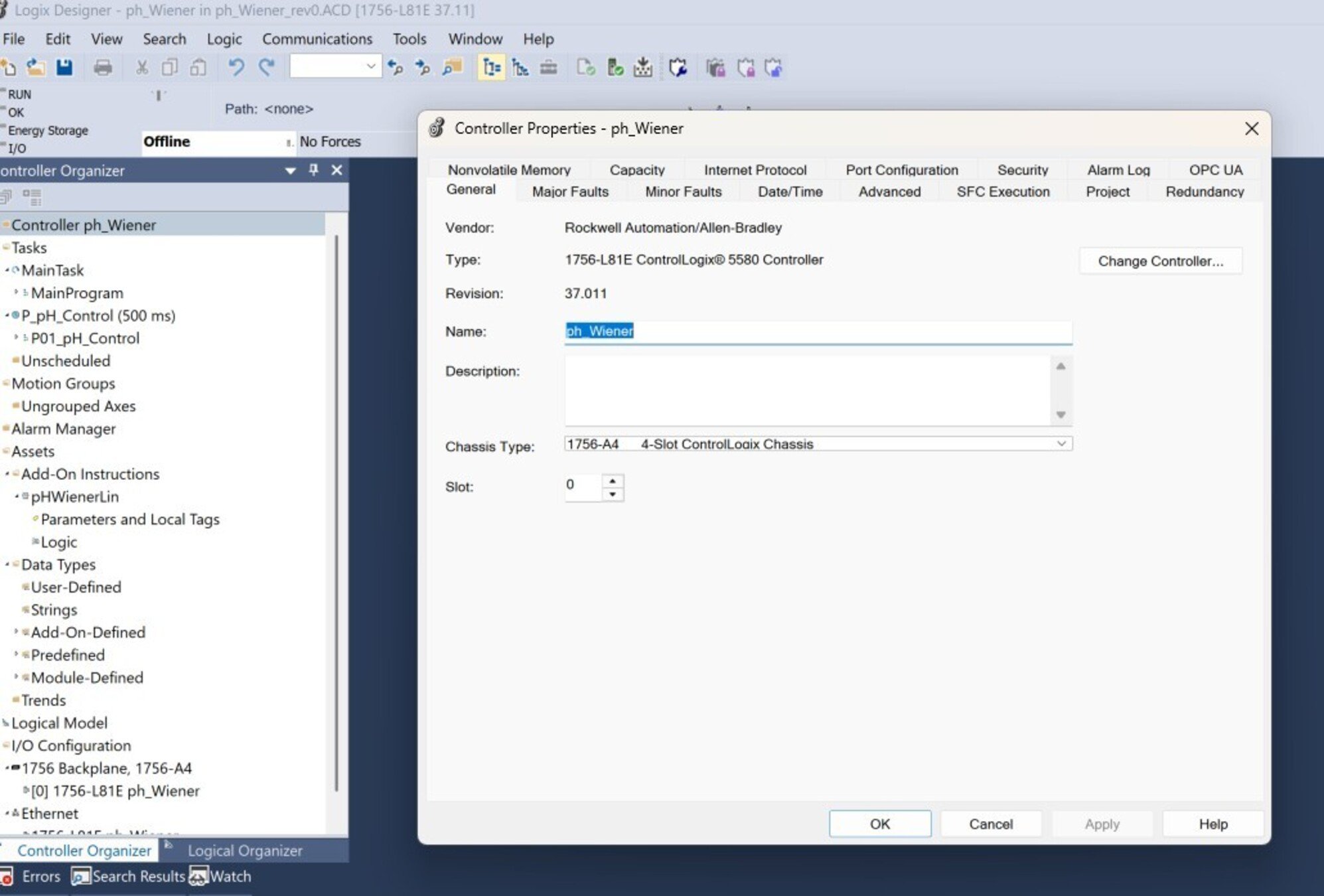
  • Cualquier controlador Logix (el programa está probado en 1756-L81E ControlLogix 5580)
  • Transmisor de pH con compensación de temperatura
  • Elemento final: válvula de control o bomba dosificadora de reactivo

Software

  • Studio 5000 (el programa está elaborado en versión 37)
  • MS Excel

Conocimiento previos

Conocimiento básico de programación y configuración en:

  • Studio 5000 (Add-On Instructions, instrucción PIDE, Texto Estructurado)
  • Control regulatorio de procesos
  • Fundamentos de control de pH / modelos Wiener
 
 
AHIC STEP ICON.png

Guía de Implementación

 
  1. Paso 1
  2. Paso 2
  3. Paso 3
  4. Paso 4
  5. Paso 5
  6. Paso 6
  7. Paso 7
  8. Paso 8
  9. Paso 9
  10. Paso 10
  11. Paso 11
Open All Close All
Paso 1


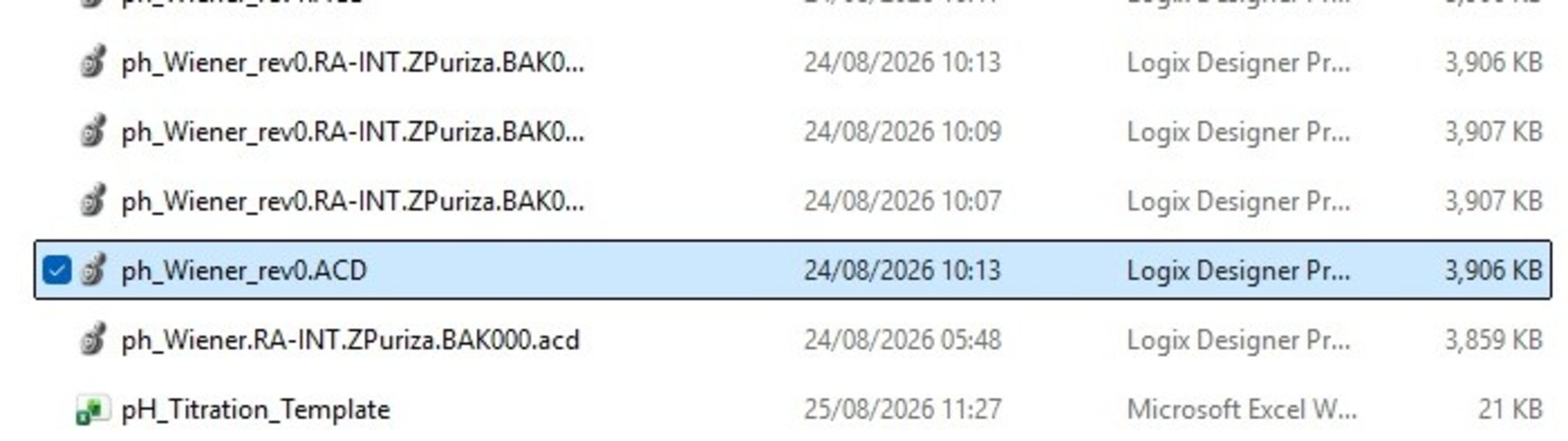
Extraiga los archivos del programa entregado (proyecto “.ACD”).


control-of-ph-based-on-a-wiener-model_16x9-phControl_step1_imagen1.jpg

control-of-ph-based-on-a-wiener-model_16x9-phControl_step1_imagen1.jpg


Abra el programa de Studio 5000 haciendo doble clic sobre el archivo .ACD. Para la prueba de esta aplicación se ha empleado un controlador ControlLogix 5580 (1756-L81E).

control-of-ph-based-on-a-wiener-model_16x9-phControl_step1_imagen2.jpg

control-of-ph-based-on-a-wiener-model_16x9-phControl_step1_imagen1.jpg

Paso 2


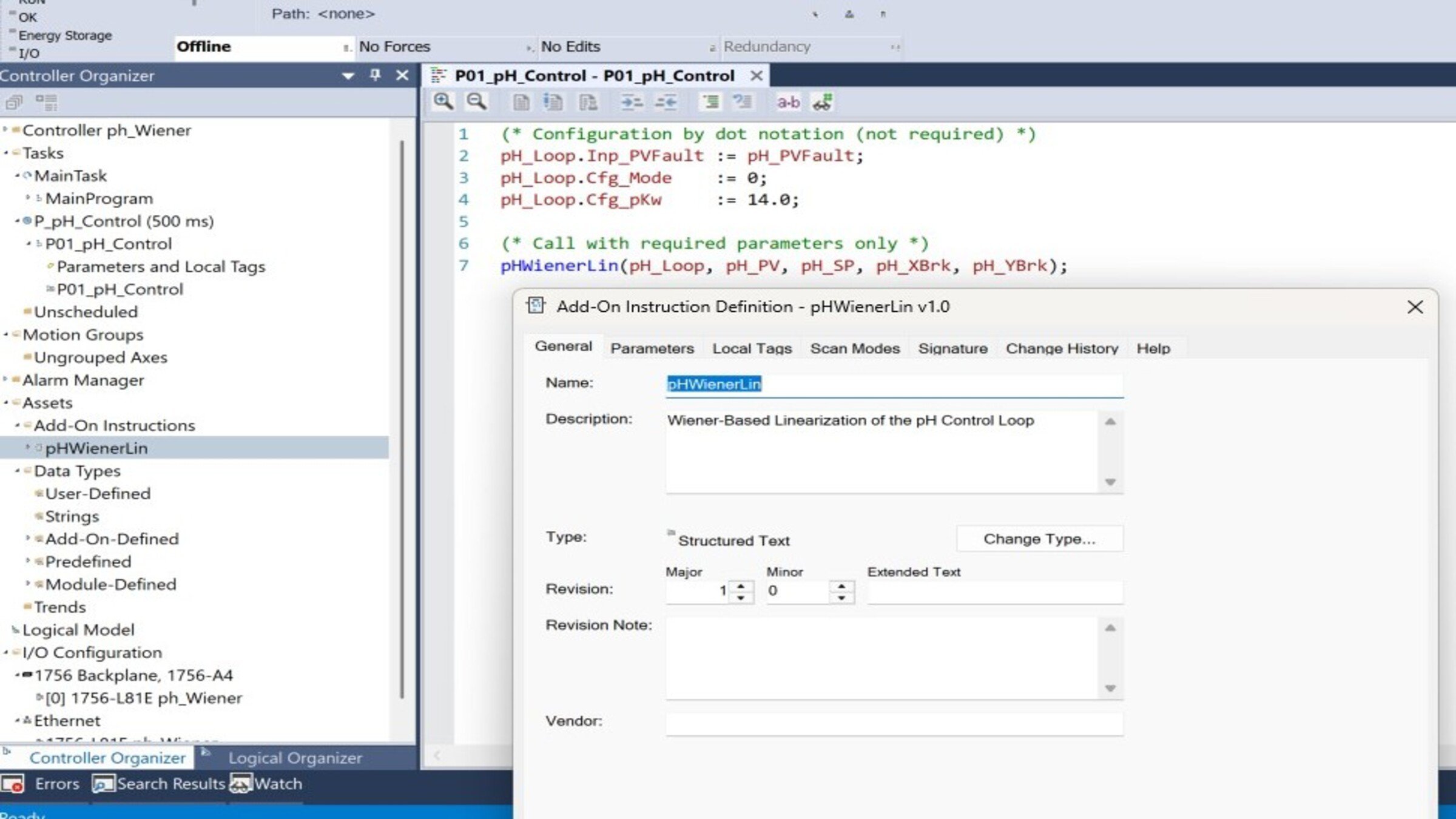
Entender la estructura del programa Revise en el “Controller Organizer”, los componentes principales del programa:

  • pH_WienerLin: Linealiza el pH aplicando la inversa de la curva de titulación
  • pH_PIDE (PID_ENHANCED): Control regulatorio en el dominio lineal
  • Programa P_pH_Control: Contiene la rutina de llamada
  • Task T_Process: Tarea periódica que ejecuta el control
 
control-of-ph-based-on-a-wiener-model_16x9-phControl_step2_imagen1.jpg

control-of-ph-based-on-a-wiener-model_16x9-phControl_step2_imagen1.jpg

Paso 3


Entender el AOI pH_WienerLin

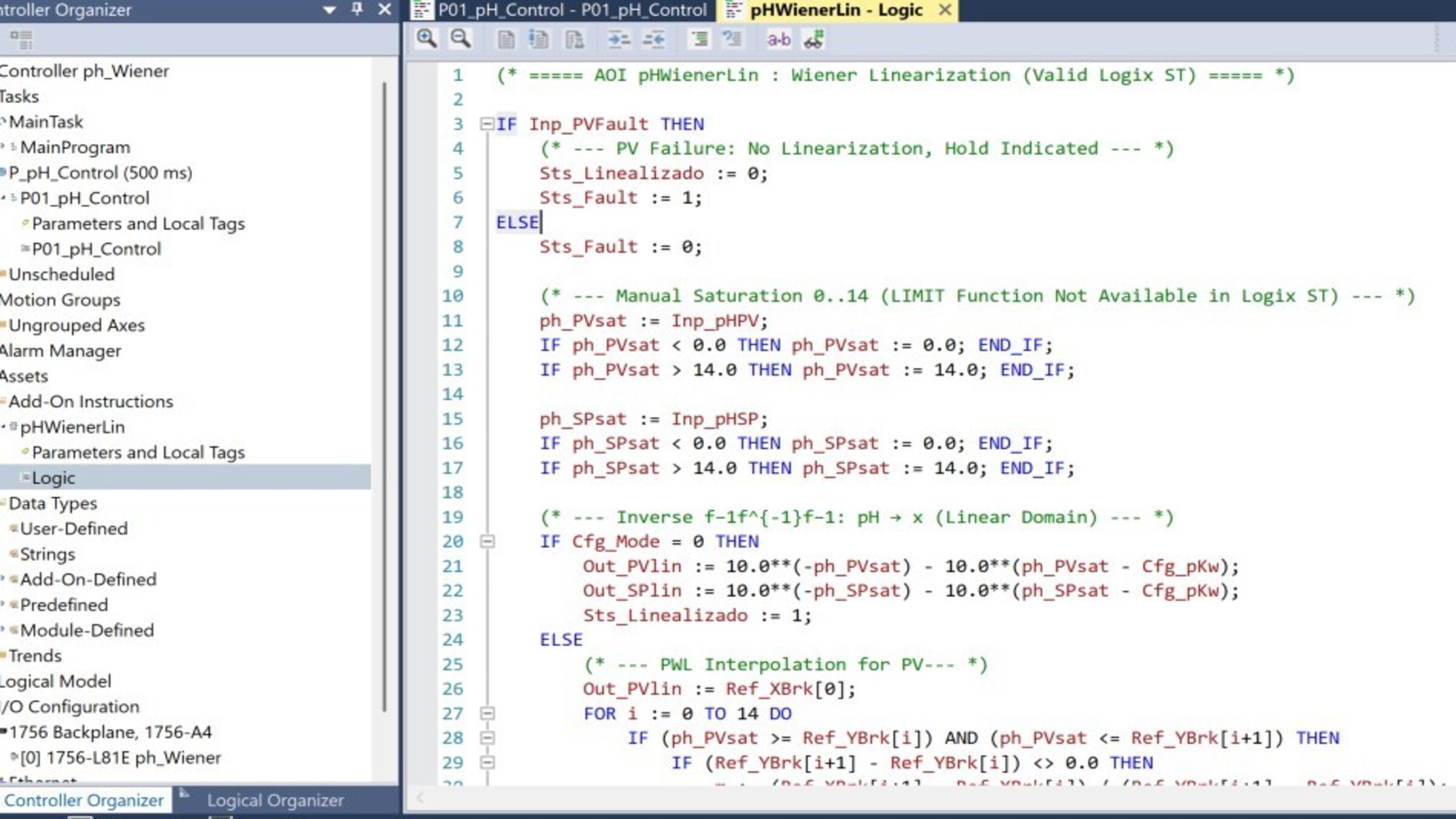
  • Abra el AOI en el Controller Organizer y revise la pestaña Logic.
  • El AOI transforma el pH al dominio lineal x mediante la inversa de la no linealidad: x=10−pH−10(pH−pKw)x = 10^{-pH} - 10^{(pH - pK_w)}x=10−pH−10(pH−pKw)
  • Entrega dos salidas: Out_SPlin (SP linealizado) y Out_PVlin (PV linealizado), que alimentan al PIDE. El parámetro Cfg_Mode selecciona el método: 0 = inversa analítica; 1 = tabla PWL (curva de titulación real).


control-of-ph-based-on-a-wiener-model_16x9-phControl_step3_imagen1.jpg

control-of-ph-based-on-a-wiener-model_16x9-phControl_step3_imagen1.jpg

Paso 4


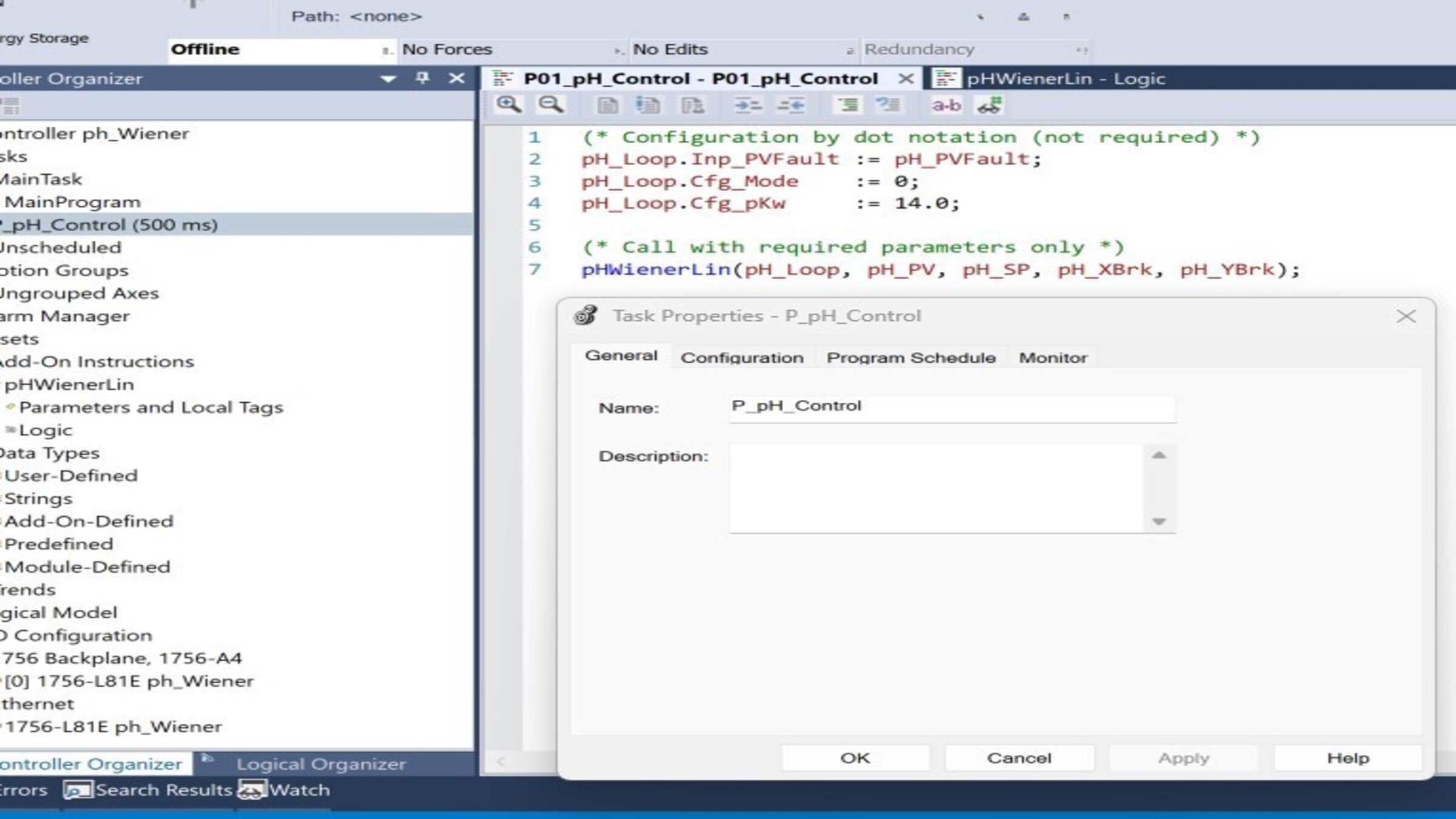
Entender la rutina de llamada En la rutina de P_pH_Control, verifique la secuencia de ejecución:

 
control-of-ph-based-on-a-wiener-model_16x9-phControl_step4_imagen1.jpg

control-of-ph-based-on-a-wiener-model_16x9-phControl_step4_imagen1.jpg

Paso 5


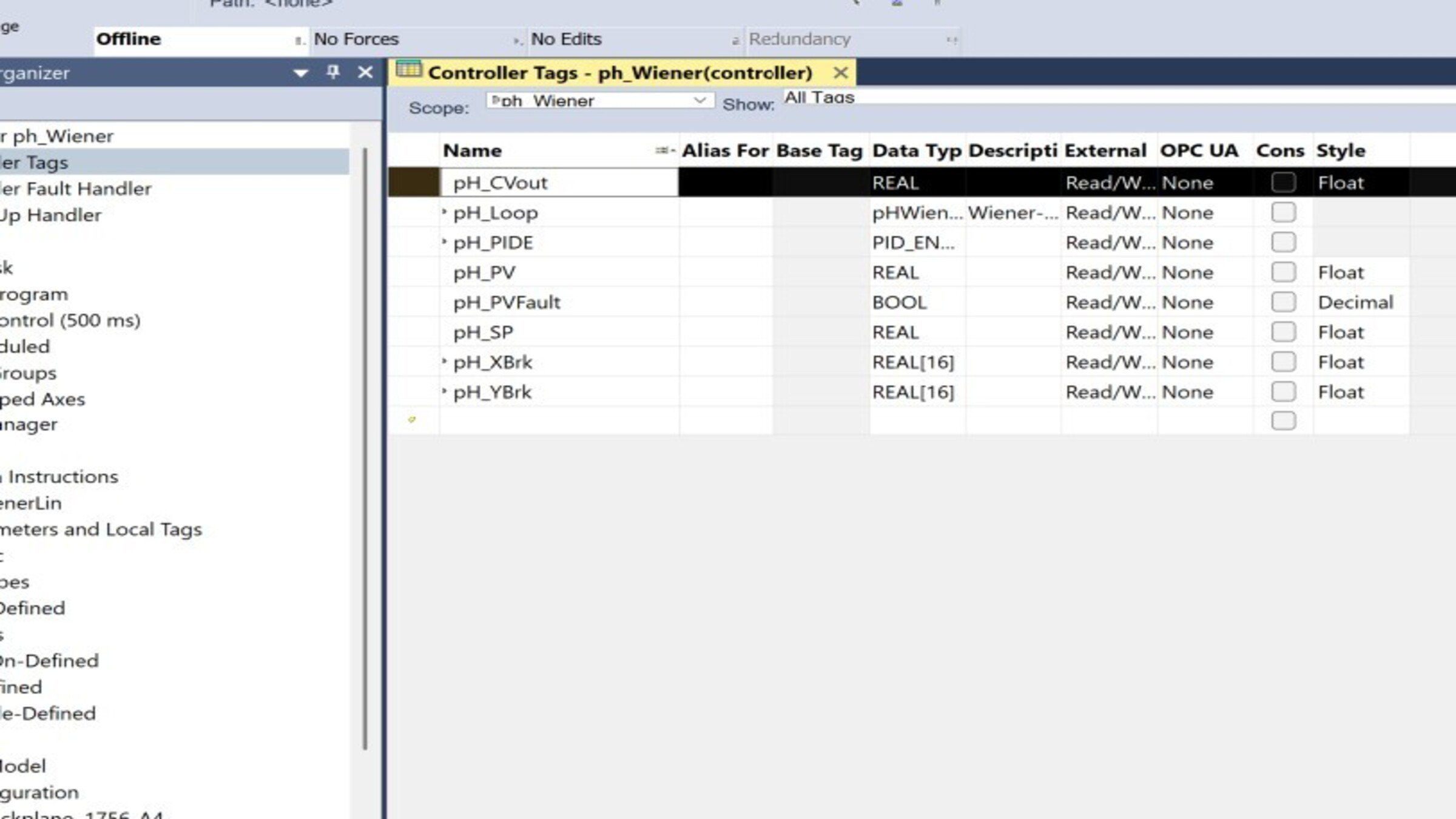
Configurar los tags de campo (mapeo de E/S) Vincule los tags del programa a sus módulos de entrada/salida:

Tag Tipo Vincular a
pH_CVout REAL Salida analógica a válvula/bomba
pH_PVFault BOOL Diagnóstico del canal / falla de transmisor
pH_SP REAL Setpoint (valor inicial 7.0)
pH_PV REAL Entrada analógica del transmisor de pH


control-of-ph-based-on-a-wiener-model_16x9-phControl_step5_imagen1.jpg

control-of-ph-based-on-a-wiener-model_16x9-phControl_step5_imagen1.jpg

Paso 6


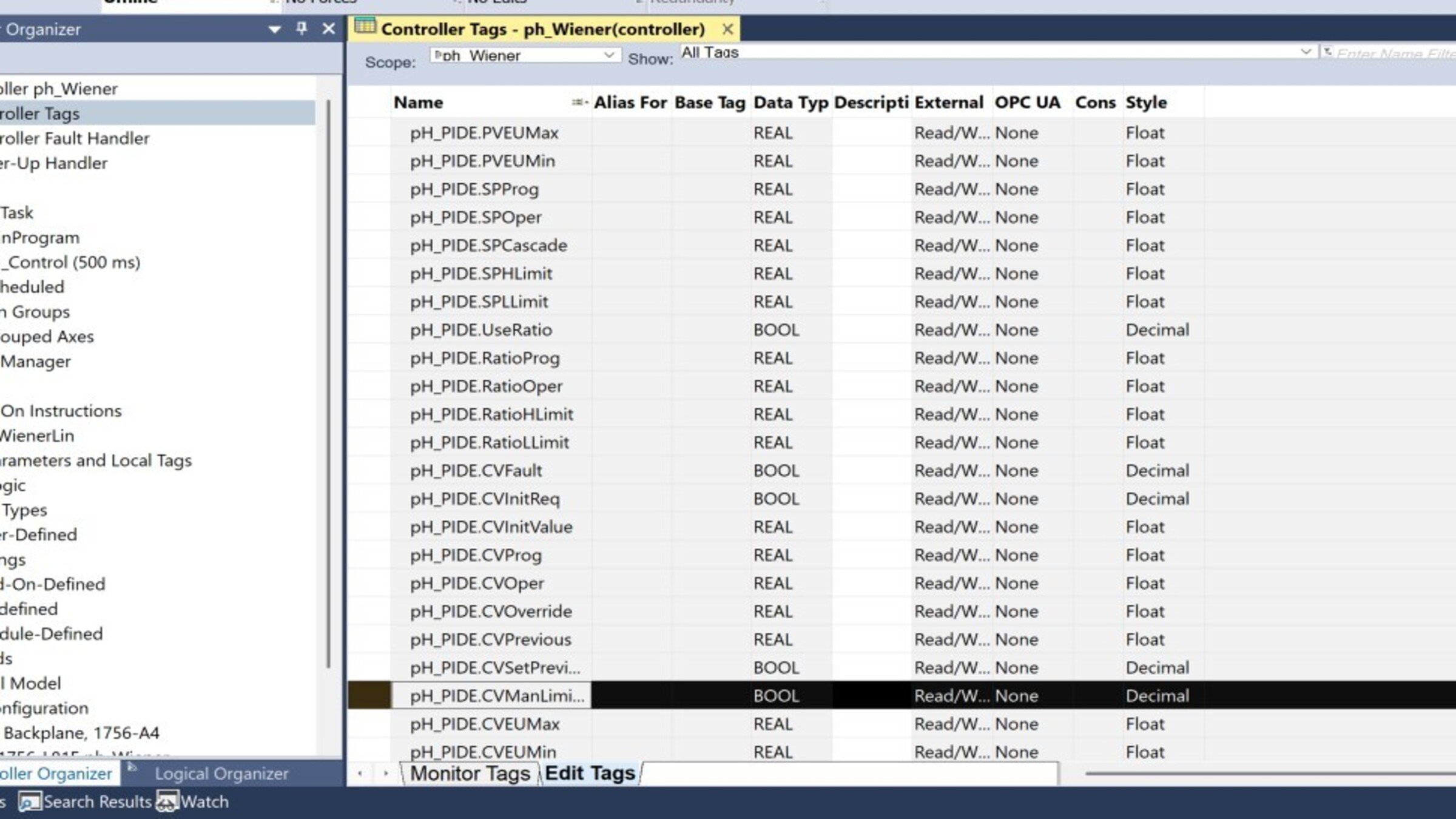
Configurar la instrucción PIDE. Abra las propiedades de pH_PIDE y ajuste:

Parámetro
Valor recomendado
Motivo – Acción
CVEUMax / CVEUMin
100 / 0 %
Rango de la válvula/bomba
PVEUMax / PVEUMin
+0.1 / −0.1
Escala del dominio lineal (ajustar a su curva)
PGain / IGain
1.2 / 0.05 (seed value)
Resintonizar tras identificación
DGain
0 Habitual en pH por ruido
 
control-of-ph-based-on-a-wiener-model_16x9-phControl_step6_imagen1.jpg

control-of-ph-based-on-a-wiener-model_16x9-phControl_step6_imagen1.jpg

Paso 7


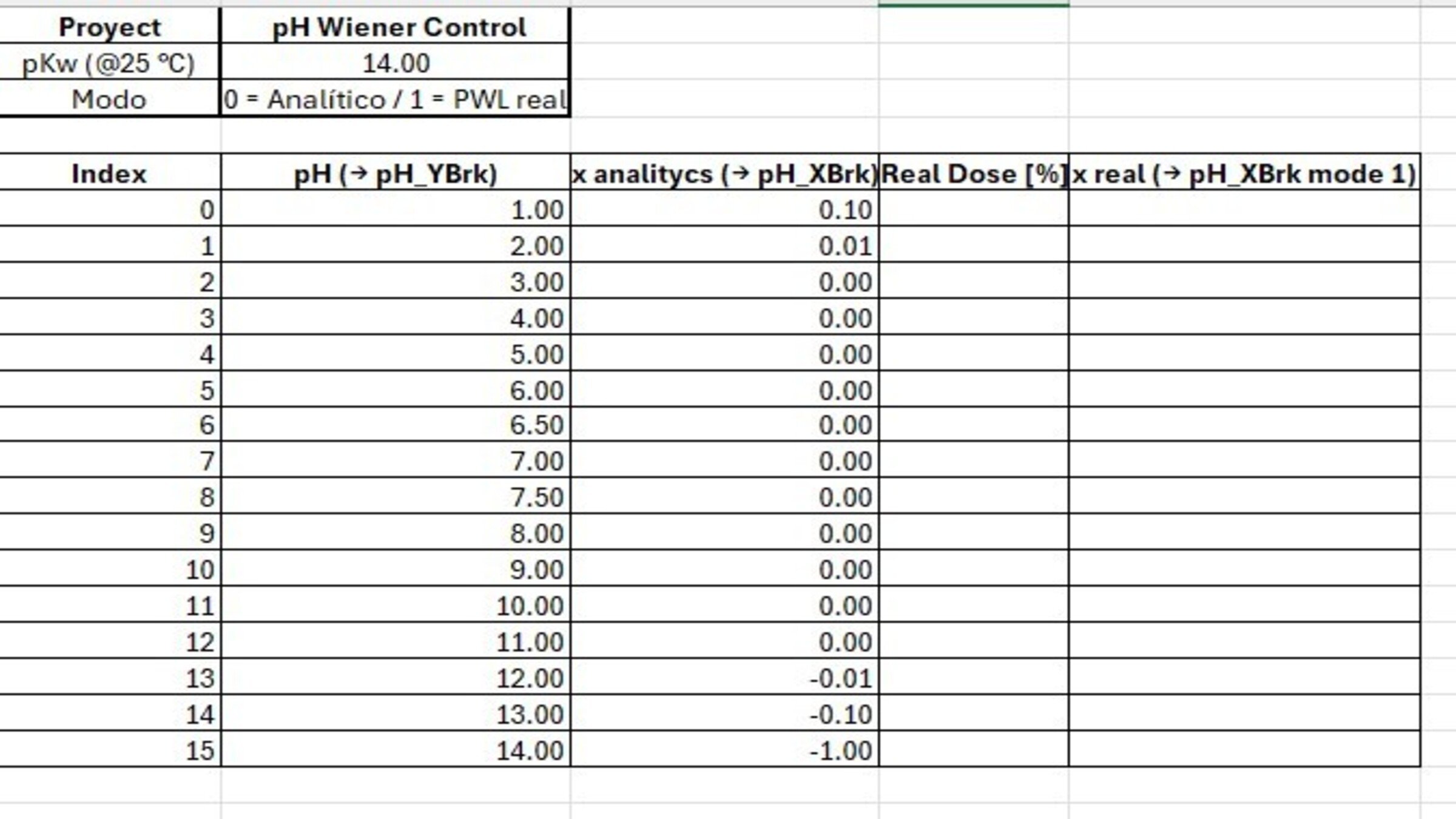
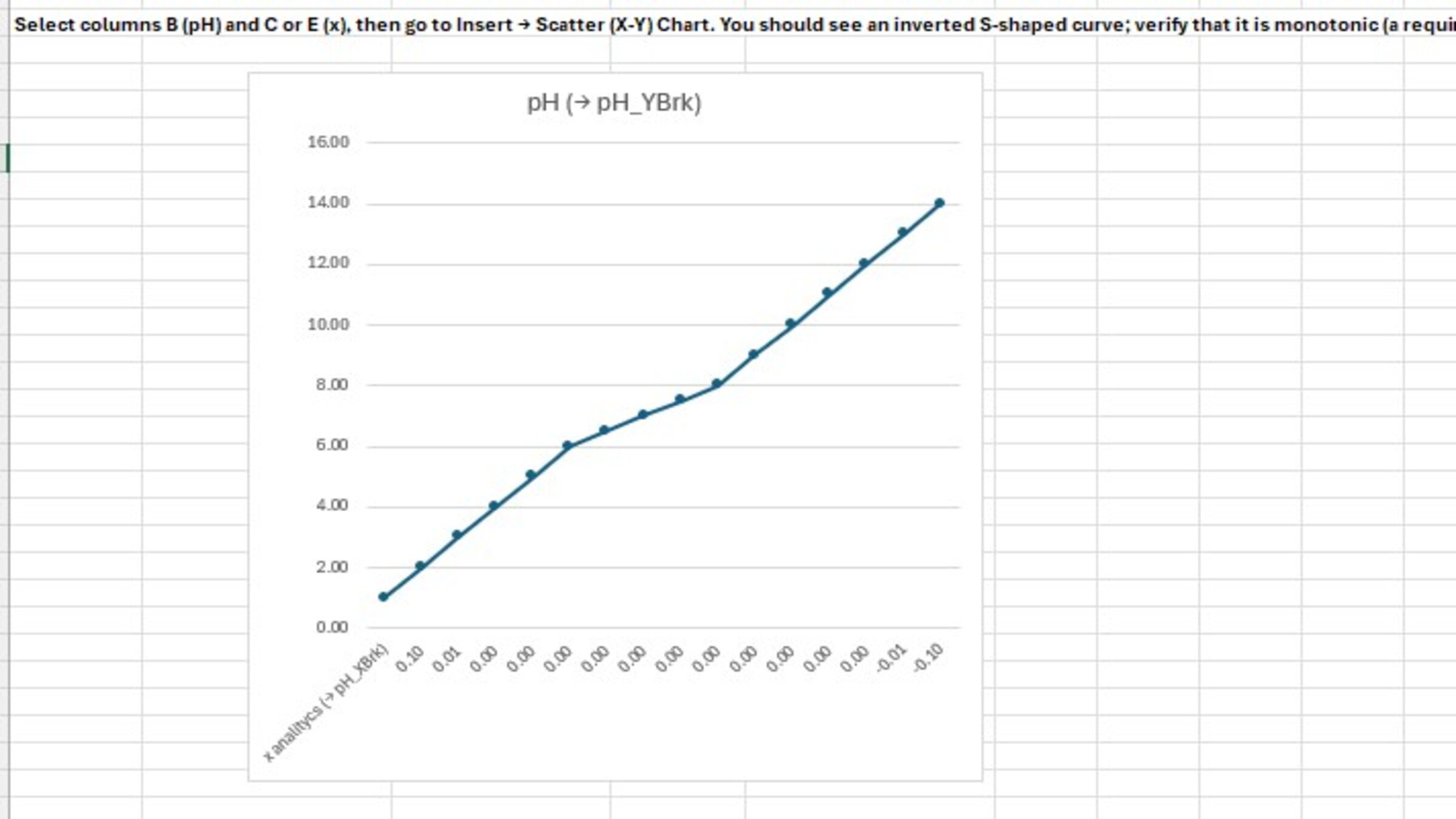
Poblar la curva de titulación (pH_XBrk / pH_YBrk):

  • En el monitor de tags, complete los 16 valores de cada arreglo (índices 0–15).
  • pH_YBrk: pH ascendente (1.0 → 14.0).
  • pH_XBrk: valores del dominio lineal x (calculados o de titulación real).
  • Verifique que pH_YBrk sea estrictamente ascendente y sin valores repetidos consecutivos.
 
control-of-ph-based-on-a-wiener-model_16x9-phControl_step7_imagen1.jpg

control-of-ph-based-on-a-wiener-model_16x9-phControl_step7_imagen1.jpg

Paso 8


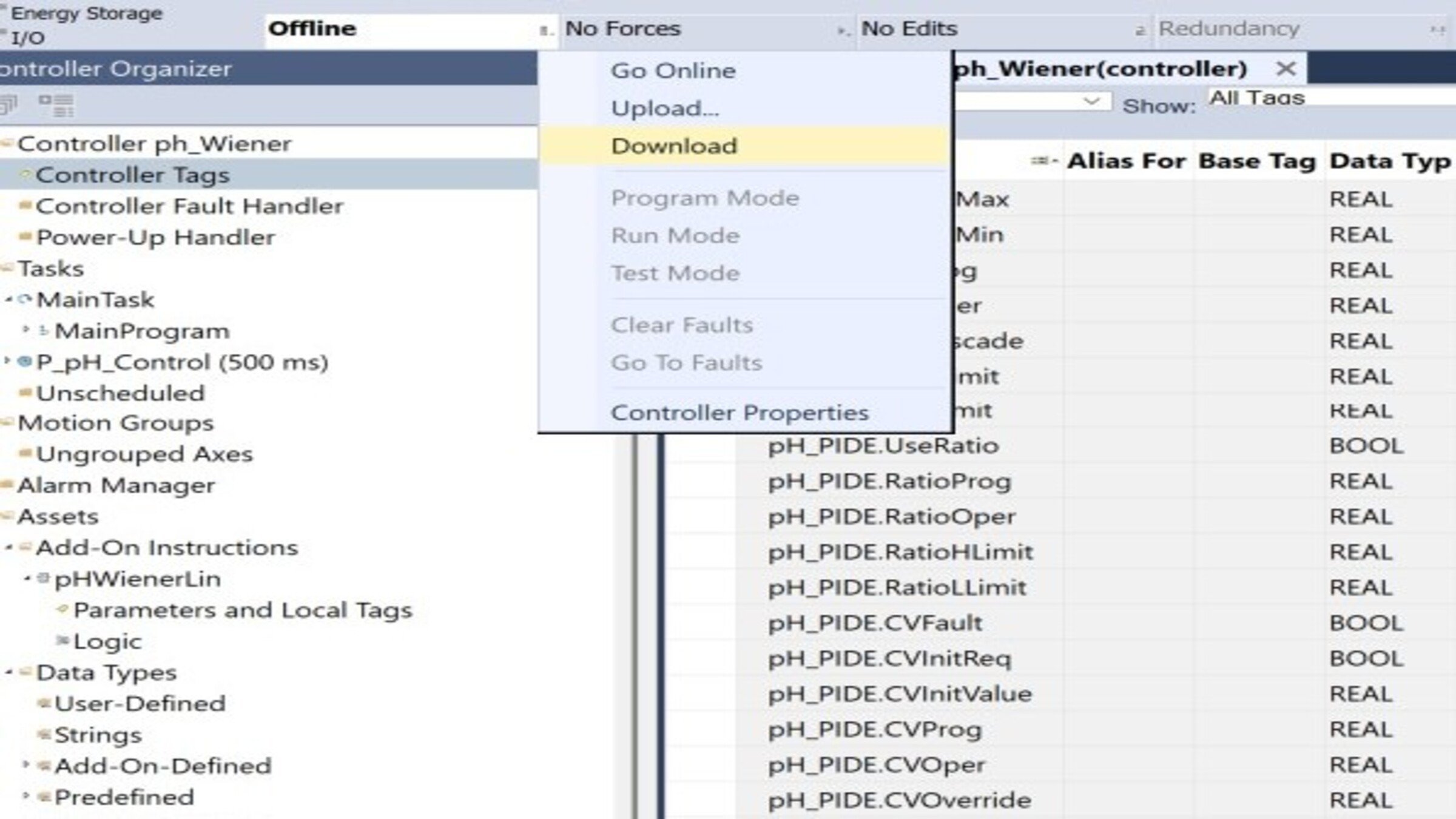
Descargar el programa al controlador:

  • Configure la ruta de comunicación (RSLinx / FactoryTalk Linx).
  • Verifique el proyecto con Verify (Ctrl+K) — debe compilar sin errores.
  • Descargue el proyecto y ponga el controlador en modo Remote Run.
 
control-of-ph-based-on-a-wiener-model_16x9-phControl_step8_imagen1.jpg

control-of-ph-based-on-a-wiener-model_16x9-phControl_step8_imagen1.jpg

Paso 9


Probar en modo Manual

  • Ponga el PIDE en Manual desde el tag pH_PIDE.
  • Verifique que al variar pH_PV (o forzando valores en simulación), Out_PVlin cambia de signo al cruzar pH 7 (positivo en zona ácida, ~0 en neutra, negativo en básica).
  • Confirme Sts_Linealizado = 1 y que pH_CVout responde manualmente.
     
 
control-of-ph-based-on-a-wiener-model_16x9-phControl_step9_imagen1.jpg

control-of-ph-based-on-a-wiener-model_16x9-phControl_step9_imagen1.jpg

Paso 10


Sintonizar y probar en Automático

  • Con el PIDE en Manual, use el autotuner de lazo abierto integrado (aplica un escalón en CV y estima el modelo del proceso).
  • Aplique las ganancias sugeridas (comience con respuesta lenta/media, adecuada para pH).
  • Pase a Auto y valide con escalones pequeños de SP.
Paso 11


Validación por rango de pH Ejecute escalones de SP en las tres zonas y confirme desempeño homogéneo:

Zona SP de prueba
Qué observar
Ácida
3 → 4 Respuesta estable, sin oscilación
Neutra
6 → 8 Zona crítica — sin sobreimpulso pese a la alta ganancia
Básica
10 → 11 Consistencia con las otras zonas


  • Verificación de funcionamiento (checklist)
  • Proyecto verificado sin errores (Ctrl+K)
  • pH_PIDE con acción inversa confirmada
  • Tags de campo mapeados a I/O
  • Arreglos pH_XBrk / pH_YBrk poblados correctamente
  • Prueba en Manual: linealización y salida correctas
  • Sintonía aplicada y prueba en Auto satisfactoria
  • Validación por rango (ácido/neutro/básico) homogénea


control-of-ph-based-on-a-wiener-model_16x9-phControl_step11_imagen1.jpg

control-of-ph-based-on-a-wiener-model_16x9-phControl_step11_imagen1.jpg

control-of-ph-based-on-a-wiener-model_16x9-phControl_step1_imagen1.jpg

control-of-ph-based-on-a-wiener-model_16x9-phControl_step1_imagen1.jpg

control-of-ph-based-on-a-wiener-model_16x9-phControl_step1_imagen2.jpg

control-of-ph-based-on-a-wiener-model_16x9-phControl_step1_imagen2.jpg

control-of-ph-based-on-a-wiener-model_16x9-phControl_step2_imagen1.jpg

control-of-ph-based-on-a-wiener-model_16x9-phControl_step2_imagen1.jpg

control-of-ph-based-on-a-wiener-model_16x9-phControl_step3_imagen1.jpg

control-of-ph-based-on-a-wiener-model_16x9-phControl_step3_imagen1.jpg

control-of-ph-based-on-a-wiener-model_16x9-phControl_step4_imagen1.jpg

control-of-ph-based-on-a-wiener-model_16x9-phControl_step4_imagen1.jpg

control-of-ph-based-on-a-wiener-model_16x9-phControl_step5_imagen1.jpg

control-of-ph-based-on-a-wiener-model_16x9-phControl_step5_imagen1.jpg

control-of-ph-based-on-a-wiener-model_16x9-phControl_step6_imagen1.jpg

control-of-ph-based-on-a-wiener-model_16x9-phControl_step6_imagen1.jpg

control-of-ph-based-on-a-wiener-model_16x9-phControl_step7_imagen1.jpg

control-of-ph-based-on-a-wiener-model_16x9-phControl_step7_imagen1.jpg

control-of-ph-based-on-a-wiener-model_16x9-phControl_step8_imagen1.jpg

control-of-ph-based-on-a-wiener-model_16x9-phControl_step8_imagen1.jpg

control-of-ph-based-on-a-wiener-model_16x9-phControl_step9_imagen1.jpg

control-of-ph-based-on-a-wiener-model_16x9-phControl_step9_imagen1.jpg

control-of-ph-based-on-a-wiener-model_16x9-phControl_step11_imagen1.jpg

control-of-ph-based-on-a-wiener-model_16x9-phControl_step11_imagen1.jpg


Control de pH basado en un modelo Wiener

Versión 1.0 - Agosto de 2026

 
AHIC White Logo

Reciba nuevas aplicaciones y novedades del Centro de Innovación directamente en su correo electrónico.

¡Suscríbase!
  1. Chevron LeftChevron Left Página principal de Rockwell Automation
  2. Chevron LeftChevron Left Asi...
  3. Chevron LeftChevron Left Sop...
  4. Chevron LeftChevron Left Descargas
  5. Chevron LeftChevron Left Application Hub - Innovation Center
  6. Chevron LeftChevron Left Control de pH basado en un modelo Wiener
El contenido de este sitio ha sido traducido mediante inteligencia artificial (IA) sin revisión humana o ediciones. El contenido podría contener errores o inexactitudes, y se proporciona “tal cual” sin ninguna garantía. El texto oficial es la versión en inglés del contenido.
Actualice sus preferencias de cookies para continuar.
Esta función requiere cookies para mejorar su experiencia. Actualice sus preferencias para permitir estas cookies.:
  • Cookies de Redes Sociales
  • Cookies Funcionales
  • Cookies de Performance
  • Cookies de Marketing
  • Todas las cookies
Puede actualizar sus preferencias en cualquier momento. Para más información, vea nuestro {0} Política de Privacidad
CloseClose