
Set the SNN of a Safety I/O Device
A time-based SNN is automatically assigned when you add the first safety I/O device on the network. This does not apply to the controller backplane or Ethernet port since the controller counts as a device on the network.
When subsequent safety devices are added to the same network, they are assigned the same SNN as defined in the lowest address on that
CIP Safety™
network or the controller itself if ports are attached to the controller. For most applications, the automatic, time-based SNN is sufficient. If your application requires you to assign the SNN of safety I/O devices manually, you only have to assign the SNN of the first safety I/O device you add in a remote network or backplane. The Logix Designer application then assigns the SNN of the first device to any additional devices that you add to that same remote network or backplane.
For an explanation on SNN, see the GuardLogix 5580 and Compact GuardLogix 5380 Safety Reference Manual, publication 1756-RM012.
- In the I/O configuration, right-click the remoteEtherNet/IP™communication device and select New Module.
- Select the safety I/O device and select Create.
- On the New Module dialog box, select the ellipse next to the safety network number.
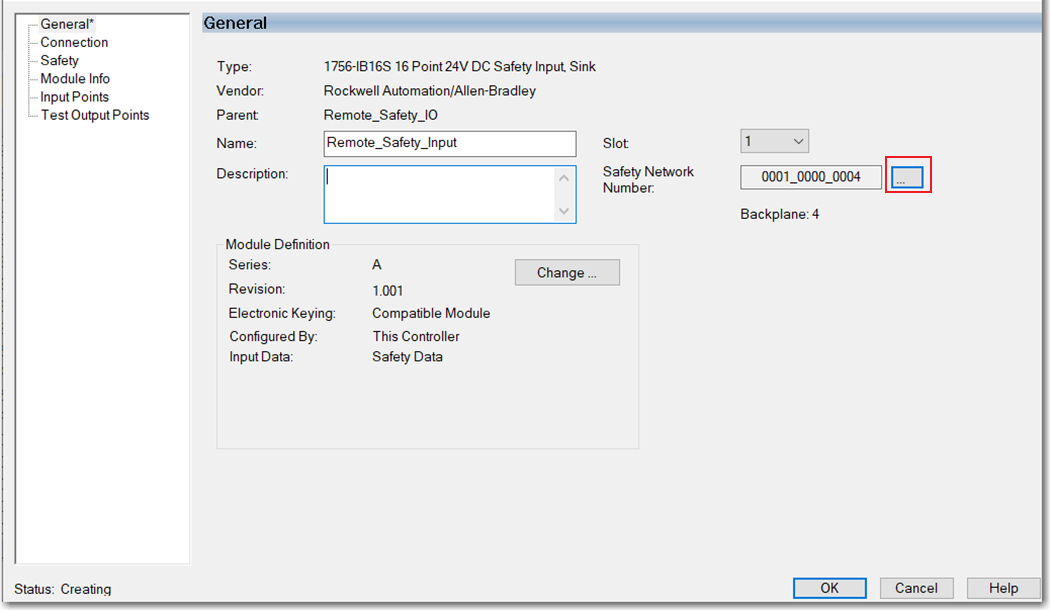
- On the Safety Network Number dialog box, select Manual.
- Enter the SNN as a value from 1…9999 (decimal) and select OK.

- On the New Module dialog box, click OK.
Provide Feedback