
Use Who Active or the Network Browser to Go Online with the Controller
Who Active or
the Network Browser to Go Online with the ControllerTo go online with the controller, you must first specify a communication path in the
Studio 5000 Logix Designer®
application.
IMPORTANT:
With the Studio 5000 Logix Designer® application version 38.00.00 and later, RSWho/Who Active has changed to Network Browser.
- Open or create a Logix Designer application project.
- In the application, clickWho Active orthe Network Browser.


- Expand the communication path and select the controller.
- To store the path in the project file, click Set Project Path.TIP:If you store the project path in the project, then you do not have to choose the path each time you go online.
- After choosing the communication path, click Go Online.
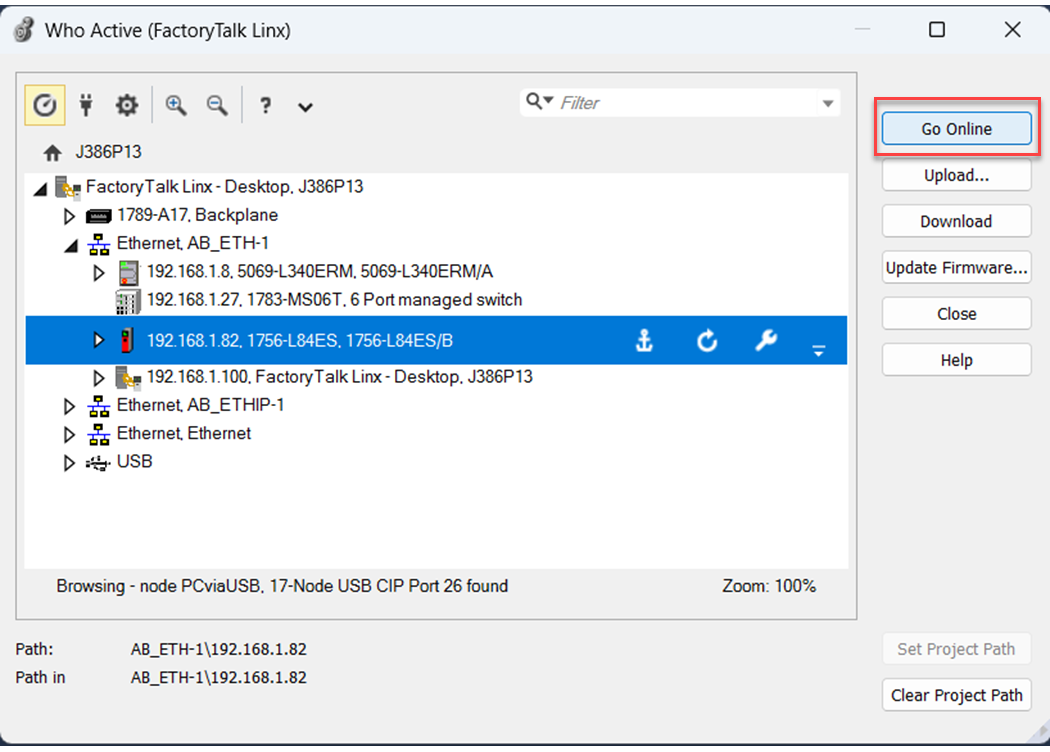 Go Online uses the highlighted node in the tree, regardless of the setting for Path in Project.
Provide Feedback