
Read output values of a method
Read values returned by OPC UA methods and custom methods defined in
NetLogics.
TIP:
For more information about methods, see OPC UA methods and Custom methods.
Prerequisites
- Either:
- Create a NetLogic and develop a custom method. See Define methods in C#.
- Import an existing OPC UA method. See OPC UA methods.
- If needed, create graphic objects to trigger the method and handle input and output arguments. See Graphic objects.
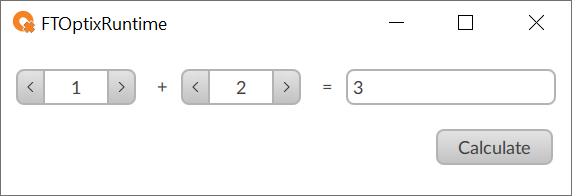
For example, create a runtime NetLogic and define a
CalculateSum
method
that sums two input arguments to return one output
argument.Then, add these graphic objects:#region Using directives using System; using UAManagedCore; using OpcUa = UAManagedCore.OpcUa; using FTOptix.HMIProject; using FTOptix.UI; using FTOptix.Retentivity; using FTOptix.NativeUI; using FTOptix.Core; using FTOptix.CoreBase; using FTOptix.NetLogic; #endregion public class AddNetLogic : BaseNetLogic { public override void Start() { // Insert code to be executed when the user-defined logic is started } public override void Stop() { // Insert code to be executed when the user-defined logic is stopped }[ExportMethod] public void AddNumbers(int number1, int number2, out int result) { result = number1 + number2; }}
- Two spin boxes to handle input arguments.
- Two labels with static+and=text displayed at runtime.
- A label to display the output argument.
- A button to trigger the method.
- Read the output value of a custom method
- Create a trigger for the method:
- InProject view, select an object to trigger the method.For example, select a button object.For more information about graphic objects, see Graphic objects.
- In the trigger objectEvents, add an event to trigger the method.For example, associate the custom method with theMouseClick eventof a button object.For more information, see Add a method to an existing event.
- If needed, create dynamic links between input arguments of the associated method and graphic objects.For more information, see Create dynamic links.For example, create dynamic links between input arguments and spin boxes or text boxes.
- Handle output values:
- InProject view, select an object to read the method output value.For example, select a label or a text box object to display the output value.For more information about graphic objects, see Graphic objects.
- InProperties, create a dynamic link between the property to read the output value and the method output value.For more information, see Create dynamic links.For example, create a dynamic link between theTextproperty and .
- If needed, repeat 2 for more output values.
Add method example
This example shows a custom method that adds two numbers from spin boxes. The text box
object displays the returned value.
Download a sample project:
ReadMethodOutputValue.zip.output
return
arguments
input
NetLogic
C#
method
Provide Feedback