
M - R
- M -
Master file
The term master is used loosely to describe the file (or binder) version to which the device data is compared during a Backup and Compare operation. Specific details vary depending on the device type.
- For Generic FTP, Siemens S5, and Siemens S7 Controller (STEP7) devices:A version of the asset's Backup Data serves as a master and is compared to the device binder. If specified, a version of the Configuration Data may also be compared to the device binder.
- For all other device types:A master file is a designated version of an asset's Configuration Data file. A master file may initially be uploaded from the physical device, such as a controller or robot, or it may be saved directly from the programming software (such as RSLogix 500). Operations that require a master file use the pinned version of the file, or the most recent version if no version is pinned.
- P -
Parenthesis
With just two conditions, evaluating the expression is pretty straightforward. More complicated expressions can have another meaning depending on how the elements are grouped. With no grouping, FactoryTalk AssetCentre evaluates first the AND operators and then the OR operators. Parenthesis override this, so anything in parenthesis is evaluated first.
Example 1:
Occurred Time Equals '7/22/2007'
And
Username Equal To SallyOr
Username Equal To HarryAnd
Resource Equal To Line1ComputerFactoryTalk AssetCentre evaluates first the ANDs and then the OR, so it is as if the expression were written:
(7/22/2007 AND Sally)
Or
(Harry AND Line1Computer)Meaning: Include anything Sally did on July 22. Include anything Harry did on the Line1Computer.
Occurred Time Equals '7/22/2007'
And
( Username Equal to SallyOr
Username Equal to Harry)And
Resource Equal To Line1ComputerFactoryTalk AssetCentre evaluates (Sally or Harry) first.
Meaning: Include anything that Sally or Harry did on July 22 on the Line1Computer.
Personal working folder
The working folder that overrides the system working folder where you can check out an editable version of a file or binder or get a read-only version of a file or binder.
Pin
Mark a version of a file or binder as the master for use in projects, but not for editing. The pinned version is used as the master file for Backup and Compare operations.
When you get a file or binder using the Archive tool, you get the pinned version (if a version has been pinned). If you check out the file or binder, however, you get the most recent version and your checked-in changes are saved as another version. Use pinning when you want people to use an existing version while development on the file or binder continues.
- R -
Root
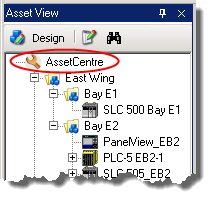
The root is the topmost node in the asset tree. All contents of the tree are placed under the root.
Provide Feedback