
Turn on secure communication between the FactoryTalk AssetCentre server, desktop clients, web clients, and agents
Once you configured the TLS settings, turn on secure communication between the
FactoryTalk AssetCentre
server, desktop clients, web clients, and agents in the Configure Server Settings Utility
window.To enable secure communication
- OnConfigure Server Settings Utility:
- On the taskbar, select
 .
. - In the search box, typeServer Settings.
- SelectFactoryTalk AssetCentre Server Settings.
- Enter the user name and password to sign in toFactoryTalk, and then selectOK.In theConfigure Server Settings Utilitywindow, underServer Location, the domain name (FQDN) of theFactoryTalk AssetCentreserver computer will be detected automatically.
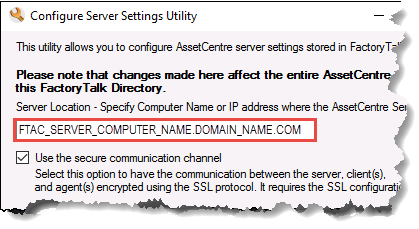
- Select theUse the secure communication channeloption.
- SelectOK.
Provide Feedback