
Lifecycle Information Dashboard widgets
The dashboard is composed of various widgets. Clicking the name, number, or chart in each widget will show the detailed filter results on the Report page.
Inventory Files
The
Inventory Files
widget shows the number of RAAI file that the dashboard is aggregating and the total number of RAAI files found in the selected container. Currently RAAI files containing only the results of a WMI scan are excluded from the aggregation.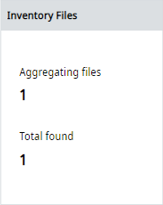
Device Summary
The
Device Summary
widget shows the total number of devices in the aggregated RAAI files, the number of duplicate devices found, and the number of devices without a serial number. To determine if a device is a duplicate, the system looks at the vendor ID, product type, product code, and serial number. If these attributes are identical the device is considered a duplicate. If either the serial number, product type, product code, or vendor ID is not the same, the device is not a duplicate.
TIP:
Clicking the name and number of
Duplicates
will not show the detailed filter results on the Report page.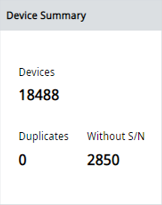
Install Base Total
The
Install Base Total
widget displays the Rockwell Automation devices and third-party devices.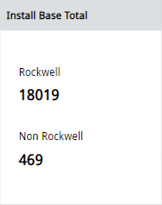
Major Lifecycle Items
The
Major Lifecycle Items
widget displays the total number of aggregated Rockwell Automation devices that are no longer manufactured or available for sale, and the total number of aggregated Rockwell Automation devices for which a Product Safety Advisory has been issued.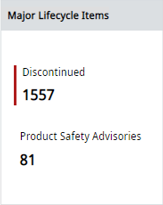
Minor Lifecycle Items
The
Minor Lifecycle Items
widget displays the total number of aggregated Rockwell Automation devices using firmware in the Limited lifecycle state for which there is limited support, and the total number of aggregated Rockwell Automation devices using firmware in the Retired state that is no longer available for download and was replaced by newer firmware.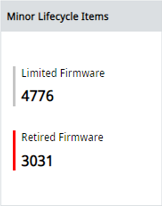
Out of Date
The
Out of Date
widget shows the total number of aggregated Rockwell Automation devices using firmware for which a newer major version is available (for example, 1756-L83 using v31.002 and the most current available firmware is v35.002), and the total number of aggregated Rockwell Automation devices using firmware for which a newer minor version is available (for example, 1756-L83 using v31.002 and the most current available v31 firmware is v31.007).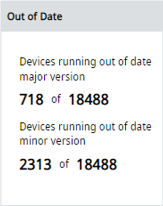
Product Lifecycle
The
Product Lifecycle
widget shows the distribution of the aggregated devices' lifecycle statuses, including None, Active, Active Mature, End of Life, Discontinued, Multiple Status, Not Available, and Non Rockwell. For more information, see Product lifecycle statuses.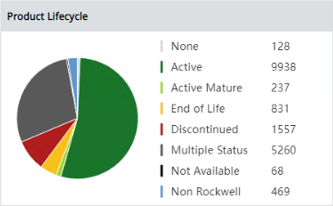
Lifecycle Projections
The
Lifecycle Projections
widget shows the number of Rockwell Automation devices that are expected to be discontinued within specified time frames. This chart only includes Rockwell Automation devices whose product lifecycle state is Active Mature or End of Life.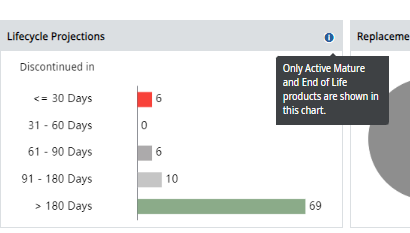
Replacement Category
The
Replacement Category
widget displays the product replacement category. This chart only shows the replacement categories for the product lifecycle statuses of Active Mature, End of Life, and Discontinued. The widget only applies to Rockwell Automation devices.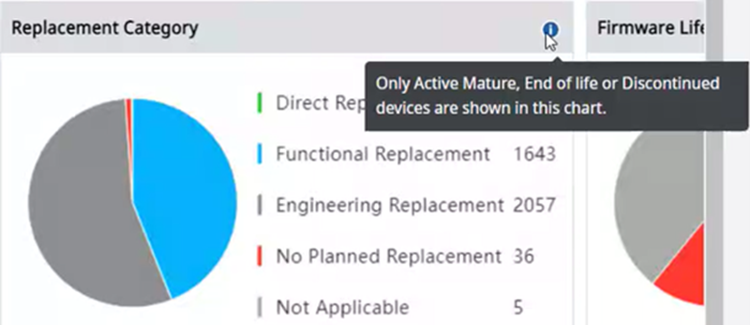
Firmware Lifecycle
The
Firmware Lifecycle
widget shows the distribution of the aggregated devices' firmware lifecycle state. Rockwell Automation devices are distributed among Preferred, Managed, Limited, Retired, and None. A firmware lifecycle state of None means that no state could be found for the firmware version found in a device.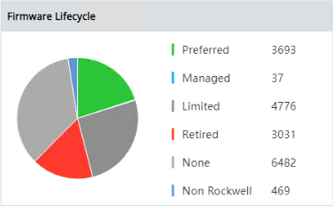
Top 5 Product Type
The
Top 5 Product Type
widget shows a quantity histogram of the five most frequently found devices in the aggregated RAAI files.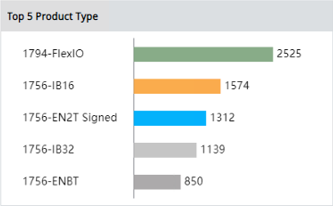
Communication Protocol
The
Communication Protocol
widget displays the number of aggregated devices found using each supported communication protocol.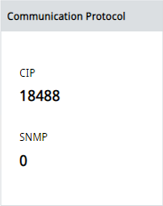
Provide Feedback