
Network manager
Click the
Network Manager
option to view the current network manager connection statistics.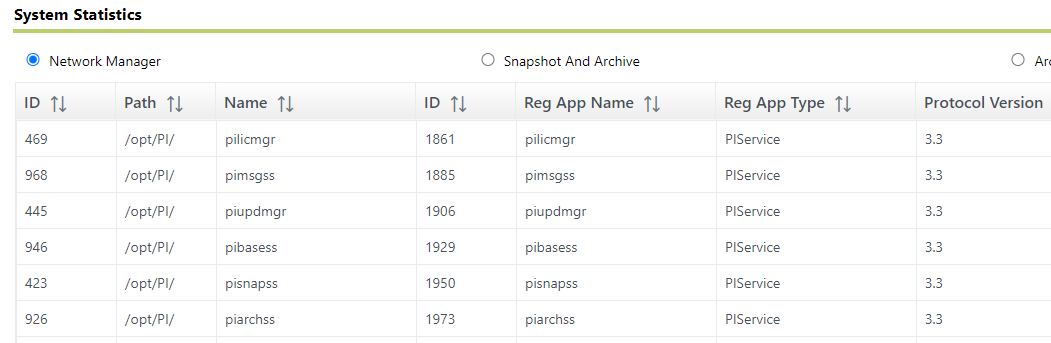
The
Network Manager
section displays the following information:Item | Description |
|---|---|
ID | The connection ID. This is the primary key. |
Path | The root directory on the server. This directory is the same for all connections. |
Name | The connection name. |
ID | The process ID number. |
Reg App Name | The registered application name. |
Reg App Type | The registered application type. |
Protocol Version | The protocol version of the connecting application. |
Peer Name | The host name of the connecting machine. |
Peer Address | The IP address of the connecting machine. |
Peer Port | The port number of the connecting machine. |
ConType | The connection type. |
Net Type | The network type. |
ConStatus | The connection status. |
ConTime | The time of the connection. |
Last Call | The time of the last call. |
Elapsed Time | The amount of time passed. |
Bytes Sent | The number of bytes sent. |
Bytes Recv | The number of bytes received. |
Msg Sent | The number of messages sent. |
Msg Recv | The number of messages received. |
Errors Recv | The number of errors received. |
Errors Sent | The number of errors sent. |
API Count | The number of APIs. |
SDK Count | The number of SDKs. |
Server ID | The identification number of the server. |
NetMgr Version | The number of the network manager version. |
OS Sys Name | The operating system name. |
OS Node Name | The operating system node name. |
OS Release | The operating system release number. |
OS Version | The operating system version number. |
Machine | The system name. |
User | The user name. |
OS User | The operating system user name. |
Trust | The name of the trust connection. |
Provide Feedback