
Motion Servo On (MSO)
Use the Motion Servo On (MSO) instruction to activate the drive amplifier for the
specified axis and to activate the axis servo control loop.
Available Languages
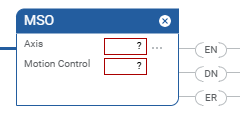
Ladder Diagram
Structured Text
MSO(Axis,MotionControl);
Operands
Ladder Diagram and Structured Text
Operand | Type | Format | Description |
|---|---|---|---|
Axis | AXIS | tag | Name of the axis on which to perform operation. |
Motion Control | MOTION_INSTRUCTION | tag | Structure used to access instruction status parameters. |
See Structured Text syntax for more information on the syntax of expressions within structured text.
Mnemonic | Description |
|---|---|
.EN (Enable) Bit 31 | It is set when the rung makes a false-to-true transition and
remains set until the servo message transaction is completed and
the rung goes false. |
.DN (Done) Bit 29 | It is set when the axis’ servo action has been successfully
enabled and the drive enable and servo active status bits have
been set. |
.ER (Error) Bit 28 | It is set to indicate that the instruction detected an error,
such as if you specified an unconfigured axis. |
Description
The MSO instruction directly activates the drive and enables the configured servo
loops associated with a physical servo axis. It can be used anywhere in a program,
but should not be used while the axis is moving. If this is attempted, the MSO
instruction generates an Axis in Motion error.
The MSO instruction automatically enables the specified axis by activating the drive
and the associated servo loop. The resulting state of the axis is referred to as the
Running state.
The most common use of this instruction is to activate the servo loop for the
specified axis in its current position in preparation for commanding motion.
IMPORTANT:
The instruction execution may take multiple
scans to execute because it requires multiple coarse updates to complete the
request. The Done (.DN) bit is not set immediately, but only after the request is
completed.
In this transitional instruction, the relay ladder, toggle the Rung-condition-in from
cleared to set each time the instruction should execute.
Affects Math Status Flags
No
Major/Minor Faults
None specific to this instruction. A major fault can occur if an uninitialized
reference or a reference of the incorrect type is passed to the Axis operand. See
Common Attributes for operand-related faults.
Execution
Ladder Diagram
Condition/State | Action Taken |
|---|---|
Prescan | The .EN, .DN, and .ER are cleared to false. |
Rung-condition-in is false | The .EN bit is cleared to false if the .DN or .ER bit is
true. |
Rung-condition-in is true | The .EN bit is set to true and the instruction executes. If the
EN bit is set to false, there is no action taken, |
Postscan | N/A |
Structured Text
Condition/State | Action Taken |
|---|---|
Prescan | See Prescan in the Ladder Diagram table |
Normal execution | See Rung-condition-in is false, followed by rung is true in the
Ladder Diagram table. |
Postscan | See Postscan in the Ladder Diagram table. |
Error Codes
See Motion Error Codes
.ERR for Motion Instructions.
Extended Error Codes
Extended Error Codes provide additional instruction specific information for the
Error Codes that are generic to many instructions. See Motion Error Codes
.ERR for Motion Instructions. These Extended Error codes help to pinpoint
the problem when the MSO instruction receives a Servo Message Failure (12) error
message.
Extended Error Code (decimal) | Associated Error Code (decimal) | Meaning |
|---|---|---|
Object Mode conflict (12) | SERVO_MESSAGE_FAILURE (12) | Axis is shutdown. |
Process terminated on request (15) | SERVO_MESSAGE_FAILURE (12) | Enable input switch error. (SERCOS) |
Device in wrong state (16) | SERVO_MESSAGE_FAILURE (12) | Device State not correct for action. (SERCOS) |
MSO Changes to Status Bits
Axis Status Bit
Bit Name | State | Meaning |
|---|---|---|
ServoActionStatus | TRUE | Axis is in Servo Control state with the servo loop active. |
DriveEnableStatus | TRUE | The axis drive enable output is active. |
Motion Status Bits
None
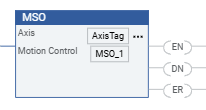
Example
Ladder Diagram
Provide Feedback