
Considerations for Assigning SNNs
When you create a controller project, the application generates an SNN value automatically whenever a new subnet contains
CIP Safety™
devices:- EachCIP Safety™-capable port on the controller is assigned an SNN.
- If a bridge or adapter device is in the I/O tree and a childCIP Safety™device is added, the subnet that is created by the bridge or adapter is assigned an SNN.
If the entire
CIP Safety™
system consists of one controller project, these automatically generated SNN values are sufficient.If there are multiple controllers that must interact or access the same safety I/O, the
CIP Safety™
system designer must coordinate the SNN values between the separate project files. The application provides copy/paste access to the SNN assignments to enable this coordination.You can also choose to map out the entire routable system (perhaps for the entire plant) and manually assign SNN values to each subnet. The application provides a manual entry method for assigning SNN values to enable this design methodology.
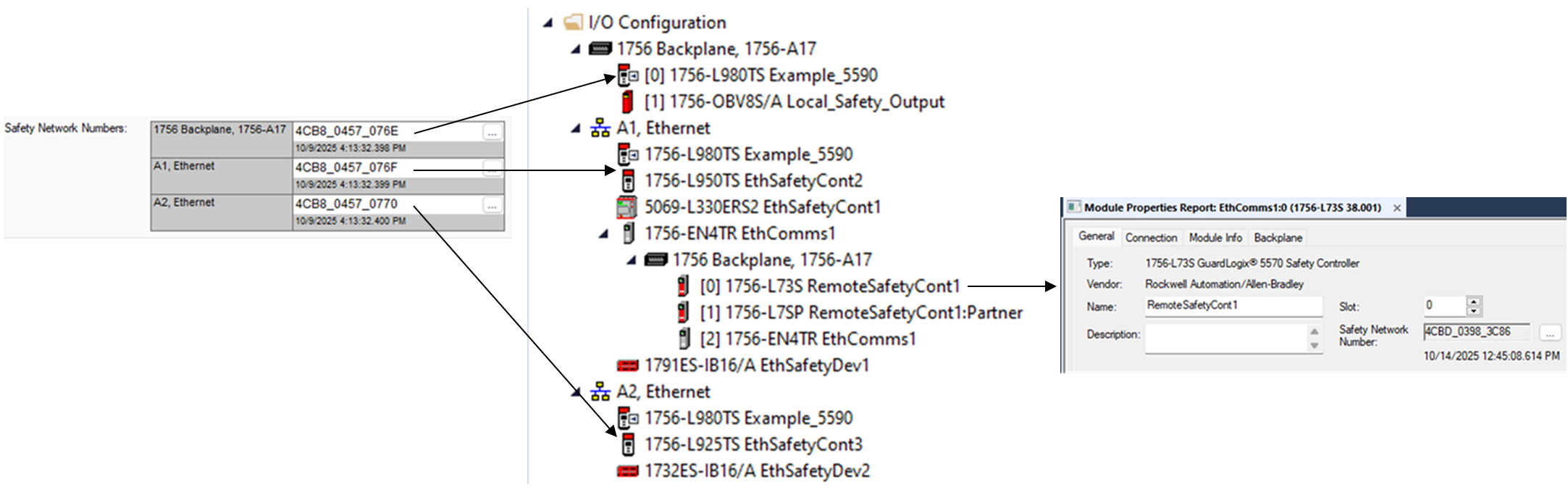
The following example shows how SNNs can be assigned to subnets.
SNN Assignment Example

Subnet | Type | SNN Assignment |
|---|---|---|
SNN_1 | EtherNet/IP™ | 5069-L330ERS2 Ethernet port 1, 1791ES-IB16, 1756-L980TS Ethernet port 1, and 1756-L950TS Ethernet port 1 |
SNN_2 | Backplane | 1756-L73S, 1756-L950TS, and 1756-L925TS backplane port |
SNN_3 | Backplane | 1756-L980TS backplane and 1756-OBV8S |
SNN_4 | EtherNet/IP™ | 1756-L980TS Ethernet port 2, 1756-L925TS Ethernet port 2, 1732ES-IB16 |
The following figure shows how the preceding example corresponds to the Controller Organizer I/O tree.
Controller Organizer
The configuration profile for each
CIP Safety™
device in the I/O tree includes a parameter for the SNN value that the controller uses when it opens the CIP Safety™
connection to that device. This parameter automatically adopts the SNN value that is already established by the SNNs known to the project:- Safety devices, including controllers, that are direct children of a controller adopt the SNN that matches the controller for the port that is used to connect to the safety module.
- Safety devices directly under the backplane port adopt the backplane port SNN of the controller.
- Safety devices directly under an Ethernet port adopt that Ethernet port SNN of the controller.
- Safety devices, including controllers, on a remote subnet adopt the SNN value that is already assigned to that subnet, or a new SNN is generated for the firstCIP Safety™device on that subnet.
We recommend that you assign each controller SNN to the already established SNN for the subnet. This recommendation enables the Logix Designer application to assign the correct SNN to each safety I/O module and safety controller that are added to the project.
If safety I/O is copied from an existing project during controller program development, the SNN value from the original location is retained. To create an SNN structure that resembles the newly created I/O, you can manually change the SNN of copied devices to follow the SNN structure of the new project by using copy/paste SNN from other I/O on the subnet or parent device. If you copy safety I/O into a new remote rack, then a new time-based SNN can be established and populated throughout the remote rack.
Provide Feedback