
Configuring container priorities
The priorities of a container are used to select materials that you want to use first. For
example, the oldest material needs to be used before newer materials are used in a recipe,
so you can set priority values for each container. The default priority value is
100
. The allowed values are 1 to 100, with
1
being the lowest value, which is selected first. You can
assign as many priorities per material as needed. If the container with a value of
1
runs out of material, the next priority container for that
material is used.The
Priorities
tab displays area model data loaded into the material
database by a FactoryTalk Batch
Server during start up. If no information is
visible, then the database does not contain the area model data.- From theEdit Material Storage Containerdialog, select thePrioritiestab.
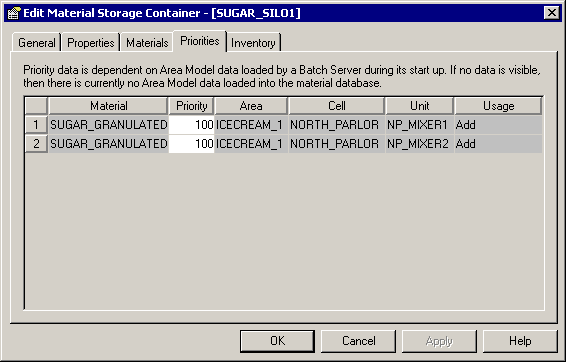 The following is a list of items in thePrioritiestab:Priorities itemsItemDescriptionMaterialUnique name of the material stored in the container(view-only).PriorityThe priority ranking of the container(required).AreaThe area model name loaded by theFactoryTalk BatchServer(view-only).CellThe cell class instance configured in the area model, that has the container assigned to it(view-only).UnitThe unit class instance configured in the area model that has the container assigned to it(view-only).UsageThe type of usage configured in the area model, which determines if the container is an addition of material, distribution, or both(view-only).
 - In thePrioritycolumn, select a record row to edit, and then type a value from1to100.
- ClickApplyto save the changes, or clickOKto save the changes and close the dialog.
Provide Feedback