
Push Button Configuration - Fault/Program Action View
For illuminated push buttons, you can configure fault and program actions.
The Fault/Program Action view defines the device states when the controller is switched to the Program Mode or a communication fault occurs.
Push Button Configuration - Fault/Program Action View
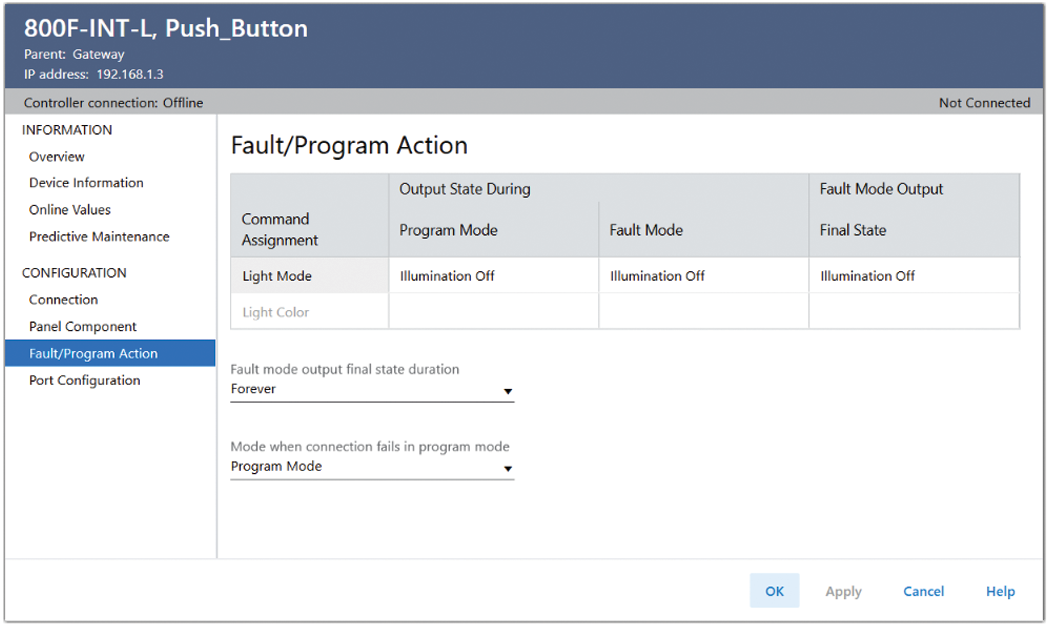
Field | Description |
|---|---|
Command Assignment Light Mode | Defines the light source transition for the Output state during Program mode, Fault mode, and Fault mode output Final state. Options are:
|
Command Assignment Light Color | Defines the light source color that is displayed for the corresponding Command Assignment Light Mode. If the selected Panel Component is clear lens, dropdown options are:
If the Panel Component selected has a color lens, the Light Color matches the selection. |
Fault mode output final state duration | Only available when controlled by controller. Defines the time that elapses before device transitions to the final fault state:
|
Mode when connection fails in program mode | Only available when controlled by controller. Defines the state to which the device transitions when the controller operating mode changes from Program to Fault. In the Peer mode, the control defines the action after the device transitions form idle to faulted. Options are:
|
Provide Feedback