
Configuration - Reference Topology View
The Reference Topology displays the devices and their expected locations that you configured in the system.
Gateway Reference Topology
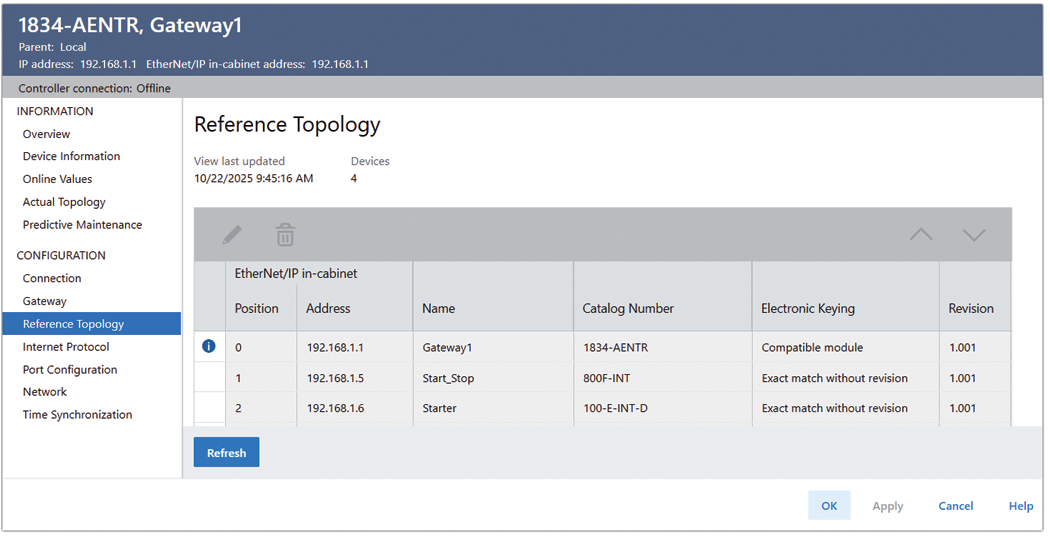
Table Fields | Description |
|---|---|
View last updated | Displays the date and time that the data was last read from the device. |
Devices | Displays the number of rows in the In-cabinet Actual Topology table. Data is not saved when the number of rows exceeds 40. |
Status | Displays the status of devices in the reference topology:
|
 Not ready. Mouse hover over the icon to display
  Device changed at position X: In-Cabinet
Table Fields | Description |
|---|---|
First column | Position 0 is reserved for Gateway, cannot be edited
|
IP address | Displays the IP address of the device present at this position. |
Name | Displays the name of the device present at this position. A blank field indicates that the device does not exist in the project. |
Catalog number | Displays the catalog number when available. Displays the catalog number if it does not match with the one in Project Topology. If the catalog number is unavailable, it displays Unknown Product Code. |
Electronic keying | Displays the electronic keying selection.
|
Revision | Displays the device revision in the format: Major Revision Minor Revision. The Minor Revision is always displayed as 3 characters with leading zeros. |
 The In-cabinet Actual Topology table has a new entry that is not saved into the configuration structure.
 An entry is edited.
Provide Feedback