
The ACM database structure
A working knowledge of the structure of the ACM database will assist when writing document generation scripts for data extraction. There are several tables and views that will be useful for generating documentation.
In addition to the SQL tables, there are also several views available. A view is a virtual table that can be queried in the same way as a table. Views can provide advantages over tables in the following ways:
- Views can represent a subset of data contained within a table.
- Views can join and simplify multiple tables into a single virtual table.
Important tables in use in the ACM database are as follows:
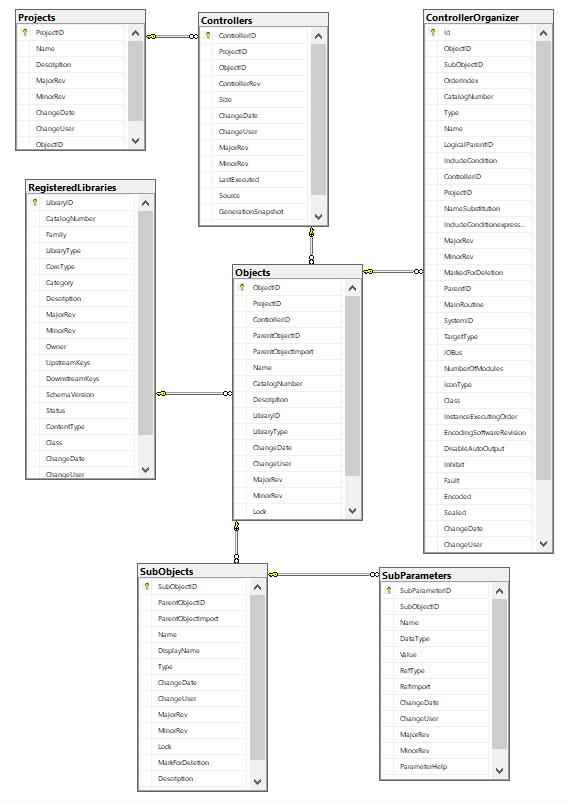
Table descriptions
- Projects: Contains ACM project information. Columns available in this table are as follows:
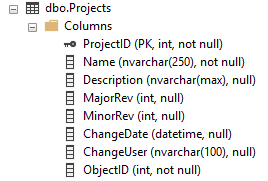
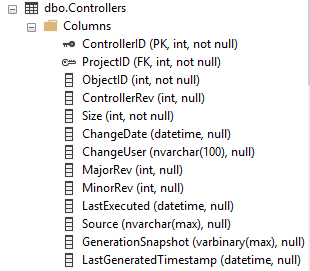
- Controllers: All controllers in use in projects in the ACM database are recorded in this table. Columns available are as follows:
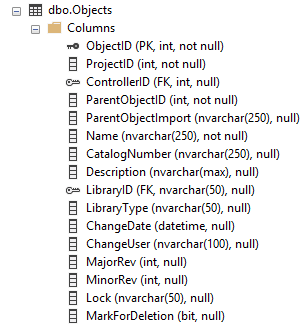
- Objects: All objects used in ACM projects are recorded in this table. Columns available are as follows:
- SubObjects: All SubObjects linked to parent objects in use in ACM projects in the ACM database are stored in this table. Columns available are as follows:
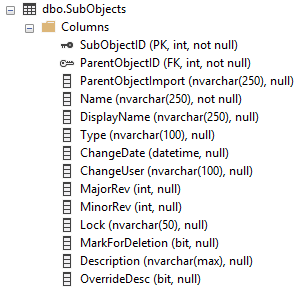
- SubParameters: All parameters created for SubObjects used in ACM projects are recorded in this table. Columns available are as follows:
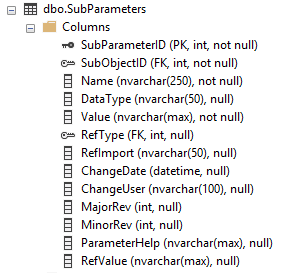
- RegisterdLibraries: All libraries registered in the ACM database are recorded in this table. Columns available are as follows:
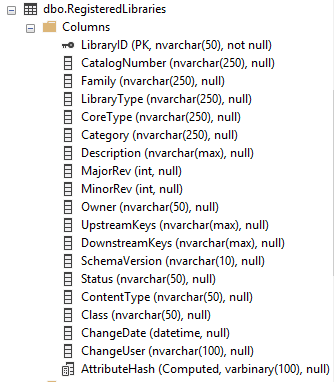
View Descriptions
As mentioned earlier, several views are available that contain consolidated information that may simplify SQL query construction in that they make information from different tables available from a single source. Search parameters must be provided to ensure that only data for the loaded ACM project is retrieved.
Views available are as follows:
- ControllerDetail: Provides information about each controller including the controller name, library catalog number, description and other library information. Columns available in this view are as follows:
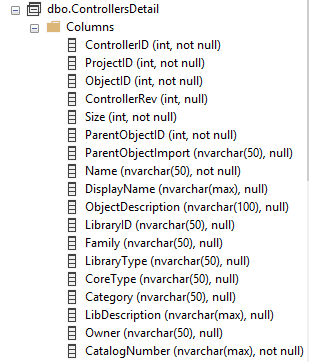
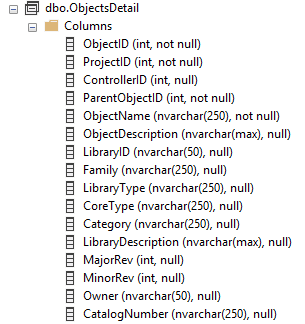
- ObjectsDetail: Provides information about each object in use in projects within the ACM database. Useful information provided includes the object name, object description and library information including the current revision in use. Columns available in the view are as follows:
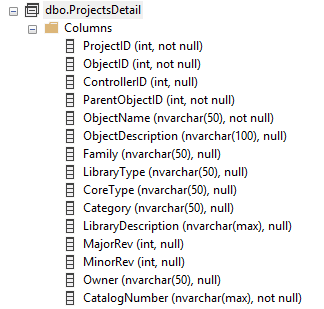
- ProjectsDetail: Provides information about projects available within the ACM database. Useful information includes the project name and library information for each project type library. Columns available in the view are as follows:
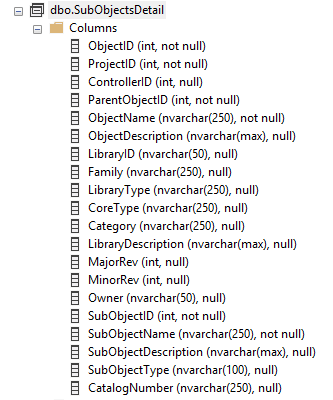
- SubObjectDetail: Provides information about sub objects linked to objects within the ACM database. Useful information includes the name for the object to which the sub object belongs, the description for the object to which the sub object belongs, sub object name, sub object description and library information for the object to which the sub object belongs. The columns available in the view are as follows:
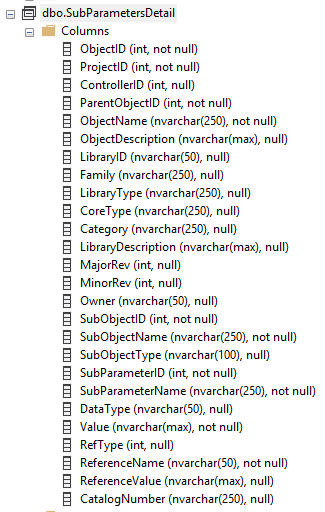
- SubParameterDetail: Provides information about sub parameters belonging to sub objects. These sub objects in turn would belong to a specific object. Useful information provided includes the sub parameter name, datatype, reference type, name of the sub object and library information for the object to which the sub parameters parent (sub object) belongs. The columns available in the view are as follows:
Practical Scenario Overview
The number of instances created in an ACM project for the library with CatlogNumber MsDinSiS are needed for a project management meeting. This information can be easily obtained from the ACM database via the use of a number of SQL queries. The first step is to get the Project Id of the relevant project in ACM. We know the name of the project and can get the Id from the Projects table via a SQL statement. The first step is to open either a query window within Microsoft SQL Server Management Studio, a new command-line session for Microsoft sqlcmd or via the use of any other tool that provides access to the ACM database for querying purposes.
The following SQL query will retrieve the ProjectID for the known project name RAMSProjectSmall:
SELECT ProjectID, Name
FROM [ACM_V400].[dbo].[Projects] WHERE Name = 'RAMSProjectSmall'
In the previous query, we are returning only the
ProjectID
and Name
columns for records that match on the name RAMSProjectSmall
. The following result is returned for the given example: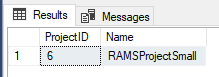
From the previous screenshot, we can see that the ProjectID we are looking for has a value of 6. The next step is to write a query for the Objects table using the ProjectID with a filter value of 6 that will return only records for this project. In addition to the ProjectID, we need to return records for only instances of the library with a catalog number of "MsDinSiS". We are also only interested in the total count of returned records and not the records themselves. In order to accomplish this, we will use the SQL COUNT instruction.
The query to return the required information will look as follows:
SELECT COUNT(*) AS Total FROM [ACM].[dbo].[Objects] WHERE ProjectID = 6 AND CatalogNumber = 'MsDinSiS'
Breakdown and Explanation:
- COUNT(*) AS Total: Ensures that the total number of matched records rather than the records themselves is returned. The returned count column is given the name of Total.
- FROM [ACM].[dbo].[Objects]: References the Objects table within the ACM database.
- WHERE ProjectID = 6 AND CatalogNumber = 'MsDinSiS': This section of the SQL statement provides the filtering required in order to ensure that only relevant records are returned. Firstly, only records relating to the project with an ID of 6 are returned (ProjectID = 6) and in addition to this, only objects that match on the name 'MsDinSiS' in the CatalogNumber column will be returned.
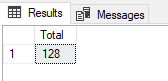
A total count for the number of matches will be returned in the result. An example is provided for a specific project where 128 matches are found:
Provide Feedback