
Configure Emissions Factors
This feature enables users to add, edit, and delete emission factors, allowing them to set specific parameters to calculate and manage emissions produced by various resource types over defined periods.
Add Emissions Factor
Perform the following steps to add a new emission factor:
- Under theEmissions Factortab, clickAdd.
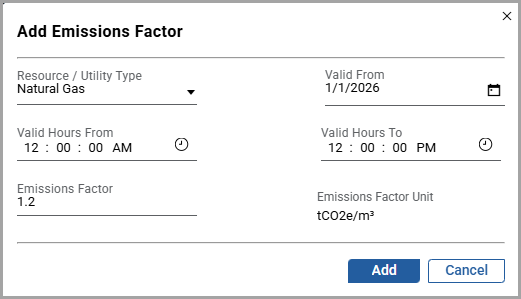
- In theAdd Emissions Factordialog box, set these parameters:
- Resource/Utility Type: Select a resource/utility from the dropdown list.
- Valid From: Click the [
 ] icon and select the date.
 - Valid Hours FromandValid Hours To: Click the [
 ] icon and select hours.
 - Emissions Factor: Provide a value.
- ClickAdd.Add Emission Factor
 The "Added successfully” message is displayed. User can add multiple emission factors and they are displayed under each resource/utility type dropdown.
Edit Emissions Factor
Perform the following steps to edit the emission factor details:
- Under any site, under theConfigurationsection and click to theEmissions Factorstab.Emission Factors
 The user can view all the available resource/utility types in theEmissions Factorstab.
 - On the required resource/utility type, click the [
 ] icon.
 - In theEdit Emissions Factordialog box, edit the required fields, and clickSave.Edit Emissions Factor
 The "Updated successfully” message is displayed.
Delete Emission Factor
NOTE:
A user can delete an emission factor only when multiple emission factors are available for the selected resource/utility type.
Perform the following steps to delete the emission factor:
- Under theEmission Factortab, on the required resource/utility type, click the [
 ] icon.
 - In theDelete Emissions Factordialog box, clickDelete.Delete Emission Factor
 NOTE:If the user deletes an emission factor, historical data is retained. Since the emission factor is deleted, no further emission data will be generated.The “Deleted successfully” message is displayed.
Provide Feedback