
Policy model configuration
Manage zones, conduits, devices, and ranges.
Policy model planning
Discover
FactoryTalk Policy Manager
capabilities to plan advanced configuration for the policy model. See Policy management capabilitiesPolicy model auditing
FactoryTalk System Services
generate diagnostic messages upon specific actions and log
them to FactoryTalk Diagnostics
. These messages can be later reviewed as a part of an
audit.The diagnostic messages are divided into these categories:
- Model deployment
- Sent when you deploy a security policy model or cancel deployment.
- Model creation
- Sent when you create a security policy model.
- Model editing
- Sent when you edit the security policy model.
Policy model example
Policy model example
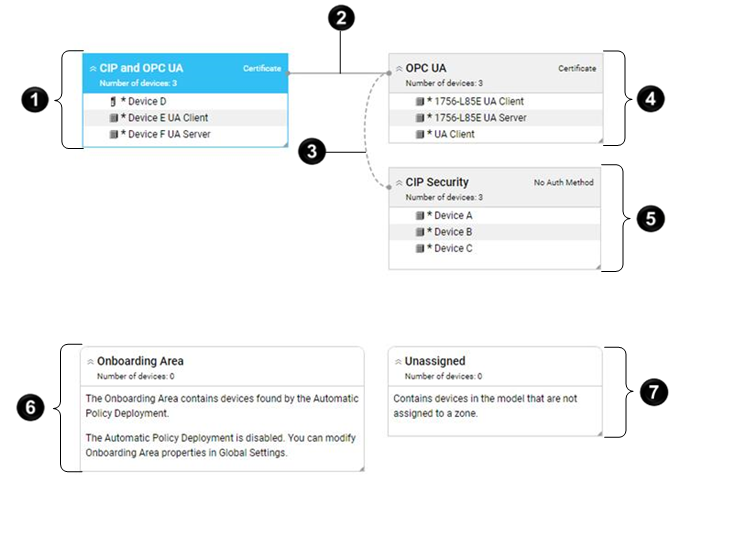
Item | Name | Description |
|---|---|---|
 | CIP and OPC UA zone | Contains OPC UA devices and CIP devices. |
 | Secure conduit | Connects CIP and OPC UA zone with OPC
UA zone. |
 | Trusted unsecure conduit | Connects OPC UA zone with CIP
Security zone. |
 | OPC UA zone | Contains OPC UA devices only, including two OPC UA clients and one OPC UA server. |
 | CIP Security zone | Contains three CIP devices. |
 | Onboarding Area container | Contains devices found by Automatic Policy Deployment that can be added to the
policy model. There are no devices found by Automatic Policy Deployment in this example. |
 | Unassigned container | Contains devices added to the policy model but not added to any zone in the
policy model. There are two unassigned devices in this example. |
Provide Feedback