
Phase process diagram
This diagram is an example of a phase process:
Example of a phase process
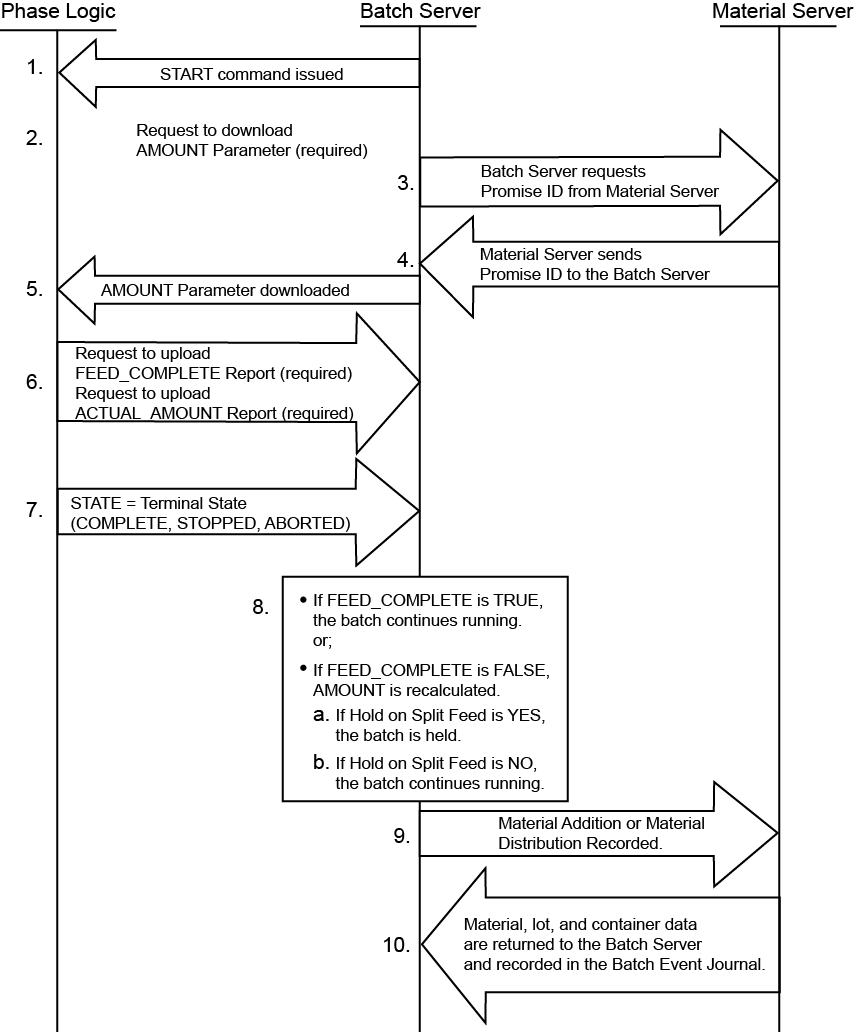
- The command to START the phase is issued from theFactoryTalk BatchServer. The RUNNING program eventually begins.
- The phase logic sends a request to download the AMOUNT parameter from theFactoryTalk BatchServer.
- TheFactoryTalk BatchServer requests a Promise ID from the Material Server. This establishes an accounting data entity for tracking the inventory used.
- The Material Server returns SUCCESS for the Promise ID to theFactoryTalk BatchServer. This is used by theFactoryTalk BatchServer during a non-Cold Restart to restore the state of a batch if theFactoryTalk BatchServer service stopped as the batch was running.
- TheFactoryTalk BatchServer downloads the parameters to the phase logic. The PCD runs its program to perform a material addition or distribution.
- The FEED_COMPLETE and ACTUAL_AMOUNT parameters are uploaded to theFactoryTalk BatchServer.
- The phase logic transitions to a terminal state.
- The value returned in the FEED_COMPLETE report parameter, and the Hold on Split Feed configuration determine what recipe execution will do next:TIP:Set theHold on Split Feedoption in theFactoryTalk Administration Console Explorer. Right-click an application or area name to either add a server or edit an existing one. To add a server, selectAdd New Server FactoryTalk Batch Server. Set theHold on Split Feedoption by opening theFactoryTalk Batch Services PropertiesdialogGeneraltab. In theMaterial policiesarea, view theHold on Split Feedoption.
- If FEED_COMPLETE is TRUE, the batch continues running.
- If FEED_COMPLETE is FALSE, andHold on Split Feedis YES, the batch is held.
- If FEED_COMPLETE is FALSE, andHold on Split Feedis NO, the batch continues running.
- The amount of the material addition or distribution is sent to the Material Server. The inventory levels in the material database are updated, and for material additions, the sublot or sublots of inventory used are identified.
- Material, lot, and container data are returned to theFactoryTalk BatchServer and recorded in theFactoryTalk BatchEvent Journal.
Provide Feedback