
Configure hold propagation
When a batch executing in a primary or secondary
FactoryTalk® Batch
Server detects a failure condition, the system may hold all or parts of a batch. The selected
Hold propagation
type identifies how much of the batch is commanded to
hold in response to the failure and how much continues to
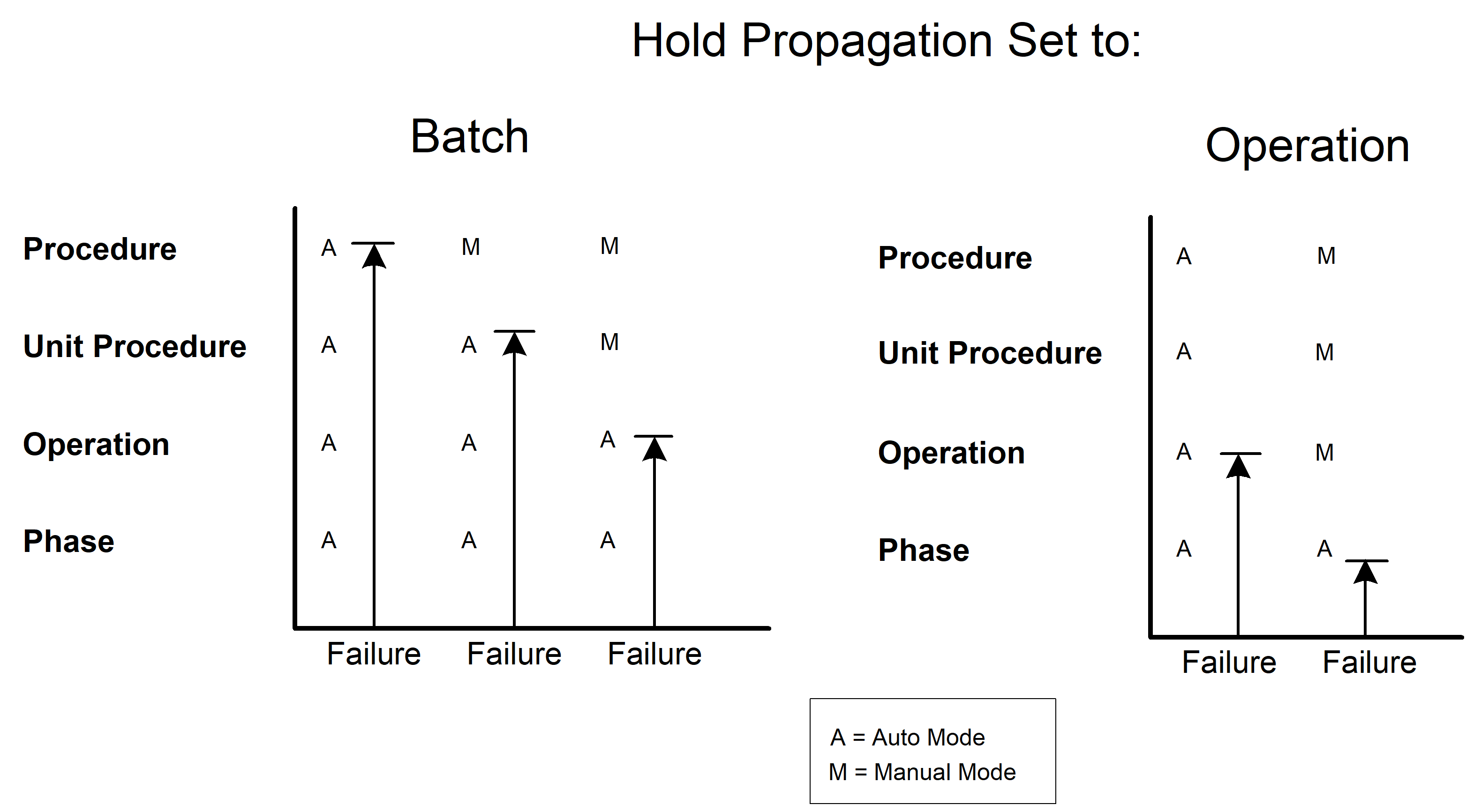
run.The following diagram shows how a step mode can affect the hold propagation. Depending on
the step mode, the batch may be held at a lower level than the selected hold propagation
option.
To configure the hold propagation
- OpenFactoryTalk Administration Consoleand sign in to theFactoryTalkNetwork Directory.
- InFactoryTalk Administration ConsoleExplorer, do one of the following:
- For a newFactoryTalk BatchServer, right-click the application or the area name and select .
- For an existingFactoryTalk BatchServer, expand the application or the area name, right-click the server, and selectProperties.
- In theFactoryTalk Batch Services Propertiesdialog, select theGeneralorSecondary Servertab.
- In theMiscellaneousarea, select theHold Propagationdropdown list and choose your hold propagation type.Hold propagation typesTypeDescriptionNoneNo hold. The entire batch continues running.PhaseHolds only the affected phase, allowing the balance of the phase’s unit and all other units to continue running.OperationHolds only the affected phase and the related operation, allowing the balance of the operation’s unit and all other units to continue running.UnitHolds the phase and the related unit, and all other units continue running.BatchHolds the entire batch. This is the default value.
- Perform one of the following:
- To save all changes, selectApply.
- To save all changes and close theFactoryTalk Batch Services Propertiesdialog, selectOK.
Provide Feedback