
Use report verifications
Some control steps may require report verification with one or more signatures. Report verification policies are configured and associated with phases in the encounters a phase that has an associated verification policy, the report Verification Signature instructions are displayed in the Instructions view, similar to the one shown here:
FactoryTalk Batch
Equipment Editor by the control engineer. When e
Procedure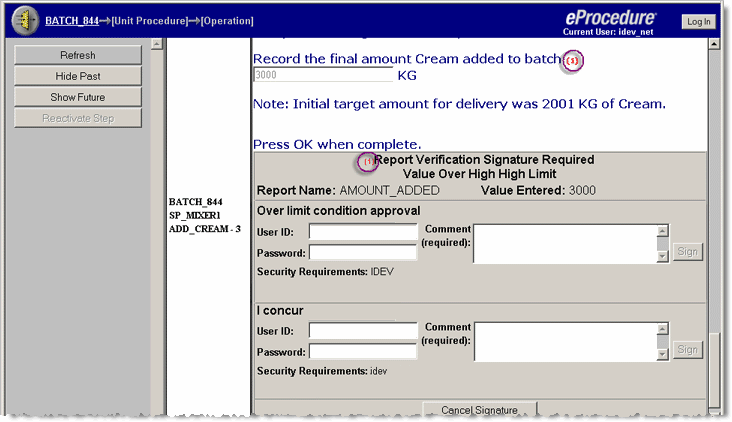
This example shows the execution of a dual signature for an
e
Procedurereport
verification before either signoff is completed. The execution of a signature for an e
Procedurestep
verification looks very similar. The red (1)
visually ties the signature to the report to which it corresponds.
TIP:
Step Verification signature requests and Reactivate
Step signature requests will display in the Instructions view; all others display in the
Signature List view and the appropriate
Signature
dialog box opens in the
Instructions view.Report Verifications contain the following fields:
- The reason (meaning) for the required signature, i.e. "Report Limit Violated".
- The report name
- Limit type
- Limit value
- Value entered
- Signature 1 area, which contains the signature meaning (confirmed over limit, etc.), user name, password, comment, plusOKandCancelbuttons.
- Signature 2 area, if required (contains the same information as the Signature 1 area).
Provide Feedback