
Verify PCD communications
To verify PCD communications:
- SelectStart, point to , and then selectBatch Service Manager. TheFactoryTalk Batch Service Manageropens.IMPORTANT: Administrator privileges are required to perform this procedure.
- Make sureFactoryTalkBatch Serveris selected in theServicebox.
- SelectServer Statistics. TheFactoryTalk Batch Server Statisticsdialog opens.
- Select thePCD Communicationstab. The Data Server Status area displays the status of the conversation with the OPC_SIM data server (Phase Simulator), which should be PHASES GOOD, and the INSTRUCTIONBASEDSERVER, which should be INSTRUCTIONS GOOD.
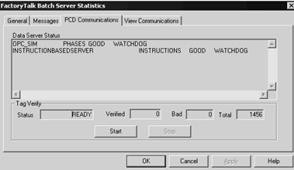
- In theTagVerifyarea, selectStartto begin the verify process. The tag verification process takes several minutes.
- When theStatusbox shows COMPLETED, selectOKto close the dialog.
Provide Feedback