
Configure sample permissions for FactoryTalk Security users
After creating the
FactoryTalk
security users, set up access modes for each
FactoryTalk Batch
component to specify which users are permitted to view or
perform actions. Configure security settings in the FactoryTalk® Administration Console
. To
tighten security in the client, remove the All Users
group from the
Full Edit
policy setting.To configure sample permissions for
FactoryTalk
Security users:- In theFactoryTalkAdministration Console Explorer pane, navigate to .
- Right-clickAccess Modes, and then selectProperties. TheAccess ModesPropertiesdialog opens.
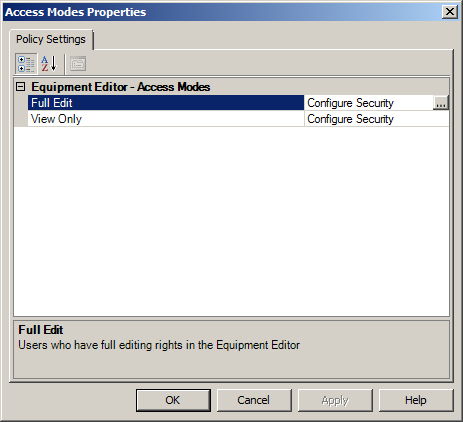
- In theFull Editrow, select theConfigure Securitybrowse button. TheConfigure Securable Actiondialog opens.
- SelectAdd. TheSelect User and Computerdialog opens.
- In theFilter Usersbox, selectShow All.
- InUsers, selectENG.
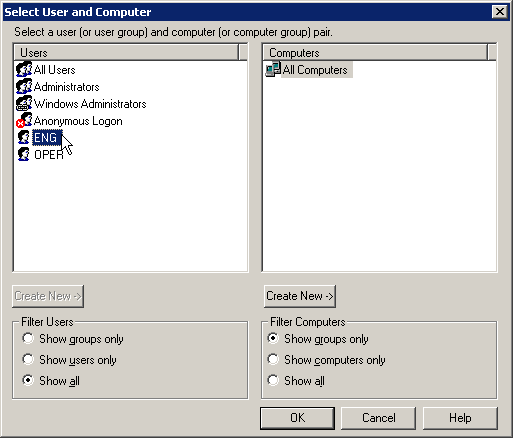
- SelectOK. TheConfigure Securable Actiondialog is updated, showingENGin the list ofUserswith theAllowcheckbox selected.
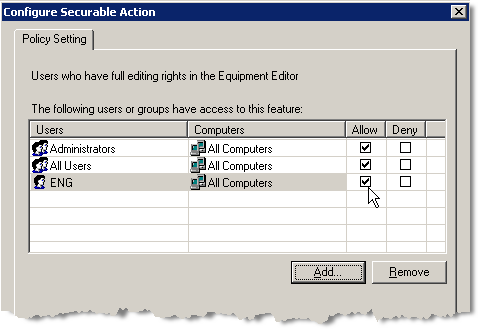
- SelectOKto close theConfigure Securable Actiondialog.
- In theAccess Modes Propertiesdialog, selectView Only.
- In theView Onlyrow, select theConfigure Securitybrowse button. TheConfigure Securable Actiondialog opens.
- SelectAdd. TheSelect User and Computerdialog opens.
- In theFilter Usersbox, selectShow All.
- InUsers, selectOPER.
- SelectOK. TheConfigure Securable Actiondialog is updated, showingOPERin the list ofUserswith theAllowcheckbox selected.
- SelectOKto close theConfigure Securable Actiondialog.
- SelectOKto close theAccess Modes Propertiesdialog.
See the for more information on
security.
FactoryTalk Batch
Administrator's User Manual
, publication BATCH-UM003
Provide Feedback