
Add sample FactoryTalk Security users
For the sample demonstrations file, create
FactoryTalk
user accounts for an operator and an engineer. Create these user accounts in the FactoryTalk® Directory
.To add sample
FactoryTalk
Security users:- Select . TheSelect FactoryTalk Directorydialog opens.TIP: This procedure requires administrator privileges.
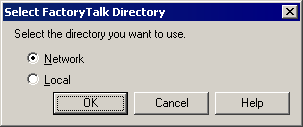
- SelectNetworkto add this user account to theFactoryTalkNetwork Directory, and selectOK.
- If not already logged on to theFactoryTalkNetwork Directory, theLog On to FactoryTalkdialog opens. InUser name, type the user name for the Administrator that was configured when theFactoryTalk® Services Platformwas installed.
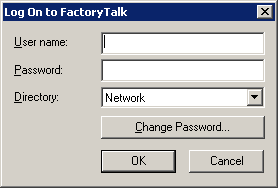
- InPassword, type the password for the Administrator.
- Verify theDirectoryand selectOK. TheFactoryTalk Administration Consolewindow opens and displays the specifiedFactoryTalkDirectory.
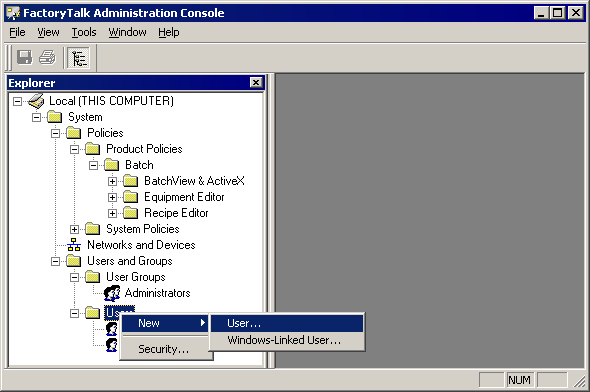
- ExpandUsers and Groups.
- Right-click theUsersfolder, and select to create a newFactoryTalkSecurity user account inFactoryTalkDirectory.
- TheNew Userdialog opens and displays theGeneraltab. In theUser namebox, typeOPER.
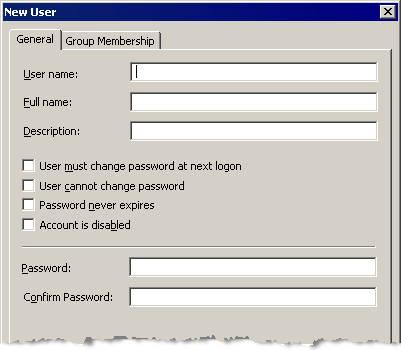
- InFull name, typeOperator.
- InPassword, typepassword, and confirm it by re-enteringpasswordin theConfirm Passwordbox.
- SelectCreate.
- Repeat steps 7 through 11, but this time in theUser Namefield, enterENGand in theFull Namefield, enterEngineer.
- Keep theFactoryTalkAdministration Console open to configure permissions for theseFactoryTalkSecurity users in the next exercise.
Provide Feedback