Loading
Innovation Center LOGO
Recent ActivityRecent Activity

Tank phase operation via FactoryTalk Optix

Monitoring and control of phases in FactoryTalk Optix based on predefined objects from the Process library. - [Implementation Time: 30 minutes]
Innovation Center Home Page
hydrogen energy storage tanks in industrial facility
Innovation Center LOGO
  • Overview
  • Installation Guide
  • Downloads
  • Contact us
  • I want to subscribe.
Innovation Center Home Page
 

What is this for?

The purpose of developing this application is to offer users a visualization alternative for local process monitoring and control from a modern, simplified, and intuitive interface. This allows to reuse predefined code for easy, reliable, and repeatable implementation, providing information for similar operations used in the operation workstations in a centralized control room. It also allows open connectivity to other equipment using international communication standards.


Is this useful to me?

This application shows how to implement sequences for any process, which is useful to different applications in different industries, and is useful to various types of users: operators who will have access to new local operating interfaces who will have homogeneous interfaces at the local and distributed levels; and automation and system maintenance engineers who, through an easy-to-interact platform, can address changes or new requirements based on predefined and reusable objects.

How can I make it work?

The configuration was developed in:

  • Engineering workstation where the following programs are installed:
    • FactoryTalk® Services Platform software v.6.50.00
    • Studio 5000 Logix Designer® Application v.37.00.00
    • FactoryTalk® Optix v.1.6.2.36
    • FactoryTalk® Logix Echo v.3.00.00
  • Folder with material from Process Library v.5.20.03
  • Folder with material from the Power Device Library v.3.05.01

No hardware will be used for the development of this application, but for the type of applications where a similar exercise can be implemented, the following can be used:

  • Controller Process (CompactLogix o ControlLogix)
  • OptixPanel™
  • Access Switch
  • Intelligent components for motor control (Powerflex drives , E300 relays and/or SMC soft starters)
AHIC Download ICON VF.png

Downloads

Please note: You will need to agree to the Terms & Conditions for each download.

Downloadable file ›
Legal Disclaimer Acceptance. ROCKWELL AUTOMATION WILL PROVIDE ACCESS TO ROCKWELL PRODUCTS (BEST PRACTICES, APPLICATIONS AND KNOWLEDGE) ON THE CONDITION THAT YOU ACCEPT AND COMPLY WITH THE FOLLOWING TERMS AND CONDITIONS. YOU ACCEPT AND AGREE TO BE BOUND BY THE TERMS OF THIS AGREEMENT BY DOWNLOADING, INSTALLING, COPYING, OR OTHERWISE USING PRODUCTS. IF YOU ARE ACCEPTING THESE TERMS ON BEHALF OF ANOTHER PERSON, COMPANY, OR OTHER LEGAL ENTITY, YOU REPRESENT AND WARRANT THAT YOU HAVE FULL AUTHORITY TO BIND THAT PERSON, COMPANY, OR LEGAL ENTITY TO THESE TERMS. IF YOU DO NOT AGREE TO THESE TERMS, DO NOT DOWNLOAD, INSTALL, COPY, ACCESS, OR USE THE PRODUCTS, SOFTWARE AND/OR CLOUD SERVICES. 1. Rockwell Automation retains full ownership and title to all Products and related documentation. No rights or licenses are granted other than those set forth in this Agreement. Company grants to Rockwell Automation a non-exclusive, worldwide, royalty-free, perpetual, non-revocable license to use any feedback Company provides regarding the Products, even if Company has designated the feedback as confidential. Rockwell Automation will be entitled to use the feedback without restriction or compensation to Company. 2. Company may not lease sub-lease, assign, license, sub-license or otherwise transfer any of the Products without the prior written consent of Rockwell Automation. Company may not assign or otherwise transfer access rights to the Products without the prior written consent of Rockwell Automation. Any reverse assembly, reverse engineering, decompilation, and creation of derivative works based on the Products by Company is prohibited. 3. Company acknowledges that Products provided under this Agreement are Rockwell Automation’s Confidential Information and are covered by effective or pending copyrights, patents, trademarks and/or trade secrets of Rockwell Automation, and Company agrees to maintain confidentiality by not disclosing Products or documentation to any third party without the prior written consent of Rockwell Automation and to protect the confidentiality of the Products as it would Company’s own confidential information. Company agrees that its obligation of confidentiality under this paragraph shall survive expiration or termination of this Agreement. 4. Company agrees that Products provided under this Agreement are prototypes and examples and its application and results may vary depending on each customer and project conditions. Rockwell Automation do not warranty the same results. This Agreement shall in no way be construed as a commitment by Rockwell Automation at any time to manufacture and/or offer Products for sale. There is no explicit or implicit service level agreement associated with using the Products. Rockwell Automation does not warrant that the functions contained in the Products will meet Company’s requirements. Company agrees to use all Products only in accordance with the instructions and only for the intended usages identified in the documentation. 5. EXCLUSION OF WARRANTIES AND LIMITATION OF LIABILITY. THE PRODUCTS ARE PROVIDED "AS IS". ROCKWELL AUTOMATION DISCLAIMS ANY AND ALL WARRANTIES, EXPRESS, IMPLIED OR STATUTORY, INCLUDING WITHOUT LIMITATION ANY WARRANTIES OF MERCHANTABILITY OR FITNESS FOR A PARTICULAR PURPOSE. ROCKWELL AUTOMATION EXPLICITLY DISCLAIMS ALL WARRANTIES OF NON- INFRINGEMENT AND EXPRESSLY DOES NOT WARRANT THAT THE PRODUCTS, IN WHOLE OR IN PART, WILL BE ERROR FREE OR FREE FROM SECURITY VULNERABILITIES. IN NO EVENT SHALL ROCKWELL AUTOMATION BE LIABLE FOR (i) LOST PROFITS, LOST SAVINGS, DOWNTIME, SPECIAL, INDIRECT OR CONSEQUENTIAL DAMAGES OF ANY KIND, OR (ii) ANY PERSONAL INJURY, PROPERTY DAMAGE OR ENVIRONMENTAL DAMAGE ARISING OUT OF OR IN CONNECTION WITH THIS AGREEMENT, WHETHER IN AN ACTION IN CONTRACT, STRICT LIABILITY OR IN TORT INCLUDING NEGLIGENCE. 6. COMPANY AGREES TO INDEMNIFY AND HOLD ROCKWELL AUTOMATION HARMLESS FROM ALL COSTS, AWARDS, DAMAGES, EXPENSES AND FEES (INCLUDING ATTORNEYS FEES) RESULTING FROM OR RELATED TO ANY THIRD-PARTY CLAIMS (INCLUDING EMPLOYEES AND AGENTS OF COMPANY) AGAINST ROCKWELL AUTOMATION, ITS DISTRIBUTORS, AGENTS, OFFICERS, DIRECTORS OR EMPLOYEES FOR PERSONAL INJURY (INCLUDING DEATH), PROPERTY DAMAGE OR ENVIRONMENTAL DAMAGE RELATED TO OR RESULTING FROM THE USE OF THE PRODUCTS. 7. In the event a Product is exported, Company agrees to comply with all applicable United States Export Control Law and Regulations, and the applicable export control laws of other countries. This Agreement shall be governed by the laws of the state of Wisconsin. This Agreement is the complete and exclusive Agreement between Rockwell Automation and the Company, and supersedes all prior agreements, whether written or oral, relating to the Products.
AHIC NEED HELP ICON VF.png

Need Help?

If you need help with an application or have feedback from the Innovation Center, please contact us.


Links of interest

  • A Unified Control Platform is a Smart Solution
  • Device Object Libraries
  • Smart Motor Control
  • FactoryTalk Optix portfolio


AHIC STEP ICON.png

Implementation Guide

 
  1. Step 1
  2. Step 2
  3. Step 3
  4. Step 4
  5. Step 5
  6. Step 6
  7. Step 7
  8. Step 8
  9. Step 9
  10. Step 10
Open All Close All
Step 1
 

Rockwell Automation has developed materials that allow users to access templates for standardized and repeatable plant-wide implementation (Control Strategy Templates and graphical objects), manuals, and videos for different types of connected smart devices in the plant.

Several of these elements were used for this application; some of the procedures and important points to consider in similar developments are attached as an appendix.


Prepare the engineering workstation with the following software components:

  • Studio 5000 v. 37.00.00
  • FactoryTalk Optix 1.6.2.36
  • FactoryTalk Logix Echo (to emulate the controller) 3.00.00


Step 2
 

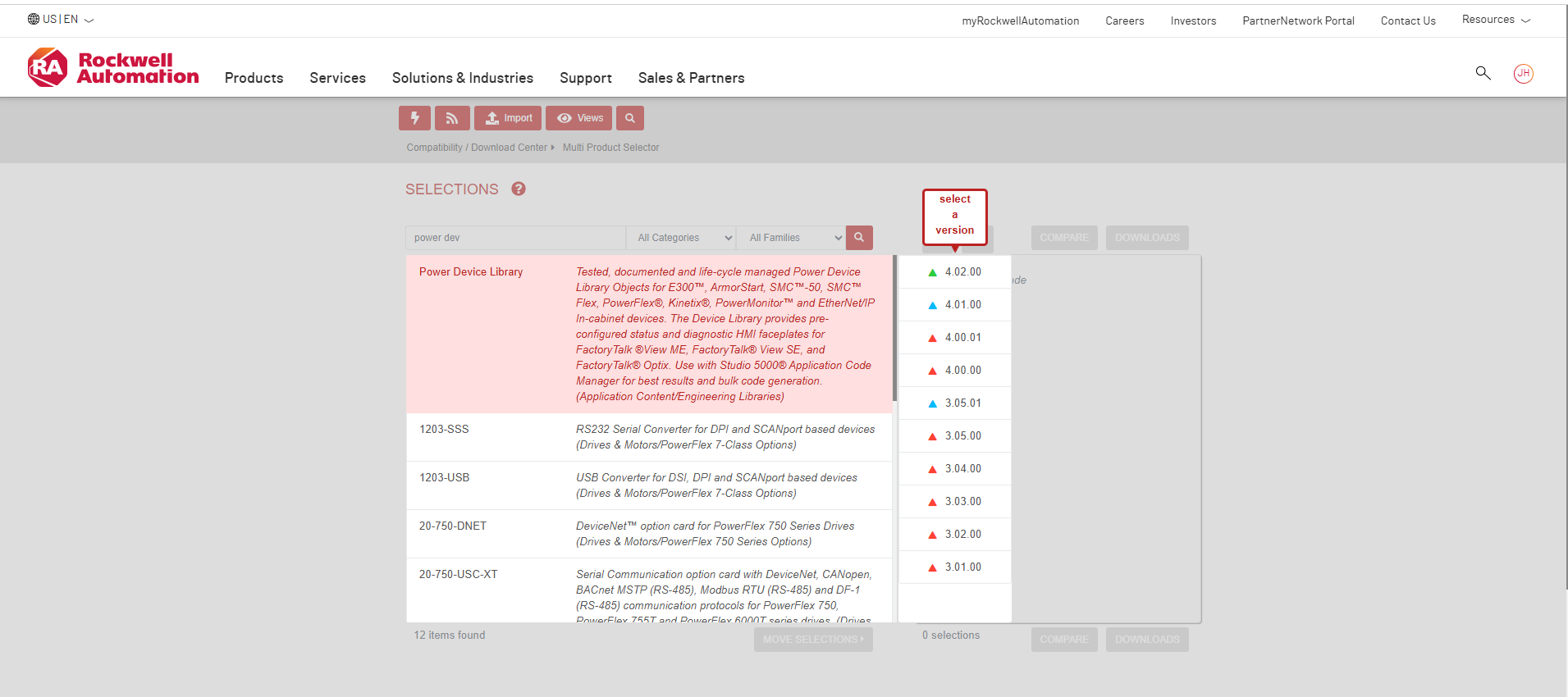
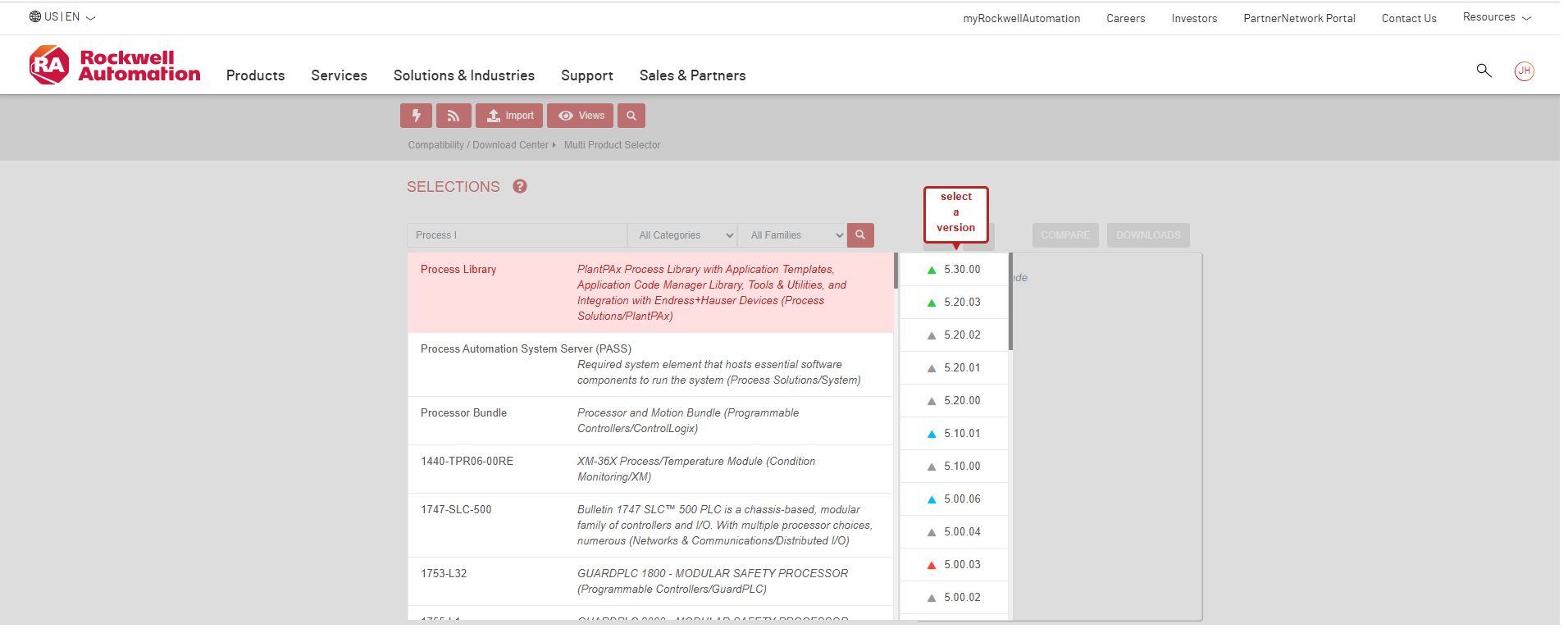
Download the following libraries from the Rockwell Product Compatibility and Download Center page:

  • Process Library v.5.20.03
  • Power Device Library v.3.05.01
     
tank-phase-operation-via-factorytalk-optix_Fig 1_1.png

tank-phase-operation-via-factorytalk-optix_Fig 1_1.png

tank-phase-operation-via-factorytalk-optix_Fig 1_2.png

tank-phase-operation-via-factorytalk-optix_Fig 1_2.png


The application uses the following elements for configuration, but they can be downloaded from the same page for other types of devices.

  • Control strategies (Analog Monitoring, Motor Control with Variable Speed Drive, Solenoid Valves, Phase Operator), which are widely used in most operations across all types of industries.
  • Instructions for smart control devices (for this application, only for PF525 drive, there are more options)
Step 3
 

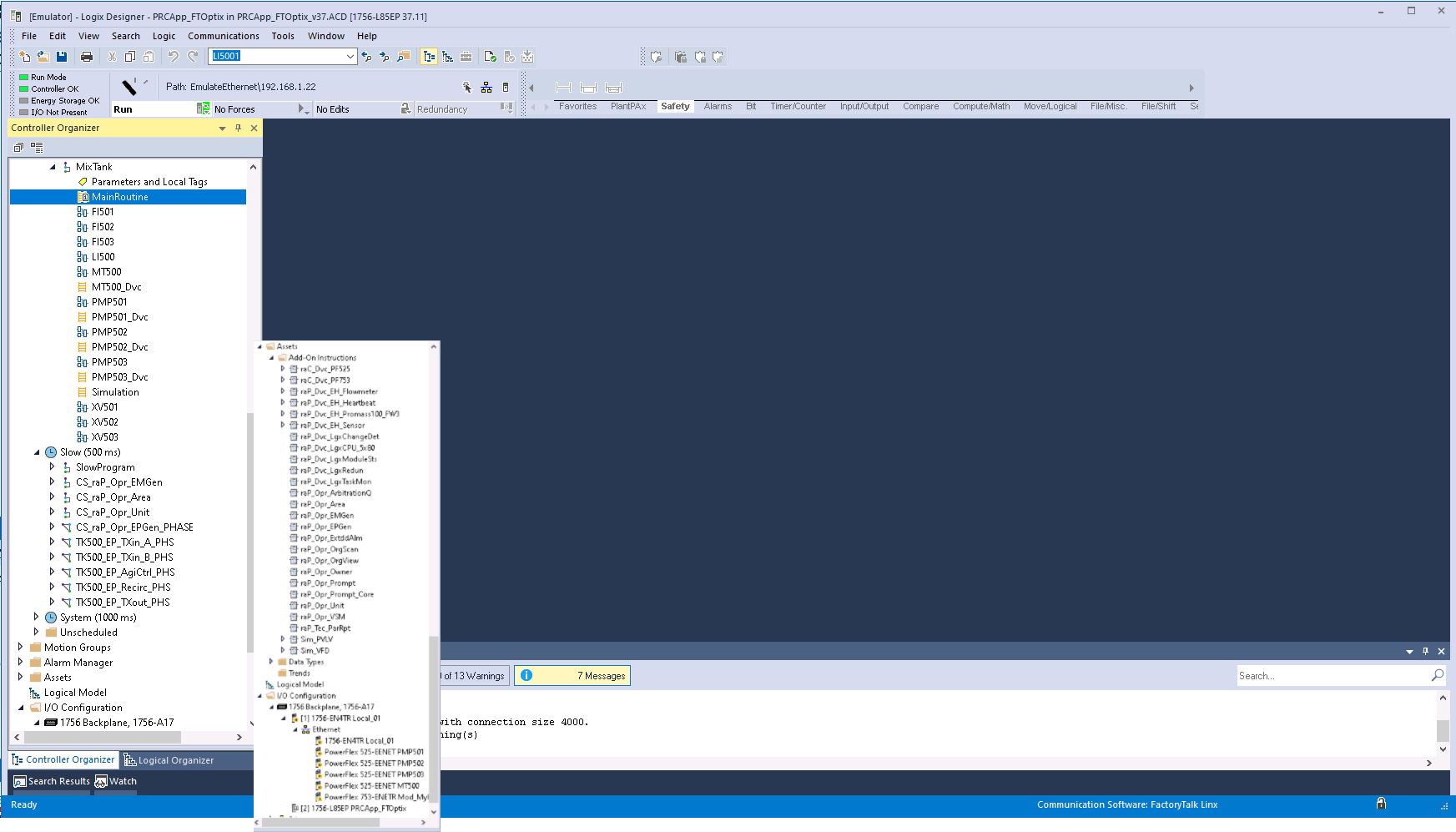
Open the project in Studio 5000.

Note that, due a Process Controller was used, the PlantPAx Instruction category is native and available for use in Ladder Logic or Function Block routines.

Also note that, for this application, instructions for the motor control devices used to move materials in the plant have been added.
 

tank-phase-operation-via-factorytalk-optix_Fig 2.png

tank-phase-operation-via-factorytalk-optix_Fig 2.png

Step 4
 
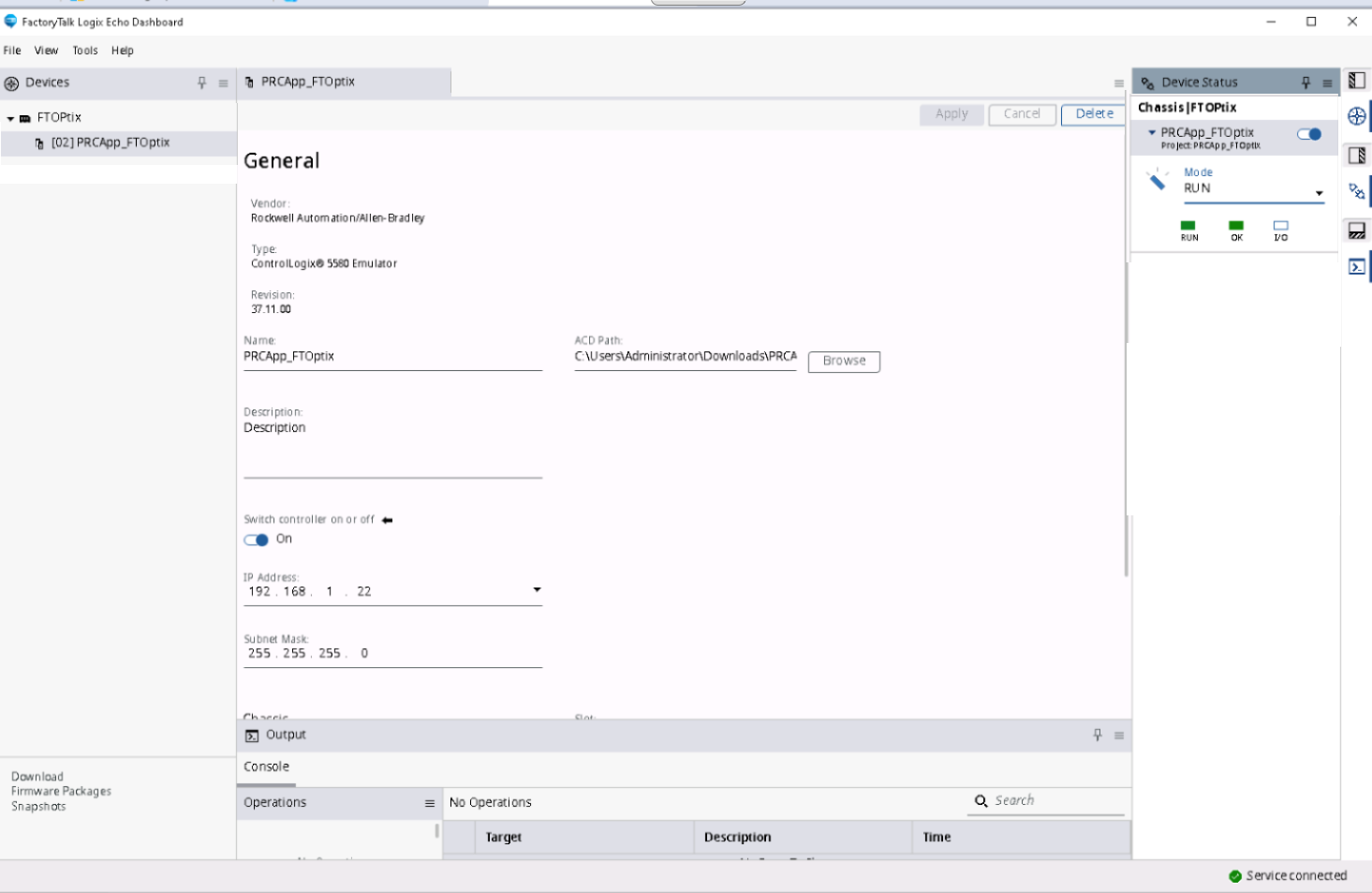
Emulate the controller in FactoryTalk Logix Echo.
  • Open the FactoryTalk Logix Echo application
  • Add a chassis to emulate the controller
  • Create a driver from the backup in Studio 5000 of the project: PRCApp_FTOptix_v37.ACD
tank-phase-operation-via-factorytalk-optix_Fig 3.png

tank-phase-operation-via-factorytalk-optix_Fig 3.png

Step 5
 

Download the project

Whether from FactoryTalk Logix Echo or Logix Designer, with the project open, make sure to set the path to the emulated controller and download it; when finished, leave it in RUN mode.

Step 6
 
  • Open the project in FactoryTalk Optix


    For this application, the PRC_App 1 folder is available, which contains several project files; run PRC_App1 Optix

    FactoryTalk Optix file folder


    tank-phase-operation-via-factorytalk-optix_Fig 4.png

    tank-phase-operation-via-factorytalk-optix_Fig 4.png

  • Once the project is open, familiarize yourself with the content:

    tank-phase-operation-via-factorytalk-optix_Fig 5.png

    tank-phase-operation-via-factorytalk-optix_Fig 5.png

  • If you wish, you can explore the project components.


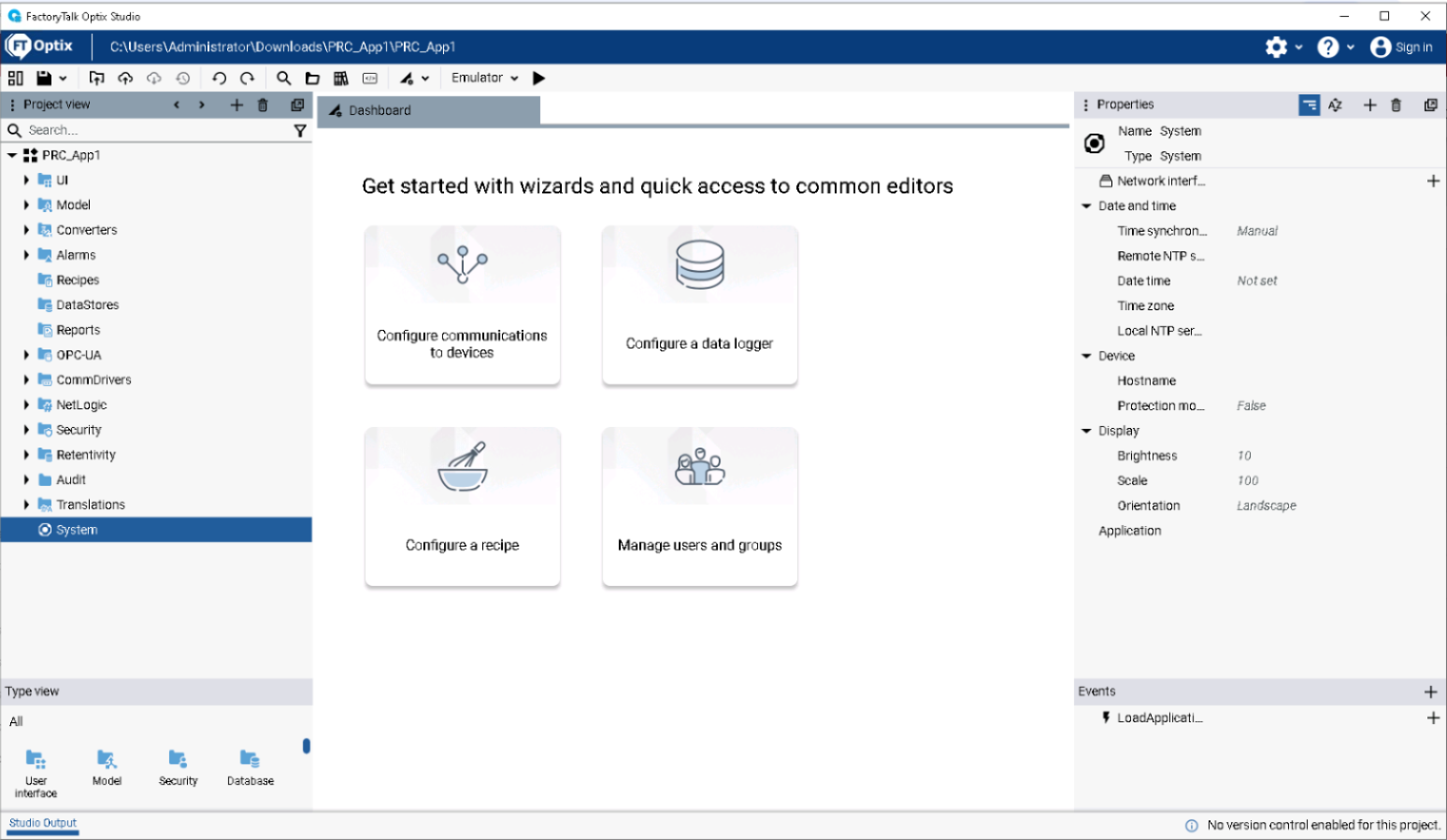
    There you will find not only the graph that allows monitoring and control of sequences in the Tank100, but also all the Process objects developed for FactoryTalk Optix.


    UI / Main Window Panels


    tank-phase-operation-via-factorytalk-optix_Fig 6_1.png

    tank-phase-operation-via-factorytalk-optix_Fig 6_1.png

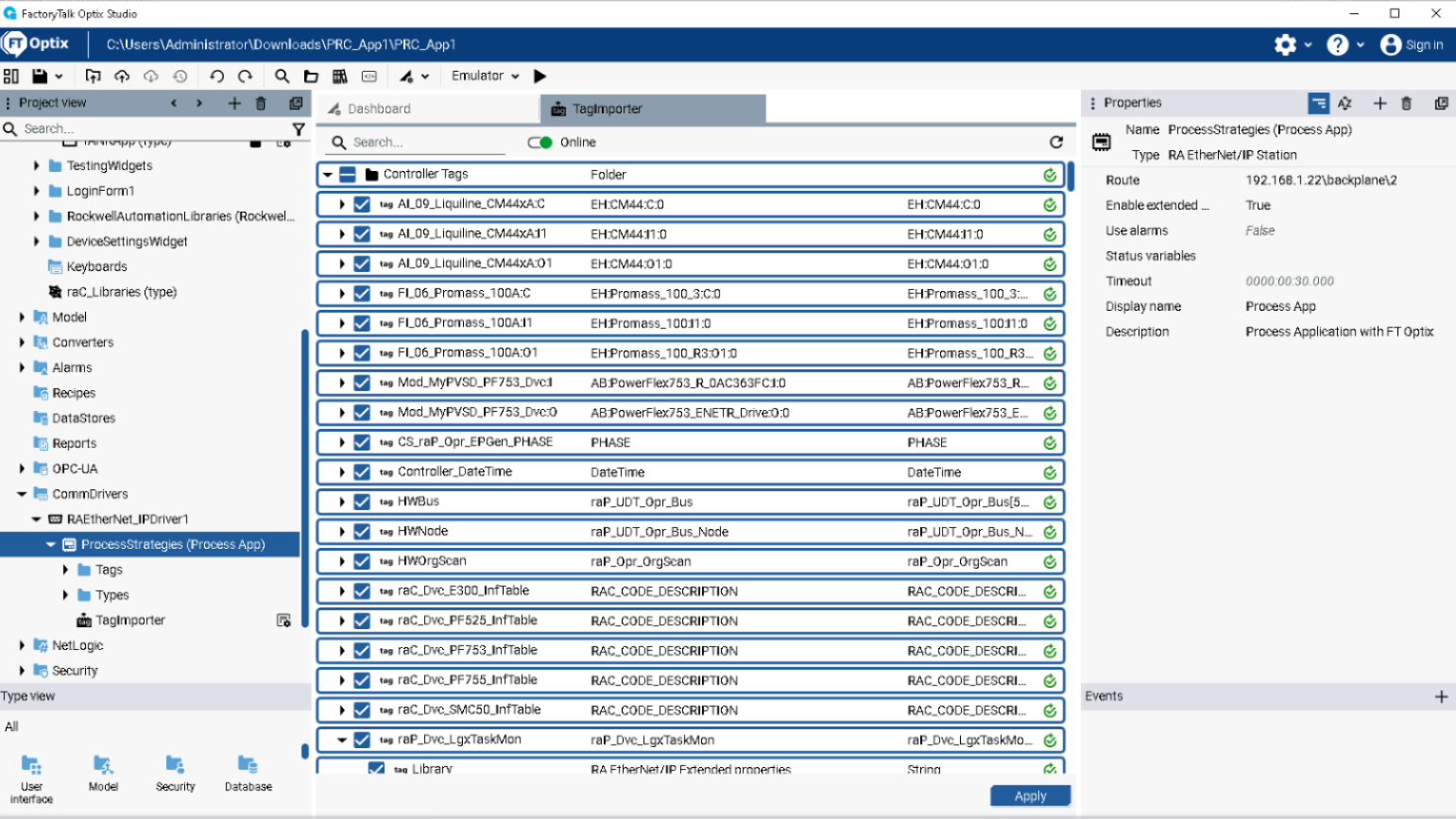
    CommDrivers/RAEtherNetIP


    tank-phase-operation-via-factorytalk-optix_Fig 6_2.png

    tank-phase-operation-via-factorytalk-optix_Fig 6_2.png

  • Project Header

    tank-phase-operation-via-factorytalk-optix_Fig 7_1.png

    tank-phase-operation-via-factorytalk-optix_Fig 7_1.png

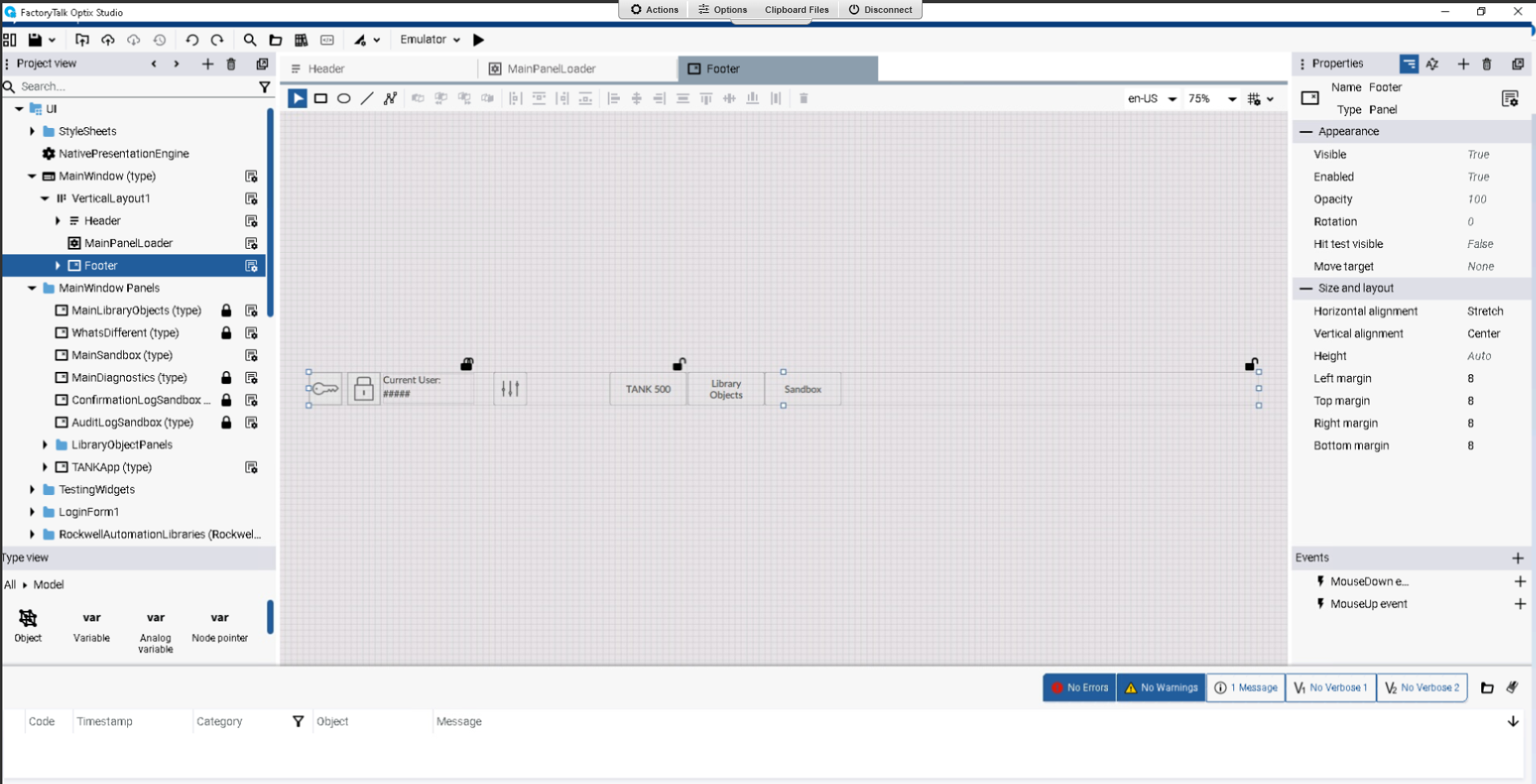
    Project Footer


    tank-phase-operation-via-factorytalk-optix_Fig 7_2.png

    tank-phase-operation-via-factorytalk-optix_Fig 7_2.png

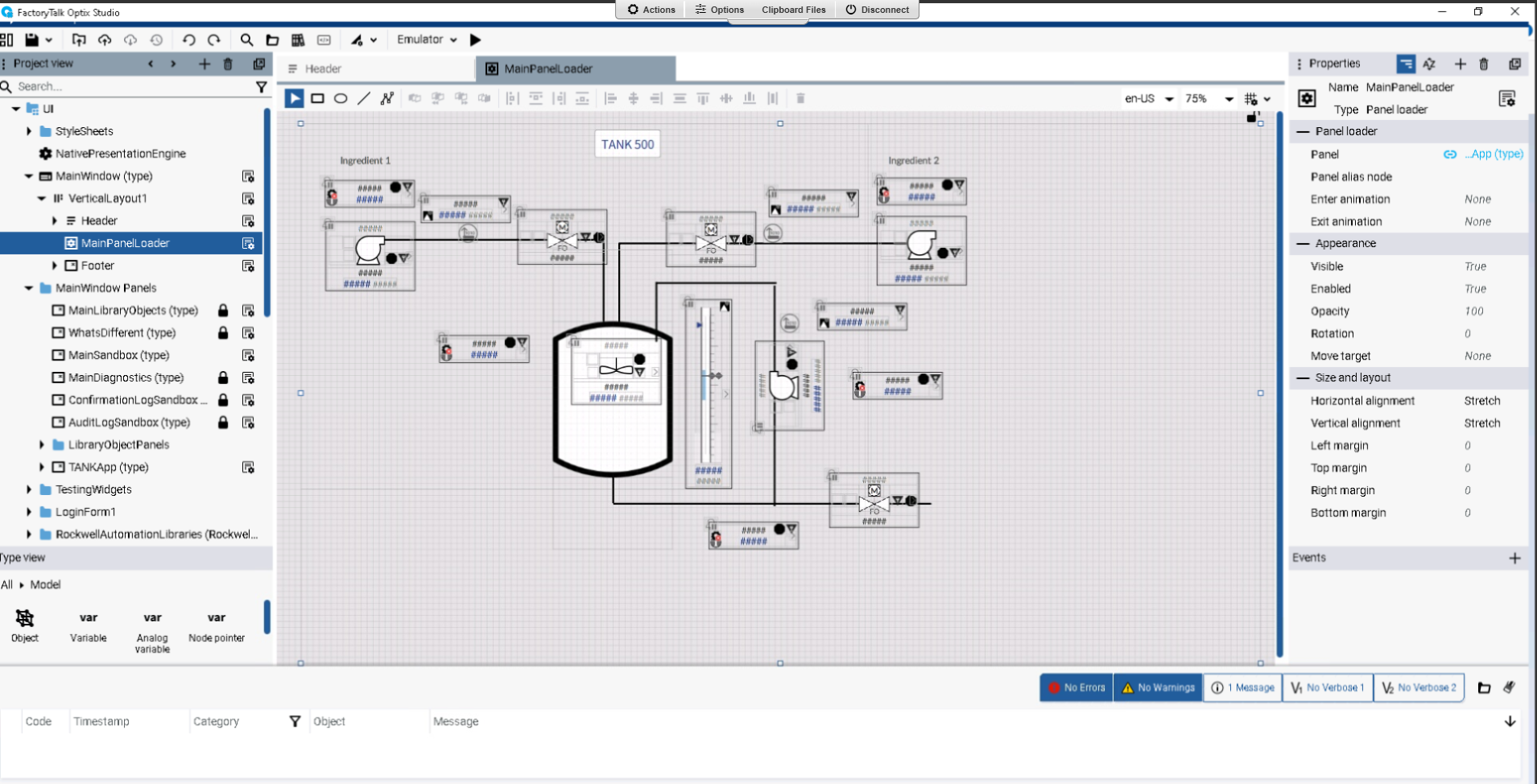
    Tank500 Chart


    tank-phase-operation-via-factorytalk-optix_Fig 8.png

    tank-phase-operation-via-factorytalk-optix_Fig 8.png

Step 7
 

Establish communication with the controller

Confirm that the Driver Observe that all Controller tags will be linked at this time to be used on the generated screens to represent the filling, stirring, recirculation, and transfer process in a tank.
 

Imported controller tags


tank-phase-operation-via-factorytalk-optix_Fig 9.png

tank-phase-operation-via-factorytalk-optix_Fig 9.png

Step 8
 

Project Emulation

Once the tags have been synchronized, emulate the project.

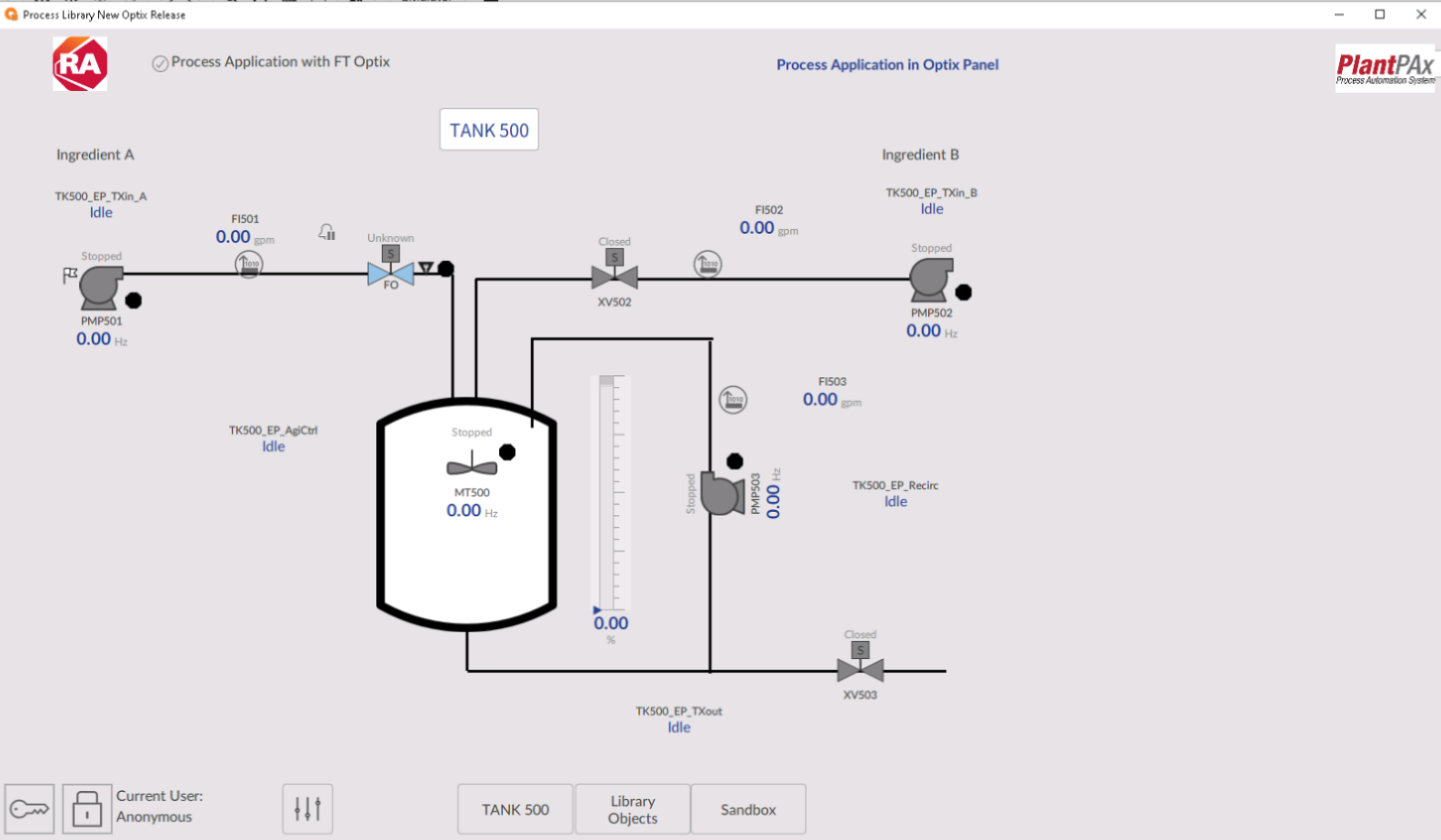
Initial view of the emulated project


tank-phase-operation-via-factorytalk-optix_Fig 10.png

tank-phase-operation-via-factorytalk-optix_Fig 10.png

Step 9
 

Process Operation

Begin the operation by checking the front panels of each piece of equipment and verifying the operation of the sequences:

  • Filled with ingredient A
  • Filled with ingredient B
  • Agitation
  • Recirculation
  • Transfer

You will notice that each of the control components can be operated independently.


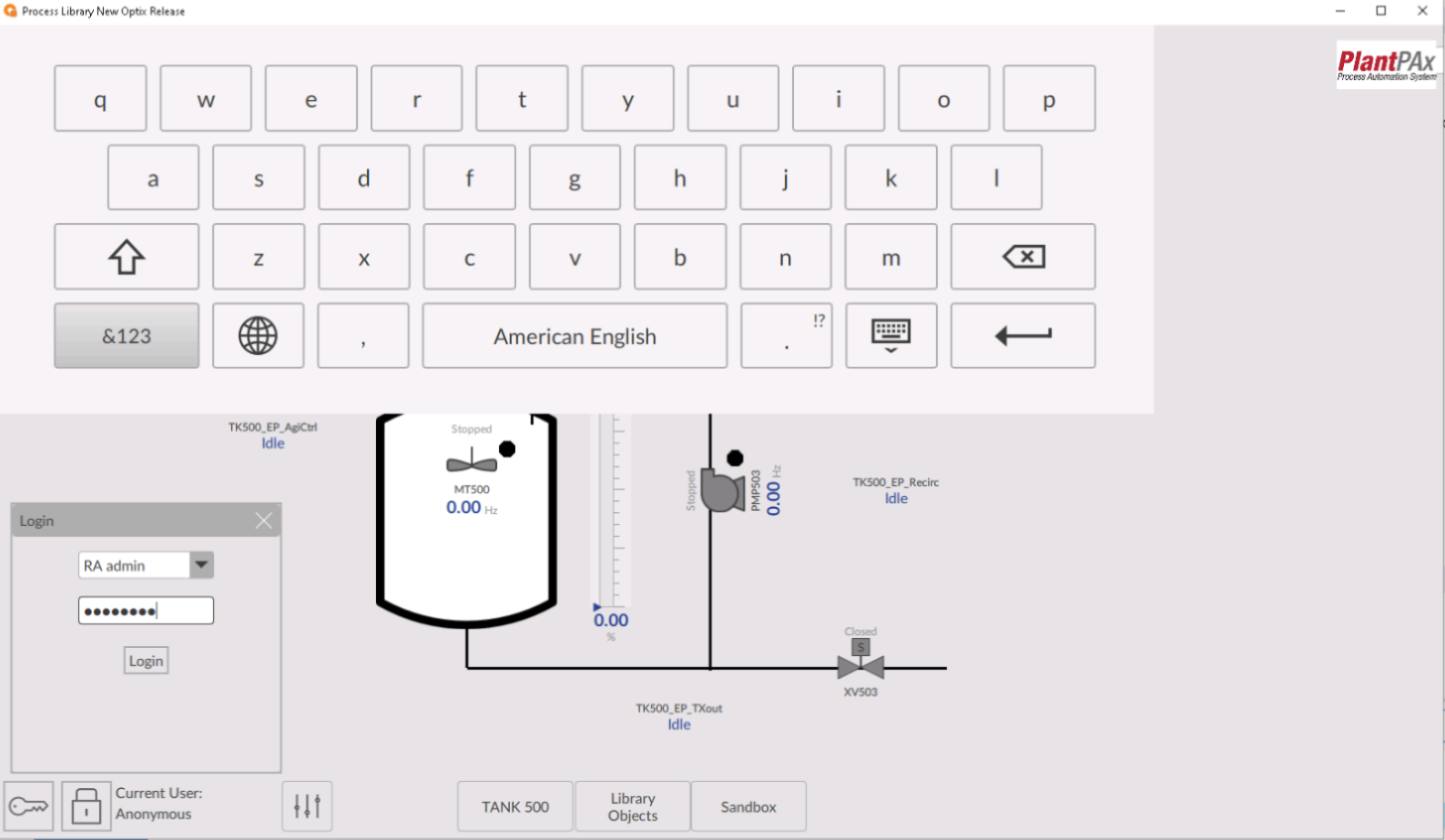
Log in with one of the declared users


  • User Login


    tank-phase-operation-via-factorytalk-optix_Fig 11.png

    tank-phase-operation-via-factorytalk-optix_Fig 11.png

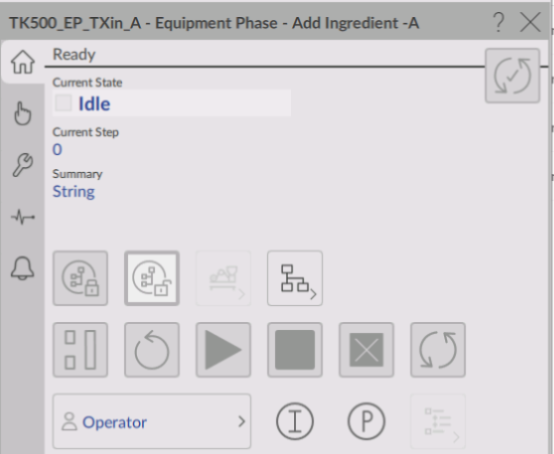
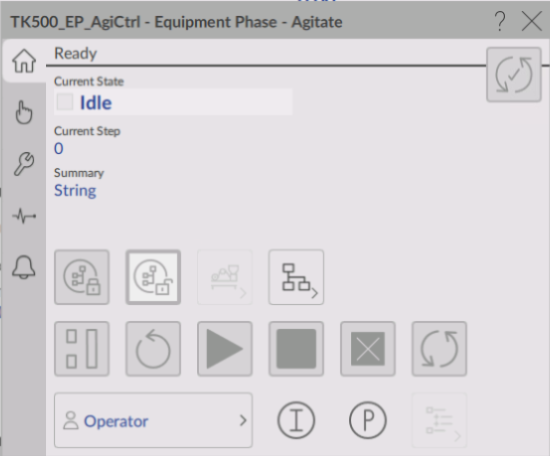
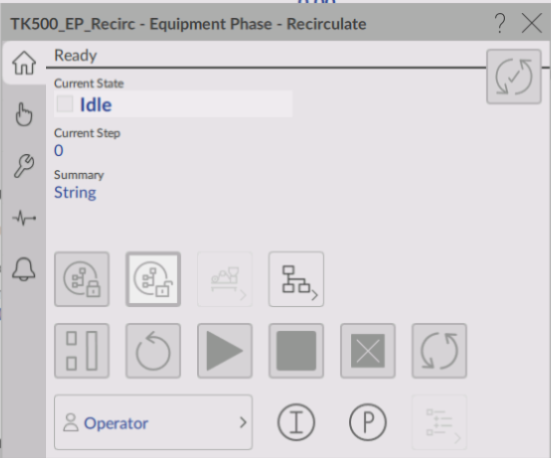
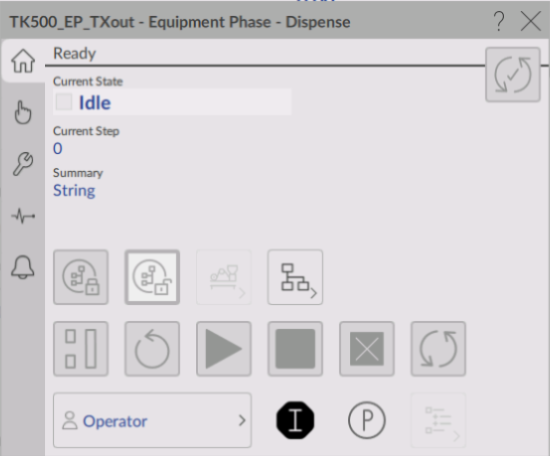
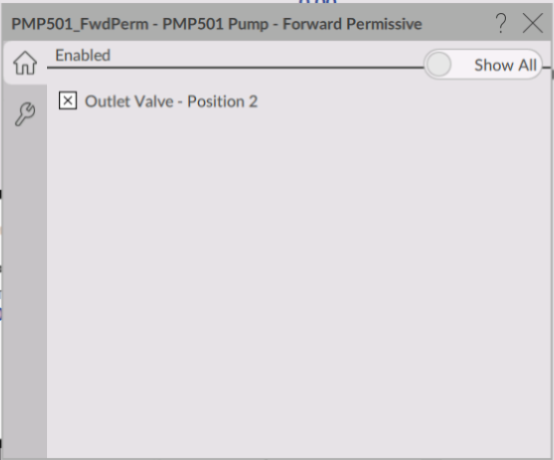
  • Faceplates for phase control in Tank 500 (Fig. 1/5)


    tank-phase-operation-via-factorytalk-optix_Fig 12_1.png

    tank-phase-operation-via-factorytalk-optix_Fig 12_1.png

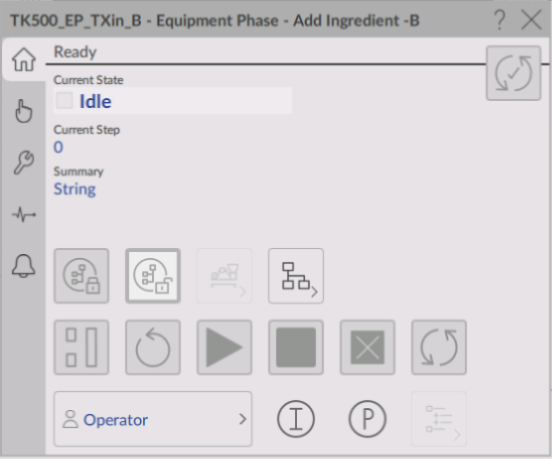
  • Faceplates for phase control in Tank 500 (Fig. 2/5)


    tank-phase-operation-via-factorytalk-optix_Fig 12_2.png

    tank-phase-operation-via-factorytalk-optix_Fig 12_2.png

  • Faceplates for phase control in Tank 500 (Fig. 3/5)


    tank-phase-operation-via-factorytalk-optix_Fig 12_3.png

    tank-phase-operation-via-factorytalk-optix_Fig 12_3.png

  • Faceplates for phase control in Tank 500 (Fig. 4/5)


    tank-phase-operation-via-factorytalk-optix_Fig 12_4.png

    tank-phase-operation-via-factorytalk-optix_Fig 12_4.png

  • Faceplates for phase control in Tank 500 (Fig. 5/5)


    tank-phase-operation-via-factorytalk-optix_Fig 12_5.png

    tank-phase-operation-via-factorytalk-optix_Fig 12_5.png

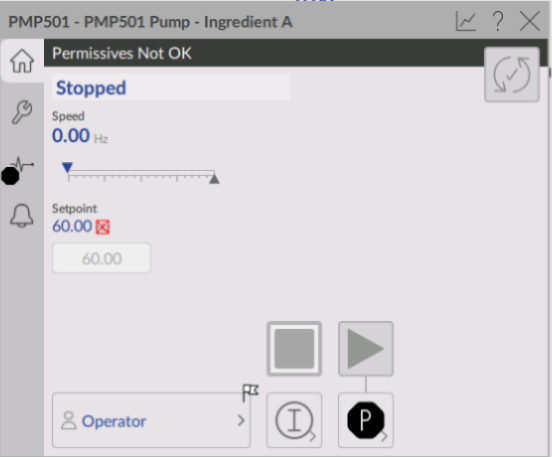
  • Discrete equipment covers with interlock (Fig. 1/2)


    tank-phase-operation-via-factorytalk-optix_Fig 13_1.png

    tank-phase-operation-via-factorytalk-optix_Fig 13_1.png

  • Discrete equipment covers with interlock (Fig. 2/2)


    tank-phase-operation-via-factorytalk-optix_Fig 13_2.png

    tank-phase-operation-via-factorytalk-optix_Fig 13_2.png

Step 10
 

Navigating to other screens in the project

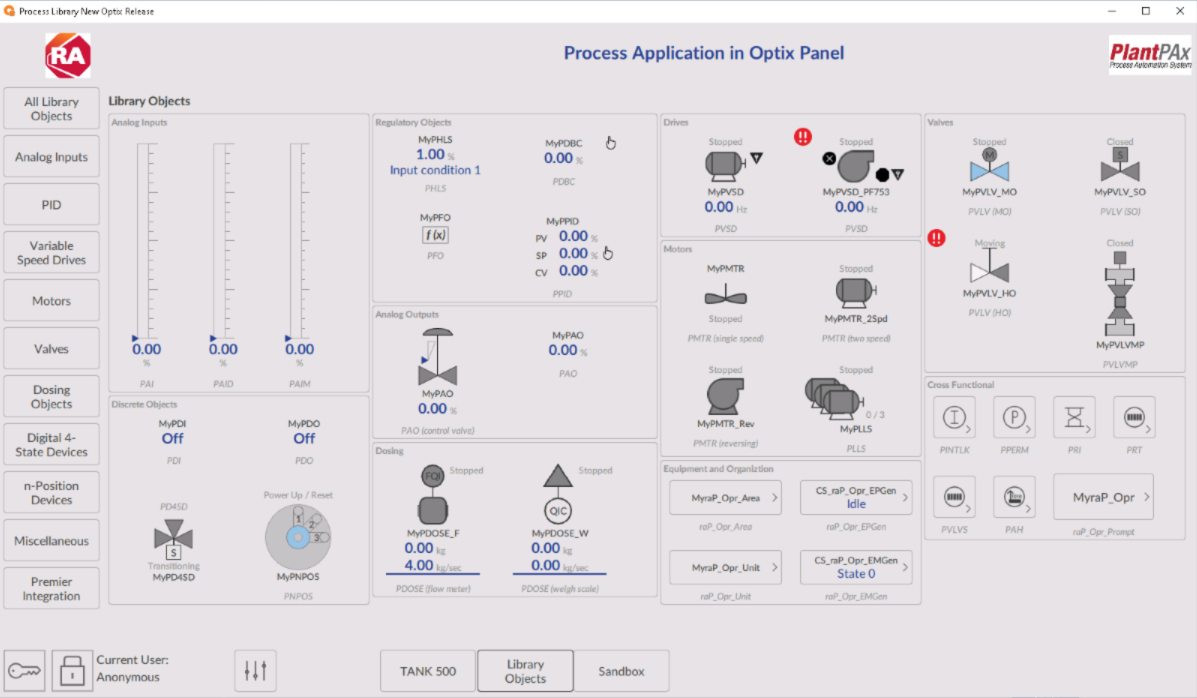
Since the Optix template downloaded from Process Library was used, navigation was left to the predefined screens to familiarize oneself with the objects and their capabilities.

Library objects for process control Available in v 5.20.03


tank-phase-operation-via-factorytalk-optix_Fig 14.png

tank-phase-operation-via-factorytalk-optix_Fig 14.png

Sandbox Screen


tank-phase-operation-via-factorytalk-optix_Fig 15.png

tank-phase-operation-via-factorytalk-optix_Fig 15.png

tank-phase-operation-via-factorytalk-optix_Fig 1_1.png

tank-phase-operation-via-factorytalk-optix_Fig 1_1.png

tank-phase-operation-via-factorytalk-optix_Fig 1_2.png

tank-phase-operation-via-factorytalk-optix_Fig 1_2.png

tank-phase-operation-via-factorytalk-optix_Fig 2.png

tank-phase-operation-via-factorytalk-optix_Fig 2.png

tank-phase-operation-via-factorytalk-optix_Fig 3.png

tank-phase-operation-via-factorytalk-optix_Fig 3.png

tank-phase-operation-via-factorytalk-optix_Fig 4.png

tank-phase-operation-via-factorytalk-optix_Fig 4.png

tank-phase-operation-via-factorytalk-optix_Fig 5.png

tank-phase-operation-via-factorytalk-optix_Fig 5.png

tank-phase-operation-via-factorytalk-optix_Fig 6_1.png

tank-phase-operation-via-factorytalk-optix_Fig 6_1.png

tank-phase-operation-via-factorytalk-optix_Fig 6_2.png

tank-phase-operation-via-factorytalk-optix_Fig 6_2.png

tank-phase-operation-via-factorytalk-optix_Fig 7_1.png

tank-phase-operation-via-factorytalk-optix_Fig 7_1.png

export-report-variables-from-factorytalk-optix_Image 5.jpg

tank-phase-operation-via-factorytalk-optix_Fig 7_2.png

tank-phase-operation-via-factorytalk-optix_Fig 8.png

tank-phase-operation-via-factorytalk-optix_Fig 8.png

tank-phase-operation-via-factorytalk-optix_Fig 9.png

tank-phase-operation-via-factorytalk-optix_Fig 9.png

export-report-variables-from-factorytalk-optix_Image 3.jpg

tank-phase-operation-via-factorytalk-optix_Fig 10.png

tank-phase-operation-via-factorytalk-optix_Fig 11.png

tank-phase-operation-via-factorytalk-optix_Fig 11.png

tank-phase-operation-via-factorytalk-optix_Fig 12_1.png

tank-phase-operation-via-factorytalk-optix_Fig 12_1.png

tank-phase-operation-via-factorytalk-optix_Fig 12_2.png

tank-phase-operation-via-factorytalk-optix_Fig 12_2.png

tank-phase-operation-via-factorytalk-optix_Fig 12_3.png

tank-phase-operation-via-factorytalk-optix_Fig 12_3.png

tank-phase-operation-via-factorytalk-optix_Fig 12_4.png

tank-phase-operation-via-factorytalk-optix_Fig 12_4.png

tank-phase-operation-via-factorytalk-optix_Fig 12_5.png

tank-phase-operation-via-factorytalk-optix_Fig 12_5.png

tank-phase-operation-via-factorytalk-optix_Fig 13_1.png

tank-phase-operation-via-factorytalk-optix_Fig 13_2.png

tank-phase-operation-via-factorytalk-optix_Fig 13_2.png

tank-phase-operation-via-factorytalk-optix_Fig 13_2.png

tank-phase-operation-via-factorytalk-optix_Fig 14.png

tank-phase-operation-via-factorytalk-optix_Fig 14.png

tank-phase-operation-via-factorytalk-optix_Fig 15.png

tank-phase-operation-via-factorytalk-optix_Fig 15.png


Tank phase operation via FactoryTalk Optix

Version 1.0 - June 2026


AHIC White Logo
Subscribe!

Receive new app releases and other updates from the Innovation Center directly in your inbox.

I want to subscribe.
 
  1. Chevron LeftChevron Left Rockwell Automation Home
  2. Chevron LeftChevron Left Sup...
  3. Chevron LeftChevron Left Pro...
  4. Chevron LeftChevron Left Downloads
  5. Chevron LeftChevron Left Innovation Center
  6. Chevron LeftChevron Left Tank phase operation via FactoryTalk Optix
Please update your cookie preferences to continue.
This feature requires cookies to enhance your experience. Please update your preferences to allow for these cookies:
  • Social Media Cookies
  • Functional Cookies
  • Performance Cookies
  • Marketing Cookies
  • All Cookies
You can update your preferences at any time. For more information please see our {0} Privacy Policy
CloseClose