Loading
Innovation Center LOGO
Recent ActivityRecent Activity

Connect Processes with Azure IoT Operations

IoTConnect connects industrial plant data to Azure IoT Operations through FTOptix, OPC UA and MQTT, enabling operations monitoring. - [Implementation time: 120 Minutes]
Innovation Center Home Page
connect-processes-with-azure-iot-operations_Adaptive Cloud Approach Architecture_1.png
 
Innovation Center LOGO
  • Overview
  • Implementation Guide
  • Download
  • Contact us
  • Subscribe
Innovation Center Home Page
 

What does this application do?

The application enables industrial plant data to be securely, standardizedly, and scalably transferred to the cloud, making it possible to leverage analytics, artificial intelligence, and enterprise applications without relying on proprietary integrations. Azure IoT Operations acts as an edge data platform that connects industrial assets through OPC UA and MQTT, while FactoryTalk Optix provides visualization, monitoring, and access to operational data.

  1. Advantages
  2. Limitations
  3. Disadvantages
Open All Close All
Advantages


  1. Open and Standards-Based Architecture - Uses industry-standard protocols such as OPC UA and MQTT, reducing dependency on proprietary integrations. Facilitates interoperability between equipment from multiple vendors and existing automation systems.
  2. Secure OT-to-Cloud Connectivity - Provides a secure framework for transferring operational data from industrial assets to Azure. Supports modern cybersecurity strategies by implementing standardized communication and centralized data governance.
  3. Scalability and Flexibility - Architecture can scale from a single production line to multiple plants across the enterprise.Edge and cloud components can be expanded as operational requirements grow.
  4. Accelerated Digital Transformation - Creates a foundation for advanced use cases including: Predictive maintenance, Energy optimization, AI-driven recommendations, Operational anomaly detection and Digital twins.
  5. OT and IT Convergence - Aligns with the ISA-95 framework, enabling structured integration between industrial operations and enterprise systems. Improves visibility across production, maintenance, quality, and business functions.
  6. Real-Time Operational Intelligence - FactoryTalk Optix enables real-time visualization and monitoring. Azure services provide advanced analytics and AI capabilities using operational data collected from the plant floor.
  7. Reduced Integration Complexity - Eliminates the need for multiple custom point-to-point integrations. Provides a more maintainable and future-ready data architecture.


Limitations


  1. Azure-Centric Ecosystem - The architecture delivers maximum value when organizations adopt Microsoft Azure services. Companies with significant investments in other cloud providers may require additional integration efforts.
  2. Dependence on Network Infrastructure - Reliable connectivity between OT, Edge, and Cloud environments is required. Network latency, bandwidth limitations, or connectivity interruptions may affect cloud-based use cases.
  3. Data Readiness Requirements - Successful analytics and AI initiatives require high-quality, contextualized operational data. Organizations with inconsistent tag structures, poor data governance, or outdated instrumentation may need preparatory work.
  4. Skills and Organizational Readiness - Requires expertise across OT, networking, cybersecurity, cloud technologies, and data analytics. Change management and workforce enablement may be necessary to maximize benefits.
  5. Initial Deployment Complexity - Integration across automation systems, historians, enterprise applications, and cloud services may require detailed architecture planning and phased implementation.


Disadvantages


  1. Additional Cloud Operational Costs - Ongoing expenses may include cloud storage, data processing, AI services, and network bandwidth. Costs increase as data volume and analytics workloads grow.
  2. Higher Cybersecurity Responsibility - While the platform enables secure architectures, organizations must actively manage identities, certificates, access control, monitoring, and compliance requirements.
  3. Potential Return-on-Investment Timeline - Benefits from AI, predictive analytics, and optimization initiatives may take time to materialize, particularly when large-scale data preparation is required.
  4. Increased Architectural Complexity - Compared with traditional on-premise architectures, the introduction of Edge, Cloud, AI, and enterprise integration layers creates more components to manage.
  5. Dependence on Digital Maturity - Organizations with limited OT/IT integration maturity may not immediately realize the full value of the platform until processes, governance, and data management practices are improved.


AHIC Download ICON VF.png

Downloads

Please note: You will need to agree to the Terms & Conditions for each download.

Downloadable file ›
Legal Disclaimer Acceptance. ROCKWELL AUTOMATION WILL PROVIDE ACCESS TO ROCKWELL PRODUCTS (BEST PRACTICES, APPLICATIONS AND KNOWLEDGE) ON THE CONDITION THAT YOU ACCEPT AND COMPLY WITH THE FOLLOWING TERMS AND CONDITIONS. YOU ACCEPT AND AGREE TO BE BOUND BY THE TERMS OF THIS AGREEMENT BY DOWNLOADING, INSTALLING, COPYING, OR OTHERWISE USING PRODUCTS. IF YOU ARE ACCEPTING THESE TERMS ON BEHALF OF ANOTHER PERSON, COMPANY, OR OTHER LEGAL ENTITY, YOU REPRESENT AND WARRANT THAT YOU HAVE FULL AUTHORITY TO BIND THAT PERSON, COMPANY, OR LEGAL ENTITY TO THESE TERMS. IF YOU DO NOT AGREE TO THESE TERMS, DO NOT DOWNLOAD, INSTALL, COPY, ACCESS, OR USE THE PRODUCTS, SOFTWARE AND/OR CLOUD SERVICES. 1. Rockwell Automation retains full ownership and title to all Products and related documentation. No rights or licenses are granted other than those set forth in this Agreement. Company grants to Rockwell Automation a non-exclusive, worldwide, royalty-free, perpetual, non-revocable license to use any feedback Company provides regarding the Products, even if Company has designated the feedback as confidential. Rockwell Automation will be entitled to use the feedback without restriction or compensation to Company. 2. Company may not lease sub-lease, assign, license, sub-license or otherwise transfer any of the Products without the prior written consent of Rockwell Automation. Company may not assign or otherwise transfer access rights to the Products without the prior written consent of Rockwell Automation. Any reverse assembly, reverse engineering, decompilation, and creation of derivative works based on the Products by Company is prohibited. 3. Company acknowledges that Products provided under this Agreement are Rockwell Automation’s Confidential Information and are covered by effective or pending copyrights, patents, trademarks and/or trade secrets of Rockwell Automation, and Company agrees to maintain confidentiality by not disclosing Products or documentation to any third party without the prior written consent of Rockwell Automation and to protect the confidentiality of the Products as it would Company’s own confidential information. Company agrees that its obligation of confidentiality under this paragraph shall survive expiration or termination of this Agreement. 4. Company agrees that Products provided under this Agreement are prototypes and examples and its application and results may vary depending on each customer and project conditions. Rockwell Automation do not warranty the same results. This Agreement shall in no way be construed as a commitment by Rockwell Automation at any time to manufacture and/or offer Products for sale. There is no explicit or implicit service level agreement associated with using the Products. Rockwell Automation does not warrant that the functions contained in the Products will meet Company’s requirements. Company agrees to use all Products only in accordance with the instructions and only for the intended usages identified in the documentation. 5. EXCLUSION OF WARRANTIES AND LIMITATION OF LIABILITY. THE PRODUCTS ARE PROVIDED "AS IS". ROCKWELL AUTOMATION DISCLAIMS ANY AND ALL WARRANTIES, EXPRESS, IMPLIED OR STATUTORY, INCLUDING WITHOUT LIMITATION ANY WARRANTIES OF MERCHANTABILITY OR FITNESS FOR A PARTICULAR PURPOSE. ROCKWELL AUTOMATION EXPLICITLY DISCLAIMS ALL WARRANTIES OF NON- INFRINGEMENT AND EXPRESSLY DOES NOT WARRANT THAT THE PRODUCTS, IN WHOLE OR IN PART, WILL BE ERROR FREE OR FREE FROM SECURITY VULNERABILITIES. IN NO EVENT SHALL ROCKWELL AUTOMATION BE LIABLE FOR (i) LOST PROFITS, LOST SAVINGS, DOWNTIME, SPECIAL, INDIRECT OR CONSEQUENTIAL DAMAGES OF ANY KIND, OR (ii) ANY PERSONAL INJURY, PROPERTY DAMAGE OR ENVIRONMENTAL DAMAGE ARISING OUT OF OR IN CONNECTION WITH THIS AGREEMENT, WHETHER IN AN ACTION IN CONTRACT, STRICT LIABILITY OR IN TORT INCLUDING NEGLIGENCE. 6. COMPANY AGREES TO INDEMNIFY AND HOLD ROCKWELL AUTOMATION HARMLESS FROM ALL COSTS, AWARDS, DAMAGES, EXPENSES AND FEES (INCLUDING ATTORNEYS FEES) RESULTING FROM OR RELATED TO ANY THIRD-PARTY CLAIMS (INCLUDING EMPLOYEES AND AGENTS OF COMPANY) AGAINST ROCKWELL AUTOMATION, ITS DISTRIBUTORS, AGENTS, OFFICERS, DIRECTORS OR EMPLOYEES FOR PERSONAL INJURY (INCLUDING DEATH), PROPERTY DAMAGE OR ENVIRONMENTAL DAMAGE RELATED TO OR RESULTING FROM THE USE OF THE PRODUCTS. 7. In the event a Product is exported, Company agrees to comply with all applicable United States Export Control Law and Regulations, and the applicable export control laws of other countries. This Agreement shall be governed by the laws of the state of Wisconsin. This Agreement is the complete and exclusive Agreement between Rockwell Automation and the Company, and supersedes all prior agreements, whether written or oral, relating to the Products.
AHIC NEED HELP ICON VF.png

Need Help?

If you need help with an application or have feedback from the Innovation Center, please contact us.


Is this application relevant to me?

This version provides a foundation for accelerating the development of a software solution that will centralize production data, capture process information, and enable its consumption by enterprise applications in Azure. The captured data can be used for:

  • Energy optimization
  • Failure prediction
  • Operational anomaly detection
  • AI-driven operational recommendations

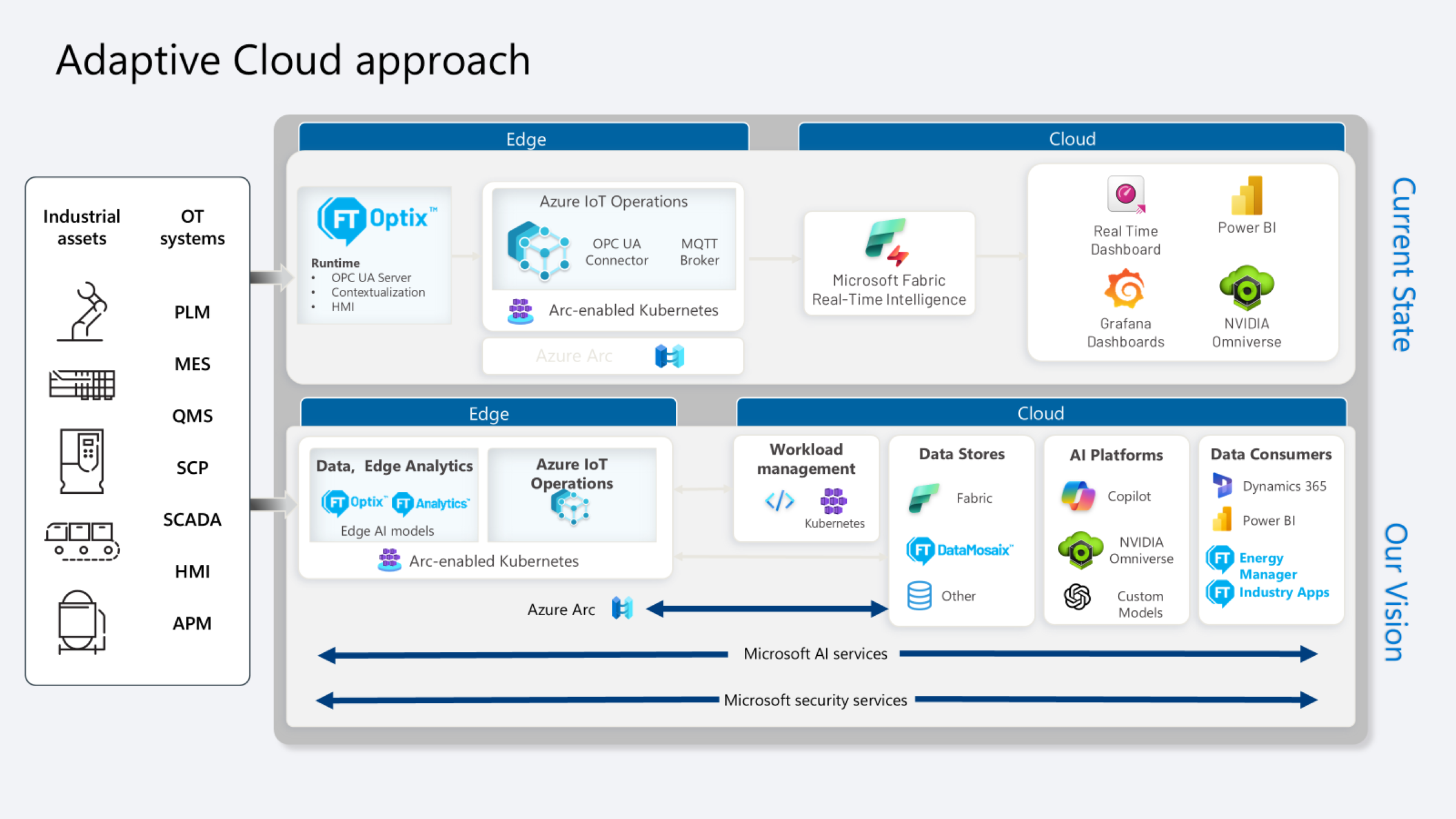
The adaptive cloud architecture from Rockwell Automation and Microsoft connects industrial equipment and OT systems with edge technologies such as Azure IoT Operations and FactoryTalk Optix, enabling operational data to be securely collected, contextualized, and transferred to the cloud. This facilitates advanced analytics, real-time intelligence, and AI-powered applications, creating a more secure, scalable, and integrated operation. The objective is to evolve from traditional siloed architectures toward a unified ecosystem where OT, IT, Edge, Cloud, and AI converge to drive digital transformation and operational excellence.


connect-processes-with-azure-iot-operations_Adaptive Cloud Approach Architecture_1.png

connect-processes-with-azure-iot-operations_Adaptive Cloud Approach Architecture_1

connect-processes-with-azure-iot-operations_Adaptive Cloud Approach Architecture_1.png

connect-processes-with-azure-iot-operations_Adaptive Cloud Approach Architecture_1


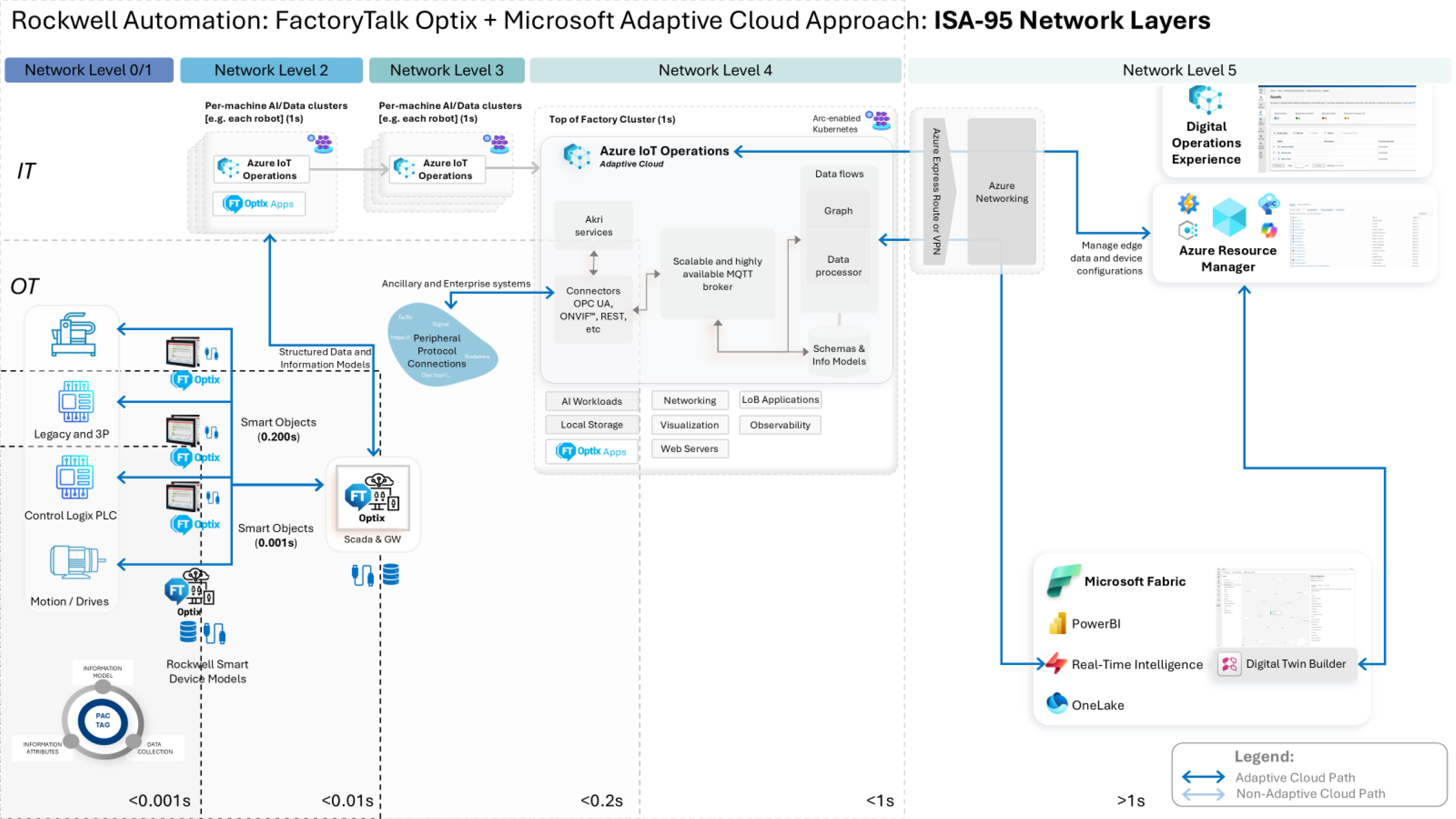
The architecture integrates industrial automation systems with IT platforms using the ISA-95 model as a reference framework. Through FactoryTalk Optix, Azure IoT Operations, and cloud services, data flows from field devices and PLCs to enterprise applications and AI tools.

This approach enables a more connected, scalable, and intelligent operation, supporting use cases such as real-time monitoring, advanced analytics, digital twins, and enterprise-wide process optimization. By bridging OT and IT environments, organizations can unlock greater operational visibility, faster decision-making, and enhanced business outcomes.

connect-processes-with-azure-iot-operations_Factorytalk Optix + Microsoft Adaptive Cloud Approach Architecture_2.png

connect-processes-with-azure-iot-operations_Factorytalk Optix + Microsoft Adaptive Cloud Approach Architecture_2

connect-processes-with-azure-iot-operations_Factorytalk Optix + Microsoft Adaptive Cloud Approach Architecture_2.png

connect-processes-with-azure-iot-operations_Factorytalk Optix + Microsoft Adaptive Cloud Approach Architecture_2


How can I make it work?

Requirements: products, tools, prior knowledge.

Hardware

  • ASEM 6300B-JB1 Compact Box PC 6300B-JB1AAB-CCCAN-BNNN
  • Allen-Bradley ControlLogix L8 Controller

Software

  • FactoryTalk Optix Studio Version 1.7.4
  • FactoryTalk Optix Runtime Version 1.7.4
  • Azure IoT Operations Version 1.4

Prior Knowledge

Basic knowledge of installation, configuration and integration in:

  • FactoryTalk Optix
  • Azure IoT Operations
  • OPC UA
  • MQTT
  • Industrial Networking
  • Kubernetes


AHIC STEP ICON.png

Implementation Guide

 
  1. Step 1
  2. Step 2
  3. Step 3
  4. Step 4.1
  5. Step 4.2
  6. Step 5.1
  7. Step 5.2
  8. Step 5.3
  9. Step 6
Open All Close All
Step 1


Download the IoTConnect.zip folder and extract its contents.

  • Install FactoryTalk Optix Studio and FactoryTalk Optix Runtime from FactoryTalk Hub.
  • Install a Kubernetes cluster and Azure IoT Operations by following the instructions provided in the deployment guide. Deployment overview - Azure IoT Operations Preview | Microsoft Learn.

Note: This quick start guide was developed and tested on an Ubuntu machine; however, it should also work with a Windows machine.

Step 2


FactoryTalk Optix

The sample FactoryTalk Optix Application in this repository contains the key components required to publish data from a control system to Azure IoT Operations. The sample application contains:

  • A sample PLC program for Allen-Bradley L8 ControlLogix
  • Ethernet/IP Communication Driver
  • Application certificate
  • OPC UA Server
  • Graphical User Interface
    • Read data from PLC
    • Manual tag write (for when no PLC is connected)

Note: The application certificate used by the application will need to be regenerated to match your computer name.
 

Step 3


Alternatively, follow the steps outlined below to manually create a FactoryTalk Optix application that contains OPC UA data and make it available as an OPC UA Server for use with Azure IoT Operations.


  • Use FactoryTalk Optix Studio to create a FactoryTalk Optix application.
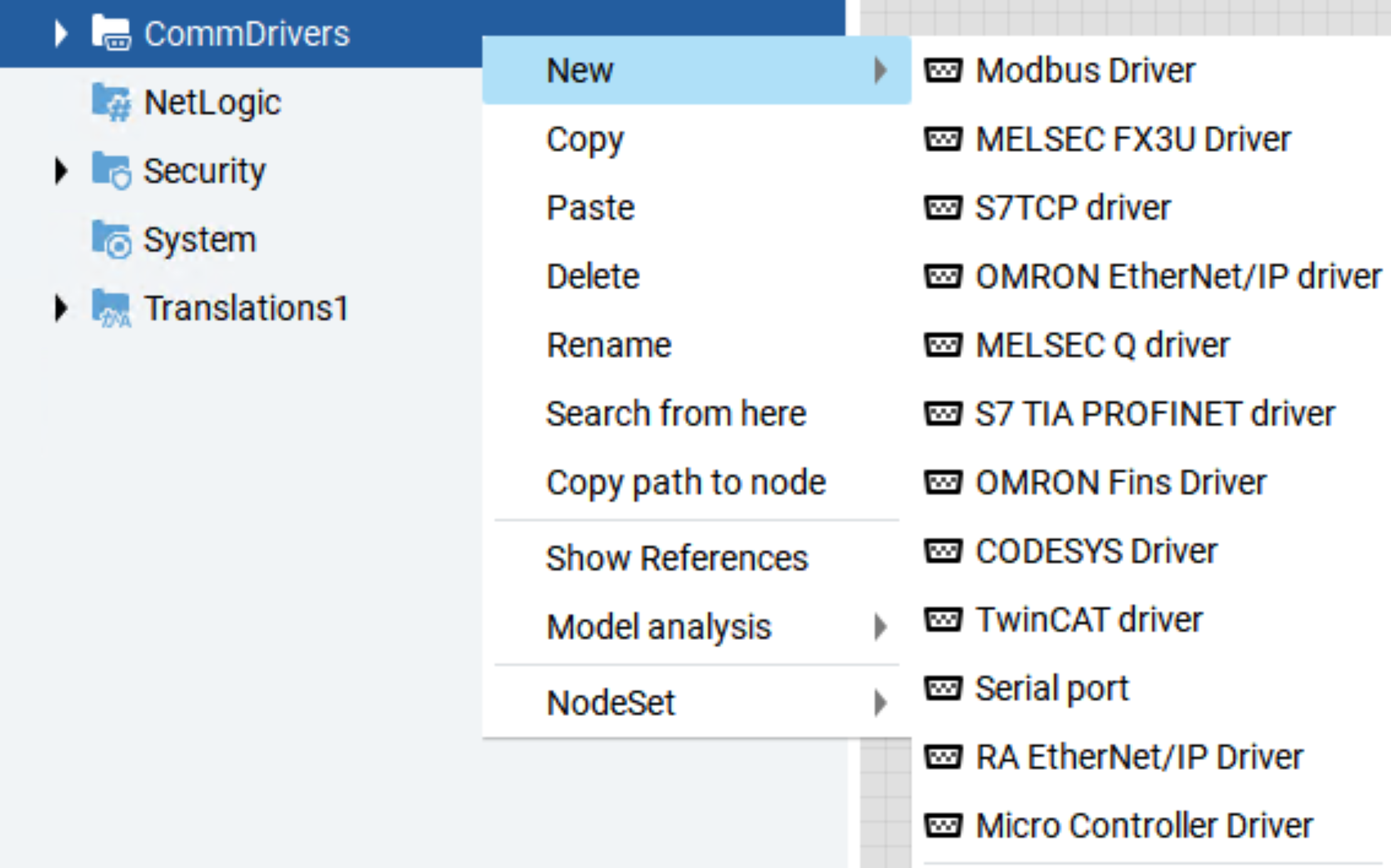
  • Add Communication Driver(s) to read control system data.
    • Use the RAEtherNet/IP Driver to connect to a Rockwell Automation controller.
    • OPC UA is supported through the OPC UA object.


connect-processes-with-azure-iot-operations_FTOptix_CommsDrivers_3.png

connect-processes-with-azure-iot-operations_FTOptix_CommsDrivers_3

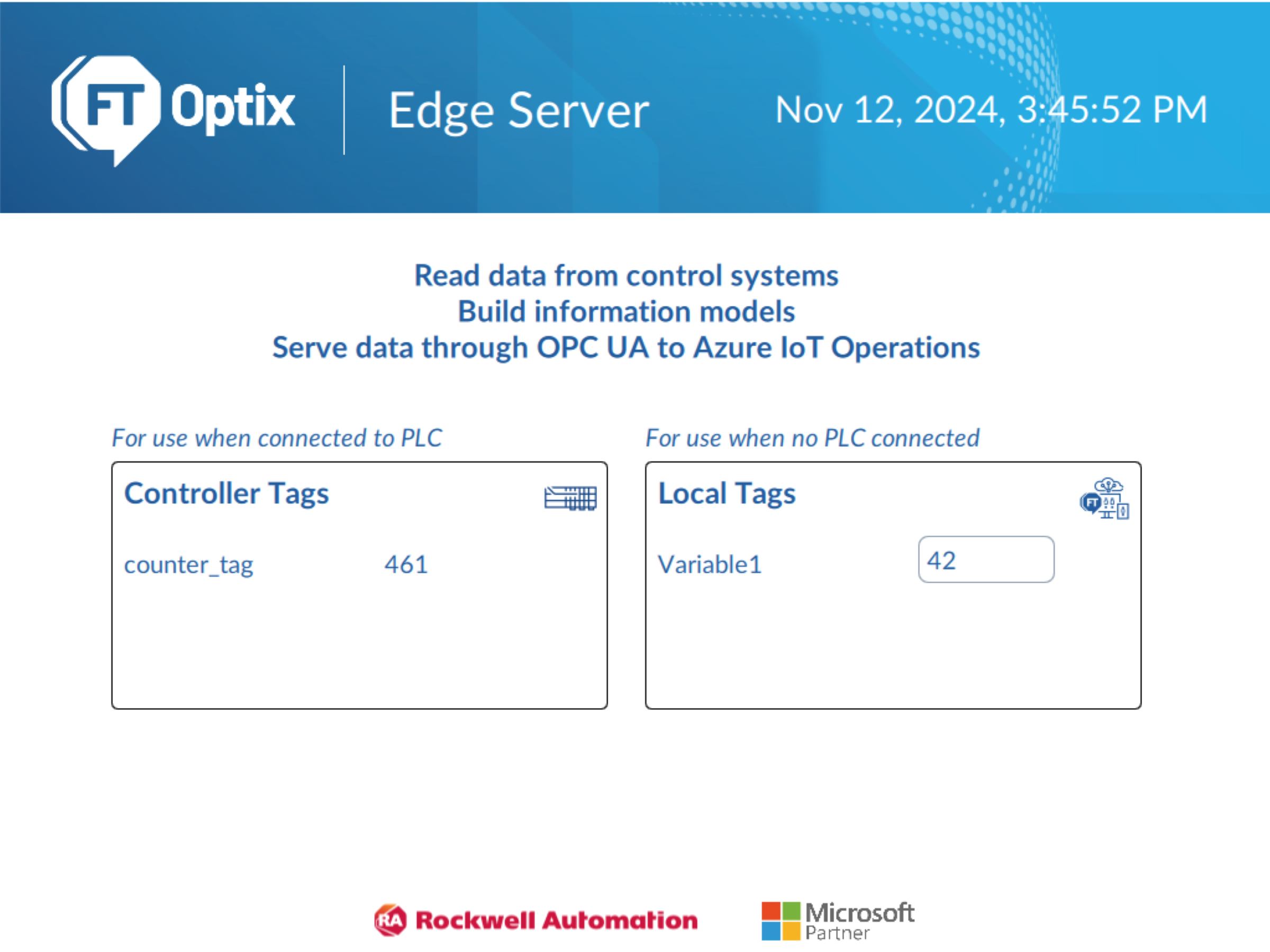
  • (Optional) Visualise the control system data on a graphical screen.
connect-processes-with-azure-iot-operations_FTOptix_runtime_app_4.png

connect-processes-with-azure-iot-operations_FTOptix_runtime_app_4

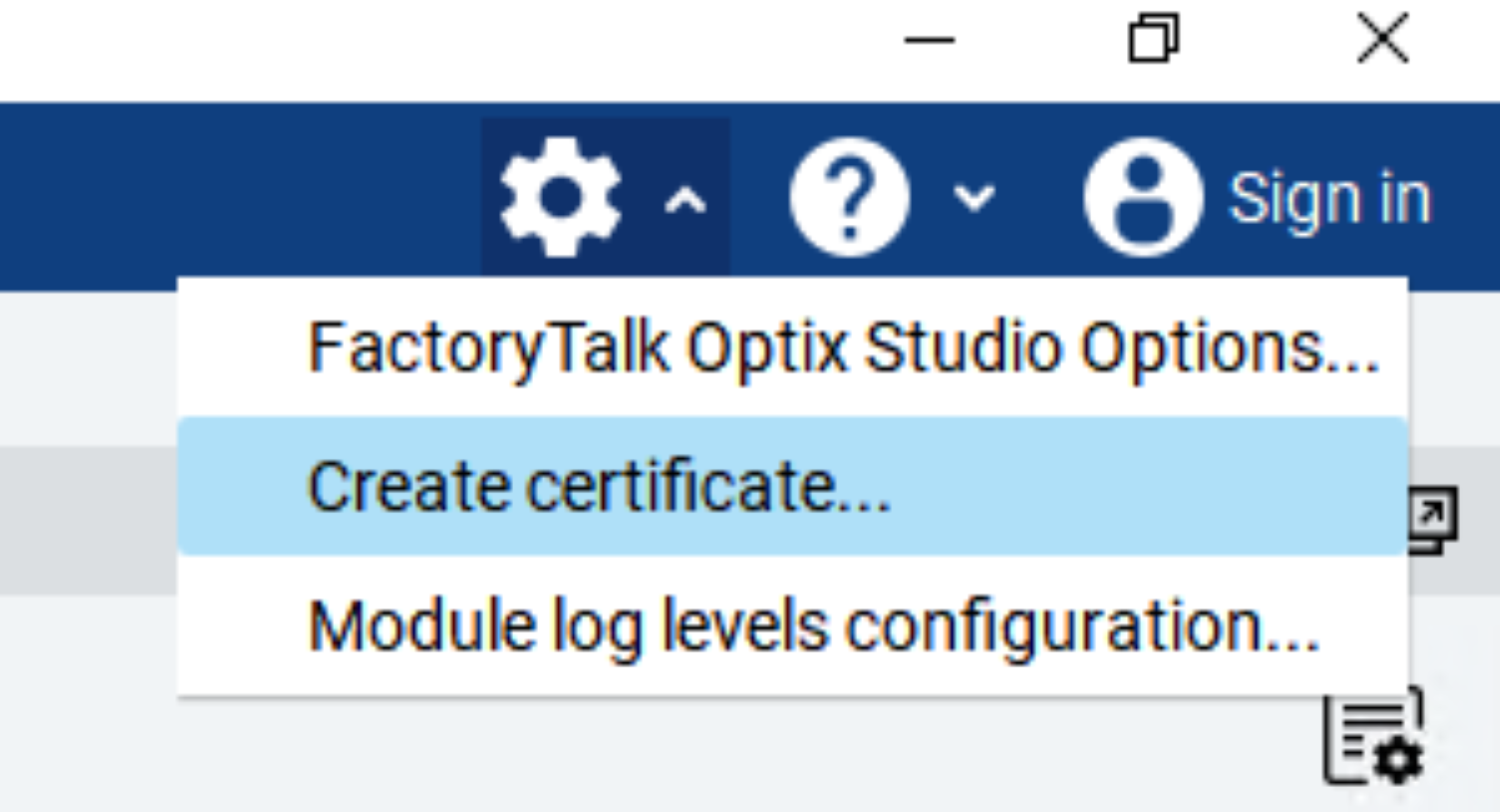
  • Use the Settings → Create certificate menu to create an application certificate for the FactoryTalk Optix server. This certificate will be used to authenticate the Optix OPC UA Server with Azure IoT Operations.
connect-processes-with-azure-iot-operations_FToptix_create_certificate_5.png

connect-processes-with-azure-iot-operations_FToptix_create_certificate_5

Step 4.1


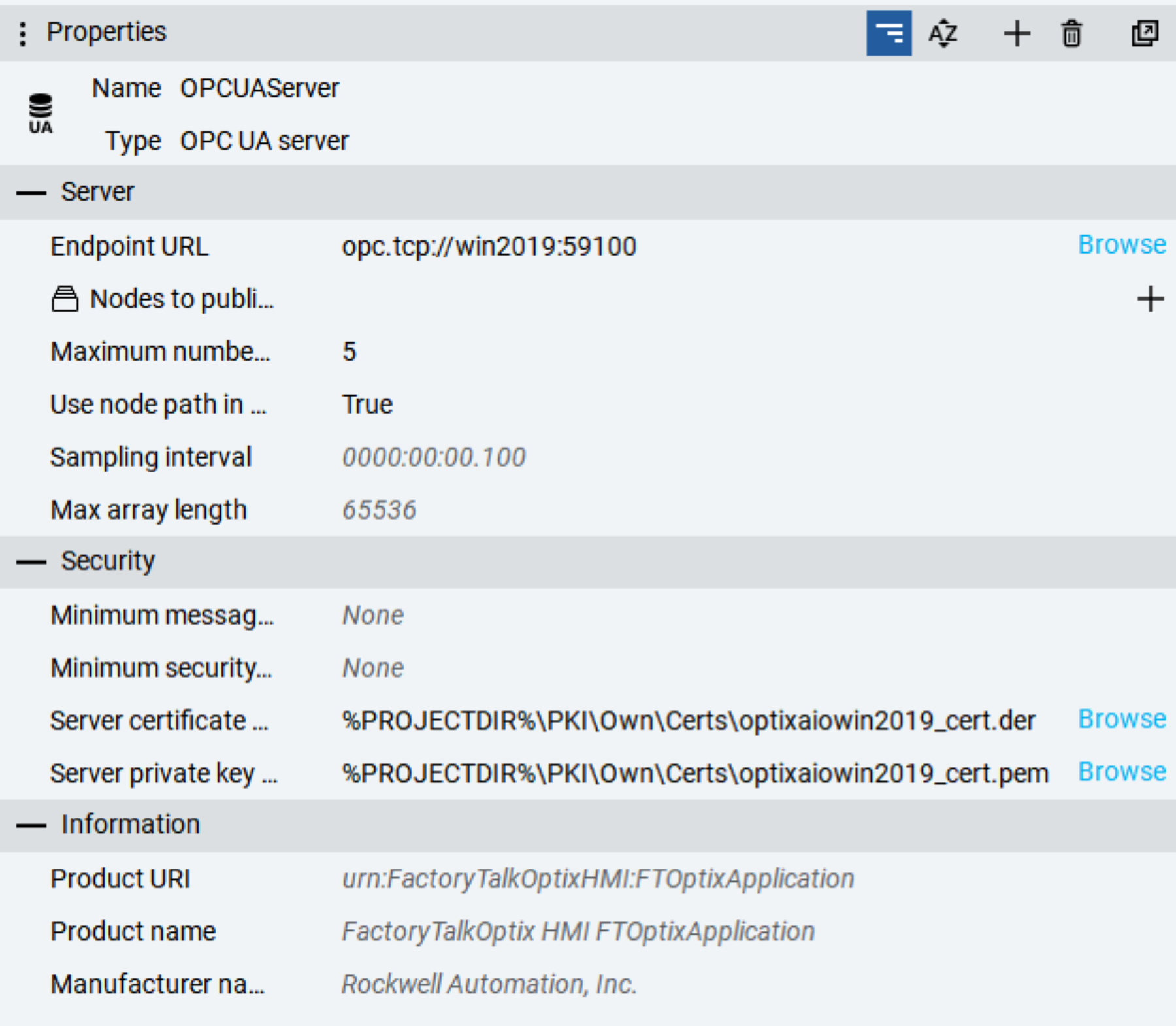
In the project folder pane, add an OPC UA Server.

  • Set the Server certificate file and Server private key file properties to use the FactortyTalk Optix certificate.
  • Use the Nodes to publish property to create a Configuration to publish a subset of nodes or leave blank to publish all nodes.
  • Set the Endpoint URL property to use computer name or IP address so that it is accessible from the AIO box.
  • Set the Use node path in NodeIds property to True to use fully qualified tag names when configuring tags in AIO. Setting this to true will ensure the OPC UA tag names use the user-friendly format of ns=<namespace>;s=Path.To.Node instead of having to specify the node id guid.
Step 4.2


connect-processes-with-azure-iot-operations_optix_opcua_server_6.png

connect-processes-with-azure-iot-operations_optix_opcua_server_6

  • Import the AIO certificates into the project trusted store using the instructions in the FactoryTalk Optix Studio Help.
Step 5.1


Azure IoT Operations

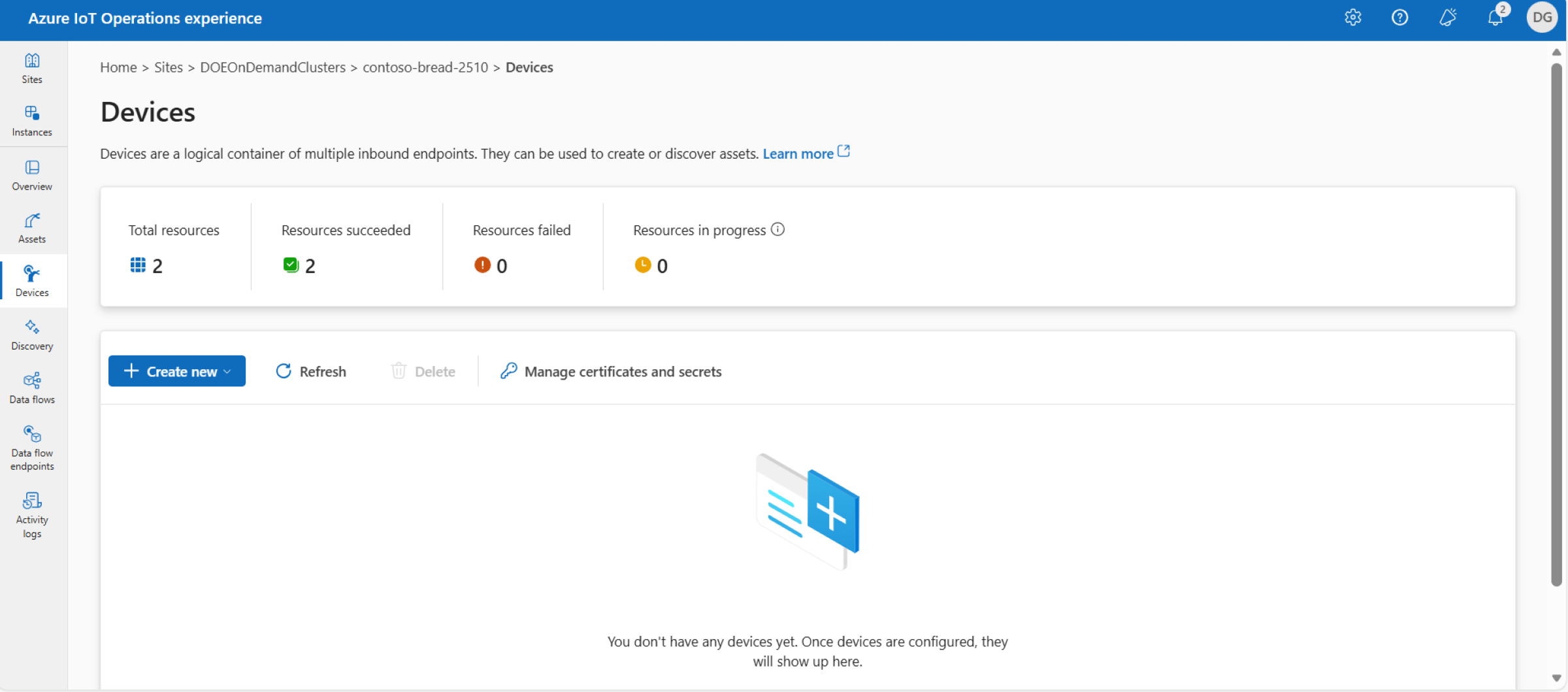
  • Import the FactoryTalk Optix certificate into the trusted store using instructions in Configure OPC UA certificates - Azure IoT Operations Preview | Microsoft Learn.


connect-processes-with-azure-iot-operations_empty_device_screen_7.png

connect-processes-with-azure-iot-operations_empty_device_screen_7

Step 5.2


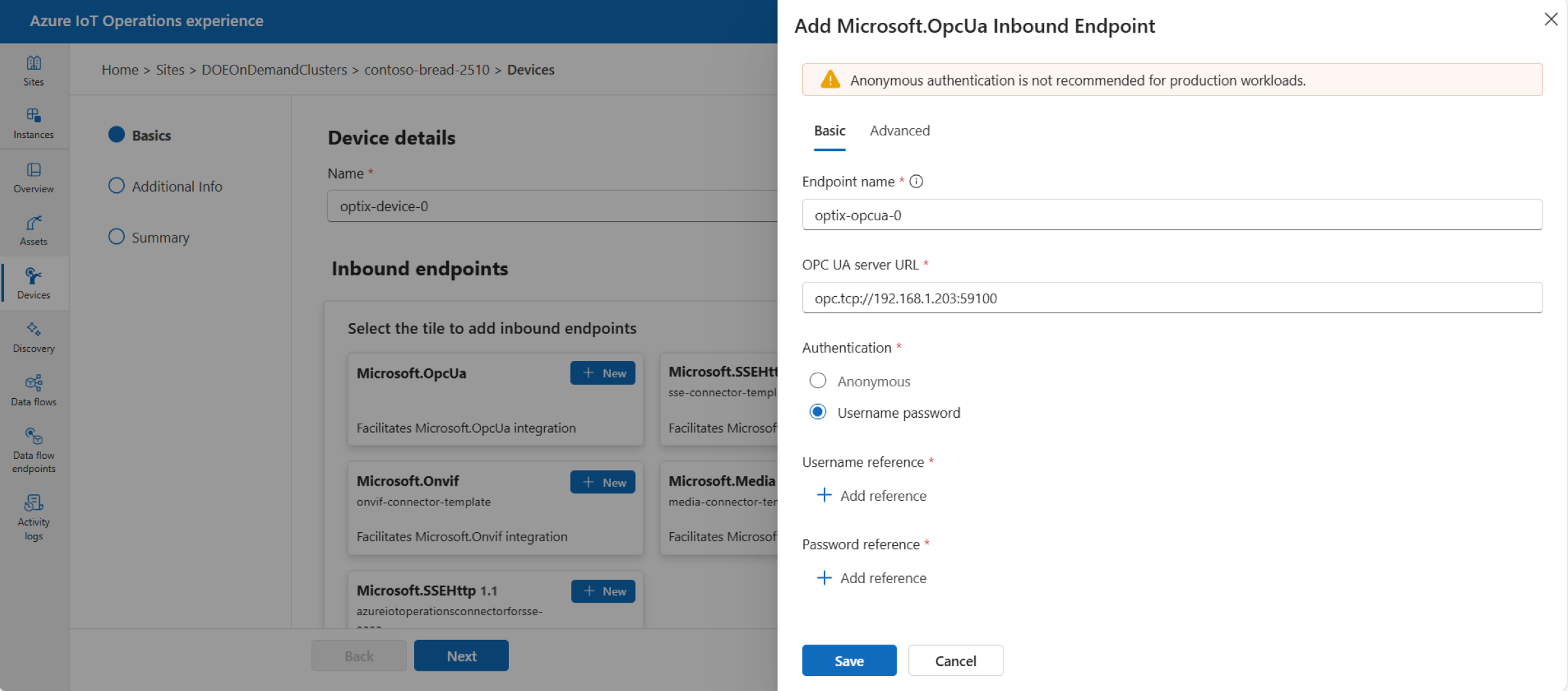
  • Open the Operations Experience site to configure a device including the endpoint profile and an asset with the right selection of data points.


connect-processes-with-azure-iot-operations_device_endpoint_config_screen_8.png

connect-processes-with-azure-iot-operations_device_endpoint_config_screen_8

Step 5.3


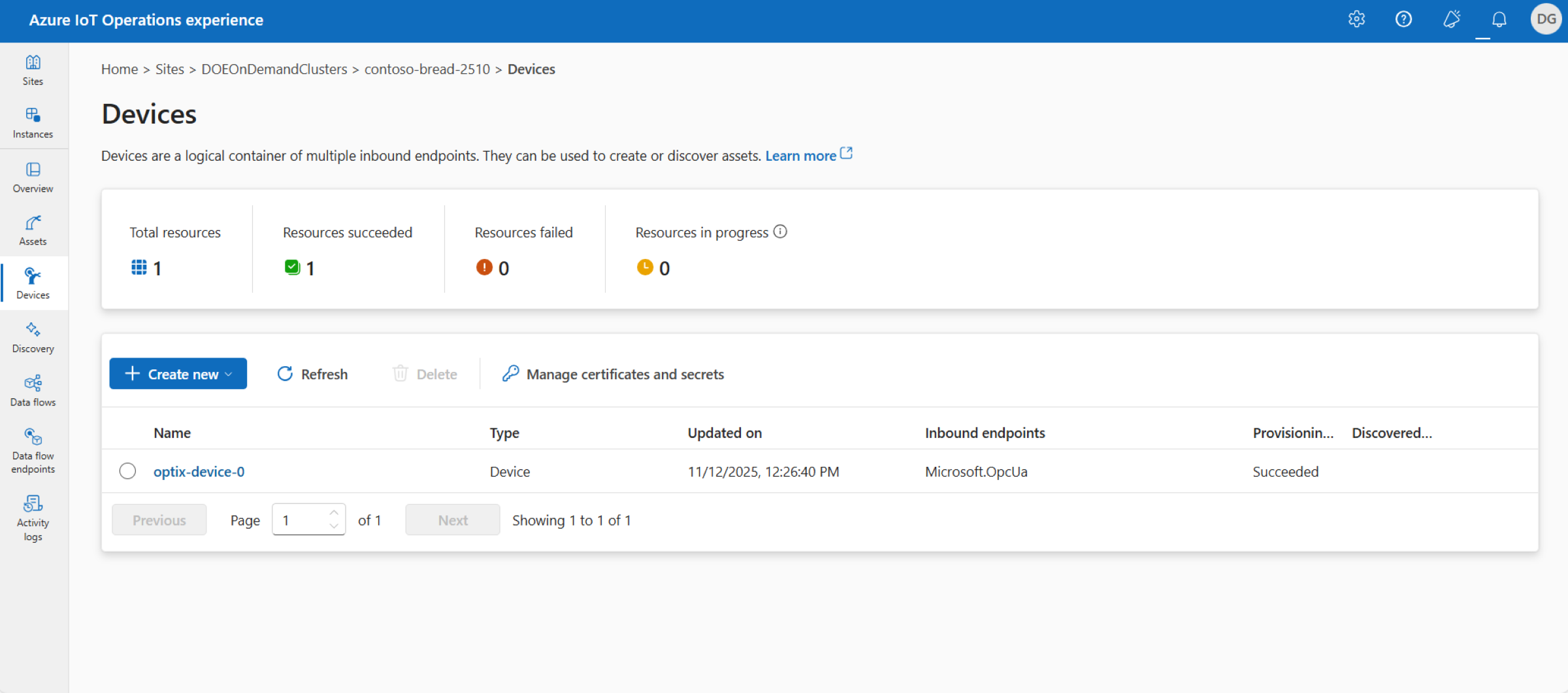
  • In the Devices page create a device to point to the FactoryTalk Optix OPC UA Server.


connect-processes-with-azure-iot-operations_optix_device_screen_9.png

connect-processes-with-azure-iot-operations_optix_device_screen_9

Step 6


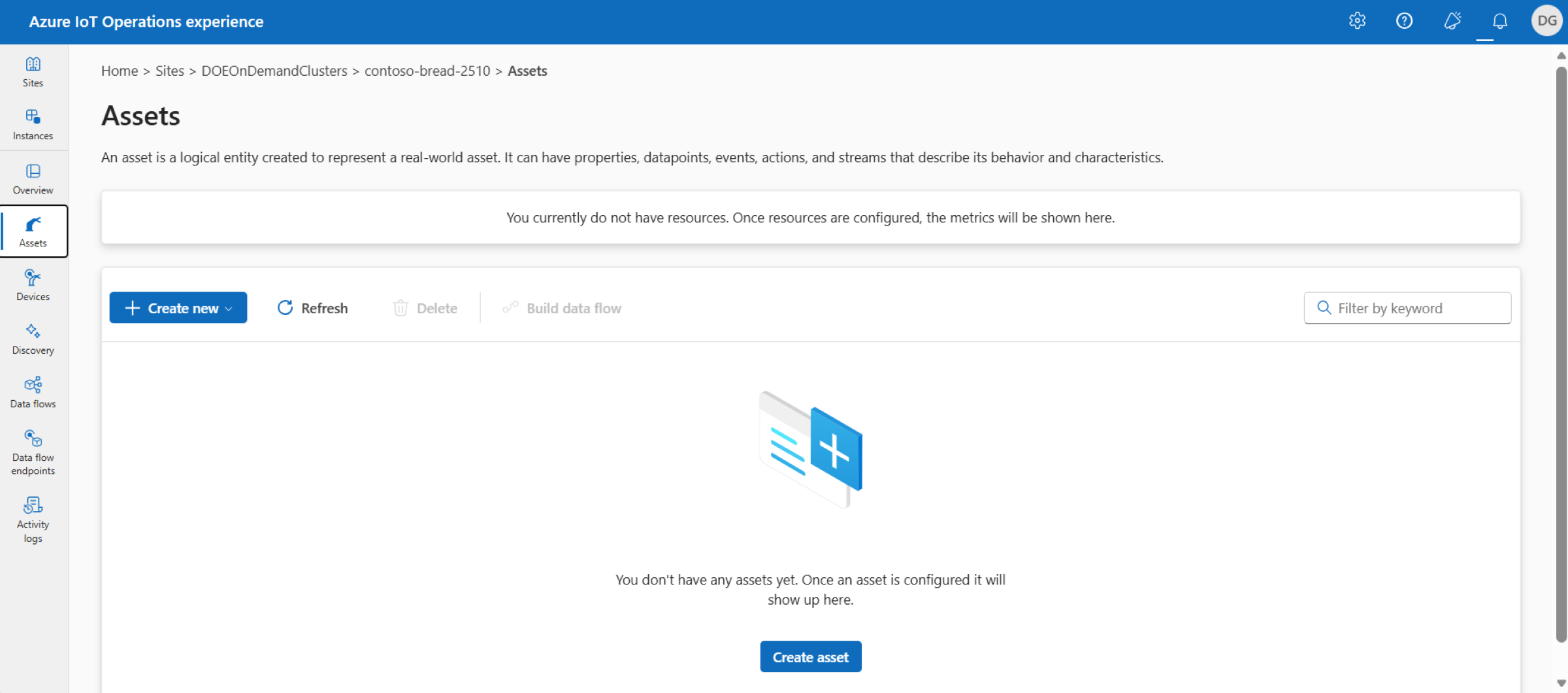
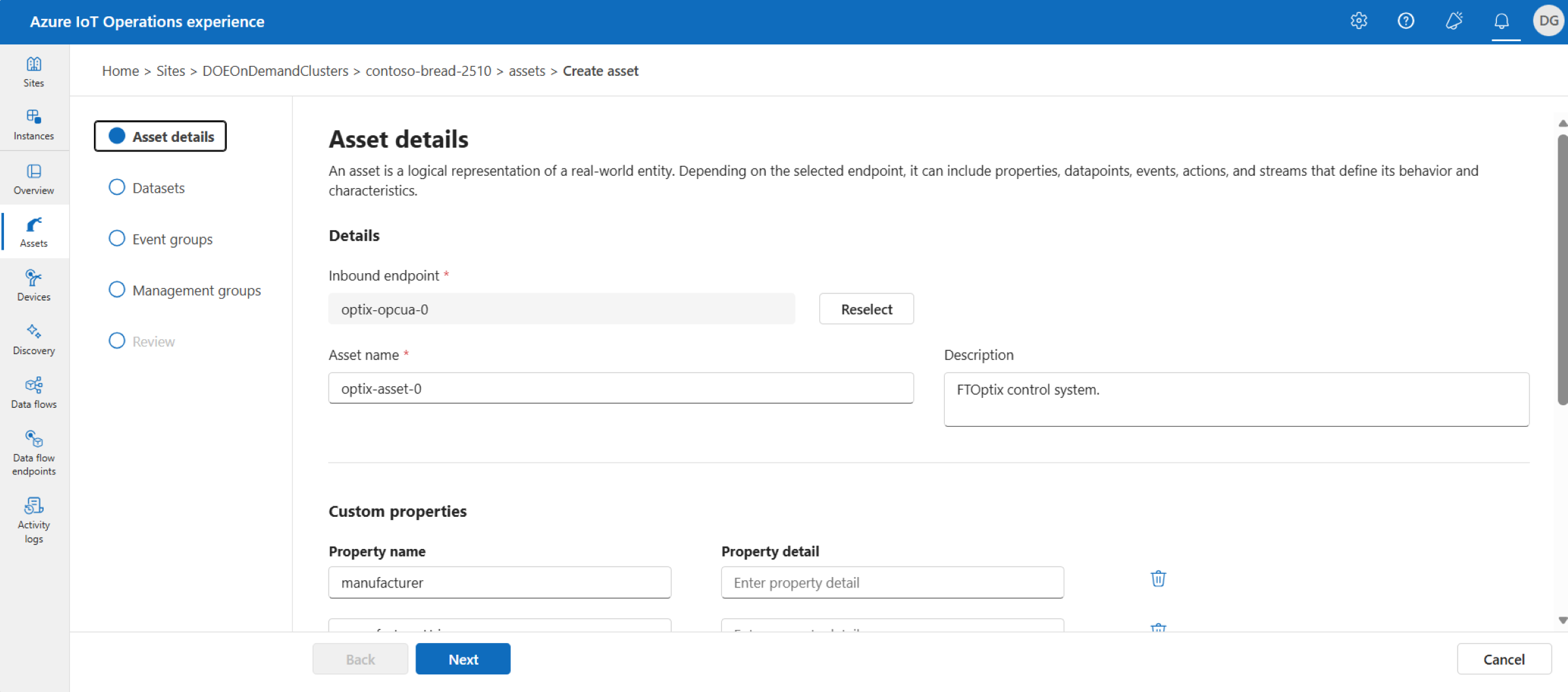
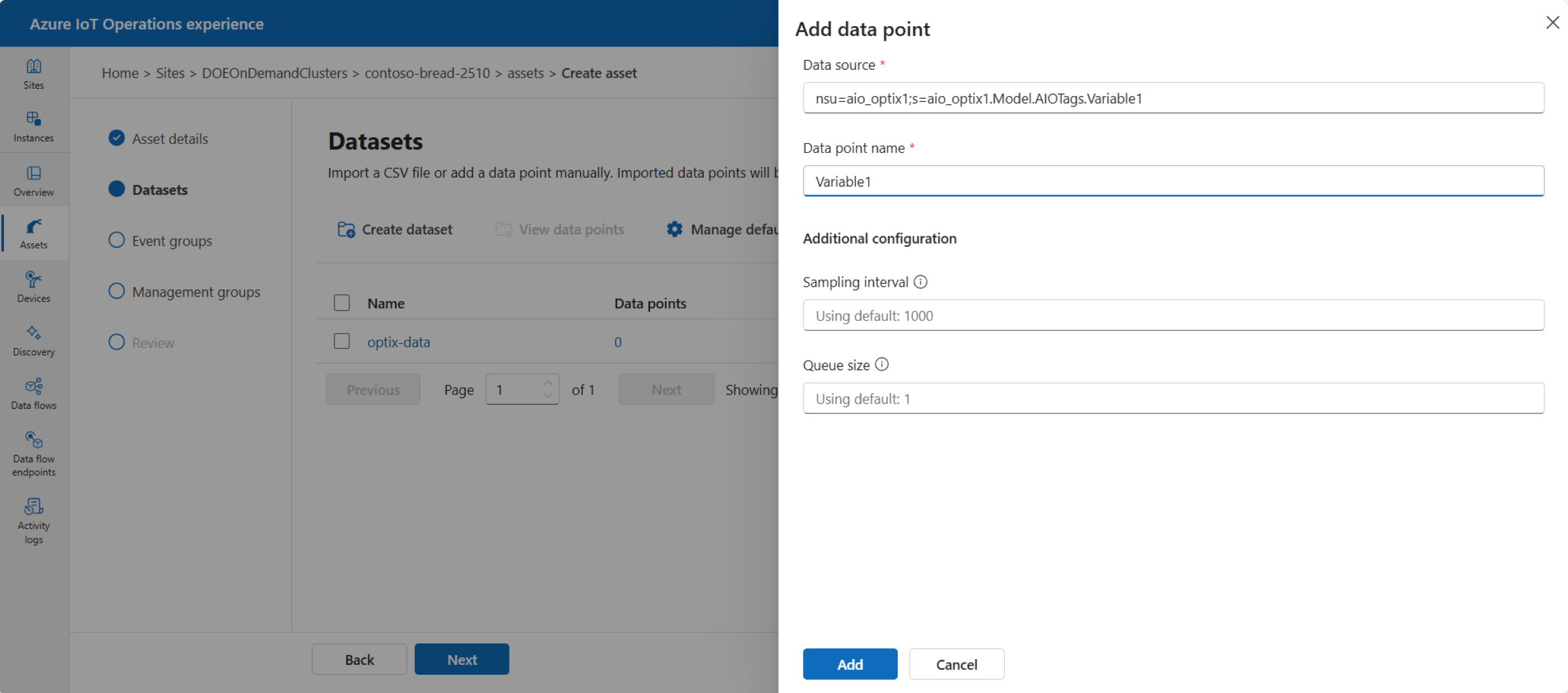
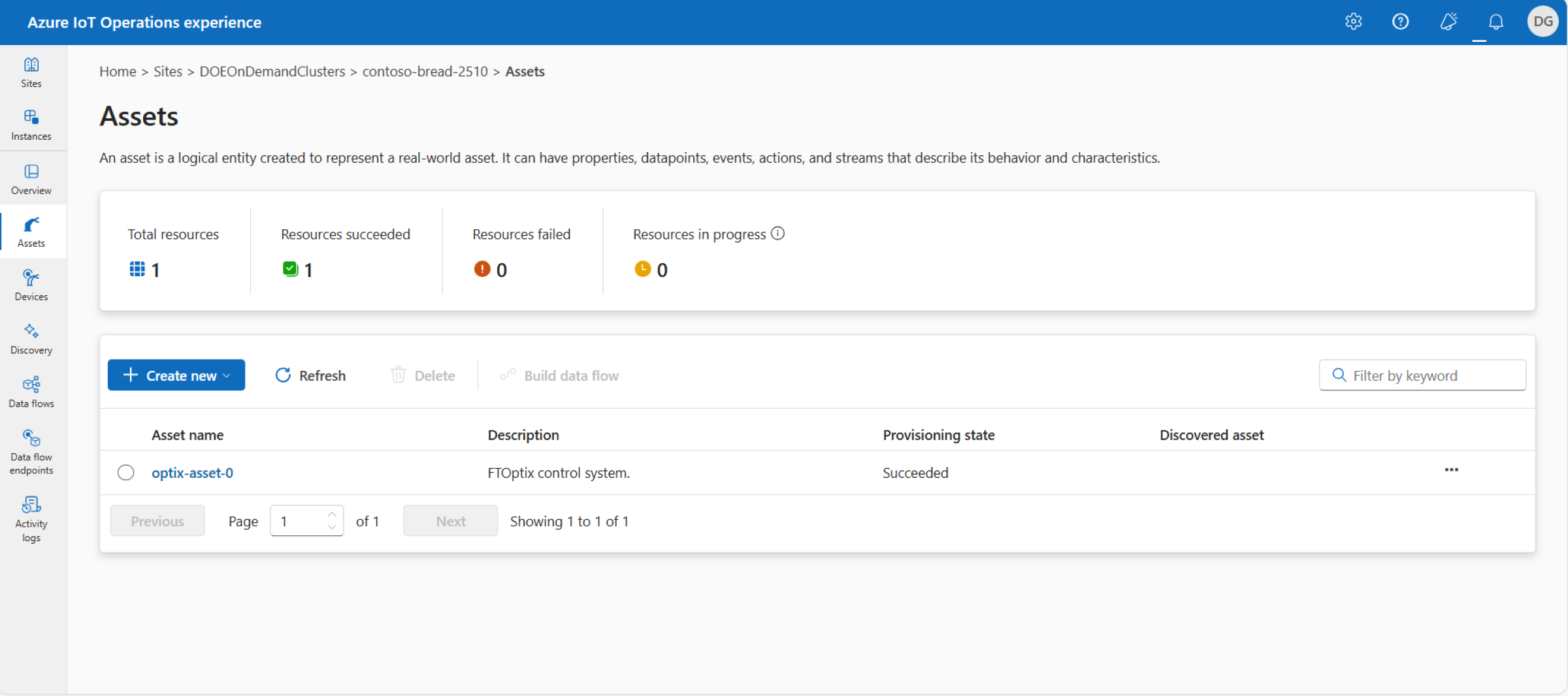
In the Assets page create an asset that uses the endpoint profile and then configure an data point for it.


  • connect-processes-with-azure-iot-operations_empty_asset_screen_10.png

    connect-processes-with-azure-iot-operations_empty_asset_screen_10

  • connect-processes-with-azure-iot-operations_asset_details_config_screen_11.png

    connect-processes-with-azure-iot-operations_asset_details_config_screen_11

  • connect-processes-with-azure-iot-operations_asset_data_point_config_screen_12.png

    connect-processes-with-azure-iot-operations_empty_asset_screen_12

  • connect-processes-with-azure-iot-operations_optix_asset_screen_13.png

    connect-processes-with-azure-iot-operations_empty_asset_screen_13

Tip: The node address for OPC UA tags can be seen in FactoryTalk Optix Studio.

Alternatively, you can use an OPC UA client such as UAExpert to browse the FactoryTalk Optix OPC UA Server to get the address configuration for the tags.

A tag's node id should use the format: nsu=<Optix_Application_Name>;s=Path.To.Node e.g. where the Optix application is named aio_optix1 and a tag named Variable1 has been created in folder named AIOTags, which is a child of the Model folder: nsu=AIO_optix2;s=AIO_optix2.Model.AIOTags.Variable2


connect-processes-with-azure-iot-operations_FTOptix_CommsDrivers_3.png

connect-processes-with-azure-iot-operations_FTOptix_CommsDrivers_3

connect-processes-with-azure-iot-operations_FTOptix_runtime_app_4.png

connect-processes-with-azure-iot-operations_FTOptix_runtime_app_4

adapting-conveyor-machines-with-muting-applications_Picture6.png

adapting-conveyor-machines-with-muting-applications_Picture6.png

connect-processes-with-azure-iot-operations_optix_opcua_server_6.png

connect-processes-with-azure-iot-operations_optix_opcua_server_6

connect-processes-with-azure-iot-operations_empty_device_screen_7.png

connect-processes-with-azure-iot-operations_empty_device_screen_7

connect-processes-with-azure-iot-operations_device_endpoint_config_screen_8.png

connect-processes-with-azure-iot-operations_device_endpoint_config_screen_8

connect-processes-with-azure-iot-operations_optix_device_screen_9.png

connect-processes-with-azure-iot-operations_optix_device_screen_9

connect-processes-with-azure-iot-operations_empty_asset_screen_10.png

connect-processes-with-azure-iot-operations_empty_asset_screen_10

connect-processes-with-azure-iot-operations_asset_details_config_screen_11.png

connect-processes-with-azure-iot-operations_asset_details_config_screen_11

connect-processes-with-azure-iot-operations_asset_data_point_config_screen_12.png

connect-processes-with-azure-iot-operations_asset_data_point_config_screen_12

connect-processes-with-azure-iot-operations_optix_asset_screen_13.png

connect-processes-with-azure-iot-operations_optix_asset_screen_13


Connect Processes with Azure IoT Operations

Version 1.0 - August 2026


AHIC White Logo
Subscribe!

Receive new app releases and other updates from the Innovation Center directly in your inbox.

I want to subscribe.
 
  1. Chevron LeftChevron Left Rockwell Automation Home
  2. Chevron LeftChevron Left Sup...
  3. Chevron LeftChevron Left Pro...
  4. Chevron LeftChevron Left Downloads
  5. Chevron LeftChevron Left Innovation Center
  6. Chevron LeftChevron Left Connect Processes with Azure IoT Operations
Please update your cookie preferences to continue.
This feature requires cookies to enhance your experience. Please update your preferences to allow for these cookies:
  • Social Media Cookies
  • Functional Cookies
  • Performance Cookies
  • Marketing Cookies
  • All Cookies
You can update your preferences at any time. For more information please see our {0} Privacy Policy
CloseClose