
Move Position
The Move Position command instructs the axis to move to an absolute or relative target
position.
Tag Name | Data Type | Description |
|---|---|---|
Command Tags | ||
O.Axisxx.Command_MovePosition | BOOL | Indicates that the axis is to perform the Move Position command. |
O.Axisxx.AbsoluteMove | BOOL | Determines whether the position command is interpreted as absolute
(relative to a fixed reference) or relative to the current
position. |
O.Axisxx.TargetPosition | REAL | For absolute Move Position command, determines the target position
that the axis moves to. For relative Move Position command, determines the distance from the
current position. Positive values mean that the target is at the
given distance away in the forward direction. Negative values mean
that the target is at the given distance away in the reverse
direction. |
O.Axisxx.TargetVelocity | REAL | Determines the maximum speed that the axis moves. |
O.Axisxx.Accel | REAL | Determines the rate of acceleration when starting the motion. |
O.Axisxx.Decel | REAL | Determines the rate of deceleration when stopping the motion. |
Status Tags | ||
I.Axisxx.ActualPosition | REAL | Indicates the current estimated position of the axis. This is only valid when I.Axisxx.PositionValid is 1. |
I.Axisxx.ActualVelocity | REAL | Indicates the current estimated velocity of the axis. |
I.Axisxx.PositionValid | BOOL | Indicates whether the current axis position is valid for motion
operations. When the module powers up, position is invalid. If you use the
absolute Move Position command, perform a Home or Set Home Position
command first. Otherwise, the absolute Move Position command is
rejected. When the axis is disabled (powered off), this tag is cleared. |
I.Axisxx.OnTarget | BOOL | Indicates whether the axis has reached the target position. |
I.Axisxx.CommandActive | BOOL | This tag is set when a Move Position command is successfully started
and cleared when the axis reaches O.Axisxx.TargetPosition. |
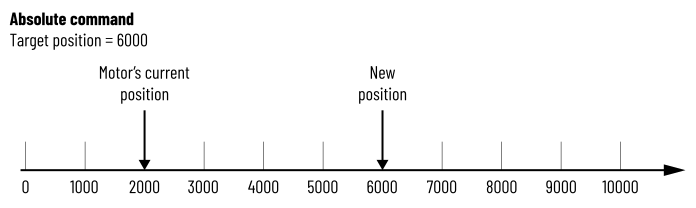
Absolute Move
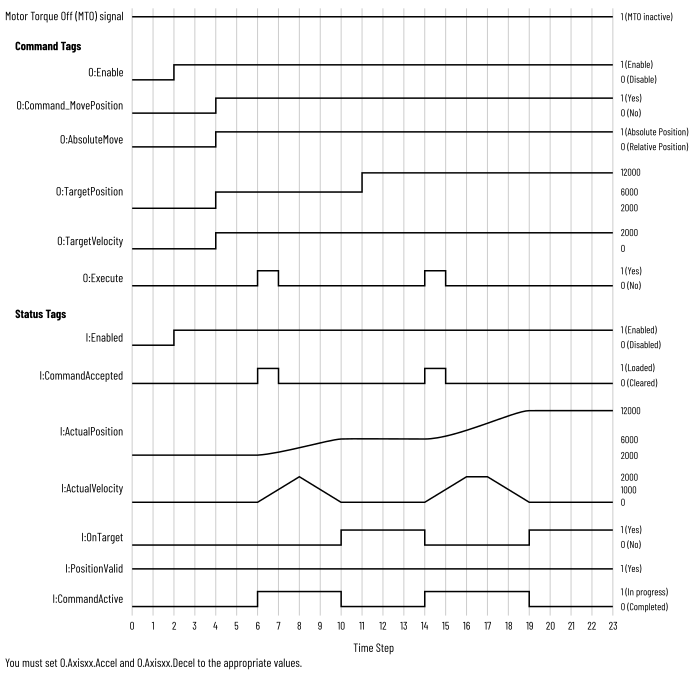
When O.Axisxx.AbsoluteMove is set, the axis moves to the position that is specified
in the tag O.Axisxx.TargetPosition. If the current axis position is not valid, the
absolute Move Position command is not allowed.
The relationship between the current position and the target position determines the
direction of movement. If the target position is greater than current position, the
axis moves in a forward direction. If the target position less than the current
position, the axis moves in a reverse direction.
Move Position – Absolute
Absolute Move Position Timing Diagram
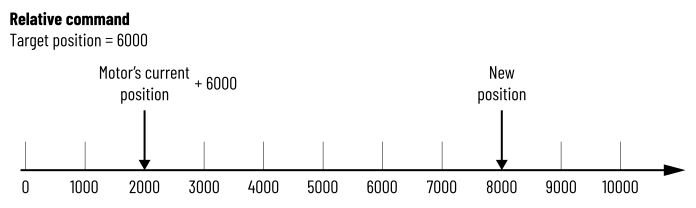
Relative Move
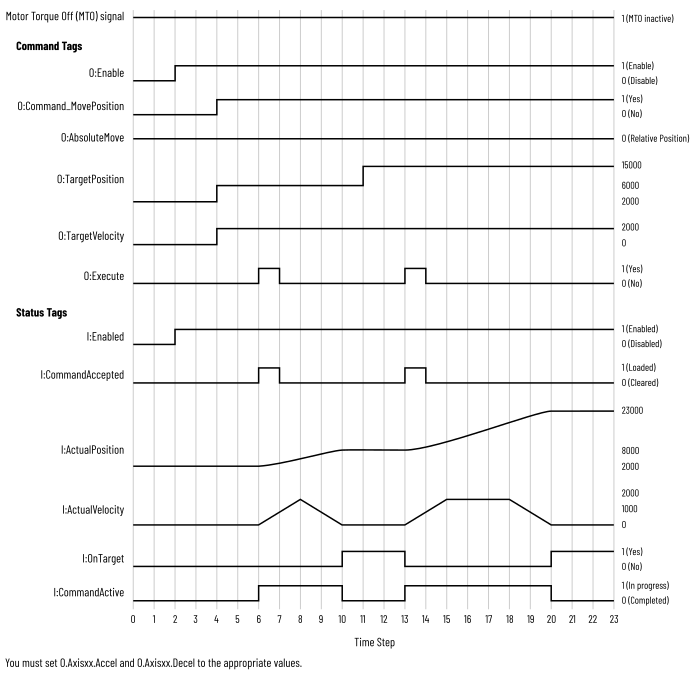
When O.Axisxx.AbsoluteMove is cleared, the axis moves to a new position based on the
current position plus the value that is specified in the tag
O.Axisxx.TargetPosition.
The sign of the target position determines the direction of movement. If the target
position is a positive value, the axis moves in a forward direction. If the target
position is a negative value, the axis moves in a reverse direction.
Move Position – Relative
Relative Move Position Timing Diagram
Provide Feedback