
Web Server Security
The web server employs HTTPS for secure and encrypted connections with clients. HTTPS
uses SSL/TLS certificates to achieve its security goals.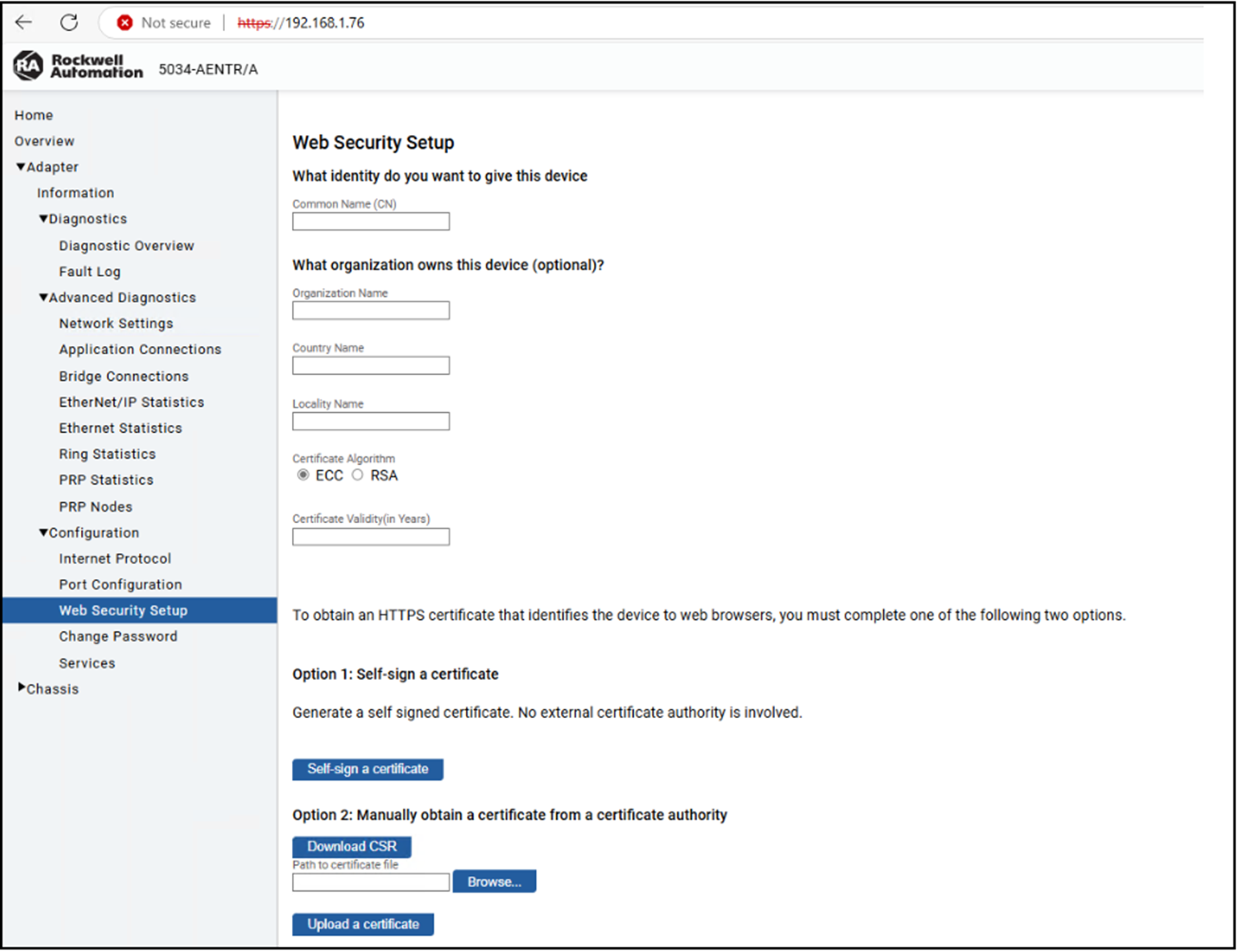
The adapter uses two types of certificates:
- A self-signed certificate — Automatically generated by the module itself during its initial power-on following a factory reset
- A CA-signed certificate — Obtained by having the certificate signed through a Certificate Authority
Generate a Self-signed Certificate
The module comes with an out-of-box self-signed certificate that is generated using
the ECC algorithm.
Parameter | Accepted Value | Length |
|---|---|---|
Common Name | Any character | 8…63 |
Organization Name | Alphabet, number, and space only | 1…63 |
Country Name | Alphabet only | 2 |
Locality Name | Alphabet only | 1…63 |
Certificate Validity | Numeric value only | 1…82 (years) |
To generate a self-signed certificate, complete these steps:
- From the Web Security Setup page, enter the necessary details that are shown.You must enter the Common NameandCertificate Validity.
- Select whether to generate the certificate using the ECC or the RSA algorithm.
- Select Self-sign a certificate.The self-signed ECC certificate generates in approximately five seconds, whereas the RSA certificate generates in approximately 50 seconds. Once the certificate is generated, the web server restarts, and the generated certificate is used.
TIP:
A self-signed certificate is automatically generated whenever you change the
IP settings.
Upload a CA-signed Certificate
You can upload a CA-signed certificate that is based on the Certificate Signing
request (CSR) generated from the module.
To upload a CA-signed certificate, complete these steps:
- From the Web Security Setup page, enter the necessary details that are shown.You must enter the Common NameandCertificate Validity.
- Select whether to generate the CSR using the ECC or the RSA algorithm.
- Select Download CSR.The CSR generates in approximately five seconds for the ECC algorithm, whereas the CSR generates in approximately 50 seconds for the RSA algorithm. Once the CSR is generated, you can retrieve the CSR in the Downloads folder.
- Use the generated CSR to have a Certificate Authority (CA).
- Once you have the CSR signed by a CA, you can use the Browse... option to go to the location where you stored the certificate.
- Select Upload a certificate. Once the certificate is uploaded, the web server restarts, and the uploaded certificate is used.
TIP:
Close the browser and reopen it to see the newly generated or uploaded
certificates.
Once you upload a CA-signed certificate, the web server will only use the
CA-signed certificate. If you regenerate a self-signed certificate, it will not
take effect.
Provide Feedback