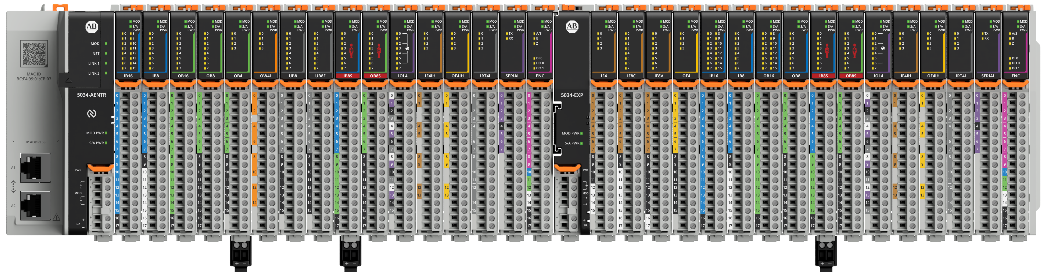
The PointMax™ I/O architecture provides a wide range of input and output modules to span
many applications, such as machine, hybrid, and process control. The architecture uses
Producer/Consumer technology that allows input information and output status to be
shared among multiple Logix 5000 controllers.
PointMax I/O modules are used as the local or remote I/O for CompactLogix® 5390* controller, and the remote I/O for CompactLogix 5380,
CompactLogix 5480, ControlLogix® 5590, and ControlLogix 5580
controllers, using Studio 5000 Logix Designer® application version 36 or later
(*requires version 39 or later).
A PointMax I/O system consists of one EtherNet/IP adapter and supports up to 32 I/O
modules. The adapter can supply power to a maximum of 16 I/O modules. To extend support
for an additional 16 modules, use an 5034-EXP or 5034-EXPXT expansion power. The I/O
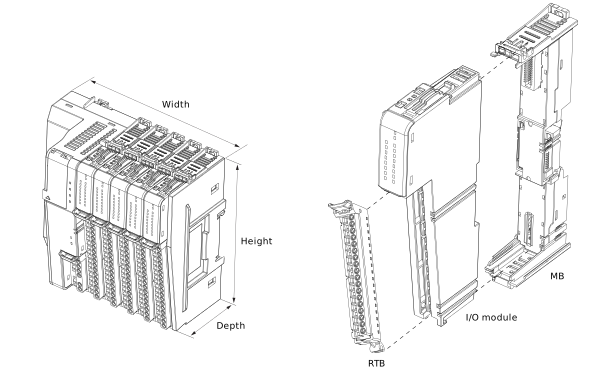
modules are mounted on an MB and require an RTB to connect field-side wiring. You must
purchase an MB and an RTB individually for each I/O module.
The PointMax I/O system is mounted onto a zinc-plated chromate-passivated steel DIN rail
such as the Allen-Bradley® 199-DR1; 46277-4; EN 60715 – 35 x 7.5 mm (1.38 x 0.30 in.).
You must also install DIN rail end anchors (Allen-Bradley 1492-EAJ35 or 1492-EAHJ35) at
both ends of your system for vibration or shock environments. See PointMax I/O System
Installation Instructions, publication 5034-IN001 for mounting guidelines.
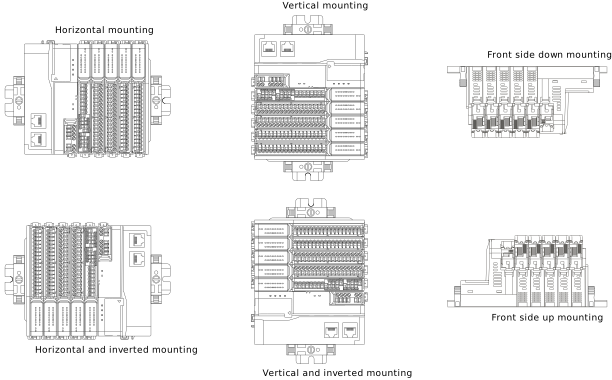
The PointMax I/O system can be oriented in the following positions.
PointMax I/O System Mounting Orientations
Spacing
Maintain spacing from enclosure walls, wireways, and adjacent equipment. Allow 25.4
mm (1 in.) of space on all sides for adequate ventilation.
Spacing Example
Dimensions
The dimension measurements that are provided in this publication are based on the
horizontal mounting orientation.
Dimension Example
An I/O module, MB, and RTB are required to fill a slot in the chassis.