
Configuration - Port Configuration View
Use the Port Configuration view to view and configure port properties. The settings
define how data is sent and received between the port and the attached device. The
values are only displayed when the gateway is online.
Power Tap Port Configuration View
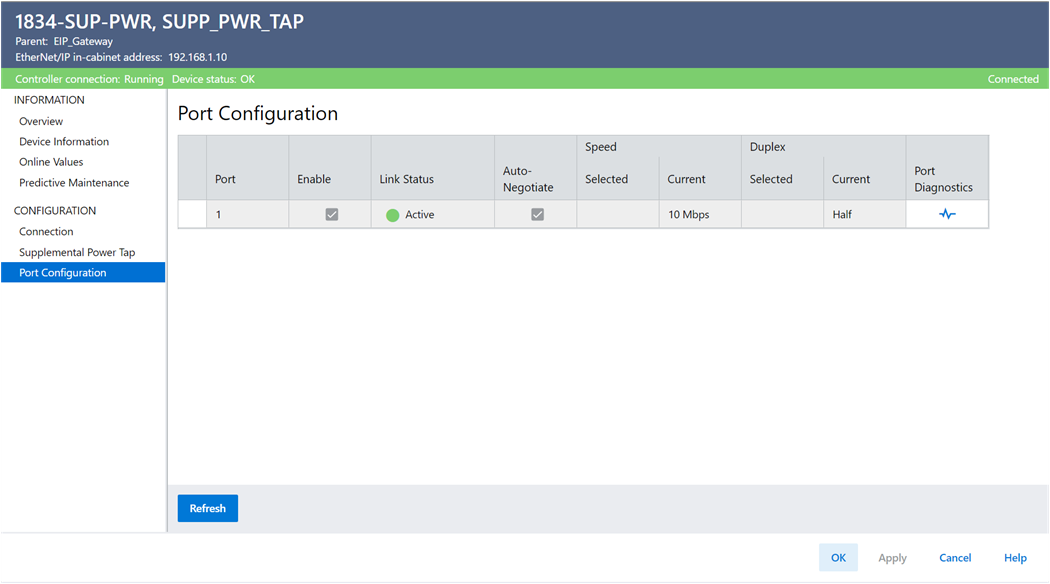
Parameters | Description |
|---|---|
Port | Displays the port data is being sent through. |
Enable | Displays whether the port is enabled. |
Link Status | Displays the port status. |
Auto-Negotiate | Enables Auto-Negotiate to enable the device to negotiate the
port’s speed and duplex automatically. |
Speed Selected | Displays the port’s selected speed if Auto-Negotiate is
unchecked. |
Current | Displays the port’s current speed. |
Selected duplex | Displays the port’s selected duplex if Auto-Negotiate is
unchecked. |
Current | Displays how much current is allocated to the port. |
Port diagnostics | Opens the Port Diagnostic dialog. |
Provide Feedback