
Push Button Configuration - Connection View
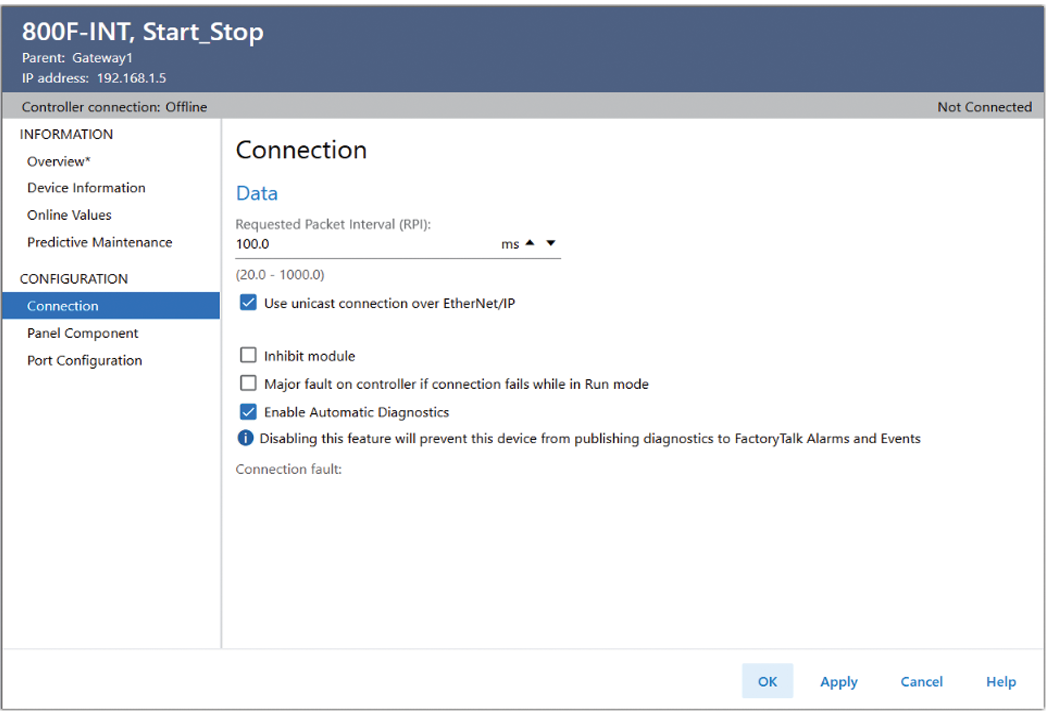
Use the Connection view to define device behavior and to view connection faults.
Push Button Connection View
Parameter | Description |
|---|---|
Requested Packet Interval (RPI) (ms) | Enter the RPI rate between the controller and the device. The valid RPI range is shown under this field. Valid ranges and default values are dependent on the device. |
Use unicast connection over EtherNet/IP™ | Select whether to establish a Unicast or Multicast connection over the network. The default value is Unicast. |
Inhibit module | Inhibit or uninhibit connections to the gateway. Inhibiting the gateway also inhibits all connections to end node devices. When the device is inhibited when online, the controller organizer displays the Inhibited Icon. |
Major fault on controller if connection fails while in run mode | Select this checkbox to configure the controller so that a connection failure causes a major fault on the controller when in Run mode. |
Enable Automatic Diagnostics | Select this checkbox to enable Automatic Diagnostics. |
Provide Feedback